
📎 AI Summary:
In this WindowsForum thread, the original poster asks about editing start menu tiles in Windows 8.1, specifically why no options appear when clicking on a tile. Responders clarify that tiles are apps, and proper editing options depend on right-clicking and system updates or patches, such as Windows 8.1.1. The original poster notes their system hasn't updated in a month and still can't modify tiles, leading to suggestions to verify if tiles are updated post-patch to enable editing. The overall sentiment indicates that tile editing issues may be due to system updates or unpatched app versions.

wannesdg

New Member
Member details
Joined
May 21, 2015
Messages
2
Thread Author #1
I recently installed a fresh install of windows 8.1. I now want to eddit my start menu tiles.
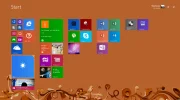
When I click on a tile i don't get any options to remove etc. (as seen in the screenshot)
Is this a configuration problem or is it necessary to install windows again?

thanks in advance
 

Attachments

  • windows_8.webp
    windows_8.webp
    94.6 KB · Views: 309
Solution
Yes, my understanding now is the option was added as a patch… possibly the 8.1.1 but just to be clear, you need to right click the tile and then; In 8 you get a bar along the bottom and in 8.1.1 you should have a small Manu.
An image from 'No options in tiles menu'. Windows Start screen showing app tiles with a right-click menu open on one tile.

If that weather app was the old 8 one i.e not up dated after the 8.1.1 patch then that could be why it's not responding… can you try a more recent tile that has been installed after the machine was last patched?

wannesdg

New Member
Member details
Joined
May 21, 2015
Messages
2
Thread Author #3
Thanks for the reply ussnorway.
I understand the system of the tiles. I'ts just that i don't get any options to change them. I can select them with my RMB but that's it.
My system is not updating annymore. I'ts been a month since i installed windows 8.
I am currently logged in into Microsoft store.
I went trought the options but I have no idea what it could be.
 

ussnorway

Windows Forum Team
Staff member
Member details
Joined
May 22, 2012
Messages
4,599
Yes, my understanding now is the option was added as a patch… possibly the 8.1.1 but just to be clear, you need to right click the tile and then; In 8 you get a bar along the bottom and in 8.1.1 you should have a small Manu.
An image from 'No options in tiles menu'. Windows Start screen showing app tiles with a right-click menu open on one tile.

If that weather app was the old 8 one i.e not up dated after the 8.1.1 patch then that could be why it's not responding… can you try a more recent tile that has been installed after the machine was last patched?
 

Last edited by a moderator:
Solution