

When I double click in WinExplorer on an *.mp4 video file a popup appears asking me if I want to play the video with a certain program (here with well known VLC video player).
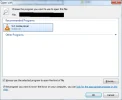
As you can see in the attached snapshot I checked the checkbox to ALWAYS use VLC for opening the video.
BUT: When I double click later another *.mp4 video then the "Open With" dialog re-appears again.
Why is Win 7 not able to remember it really?
Peter
As you can see in the attached snapshot I checked the checkbox to ALWAYS use VLC for opening the video.
BUT: When I double click later another *.mp4 video then the "Open With" dialog re-appears again.
Why is Win 7 not able to remember it really?
Peter
Attachments
-
 Microsoft Defender: No threats detected Scan detailsRemember Open with not rememberd.webp18.3 KB · Views: 240

