
- Thread Author
- #1
Solution
i had already uninstalled Google Desktop before posting this thread.
So...please let me tell you what i know so probably we will find the solution together.
I searched the web and i found that a program called "Soluto" was causing to some users this problem...Exact the same problem...after they had uninstalled it...everything was fine. Soluto is a program which replaces Windows Problem Reporting. So if you install this program it automatically replace and deactivate your Windows Problem Reporting service.
I entered in Group Policy and i think (but not sure) that there is nothing configured there...
So the last option (in my opinion) is a program like "Soluto" which does the same thing.
What do you think?...please help me because i...
So...please let me tell you what i know so probably we will find the solution together.
I searched the web and i found that a program called "Soluto" was causing to some users this problem...Exact the same problem...after they had uninstalled it...everything was fine. Soluto is a program which replaces Windows Problem Reporting. So if you install this program it automatically replace and deactivate your Windows Problem Reporting service.
I entered in Group Policy and i think (but not sure) that there is nothing configured there...
So the last option (in my opinion) is a program like "Soluto" which does the same thing.
What do you think?...please help me because i...

- Joined
- Oct 16, 2009
- Messages
- 15,152
I don't even show that option on my system, but I do show some things that are probably related in The Group Policy Editor (gpedit.msc).
If you look in Computer Configuration-Administrative Templates-Windows Components-Windows Error Reporting Settings, you may find something configured. But I have not run those programs and do not know if this is normal. It seems to just tell your system to not send any error reports for them.
Is the "What can I do to change settings" link greyed out? Are you the administrator/user?
If you look in Computer Configuration-Administrative Templates-Windows Components-Windows Error Reporting Settings, you may find something configured. But I have not run those programs and do not know if this is normal. It seems to just tell your system to not send any error reports for them.
Is the "What can I do to change settings" link greyed out? Are you the administrator/user?

Jimbo22
Essential Member
- Joined
- Aug 27, 2008
- Messages
- 5,034
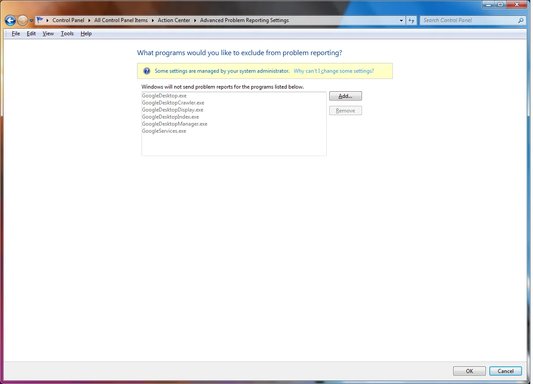
if you look closely to your first screen shot you can clearly see googledesktop.exe. Which is the installer for google desktop. You probably got in when you installed chrome. Not reading very carefully in those popups when your downloading software and allowing to install you can end up getting software you didn't bargain for which can have some ill side effects on your system. Go to your add/remove programs and un-install it. I'm betting once you get rid of it you wont have that problem any more.
- Thread Author
- #5
i had already uninstalled Google Desktop before posting this thread.
So...please let me tell you what i know so probably we will find the solution together.
I searched the web and i found that a program called "Soluto" was causing to some users this problem...Exact the same problem...after they had uninstalled it...everything was fine. Soluto is a program which replaces Windows Problem Reporting. So if you install this program it automatically replace and deactivate your Windows Problem Reporting service.
I entered in Group Policy and i think (but not sure) that there is nothing configured there...
So the last option (in my opinion) is a program like "Soluto" which does the same thing.
What do you think?...please help me because i want to get rid of this
So...please let me tell you what i know so probably we will find the solution together.
I searched the web and i found that a program called "Soluto" was causing to some users this problem...Exact the same problem...after they had uninstalled it...everything was fine. Soluto is a program which replaces Windows Problem Reporting. So if you install this program it automatically replace and deactivate your Windows Problem Reporting service.
I entered in Group Policy and i think (but not sure) that there is nothing configured there...
So the last option (in my opinion) is a program like "Soluto" which does the same thing.
What do you think?...please help me because i want to get rid of this
- Thread Author
- #6
all right now i just solved only a part of the problem....
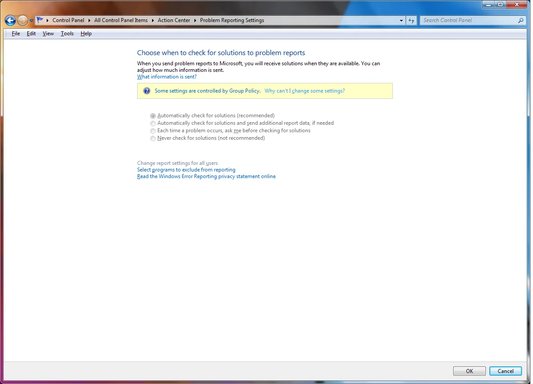
I entered in Group Policy and in the folder with Error Reporting Settings... I configured all the options right there...after that i set all to "Not Configured" and now on the second Print screen the message shown had dissapeared.
But the message and restrictions shown in the first print screen hadn't dissapeared...
Anyone know a solution...?
I entered in Group Policy and in the folder with Error Reporting Settings... I configured all the options right there...after that i set all to "Not Configured" and now on the second Print screen the message shown had dissapeared.
But the message and restrictions shown in the first print screen hadn't dissapeared...
Anyone know a solution...?
- Joined
- Oct 16, 2009
- Messages
- 15,152
Since there are two areas of the settings, Computer and User, I would open the All Settings under Administrative Templates-Windows Components folder for each section and make sure there are no configured entries.
But if you do see some configured, make sure you know what they are before changing, or make note of the way they are configured.
But if you do see some configured, make sure you know what they are before changing, or make note of the way they are configured.
- Thread Author
- #8
Saltgrass, i haven't tried with your technique so i tried checking the 2 options in the window (see the printscreen Link Removed).
I checked the 2 options but the same problem....=> no effect... So do you think that what i done... is the same with what you recommended me?
I checked the 2 options but the same problem....=> no effect... So do you think that what i done... is the same with what you recommended me?
- Joined
- Oct 16, 2009
- Messages
- 15,152
Since the dialog box states these options are to be used for disabling UNUSED portions of the Group Policy Editor, it would not seem to be the same. But I am certainly no Group Policy expert..
It only takes a couple of seconds to scan the All Settings folder.
It only takes a couple of seconds to scan the All Settings folder.
Similar threads

- Article
- Replies
- 0
- Views
- 449

- Replies
- 7
- Views
- 5K