📎 AI Summary:
The thread discusses configuring Windows 8 to default to the right-handed Dvorak keyboard layout, which the original poster cannot set as default despite selecting it. A user suggests a solution involving adjusting input methods through the control panel, adding the right Dvorak layout, and removing the default US keyboard to ensure it loads at startup. The overall tone is helpful, providing practical steps to resolve the issue with custom keyboard preferences not persisting during boot.

Lawrence Brandon

New Member
Member details
Joined
Feb 11, 2013
Messages
1
Thread Author #1
I use the right dvorak keyboard because I have use of only my right hand. When Windows 8 boot up it boots up with the US keyboard even though I have set it to us only Right Dvorak.
Is there a way I can make Right Dvorak keyboard the default?
 

Solution
Hi Lawrence,

I tried this method which seemed to work ok.

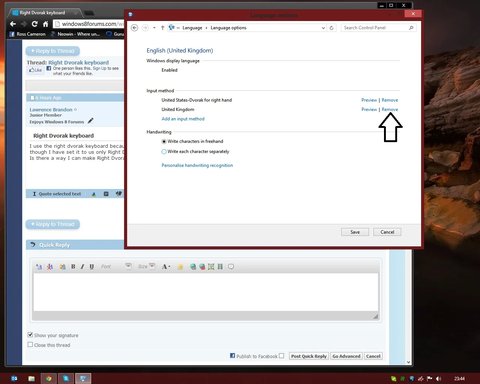
Open the control panel and navigate to 'Clock, language and region'. Under 'Language' click 'change input methods'. On the default language that's highlighted click options and you'll then see the change input method screen. Click the blue 'add input method' and from the list choose Dvorack right handed. Once it's added then click 'Remove' on your usual input method (see screenshot)

Link Removed

You should now only be left with the Dvorack input method. I tried this and then rebooted and the setting stayed in place. Hopefully this will work for you too.. 🙂 Oh and remember to save.. 🙂

kemical

Essential Member
Member details
Joined
Aug 28, 2007
Messages
36,163
Hi Lawrence,

I tried this method which seemed to work ok.

Open the control panel and navigate to 'Clock, language and region'. Under 'Language' click 'change input methods'. On the default language that's highlighted click options and you'll then see the change input method screen. Click the blue 'add input method' and from the list choose Dvorack right handed. Once it's added then click 'Remove' on your usual input method (see screenshot)

Link Removed

You should now only be left with the Dvorack input method. I tried this and then rebooted and the setting stayed in place. Hopefully this will work for you too.. 🙂 Oh and remember to save.. 🙂
 

Last edited by a moderator:
Solution