
📎 AI Summary:
The thread discusses a new HP Pro 3330 Microtower experiencing issues with partitioning its 500GB hard drive after attempting to shrink the C drive to create new partitions. The original poster, sanchit, reports that despite shrinking the C drive, they cannot extend or create new partitions, receiving errors about insufficient space. Respondents suggest potential reasons related to the partition scheme (MBR vs. GPT) and possible limitations of primary partitions, with advice about partition management and system configuration constraints.

sanchit

New Member
Member details
Joined
Jul 17, 2013
Messages
2
Thread Author #1
I have bought a brand new HP Pro 3330 Microtower model recently.

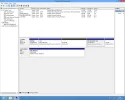
I had ordered it with 500GB hard disk and it had come with Windows 8 Pro OS. OS was installed in the C drive having all the space (465GB) available. I would like to have another disk as I don't want to save my data in the same drive in which Windows is installed. When I'm shrinking the data, around 357GB, from the C drive, it is then turning out to be an Unallocated Space. But I'm not able to convert this unallocated space to a new drive. I'm getting the error message that there is not enough space in the drive(s).

I've attached the screenshot of the disk management. Even if I'm trying to extend the volume of any of the drives other than the C, i'm not able to. Kindly put in your valuable suggestions.
 

Attachments

  • Disk Management.webp
    Disk Management.webp
    60.4 KB · Views: 364
Solution
It is strange a new computer with Windows 8 did not come in the UEFI configuration. Because it did not, the drive is configured as MBR and cannot contain more than 4 primary partitions, which you already have.

You could only switch to Logical partitions if you had 3 primary partitions and made the fourth one extended to hold the Logical drives. But removing any of your current configuration might destroy the recovery system currently in place.

BigFeet

Extraordinary Member
Member details
Joined
Feb 1, 2009
Messages
267
I have bought a brand new HP Pro 3330 Microtower model recently.

I had ordered it with 500GB hard disk and it had come with Windows 8 Pro OS. OS was installed in the C drive having all the space (465GB) available. I would like to have another disk as I don't want to save my data in the same drive in which Windows is installed. When I'm shrinking the data, around 357GB, from the C drive, it is then turning out to be an Unallocated Space. But I'm not able to convert this unallocated space to a new drive. I'm getting the error message that there is not enough space in the drive(s).

I've attached the screenshot of the disk management. Even if I'm trying to extend the volume of any of the drives other than the C, i'm not able to. Kindly put in your valuable suggestions.
Never mind. I re read your post. Did you try extending C, then trying to create a smaller partition?
 
Last edited by a moderator:

Saltgrass

Excellent Member
Microsoft Community Contributor
Member details
Joined
Oct 16, 2009
Messages
15,153
It is strange a new computer with Windows 8 did not come in the UEFI configuration. Because it did not, the drive is configured as MBR and cannot contain more than 4 primary partitions, which you already have.

You could only switch to Logical partitions if you had 3 primary partitions and made the fourth one extended to hold the Logical drives. But removing any of your current configuration might destroy the recovery system currently in place.
 
Solution