📎 AI Summary:
The user is seeking help to reverse a modification that removed their administrator account from the Windows Vista login screen, making it invisible and unselectable. Despite attempting to follow a guide and booting into safe mode with administrative rights, they are unable to restore visibility or access to the admin account. The overall sentiment indicates frustration with the difficulty of undoing the account removal, and suggestions include further troubleshooting in safe mode or using command prompts.

GetGankNow

New Member
Joined
Jun 15, 2017
Messages
14
Thread Author #1
Hello guys,i have do this guide>howtogeek(dot)ci oo em/howto/windows-vista/remove-user-accounts-from-the-logon-screen-in-windows-vista/ to my administrator user,i have to 2 user to my pc,1st is mine(admin),and 2nd its my brother(user,guest-user).I cant delete the key because im a user.

How to solve it?
Thanks!
 

Last edited:

Neemobeer

Windows Forum Team
Staff member
Joined
Jul 4, 2015
Messages
8,995
You want to delete the user or just remove one from the login screen?
 

GetGankNow

New Member
Joined
Jun 15, 2017
Messages
14
Thread Author #3
i have remove the admin(me)of the login screen and now i cant to reverse it
 

Neemobeer

Windows Forum Team
Staff member
Joined
Jul 4, 2015
Messages
8,995
Should be able to, just select other user and type the username in.
 

GetGankNow

New Member
Joined
Jun 15, 2017
Messages
14
Thread Author #7
i cant select other user,all user's in the pc are 2,the admin(un-visible),and the guest user(visible)
 

Neemobeer

Windows Forum Team
Staff member
Joined
Jul 4, 2015
Messages
8,995
Then I'd boot into safe mode, select command prompt and delete that key
 

Neemobeer

Windows Forum Team
Staff member
Joined
Jul 4, 2015
Messages
8,995
None, choose command prompt

An image from 'ERROR user/admin'. Windows Advanced Options screen highlighting the Command Prompt for troubleshooting.
 

Last edited by a moderator:

Neemobeer

Windows Forum Team
Staff member
Joined
Jul 4, 2015
Messages
8,995
reg delete "HKLM\SOFTWARE\Microsoft\Windows NT\CurrentVersion\Winlogon\SpecialAccounts"
 

Solution

GetGankNow

New Member
Joined
Jun 15, 2017
Messages
14
Thread Author #16
but the cmd open in X: , no in the C:
i tried and says "the key not found"
i have tried and in the C:

(sorry about my english)
 

GetGankNow

New Member
Joined
Jun 15, 2017
Messages
14
Thread Author #17
insomnia(dot)gr/topic/647187-πρόβλημα-με-useradmin , see this topic,im from Greece,so i have post to a greek tech forum,see the screenshots
 

Neemobeer

Windows Forum Team
Staff member
Joined
Jul 4, 2015
Messages
8,995
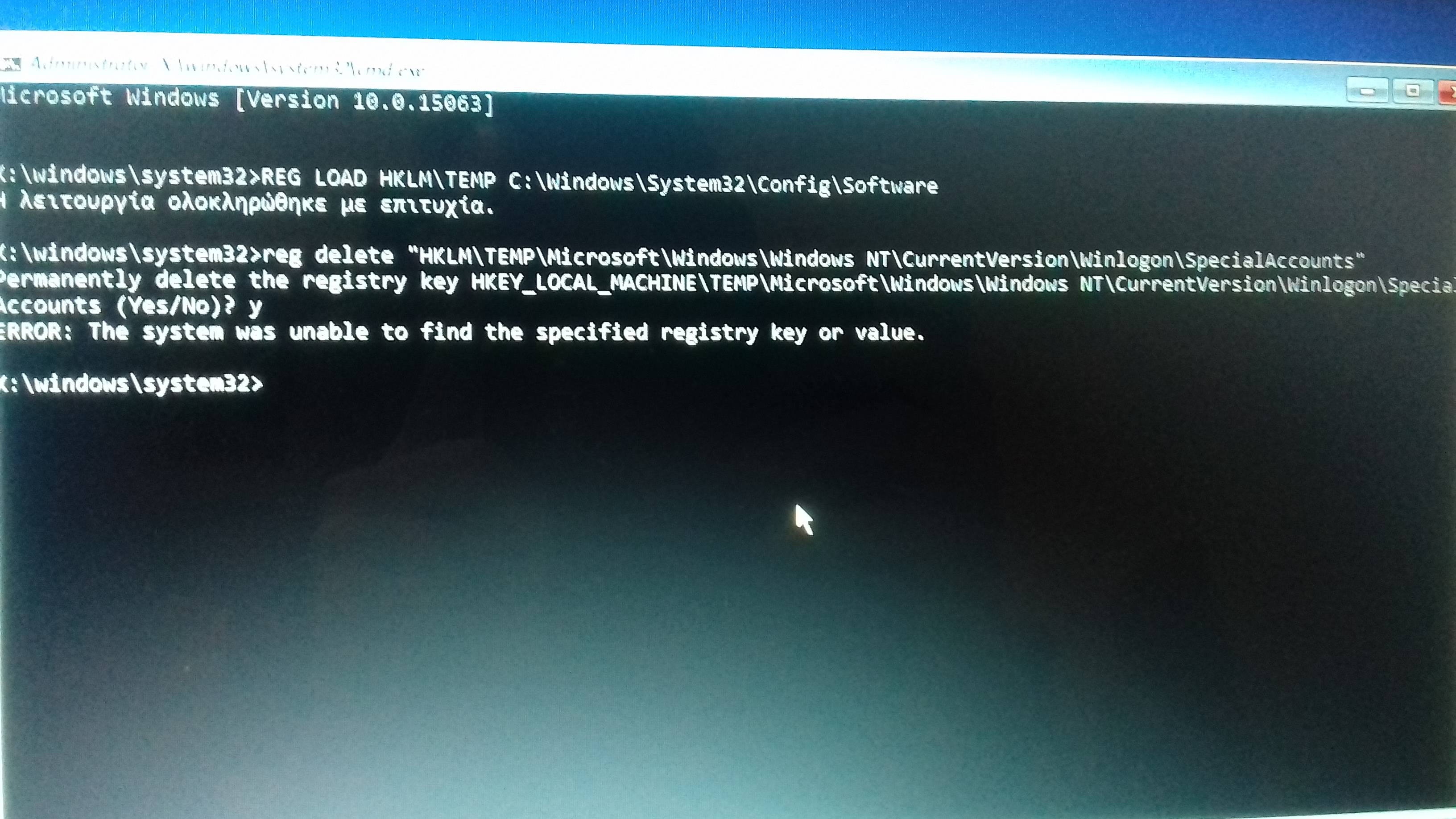
Load the real system hive then delete the key

REG LOAD HKLM\TEMP C:\Windows\System32\Config\Software

then reg delete "HKLM\TEMP\Microsoft\Windows NT\CurrentVersion\Winlogon\SpecialAccounts"