
📎 AI Summary:
The thread discusses a problem with extracting a large ZIP file containing MP3 files with Chinese characters in their names on Windows 7, where various unzip programs mess up the filenames. The original poster seeks a solution to preserve the proper names without resorting to using a Mac. A suggested workaround involves using StuffIt, which successfully maintains the correct Chinese filenames, leading the original poster to purchase it, as other tools like 7zip did not work as expected. The overall sentiment reflects a resolved issue with a recommendation to use specialized software, noting that other extraction tools may not handle non-Latin characters properly.

streetfox

New Member
Joined
Oct 6, 2010
Messages
8
Thread Author #1
Dear all

I do hope somebody is out there which can help me with my nasty problem...on my computer. I have a zip-file with 2096 Files which are all mp3s (for a language course) and they are named Number_ChineseCharacters.mp3. I use Windows 7 Professional (the MUI is not downloadable, but also not necessary)

If I unzip it with various programs, I get messed up names, e.g.
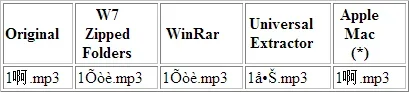
06.10.webp
(*) Apple Mac means: Oddly enough, if I download the file on a mac, extract the archive there and copy them over to Windows 7, they have the correct names!

I'm baffled... is there any other obvious solution besides using a mac as a workaround for windows 7, I have left out?

Your help is greatly appreciated!!

PS: a test zip is attached.
View attachment test.zip
 

Solution
If your goal is (and I'm not exactly sure) to maintain the Chinese Characters after you unzip the files then you may want to use StuffIt, it's basically the same software that MACs use and should do the trick for you, there is a limited time free trial download (30 days) that may get you over the hump, not sure and after that it's about 30 bucks to purchase hope this helps check it here
Link Removed
I tested it here on my machine and it seemed to do it, I ended up with an extracted file called
1啊.mp3
does that look right to you?

Trouble

Noob Whisperer
Joined
Nov 30, 2009
Messages
13,722
Ran your test.zip using 7zip (download from here Download)
right click and choose extract here
it created a file folder called
Zhongguohua.media
which contained one file called
1σòè.mp3
 

Trouble

Noob Whisperer
Joined
Nov 30, 2009
Messages
13,722
If your goal is (and I'm not exactly sure) to maintain the Chinese Characters after you unzip the files then you may want to use StuffIt, it's basically the same software that MACs use and should do the trick for you, there is a limited time free trial download (30 days) that may get you over the hump, not sure and after that it's about 30 bucks to purchase hope this helps check it here
Link Removed
I tested it here on my machine and it seemed to do it, I ended up with an extracted file called
1啊.mp3
does that look right to you?
 

Solution

streetfox

New Member
Joined
Oct 6, 2010
Messages
8
Thread Author #4
This did the trick. I didn't know that Stuffit is available for windows. However this is a pesky problem. One might expect this should've worked with 7zip or other tools. Guess I'll have to buy stuffit.

Thank you very much
 

Trouble

Noob Whisperer
Joined
Nov 30, 2009
Messages
13,722
Glad you found it useful. Not sure why the others won't preserve the actual file name when decompressing the file. Might have something to do with the language packs installed on the local machine, not sure.
Anyway, thanks for posting back and updating your thread. Hope to continue to see you around the forums.