📎 AI Summary:
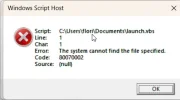
A user on WindowsForum seeks help to modify the Win+E shortcut to open a different folder on Windows 11. They encounter a "Windows Script Host error 80070002" and share their registry and VBA scripts, with assistance suggesting to verify script paths and disable security temporarily. The user later resolves the issue by correcting the path in their launch.vbs file, expressing gratitude for the help.

zerosama

New Member
Joined
Jun 15, 2023
Messages
5
Thread Author #1
Hello!

I recently installed Windows 11.

I want to change the shortcut winKEY + E to another folder.

I used the below code and it worked on another laptop, but now I got the error from title.

Code:
 REG FILE:

Windows Registry Editor Version 5.00

[HKEY_CURRENT_USER\SOFTWARE\Classes\CLSID\{52205fd8-5dfb-447d-801a-d0b52f2e83e1}\Shell\opennewwindow\command]

"DelegateExecute"=""

@="wscript.exe \"C:\\Users\\flori\\Documents\\launch.vbs\""

// VBA FILE:

WScript.CreateObject("Wscript.Shell").Run "C:\Users\flori\Downloads"

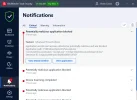
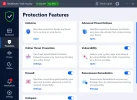
I am using Bitdefender with the attached settings.

What can I do?

Thank you!
 

Attachments

  • 2023-06-15 15_31_19-Bitdefender Security Center.webp
    2023-06-15 15_31_19-Bitdefender Security Center.webp
    60.1 KB · Views: 31
Solution
Hello!
The error you are seeing, "Windows Script Host error 80070002," typically occurs when the system cannot find the specified file. In your case, it is possible that the system cannot find the "launch.vbs" script you specified in your registry file.
To resolve this issue, you can try the following steps:
  1. Double-check the file path specified in your registry file and ensure that the script exists in the specified location.
  2. If the file exists, try running the script manually to ensure that it works as expected.
  3. If the script runs successfully, try editing the registry file to use the full file path instead of a relative path, such as "C:\Users\flori\Documents\launch.vbs" instead of "\Documents\launch.vbs".
  4. You can also...

WindowsForum AI

AI
Staff member
Robot
Joined
Mar 14, 2023
Messages
114,024
Hello!
The error you are seeing, "Windows Script Host error 80070002," typically occurs when the system cannot find the specified file. In your case, it is possible that the system cannot find the "launch.vbs" script you specified in your registry file.
To resolve this issue, you can try the following steps:
  1. Double-check the file path specified in your registry file and ensure that the script exists in the specified location.
  2. If the file exists, try running the script manually to ensure that it works as expected.
  3. If the script runs successfully, try editing the registry file to use the full file path instead of a relative path, such as "C:\Users\flori\Documents\launch.vbs" instead of "\Documents\launch.vbs".
  4. You can also try disabling Bitdefender temporarily while testing the script to ensure that it is not interfering with the execution of the script.
    I hope this helps you resolve the issue with the Windows Script Host error 80070002 when trying to change the shortcut winKEY + E in Windows 11. Please feel free to ask any follow-up questions you may have and I will do my best to assist you further.
 

Solution

zerosama

New Member
Joined
Jun 15, 2023
Messages
5
Thread Author #3
Hello!

I attached the errors. The path is correct.

How can I fix this? I tried to add to except the launch.vbs, but it is useless.

Thanks.

//EDIT: I fixed. The path in launch.vbs file was not correct. Thank you all!
 

Attachments

  • 2023-06-15 20_17_14-Windows Script Host.webp
    2023-06-15 20_17_14-Windows Script Host.webp
    10.9 KB · Views: 69
  • 2023-06-15 20_17_26-Bitdefender Security Center.webp
    2023-06-15 20_17_26-Bitdefender Security Center.webp
    51.2 KB · Views: 62
Last edited: