📎 AI Summary:
The thread revolves around configuring email settings, specifically SMTP, on a Xerox WorkCentre 3615 for scanning to email. The original poster seeks step-by-step guidance for using IMAP or POP3 with Gmail or AT&T on Windows 7. A contributor responds with a simplified solution, emphasizing the importance of SMTP server details and credentials, but the original poster reports ongoing issues despite following the manual instructions and attempting different methods. Overall, the discussion highlights troubleshooting challenges with email setup on the device.
The thread revolves around configuring email settings, specifically SMTP, on a Xerox WorkCentre 3615 for scanning to email. The original poster seeks step-by-step guidance for using IMAP or POP3 with Gmail or AT&T on Windows 7. A contributor responds with a simplified solution, emphasizing the importance of SMTP server details and credentials, but the original poster reports ongoing issues despite following the manual instructions and attempting different methods. Overall, the discussion highlights troubleshooting challenges with email setup on the device.
Solution

Actually all you need to know is the SMTP server address (DNS or IP) and the login credentials the Xerox will use to send the email. Here is the instructions from the actual manual. Setting Up Scanning To An Email Address - Xerox WorkCentre 3615 System Administrator Manual [Page 93]

LUGUY
Member
Member details
- Joined
- Apr 29, 2016
- Messages
- 51
On Windows 7.Using I MAP or POP3; gmail or at&t? Step by Step settings on CWIS. Who have Solutions, Thank you.

Member details
- Joined
- Jul 4, 2015
- Messages
- 8,995
Actually all you need to know is the SMTP server address (DNS or IP) and the login credentials the Xerox will use to send the email. Here is the instructions from the actual manual. Setting Up Scanning To An Email Address - Xerox WorkCentre 3615 System Administrator Manual [Page 93]
LUGUY
Member
Member details
- Joined
- Apr 29, 2016
- Messages
- 51
Thank you Link RemovedActually all you need to know is the SMTP server address (DNS or IP) and the login credentials the Xerox will use to send the email. Here is the instructions from the actual manual. Setting Up Scanning To An Email Address - Xerox WorkCentre 3615 System Administrator Manual [Page 93]
Actually all you need to know is the SMTP server address (DNS or IP) and the login credentials the Xerox will use to send the email. Here is the instructions from the actual manual. Setting Up Scanning To An Email Address - Xerox WorkCentre 3615 System Administrator Manual [Page 93]
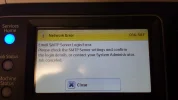
Thank you Link Removed I'd try another method that someone from the Forum provided me before and it doesn't work. I did read all instructions in Manual and applied all settings for SMTP Server Configuration, still having problems, See the Screen Shot below.Actually all you need to know is the SMTP server address (DNS or IP) and the login credentials the Xerox will use to send the email. Here is the instructions from the actual manual. Setting Up Scanning To An Email Address - Xerox WorkCentre 3615 System Administrator Manual [Page 93]