📎 AI Summary:
The user is experiencing connectivity issues with their Wi-Fi devices, which connect to the network but show "unidentified network" without internet access. Despite attempts with network troubleshooter and power management adjustments, the problem persists. Eventually, the user resolves the issue by uninstalling and reinstalling the network adapter, referencing a guide for fixing TCP/IP errors.

shall

New Member
Joined
Jan 30, 2014
Messages
12
Thread Author #1
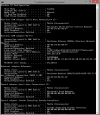
hello i recently unsuccessfully tried to connect to a friend's wifi and now my 2 favourite wireless devices do not connect. I cannot test with a cable as I have only a phone and dongle hotspot, but other devices connect to them fine. I attach my IP config as I've seen previously someone on here has mentioned an empty 'default gateway'. I think I have that, but i have tried to set my ipv4 to automatic, i get message saying that i need a wifi adapter card. as you can tell, I do not understand much of this stuff. thanks for any help you can offer!
 

Attachments

  • tmp_wifi-fail25829254.webp
    tmp_wifi-fail25829254.webp
    71.8 KB · Views: 754

shall

New Member
Joined
Jan 30, 2014
Messages
12
Thread Author #3
so here is what happens: I turn on the wifi device, laptop connects. full bars. wifi settings says 'connected'. but if I hover over the wifi icon in taskbar, it says 'unidentified network no internet access'. and internet, email etc does not work
.
 

shall

New Member
Joined
Jan 30, 2014
Messages
12
Thread Author #4
I tried running windows network troubleshooter, it found a problem but could not identify. also tried setting device to not allow computer to switch off in power management.