
That distinction matters because “SSL” is still used loosely in product interfaces, certificate names, firewall rules, and administration guides. In Microsoft Active Directory documentation, for example, LDAPS is routinely described as using SSL/TLS certificates. That wording reflects familiar terminology, not a recommendation to enable deprecated SSL versions. Microsoft’s current guidance describes LDAPS as an encrypted SSL/TLS tunnel that protects LDAP credentials and directory queries. Microsoft Learn: Configure certificates for LDAP over SSL
For Windows administrators, the practical answer is simple:
- LDAP is the directory protocol.
- LDAPS is LDAP protected by TLS from the moment the connection starts.
- SSL is the older name still embedded in the term “LDAPS.”
- TLS is the security protocol that should actually negotiate the encryption.
- A certificate is required on the directory server for LDAPS to work correctly.
That is more than a semantic correction. It shapes how administrators secure Active Directory, troubleshoot certificate failures, configure appliances, and migrate older applications away from unencrypted directory authentication.
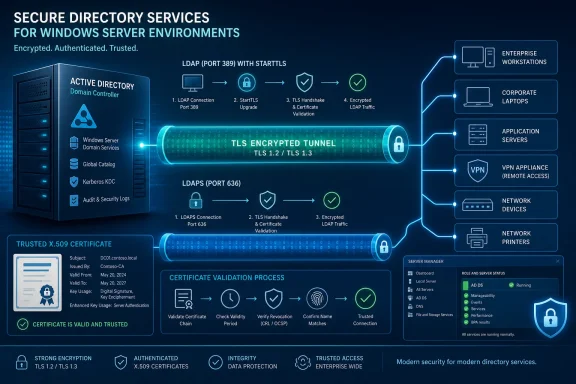 The Short Answer: LDAPS Uses TLS, Not Legacy SSL
LDAPS commonly means an LDAP client connects to a directory server’s dedicated secure port and begins the TLS handshake before exchanging LDAP traffic. In Active Directory Domain Services, Microsoft documents TCP port 636 for regular LDAPS and TCP port 3269 for Global Catalog LDAPS. Microsoft Learn: LDAP signing for Active Directory Domain Services
So, when an application is configured with a server name such as:
ldaps://dc01.contoso.com:636
the expected behavior is:
- The client connects to TCP port
636. - The server presents its certificate.
- The client validates that certificate and the server identity.
- TLS negotiates an encrypted session.
- LDAP binds, queries, and authentication operations occur inside that encrypted session.
The old word “SSL” remains in the LDAPS label because secure LDAP deployments became widespread when SSL was still the recognized name for this class of web and network encryption. In modern Windows networking, however, TLS is the protocol family that should be enabled and maintained.
The IETF’s LDAP security specification describes TLS establishment through the StartTLS operation and frames TLS as the means of delivering confidentiality, integrity, and optional authentication support for LDAP sessions. RFC 4513: LDAP Authentication Methods and Security Mechanisms
Background: LDAP Is a Protocol, Not a Security Setting
LDAP is an application-layer protocol used to access directory services. In a Microsoft environment, applications frequently use it to locate users, groups, computers, service accounts, and organizational information stored in Active Directory Domain Services.
LDAP also plays a major role in authentication workflows. A business application, VPN appliance, Wi-Fi controller, Linux host, NAS device, printer, or identity platform may submit a username and password—or use an authenticated bind—to query a domain controller and determine whether a user should be allowed access.
The important security problem is that plain LDAP does not automatically encrypt traffic. Microsoft documents the conventional LDAP port as 389, while LDAPS uses 636 and establishes encryption immediately when the connection begins. Microsoft Learn: LDAP signing for Active Directory Domain Services
An unprotected simple bind can expose highly sensitive information. Microsoft specifically warns that LDAP simple binds on standard ports without TLS/SSL transmit credentials in clear text and should be disabled through appropriate LDAP signing requirements. Microsoft Learn: LDAP session security settings and requirements
That is why the question “Is LDAPS SSL?” should really lead to a more useful operational question:
Is the LDAP connection encrypted, authenticated, and configured to resist downgrade or interception attacks?
LDAPS is one strong answer to that question, but it is not the only one.
LDAPS Versus LDAP With StartTLS
Windows Active Directory supports two primary ways to protect LDAP with TLS.
LDAPS: TLS Begins Immediately
With LDAPS, the client connects directly to a secure LDAP endpoint:
636for LDAP over TLS3269for Global Catalog LDAP over TLS
TLS is negotiated before normal LDAP application traffic proceeds. Microsoft calls these protected LDAPS ports and documents this approach alongside standard-port StartTLS. Microsoft Open Specifications: Using SSL/TLS
This model is often easier to understand operationally. The port itself signals that the service expects encrypted LDAP from the outset. It also aligns well with third-party products that expose a simple “Use SSL” or “LDAPS” checkbox.
StartTLS: Upgrade an LDAP Connection to TLS
The alternative is LDAP StartTLS. A client initially connects to the standard LDAP port, then sends the LDAP extended operation that requests a TLS upgrade. Once the server accepts the request, the client and server negotiate TLS and continue LDAP inside that secured connection.
In Active Directory, that commonly means:
389for LDAP, then StartTLS3268for Global Catalog LDAP, then StartTLS
Microsoft documents both secure paths: a connection to an LDAPS port or a connection to a regular LDAP port followed by the LDAP_SERVER_START_TLS_OID operation. Microsoft Open Specifications: Using SSL/TLS
The IETF LDAP security specification standardizes the StartTLS mechanism and requires LDAP implementations that support TLS to use it according to the documented TLS establishment rules. RFC 4513: LDAP Authentication Methods and Security Mechanisms
Neither Is “More SSL” Than the Other
A common misconception is that LDAPS is SSL while StartTLS is TLS. That is incorrect.
Both approaches can use TLS. The difference is when encryption is negotiated:
- LDAPS: TLS starts immediately after the TCP connection.
- StartTLS: LDAP begins first, then the session is upgraded to TLS.
The best choice often depends on the client application. Some products support only LDAPS on port 636; others work well with StartTLS on port 389. A migration plan should therefore validate the behavior of each LDAP-dependent application rather than assuming every client supports the same secure connection method.
Why the SSL Name Still Causes Confusion
The phrase “SSL certificate” is another source of ambiguity. A certificate used for LDAPS is not inherently an “SSL-only” object. It is an X.509 certificate used by TLS to prove the server’s identity and help establish encrypted communications.
The certificate is what lets the client answer several essential questions:
- Is this really the domain controller or directory server I intended to contact?
- Does the certificate name match the server name I used?
- Is the issuing authority trusted?
- Is the certificate currently valid?
- Does the server possess the corresponding private key?
Microsoft’s current LDAPS certificate requirements include the Server Authentication enhanced key usage (EKU), the domain controller’s fully qualified domain name in the certificate subject or Subject Alternative Name, an associated private key, and a chain trusted by both the domain controller and LDAPS clients. Microsoft Learn: Configure certificates for LDAP over SSL
This is why simply opening port 636 does not “turn on secure LDAP.” The domain controller must have a usable server certificate, and every client must be able to validate it.
Certificate Requirements for Active Directory LDAPS
A Windows domain controller does not need a special manual port-binding configuration comparable to an IIS HTTPS binding. When a correctly formatted LDAPS certificate is installed, Active Directory can automatically begin accepting secure LDAP connections. Microsoft Learn: Configure certificates for LDAP over SSL
However, “correctly formatted” is doing substantial work in that sentence.
The Essential Certificate Properties
For a domain controller certificate to be suitable for LDAPS, administrators should verify the following:
- Server Authentication EKU: The certificate must include
1.3.6.1.5.5.7.3.1. - Correct DNS identity: The domain controller’s Active Directory FQDN must appear in the certificate’s Common Name or, preferably, its DNS Subject Alternative Name.
- Available private key: The private key must be present and associated with the certificate on the domain controller.
- Trusted certificate chain: LDAPS clients must trust the root and intermediate authorities that issued the certificate.
- Suitable certificate location: Microsoft supports the Local Computer Personal certificate store and the NTDS certificate store, with Active Directory checking the NTDS store preferentially. Microsoft Learn: Configure certificates for LDAP over SSL
Microsoft’s troubleshooting guidance also emphasizes that the client must validate the certificate chain. A certificate can appear healthy in the domain controller’s local certificate console but still fail LDAPS from a third-party appliance, Linux host, remote site, or unmanaged endpoint that lacks the proper issuing CA certificates. Microsoft Learn: Troubleshoot LDAP over SSL connection problems
One Certificate Does Not Secure Every Domain Controller
A frequent deployment error is issuing an LDAPS certificate to one domain controller and treating the task as complete. Every domain controller that clients may contact for LDAPS needs a valid certificate matching its own identity.
This is especially important in load-balanced, multi-site, or highly available environments. An application may successfully authenticate one day because it contacts a correctly configured domain controller, then fail later after DNS returns a different controller lacking a trusted certificate.
The safest architecture is usually certificate auto-enrollment through an internal enterprise PKI, with templates designed for domain controllers and automatic renewal. Microsoft notes that the Domain Controller certificate template can provide the relevant Server Authentication purpose, FQDN identity information, and renewal behavior. Microsoft Learn: Configure certificates for LDAP over SSL
Is a Self-Signed Certificate Acceptable for LDAPS?
A self-signed certificate can technically establish a TLS session only when every LDAP client explicitly trusts it. That qualification is critical.
For a small lab, an isolated test network, or a narrowly controlled integration, administrators can distribute a private trust anchor to all clients. In a production Active Directory environment with multiple appliances and operating systems, though, a self-signed certificate frequently becomes an operational liability. Trust deployment, renewal, revocation handling, and name validation are harder to manage consistently.
Microsoft’s guidance does not require a public internet certificate authority. It requires a certificate chain trusted by both the domain controller and LDAPS clients, and it supports either Microsoft enterprise certificate authorities or third-party providers. Microsoft Learn: Configure certificates for LDAP over SSL
For most Windows organizations, an internal Microsoft PKI is the practical choice because domain-joined Windows systems can receive enterprise CA trust automatically through Active Directory and Group Policy. That reduces the chance that a certificate renewal becomes an outage across VPN devices, scanners, Linux servers, and line-of-business software.
LDAPS Does Not Eliminate Every LDAP Security Requirement
Encrypting LDAP is a major security improvement, but it should not be treated as a complete identity security strategy.
Encryption Protects Data in Transit
LDAPS helps protect:
- Simple-bind credentials
- LDAP search filters
- Directory attributes returned to clients
- Group-membership queries
- Authentication-related traffic between the client and directory server
Microsoft states that an encrypted LDAPS tunnel protects authentication credentials and directory queries from interception. Microsoft Learn: Configure certificates for LDAP over SSL
That is a meaningful improvement over clear-text LDAP, particularly for applications that use username-and-password simple binds.
LDAP Signing Protects Message Integrity
LDAP signing is related to—but distinct from—TLS encryption. Microsoft describes LDAP signing as cryptographic protection for LDAP message authenticity and integrity. When signing is required, domain controllers reject unsigned LDAP binds that do not meet the policy requirements. Microsoft Learn: LDAP signing for Active Directory Domain Services
This distinction matters because an organization might secure some applications through LDAPS while native Windows or legacy integrations use SASL mechanisms such as Kerberos or NTLM. Signing policies help ensure that LDAP communications are not silently accepted without the expected integrity protections.
Channel Binding Addresses a Different Risk
LDAP channel binding connects the application-layer authentication context to the TLS session. Microsoft explains that Channel Binding Tokens can help prevent session hijacking and man-in-the-middle attacks by ensuring that authentication is tied to the specific SSL/TLS connection. Microsoft Learn: LDAP signing for Active Directory Domain Services
TLS alone is not a magic shield if clients fail to validate server names, trust inappropriate certificate authorities, or mishandle certificate revocation. Microsoft’s LDAP guidance notes that, for TLS/SSL sessions using simple binds, the client’s TLS implementation and its certificate validation behavior govern its ability to detect a man-in-the-middle attack. Microsoft Learn: LDAP session security settings and requirements
The practical lesson is straightforward: use LDAPS or StartTLS, validate certificates rigorously, require signing where appropriate, and phase in channel binding after compatibility testing.
Is LDAPS Deprecated?
The claim that Microsoft has deprecated LDAPS is misleading in the context of current Windows Server and Active Directory administration.
Microsoft continues to publish and maintain detailed LDAPS deployment and troubleshooting guidance for supported Windows Server versions, including certificate installation, validation, port requirements, Global Catalog LDAPS, and LDP testing procedures. Microsoft Learn: Configure certificates for LDAP over SSL Microsoft Learn: Troubleshoot LDAP over SSL connection problems
What Microsoft has consistently pushed administrators to reduce is unsigned and unencrypted LDAP, particularly simple binds on port 389 without TLS. Microsoft’s documentation identifies those sessions as insecure because credentials can be sent in clear text, and it provides policy controls to reject them. Microsoft Learn: LDAP session security settings and requirements
That is not the same as deprecating LDAPS. It is the opposite: LDAPS remains one supported mechanism for meeting the requirement to protect LDAP traffic.
How to Verify LDAPS on a Windows Domain Controller
Windows includes a practical diagnostic tool for verifying an LDAPS listener: Ldp.exe.
Microsoft’s recommended validation workflow is concise:
- Install a qualifying certificate on the domain controller.
- Restart the domain controller if required by the certificate deployment method.
- Run
ldp.exefrom a domain controller or domain-joined administrative workstation. - Select Connection > Connect.
- Enter the domain controller’s DNS name.
- Specify port
636. - Select the SSL checkbox.
- Confirm that RootDSE information appears after the connection succeeds. Microsoft Learn: Configure certificates for LDAP over SSL
A successful TCP connection by itself is not enough. An administrator should test using the exact DNS name that production applications will use, because certificate name mismatches are a common source of failures.
When troubleshooting, verify:
- The certificate contains the expected FQDN in its Subject or SAN.
- The Server Authentication EKU is present.
- The private key is available.
- The client trusts the entire certificate chain.
- A firewall allows TCP
636. - No competing eligible certificate is confusing Schannel selection.
Microsoft warns that where multiple certificates meet LDAPS requirements in the Local Computer store, Schannel may select an unintended valid certificate. Microsoft Learn: Troubleshoot LDAP over SSL connection problems
Common Configuration Mistakes
Treating Port 636 as a Security Policy
Opening TCP 636 is necessary only for clients that need to reach LDAPS, but it does not secure LDAP on its own. A missing, expired, untrusted, or incorrectly named certificate can leave the service unavailable even though the firewall rule is correct.
Using an IP Address Instead of a DNS Name
A client configured to contact 10.0.0.10:636 may reject the certificate if it was issued to dc01.contoso.com and does not include the IP address as a valid identity. Use the intended domain controller FQDN whenever possible.
Ignoring Certificate Renewal
LDAPS is dependent on certificate validity. A certificate expiry can turn into an authentication outage for VPNs, Wi-Fi, SSO platforms, monitoring systems, applications, and appliances that rely on directory lookups. Automated renewal is not merely administrative convenience; it is business-continuity protection.
Enabling Enforcement Without Inventorying Clients
Requiring LDAP signing or channel binding can expose old applications, network devices, or embedded systems that use insecure binds. Microsoft recommends monitoring relevant Directory Service events and identifying problematic clients before moving toward full enforcement. Microsoft Learn: LDAP signing for Active Directory Domain Services
Assuming Client Certificates Are Mandatory
A server certificate is fundamental to normal LDAPS deployment. A client certificate, however, is not universally required for LDAP authentication. Microsoft documents that Active Directory requests—but does not require—a client certificate during the TLS handshake; where a valid client certificate is presented, it can be used to authenticate the connection. Microsoft Open Specifications: Using SSL/TLS
The Better Way to Describe LDAPS
The most accurate modern phrasing is:
LDAPS is LDAP over TLS, traditionally called LDAP over SSL, usually reached on TCP port 636.
That wording preserves compatibility with the terms used by Microsoft interfaces and third-party products while avoiding the dangerous implication that organizations should deploy old SSL protocols.
For Windows administrators, LDAPS remains a practical and supported mechanism for protecting Active Directory queries and credentials. It delivers encryption from the start of the connection, works with the familiar certificate model already used across Windows environments, and is widely supported by enterprise infrastructure.
The real priority is not arguing over whether the final “S” in LDAPS means SSL or secure. It is ensuring that every LDAP-dependent workload uses validated TLS, every relevant domain controller has a correctly configured certificate, clear-text simple binds are eliminated, and LDAP signing and channel binding are introduced with disciplined compatibility testing.
