

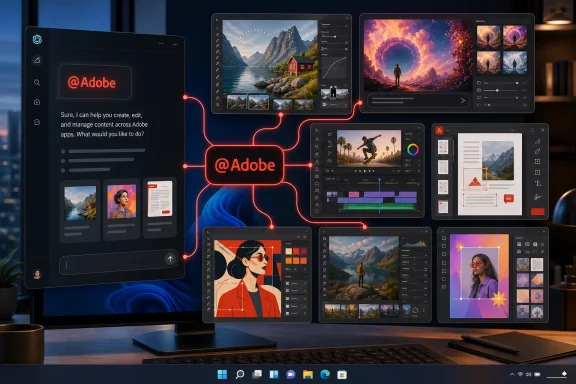
@Adobe invocation. For Windows users, the practical benefit is fewer separate ChatGPT connections and a broader path from a prompt to an editable image, short-form video, marketing asset, or PDF without bouncing among standalone Adobe web tools.But the important detail is what actually changed on August 6. According to 9to5Mac, Adobe is presenting the release as one plugin exposing more than 70 tools across its creative and document stack, available in ChatGPT, ChatGPT Work, and Codex. Adobe’s own support material and OpenAI’s plugin documentation show that much of the underlying consolidation was already in motion in July: this is chiefly a single packaged entry point for an expanding Adobe connector, not a sudden arrival of every Adobe desktop application inside ChatGPT.
The Adobe connector was already replacing individual ChatGPT integrations
Adobe launched separate Photoshop, Adobe Express, and Acrobat integrations for ChatGPT on December 10, 2025. At the time, Adobe said those apps were free to ChatGPT users and could handle conversational photo editing, template-based design, PDF conversion, merging, compression, text extraction, and redaction. Photoshop and Acrobat support was originally announced for ChatGPT on desktop, web, and iOS, while Express also reached Android.
The current Adobe for ChatGPT documentation, last updated July 13, 2026, says the older Photoshop connector has been replaced with one Adobe connector that covers “skills and tools across creativity, productivity, and more.” It also tells users to reconnect to continue using Photoshop tools along with the broader toolkit.
That sequence matters. The “new” Adobe plugin is not simply an upgrade that existing users receive invisibly. Anyone who relied on the old Photoshop-specific connector should check whether it remains connected and whether its permissions still match their expectations. Adobe’s instructions say to open ChatGPT’s Plugins area, search for Adobe, and select Connect; after that, the service can be called with @Adobe or selected from ChatGPT’s attachment and tools menu.
OpenAI changed its own terminology and distribution mechanism shortly before this rollout. On July 9, 2026, it moved from an app directory to a Plugin Directory, defining a plugin as a package that can contain apps, reusable skills, and app templates. Existing app connections were not supposed to break in that migration, according to OpenAI, but a plugin can now act as the discovery and workflow layer above individual underlying apps.
In other words, Adobe has aligned its previous collection of connectors with OpenAI’s new packaging model. That is a useful simplification, but users should read “one plugin” as an installation and routing change first—and only secondarily as evidence that 70 entirely new capabilities arrived today.
What the combined workflow can do from a ChatGPT conversation
The newly combined Adobe entry is designed around outcome-based prompts. A user can upload a batch of photos, ask for consistent color and lighting treatment, remove distractions, replace backgrounds, resize the results, then save the assets to Creative Cloud. They can turn a horizontal video into cuts suitable for YouTube Shorts or Instagram Reels, customize an Adobe Express template, animate it, and produce a shareable PDF.
Adobe’s documentation independently confirms those general workflow categories:
- The connector can apply batch photo adjustments, cropping, resizing, generative edits, background replacement, and other image changes.
- It can adapt uploaded video for other platforms and produce a shorter highlights edit from longer source footage.
- It can use Express templates for social assets and turn finished designs into PDFs.
- It can turn supplied data into formatted PDFs such as event badges, cards, catalogs, and similar structured documents.
The key distinction is that ChatGPT remains the conversational coordinator. It does not turn the browser or Windows desktop client into a full local installation of Premiere Pro, Photoshop, or InDesign. Adobe itself says users can continue into its native applications when they need advanced editing, creative control, or pixel-level precision. That is consistent with the company’s broader Firefly AI Assistant strategy, announced earlier this year: conversational AI handles multi-step orchestration, while native Adobe apps remain the place for direct, detailed work.
For professionals, that division is sensible. Asking ChatGPT to generate a social cutdown, format a sales catalog, or normalize a set of campaign images can save setup time. Color-critical retouching, intricate masking, complex Premiere timelines, print preflight, and structured InDesign layout still need the richer toolsets and verification steps that a chat-based workflow does not expose well.
“More than 70 tools” is a broad claim with few published boundaries
9to5Mac reports that Adobe describes the plugin as having more than 70 tools. That number is plausible given the named services and the range of actions listed in Adobe’s support documentation, but Adobe’s currently available ChatGPT documentation does not publish a complete 70-item inventory, per-tool quotas, or a precise feature matrix showing which actions require a paid Creative Cloud plan.
That omission makes it hard to assess the real scope from the headline alone. “Photoshop” access may mean a focused set of image-editing actions rather than every desktop Photoshop feature; the same applies to Premiere, Illustrator, Lightroom, and InDesign. A connector that can resize video or produce a quick-cut highlight reel is useful, but it is not equivalent to exposing all effects, project-management features, codecs, collaboration controls, or export options from a full Adobe application.
Adobe does say that users can start without an Adobe account. Signing in with a free Adobe account unlocks additional skills, generative-AI tool calls, asset storage, Creative Cloud file access, and continuity across sessions. The company has not publicly specified in the current documentation exactly how many generative calls a guest or free account receives, what happens when a quota is exhausted, or which premium subscriptions raise those limits.
That is the commercial caveat behind the “available today” framing. Installation may be open, but the useful ceiling of the toolset depends on account status, Adobe entitlements, and any applicable ChatGPT plan or workspace policy.
ChatGPT Work and Codex access does not bypass enterprise controls
The plugin’s appearance in ChatGPT Work and Codex is potentially more significant for business users than its presence in normal ChatGPT. OpenAI describes plugins as workflow packages that can connect to external systems, retrieve data, and—in some cases—perform write actions. It also says workspace administrators control whether plugins are available, which roles receive them, which underlying apps are enabled, and what actions those apps can take.
That means an employee seeing the Adobe plugin in a directory does not guarantee they can use it with corporate Creative Cloud files. OpenAI explicitly says plugin availability can vary by plan, role, workspace settings, supported surface, and region. A visible listing may still be disabled by an administrator, blocked by geography, or unusable until the underlying app connection is approved.
The default OpenAI permission model also deserves attention before teams connect shared Creative Cloud libraries. ChatGPT can read from connected apps automatically under its default “Important actions” setting, while it normally asks before higher-impact operations such as uploading files, moving or renaming cloud content, changing access controls, or sharing sensitive information. Administrators can impose stricter action approval rules, and individual users can choose settings that ask before every action or every change.
For a creative department, that is not procedural trivia. The Adobe connector can touch source imagery, video, campaign templates, customer-facing PDFs, and Creative Cloud assets. IT should treat it as a content-access integration, not merely as another chatbot add-on. Verify who can connect it, whether shared folders are in scope, what ChatGPT can read automatically, and whether saving or modifying assets requires an explicit confirmation.
Windows users get the plugin directory, but not universal feature parity
Adobe’s current technical requirements list Windows 10 or later, with recent versions of Microsoft Edge or Google Chrome recommended for browser use. OpenAI says its refreshed ChatGPT desktop application is globally available for Windows and Mac, with Chat, Work, and Codex available across plans, including the Free tier.
Those broad platform statements should not be confused with guaranteed Adobe feature access. Adobe’s documentation says the ChatGPT connector is globally available except where Adobe trade-compliance restrictions apply and currently supports English only. OpenAI separately warns that a plugin’s installation and invocation can depend on the user’s plan, location, workspace, role, supported surface, and the capabilities of its included apps.
The immediate action is therefore straightforward: install or reconnect the Adobe plugin, type @Adobe, and ask it to enumerate the tools currently available to the account. Test it first with disposable assets rather than a production campaign folder, and inspect every approval card before allowing file uploads, Creative Cloud searches, or save actions.
Adobe has combined an increasingly capable set of creative and document workflows into one ChatGPT surface. The measurable change for existing users is consolidation; the larger promise—reliable, controlled handoff from a plain-English request to a polished, editable Adobe deliverable—will depend on how much of the claimed toolset is actually enabled for each account and workspace.