
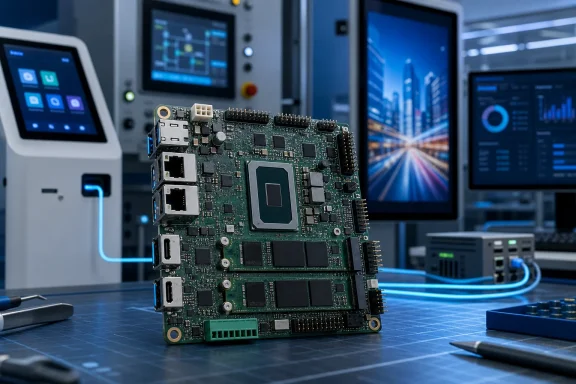
ASUS’s NUC 16 Pro board takes the company’s Panther Lake mini-PC platform out of its enclosure and exposes the connections that matter to embedded Windows deployments: RS-232, eDP 1.5, USB 2.0, a front-panel header, I²C, fan headers, and a PCIe x1 Gen2 header. The board also keeps the full NUC 16 Pro storage layout—one M.2 2280 PCIe 5.0 x4 slot and one PCIe 4.0 x4 slot—alongside dual 2.5GbE, two Thunderbolt 4 ports, and a choice of dual HDMI 2.1 or dual DisplayPort 2.1 outputs.
That makes the NUC16GDB board more consequential than the product photography suggests. The completed NUC 16 Pro is a compact office or edge-AI PC; the board version is aimed at companies building their own kiosk, signage, machine-control, retail, or panel-PC hardware around ASUS’s compute module. ServeTheHome identified the board while covering ASUS’s NUC 16 family at Computex 2026, and ASUS’s own technical datasheet confirms that it is a distinct product rather than simply a barebones NUC with its case removed.
The catch is that the board is not an open-ended motherboard in the desktop sense. The Core Ultra processor is soldered on, memory options are locked to the ordered configuration, and ASUS supplies neither a power adapter nor wireless networking. Buyers are getting a compact, platform-specific embedded board with a thermal solution—not a general-purpose Mini-ITX replacement.
ASUS’s NUC 16 Pro datasheet describes six board configurations under the NUC16GDB project code. They span Intel Core Ultra Series 3 processors from the 45W Core Ultra 5 325 to the 65W Core Ultra X9 388H, with Core Ultra X7 358H, Core Ultra 7 366H, Core Ultra 7 356H, and Core Ultra 5 335 variants between them.
The distinction is more important than the names suggest. The X9 388H and X7 358H versions pair Intel Arc B390-class graphics with soldered LPDDR5x-9600 memory in capacities from 16GB through 96GB. The remaining versions use two CSO-DIMM slots, supporting up to 128GB of DDR5, with the higher-end memory path listed at DDR5-7200 and some configurations at DDR5-6400.
That produces a straightforward purchasing rule: organizations that need the platform’s strongest integrated graphics and AI capability must accept non-upgradable LPDDR5x memory. Organizations that value memory replacement, field service, or a 128GB ceiling need the CSO-DIMM designs, but those configurations use Intel Graphics rather than the Arc-equipped processors.
Intel’s own processor database supports the underlying split. The Core Ultra X9 388H and X7 358H are 16-core Panther Lake parts with Intel Arc B390 graphics, while the Core Ultra 7 356H is also a 16-core part but is listed with Intel Graphics. “Core Ultra 7” alone therefore tells a Windows buyer very little about display, local AI, graphics, or memory behavior in this product line.
There is also a documentation problem worth flagging before anyone standardizes on a board. ASUS’s live regional specification page presently shows only the Core Ultra 7 366H for the NUC 16 Pro Board, whereas ASUS’s downloadable datasheet lists all six processor configurations. ServeTheHome similarly reported a wider selection of board and kit options, including X9 and X7 variants. The most plausible explanation is that the website is reflecting a narrower regional sales configuration while the datasheet describes the full family, but ASUS has not published a clean board-level ordering matrix that resolves that difference.
For IT procurement, that means the project code—NUC16GDB—is insufficient. Require the full SKU, processor, memory type and capacity, and display-output variant in the purchase order.
ASUS’s important addition is inside the board. It lists two internal USB 2.0 connections, RS-232, PCIe x1 Gen2, front-panel, power, I²C, eDP 1.5, CPU-fan, and auxiliary-fan headers. Those are the interfaces that let an integrator add a touchscreen or internal panel through eDP, connect a legacy serial device, wire physical buttons and indicators, or add a limited internal expansion device without hanging everything from external USB.
The PCIe x1 Gen2 header deserves appropriately modest expectations. It can be useful for a purpose-built controller, low-bandwidth capture card, or specialty I/O expansion, but it is not a path to a discrete GPU, high-speed NVMe expansion, or the sort of broad peripheral flexibility expected from a full desktop motherboard. The two onboard M.2 2280 slots are the practical expansion story here, particularly for local data retention, dual-drive Windows deployments, or separating the OS volume from application and telemetry data.
The board also omits an onboard wireless module. ASUS lists “Network: None” for the NUC16GDB board even though fully assembled NUC 16 Pro systems can include Intel Wi-Fi 7 and Bluetooth 6.0. That omission is sensible for sealed appliances, wired installations, and customers with their own radio certification requirements, but it means Wi-Fi is not something an integrator should assume is available merely because it appears in NUC 16 Pro marketing.
That matters most in Windows IoT projects. An integrator can pair the board with Windows 11 IoT Enterprise, a locked-down image, and a custom enclosure to build a long-lived appliance that boots locally and manages networked peripherals. The RS-232, eDP, front-panel, and dual-Ethernet provisions are more relevant to that use case than ASUS’s broad claims about local AI agents.
The board can also support remote-manageable deployments, but only on selected processors. ASUS identifies the Core Ultra 7 366H and Core Ultra 5 335 as vPro models, and its support documentation lists NUC16GDBv7 and NUC16GDBv5 board variants as vPro-capable. A deployment that depends on Intel’s out-of-band management stack needs to purchase those specific variants; fTPM 2.0 alone is not a substitute for vPro.
ASUS advertises up to 180 platform TOPS for the NUC 16 Pro family, a figure that combines CPU, GPU, and NPU capability rather than describing a single accelerator. The Windows consequence is narrower than the marketing copy: the Arc-equipped, LPDDR5x boards should be the meaningful candidates for local GPU-assisted inference or graphics-heavy multi-display work. The DDR5 boards may be a better fit for conventional Windows workloads that need 64GB or 128GB of serviceable RAM, networking, storage, and long-term deployment stability.
There is also no analog audio. Audio must travel over HDMI, DisplayPort through Thunderbolt, or an external USB DAC. That is manageable in digital signage and machine-control applications, but it is a needless integration complication for a kiosk or communications terminal that needs a local headset, microphone, or line-level output.
Display outputs must likewise be chosen at order time. ASUS specifies HDMI and DisplayPort board variants, rather than presenting them as interchangeable connectors on one board. HDMI models support CEC on their two rear ports; DisplayPort models do not. An enclosure, cable loom, and monitor fleet built around one option will not transfer cleanly to the other.
ASUS has not published a board-only U.S. price, an orderable public SKU list, or a regional availability schedule in the materials reviewed. ServeTheHome reported that a Core Ultra 7 356H NUC 16 Pro kit sells for $699 and that complete systems start at $1,269, but those figures do not establish the cost of the NUC16GDB board or the required memory, storage, power, wireless, enclosure, and Windows licensing around it.
The NUC 16 Pro board is therefore a credible embedded Windows foundation, especially for dual-network appliances and compact multi-display systems. But the decision point is no longer “buy the fastest NUC”: it is choosing between Arc graphics with soldered memory, or serviceable DDR5 with more conventional integrated graphics—and getting ASUS to confirm the exact board SKU before the enclosure design is committed.
The catch is that the board is not an open-ended motherboard in the desktop sense. The Core Ultra processor is soldered on, memory options are locked to the ordered configuration, and ASUS supplies neither a power adapter nor wireless networking. Buyers are getting a compact, platform-specific embedded board with a thermal solution—not a general-purpose Mini-ITX replacement.
Six processor and memory combinations, but a confusing public SKU record
ASUS’s NUC 16 Pro datasheet describes six board configurations under the NUC16GDB project code. They span Intel Core Ultra Series 3 processors from the 45W Core Ultra 5 325 to the 65W Core Ultra X9 388H, with Core Ultra X7 358H, Core Ultra 7 366H, Core Ultra 7 356H, and Core Ultra 5 335 variants between them.The distinction is more important than the names suggest. The X9 388H and X7 358H versions pair Intel Arc B390-class graphics with soldered LPDDR5x-9600 memory in capacities from 16GB through 96GB. The remaining versions use two CSO-DIMM slots, supporting up to 128GB of DDR5, with the higher-end memory path listed at DDR5-7200 and some configurations at DDR5-6400.
That produces a straightforward purchasing rule: organizations that need the platform’s strongest integrated graphics and AI capability must accept non-upgradable LPDDR5x memory. Organizations that value memory replacement, field service, or a 128GB ceiling need the CSO-DIMM designs, but those configurations use Intel Graphics rather than the Arc-equipped processors.
Intel’s own processor database supports the underlying split. The Core Ultra X9 388H and X7 358H are 16-core Panther Lake parts with Intel Arc B390 graphics, while the Core Ultra 7 356H is also a 16-core part but is listed with Intel Graphics. “Core Ultra 7” alone therefore tells a Windows buyer very little about display, local AI, graphics, or memory behavior in this product line.
There is also a documentation problem worth flagging before anyone standardizes on a board. ASUS’s live regional specification page presently shows only the Core Ultra 7 366H for the NUC 16 Pro Board, whereas ASUS’s downloadable datasheet lists all six processor configurations. ServeTheHome similarly reported a wider selection of board and kit options, including X9 and X7 variants. The most plausible explanation is that the website is reflecting a narrower regional sales configuration while the datasheet describes the full family, but ASUS has not published a clean board-level ordering matrix that resolves that difference.
For IT procurement, that means the project code—NUC16GDB—is insufficient. Require the full SKU, processor, memory type and capacity, and display-output variant in the purchase order.
The board’s real advantage is embedded I/O, not raw benchmark numbers
The NUC 16 Pro board is only 138 by 113.5mm, slightly smaller than the 144 by 117mm mini-PC chassis footprint. It retains the external ports expected from a high-end NUC: two Thunderbolt 4 Type-C ports carrying DisplayPort 2.1, two 10Gbps USB 3.2 Gen 2 Type-A ports at the rear, one 10Gbps USB-C and two 10Gbps USB-A ports at the front, plus two 2.5GbE ports.ASUS’s important addition is inside the board. It lists two internal USB 2.0 connections, RS-232, PCIe x1 Gen2, front-panel, power, I²C, eDP 1.5, CPU-fan, and auxiliary-fan headers. Those are the interfaces that let an integrator add a touchscreen or internal panel through eDP, connect a legacy serial device, wire physical buttons and indicators, or add a limited internal expansion device without hanging everything from external USB.
The PCIe x1 Gen2 header deserves appropriately modest expectations. It can be useful for a purpose-built controller, low-bandwidth capture card, or specialty I/O expansion, but it is not a path to a discrete GPU, high-speed NVMe expansion, or the sort of broad peripheral flexibility expected from a full desktop motherboard. The two onboard M.2 2280 slots are the practical expansion story here, particularly for local data retention, dual-drive Windows deployments, or separating the OS volume from application and telemetry data.
The board also omits an onboard wireless module. ASUS lists “Network: None” for the NUC16GDB board even though fully assembled NUC 16 Pro systems can include Intel Wi-Fi 7 and Bluetooth 6.0. That omission is sensible for sealed appliances, wired installations, and customers with their own radio certification requirements, but it means Wi-Fi is not something an integrator should assume is available merely because it appears in NUC 16 Pro marketing.
Windows deployments get a supported platform, but not a ready-to-run PC
ASUS lists support for Windows 11 Home, Windows 11 Pro, Windows 11 Pro Education, and Windows 11 IoT Enterprise, as well as Ubuntu 24.04 LTS and Red Hat Enterprise Linux 10. The board ships with no operating system, storage, memory on the CSO-DIMM variants, wireless module, or power supply.That matters most in Windows IoT projects. An integrator can pair the board with Windows 11 IoT Enterprise, a locked-down image, and a custom enclosure to build a long-lived appliance that boots locally and manages networked peripherals. The RS-232, eDP, front-panel, and dual-Ethernet provisions are more relevant to that use case than ASUS’s broad claims about local AI agents.
The board can also support remote-manageable deployments, but only on selected processors. ASUS identifies the Core Ultra 7 366H and Core Ultra 5 335 as vPro models, and its support documentation lists NUC16GDBv7 and NUC16GDBv5 board variants as vPro-capable. A deployment that depends on Intel’s out-of-band management stack needs to purchase those specific variants; fTPM 2.0 alone is not a substitute for vPro.
ASUS advertises up to 180 platform TOPS for the NUC 16 Pro family, a figure that combines CPU, GPU, and NPU capability rather than describing a single accelerator. The Windows consequence is narrower than the marketing copy: the Arc-equipped, LPDDR5x boards should be the meaningful candidates for local GPU-assisted inference or graphics-heavy multi-display work. The DDR5 boards may be a better fit for conventional Windows workloads that need 64GB or 128GB of serviceable RAM, networking, storage, and long-term deployment stability.
Several omissions change the enclosure design
The board ships with a thermal solution, according to ASUS, but its 65W processor options and auxiliary-fan header make clear that cooling is still an enclosure decision. A compact fanless box may be possible only with power limits and significant external heatsinking; ASUS lists a 0°C to 40°C operating range, which is ordinary commercial equipment territory rather than the extended temperatures expected from a rugged industrial PC.There is also no analog audio. Audio must travel over HDMI, DisplayPort through Thunderbolt, or an external USB DAC. That is manageable in digital signage and machine-control applications, but it is a needless integration complication for a kiosk or communications terminal that needs a local headset, microphone, or line-level output.
Display outputs must likewise be chosen at order time. ASUS specifies HDMI and DisplayPort board variants, rather than presenting them as interchangeable connectors on one board. HDMI models support CEC on their two rear ports; DisplayPort models do not. An enclosure, cable loom, and monitor fleet built around one option will not transfer cleanly to the other.
ASUS has not published a board-only U.S. price, an orderable public SKU list, or a regional availability schedule in the materials reviewed. ServeTheHome reported that a Core Ultra 7 356H NUC 16 Pro kit sells for $699 and that complete systems start at $1,269, but those figures do not establish the cost of the NUC16GDB board or the required memory, storage, power, wireless, enclosure, and Windows licensing around it.
The NUC 16 Pro board is therefore a credible embedded Windows foundation, especially for dual-network appliances and compact multi-display systems. But the decision point is no longer “buy the fastest NUC”: it is choosing between Arc graphics with soldered memory, or serviceable DDR5 with more conventional integrated graphics—and getting ASUS to confirm the exact board SKU before the enclosure design is committed.
References
- Primary source: ServeTheHome
Published: 2026-08-03T19:00:32+00:00
- Related coverage: asus.com
Loading…
www.asus.com - Related coverage: asus.com
- Related coverage: dlcdnets.asus.com
- Related coverage: press.asus.com
ASUS Unveils Groundbreaking Ultrasmall-Form-Factor PCs at CES 2026 | ASUS Pressroom - Official Global News & Updates
Discover the latest ASUS news, press releases, and global updates at the official ASUS Pressroom. Explore now! Visit press.asus.com
press.asus.com
- Related coverage: edgeup.asus.com
Panther Lake Arrives: ASUS and Intel power the next generation of work and play - Edge Up
Intel Panther Lake CPUs bring a host of improvements for performance, battery life, AI, connectivity, and more.edgeup.asus.com
- Related coverage: press.asus.com
ASUS Republic of Gamers Announces ROG NUC 16 | ASUS Pressroom - Official Global News & Updates
ROG NUC 16: ASUS unveils a compact gaming PC for gamers and creators. Features Intel Core Ultra, NVIDIA RTX 5080 Laptop GPU, AI-enhanced graphics, QuietFlow cooling, and versatile dual-orientation design. Subscribe to ASUS Pressroom for the latest tech updates!
press.asus.com
- Related coverage: 170.p.syniva.es
- Related coverage: techtimes.com
Loading…
www.techtimes.com - Related coverage: also.com
- Related coverage: windowscentral.com
ASUS unveils new ZenBook S14 and S16 laptops at CES 2026 | Windows Central
The ASUS ZenBook S14 and ZenBook S16 have been refreshed for 2026, now rocking the latest silicon from Intel and AMD, an updated lid design, and improved performance and battery life.www.windowscentral.com - Related coverage: tomsguide.com
First Intel Panther Lake laptops set to be announced at CES 2026, as Asus confirms launch event | Tom's Guide
After Geekbench data leaked, it appears we’ll get our first Panther Lake CPUs in just a few weeks courtesy of Asus.www.tomsguide.com - Related coverage: techradar.com
The Intel Core Ultra X9 388H based Asus NUC 16 Pro blends strong integrated graphics with leading AI performance | TechRadar
Launched at CES 2026, the compact desktop is built for local AI, light gaming, and creative taskswww.techradar.com - Related coverage: pcgamer.com
If gaming laptops are just too bulky for you and you're desperate to burn an enormous hole in your wallet, the new Asus ROG NUC is surely a vision of your dreams | PC Gamer
For me, it's a vision of hell.www.pcgamer.com - Related coverage: tomsguide.com
I tried the new ROG NUC 16 and Asus’ upgraded mini gaming PC is complete overkill — but in the best way possible | Tom's Guide
The new Asus ROG NUC 16 is an incredibly powerful and feature-packed mini gaming PC but the price tag still stings.www.tomsguide.com - Related coverage: rog.asus.com
- Related coverage: dlcdnwebimgs.asus.com
Loading…
dlcdnwebimgs.asus.com - Related coverage: bestbuy.com
ASUS NUC 16 Pro NUC16GDKU7 Mini PC Intel Core Ultra 7 356H, 64GB RAM, 1TB SSD, Intel Graphics, Windows 11 Pro Black NUC16GDKU7 - Best Buy
Shop ASUS NUC 16 Pro NUC16GDKU7 Mini PC Intel Core Ultra 7 356H, 64GB RAM, 1TB SSD, Intel Graphics, Windows 11 Pro Black products at Best Buy. Find low everyday prices and buy online for delivery or in-store pick-up. Price Match Guarantee.
www.bestbuy.com
- Related coverage: esg.asus.com
- Related coverage: rog.asus.com
[NUC] What is ASUS Edge Suite | Officiel support | ROG Danmark
[NUC] What is ASUS Edge Suiterog.asus.com
- Related coverage: videocardz.com
- Related coverage: newegg.com