
ServeTheHome’s Computex 2026 reporting lays out the family in full, including details ASUS has spread between product pages and specification sheets. The reporting also exposes the marketing shortcut in describing the whole lineup as Panther Lake-powered. Only the NUC 16 Pro uses Intel Core Ultra Series 3, known as Panther Lake. The standard NUC 16 and NUC 16 for Windows 365 use Core Series 3 processors, Intel’s lower-tier Wildcat Lake platform.
For organizations replacing older Intel NUC fleets, that distinction should drive procurement. The standard NUC 16 retains unusually strong networking and display connectivity for a compact machine, but its single-channel memory design establishes a clear ceiling on CPU and integrated-graphics performance. The Pro model fixes that, while creating another choice between replaceable RAM and the faster integrated Arc graphics configuration.
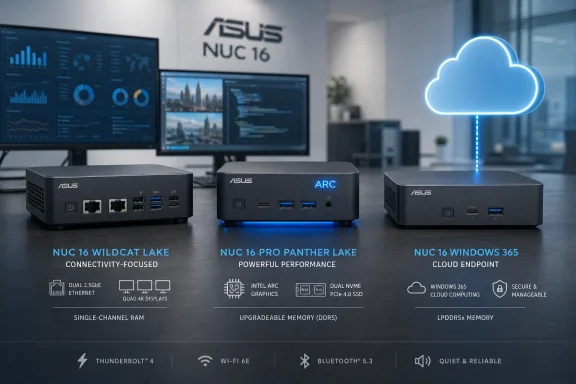 The standard NUC 16 is an I/O-first, single-channel system
The base ASUS NUC 16 tops out at the Intel Core 7 350, a six-core Wildcat Lake part with two Cougar Cove performance cores and four Darkmont low-power efficiency cores. ASUS runs it at a 28 W configurable TDP, putting it in the territory of a capable office, signage, light edge-compute, or home-lab node rather than a compact workstation.
Its most consequential limitation is memory. ServeTheHome reports that the NUC 16 has one CSO-DIMM slot because Wildcat Lake supports only a 64-bit memory channel. Fully configured models ship with 16GB or 32GB of DDR5-5600, while independent reports on ASUS’s broader NUC 16 specifications indicate support for up to 64GB of single-channel DDR5-6400 memory.
That is not a minor configuration detail. A single memory channel can reduce available bandwidth for the Xe3 integrated GPU and makes this NUC a poor fit for workloads that combine graphics, local AI inference, multiple virtual machines, and sustained memory-heavy processing. The Core 7 350 includes Intel’s NPU 5 and two Xe3 graphics cores, but those blocks do not erase the bandwidth constraint imposed by the platform.
ASUS has spent its component budget on connectivity instead. The standard NUC 16 has two 2.5GbE ports using Intel I226-V controllers, Wi-Fi 7 and Bluetooth 6.0 through Intel’s BE211 wireless module, two HDMI 2.1 outputs, a 40Gbps Thunderbolt 4 port, front USB-C and USB-A ports, and a 3.5mm headset jack. It also has a single PCIe 4.0 x4 M.2 2280 slot and a toolless chassis.
The combination makes sense for installations where the NUC’s job is connectivity rather than compute: a dual-network Windows endpoint, a small firewall-adjacent utility PC, a remote-management appliance, or a conference-room system that needs several display and peripheral options. It is less compelling as a general-purpose desktop if its eventual price lands too close to the NUC 16 Pro.
ASUS plans to sell the standard NUC 16 as a finished PC, a barebones kit, and a standalone board. But as of August 3, ASUS has not published a clear U.S. retail price or firm availability date for the ordinary Wildcat Lake NUC 16 lineup. That missing detail matters because European listings have already placed a barebones Core 7 350 configuration around the equivalent of the Pro model’s entry-level price territory.
NUC 16 Pro changes the expansion equation — with a catch
The NUC 16 Pro is the real performance model in this generation. It uses Intel’s Core Ultra Series 3 Panther Lake processors, beginning with the 45 W Core Ultra 5 325 and extending through 65 W Core Ultra 7 and Core Ultra X-series parts. ASUS’s current U.S. specifications list configurations including the Core Ultra 5 325, Core Ultra 7 356H, Core Ultra 7 366H with vPro, Core Ultra X7 358H, and Core Ultra X9 378H.
The Pro gets two Thunderbolt 4 ports rather than one, upgrades its rear USB-A ports to 10Gbps, keeps dual 2.5GbE and Wi-Fi 7, and adds a second M.2 2280 slot. One SSD slot is PCIe 5.0 x4 and the other is PCIe 4.0 x4. For IT departments deploying compact workstations or local services, the extra NVMe slot is more important than the headline processor: it permits a clean separation of operating system and data, mirrored application staging, or a high-speed scratch disk without external storage.
It also has a pronounced memory split that buyers need to understand before ordering. Core Ultra 5 and standard Core Ultra 7 variants use two CSO-DIMM slots and support up to 128GB of DDR5 memory. The more powerful Core Ultra X7 configuration substitutes soldered LPDDR5x memory, which delivers the bandwidth needed for Intel Arc B390 integrated graphics but forfeits any RAM upgrade path.
In other words, ASUS is selling two types of NUC 16 Pro under one enclosure:
- The CSO-DIMM models favor capacity, serviceability, and long-lived deployments.
- The LPDDR5x Arc models favor graphics bandwidth and compact performance, but lock the buyer into the memory capacity ordered on day one.
That is a reasonable engineering tradeoff, but it means an IT buyer should not select the Pro merely by CPU tier. A Core Ultra X7 358H system may be the right choice for a small visualization workstation or GPU-assisted local inference box, while a 128GB CSO-DIMM Core Ultra 7 configuration could be far more useful for virtual machines, development workloads, or a lab host.
ServeTheHome also notes an unusual omission: the NUC 16 Pro has no analog audio jack. Audio is available through HDMI, DisplayPort, USB, or an external USB DAC. That will not trouble a VESA-mounted office client or a server-room deployment, but it is an unnecessary complication for a desk-bound Windows machine expected to support conventional headsets.
ASUS’s own specifications have already changed
The NUC 16 Pro specification record is not as clean as it should be for a business-focused product. ASUS’s earlier datasheet listed a Core Ultra X9 388H option and LPDDR5x-9600 memory up to 96GB. The company’s current U.S. product page instead lists a Core Ultra X9 378H and gives different LPDDR5x capacity and speed entries, including LPDDR5x-8533 configurations.
ServeTheHome’s August 2 report aligns with the current 378H naming, saying the X9 378H and vPro-enabled Ultra 7 366H are available in barebones-oriented configurations. That makes the older 388H and LPDDR5x-9600 details look like pre-release or superseded material, rather than specifications a buyer should rely on.
The consequence is more than documentation clutter. The NUC 16 Pro’s graphics, memory topology, vPro support, SSD interface generation, and included operating system can vary sharply between SKUs. Purchasing teams should require the full ASUS part number and the actual memory configuration from a reseller, especially when comparing a ready-to-run Windows 11 Pro system with a barebones kit.
ASUS is already selling NUC 16 Pro hardware. ServeTheHome reports a barebones Core Ultra 7 356H configuration at $699 and complete systems starting at $1,269, while major U.S. retail listings show preconfigured Pro units at significantly higher prices once memory, storage, and Windows licensing are included. Those numbers reinforce why the lower-cost NUC 16 needs clear pricing before it can be judged as the value option.
The Windows 365 model is a thin client dressed as a NUC
The third model, ASUS NUC 16 for Windows 365, is the most narrowly targeted system. It uses Intel’s Core 3 304, a five-core Wildcat Lake chip with one performance core, four low-power efficiency cores, and just one Xe3 graphics core. ASUS pairs it with 8GB of DDR5 memory and a 128GB SSD.
ServeTheHome describes it accurately as a cloud-computing endpoint: enough local hardware for Windows 365 access and remote desktop work, with little reason to treat it as a conventional productivity PC. ASUS also cuts the networking feature set to one 2.5GbE port and swaps the standard NUC 16’s Wi-Fi 7 and Bluetooth 6.0 for Intel AX211 Wi-Fi 6E and Bluetooth 5.3.
For Windows 365 deployments, this is a sensible attempt to offer a purpose-built endpoint rather than a repurposed consumer mini PC. The 2.5GbE port is arguably overprovisioned for ordinary Cloud PC traffic, but it provides useful headroom in managed office networks and keeps the machine viable in high-bandwidth wired environments.
The risk is deployment creep. At 8GB of RAM and 128GB of storage, the Windows 365 NUC should be purchased as a dedicated Cloud PC terminal, not as a cheap standard Windows desktop with a fallback remote-work role. Its local compute and graphics resources are deliberately constrained.
Buy the platform, not the enclosure
ASUS has preserved the NUC strengths that matter: small dimensions, VESA mounting, tool-free access, dual-network options, and an unusually broad array of ports. The NUC 16 Pro, in particular, looks like a credible compact Windows 11 workstation or edge node, provided the buyer matches its memory design to the job.
But the NUC 16 family is now a brand umbrella rather than a single platform. The base NUC 16 is Wildcat Lake with one memory channel and one SSD slot. The NUC 16 Pro is Panther Lake with more CPU, graphics, storage, and I/O headroom. The Windows 365 version is a managed thin client.
For anyone ordering one in 2026, the model name is insufficient. The processor suffix, RAM type, installed capacity, M.2 layout, operating-system bundle, and vPro status now determine what the NUC actually is.
