
At its current enthusiast-class price, the ROG G700 is not positioned as a value-first desktop. It is a carefully assembled Republic of Gamers machine built for buyers who want strong hardware, polished presentation, modern connectivity, and a clearer upgrade path than many proprietary prebuilt systems provide. The result is a desktop that succeeds most convincingly as a high-refresh-rate 1440p gaming PC, while bringing enough CPU and GPU power to be useful well beyond games.
Rating: 4.2/5
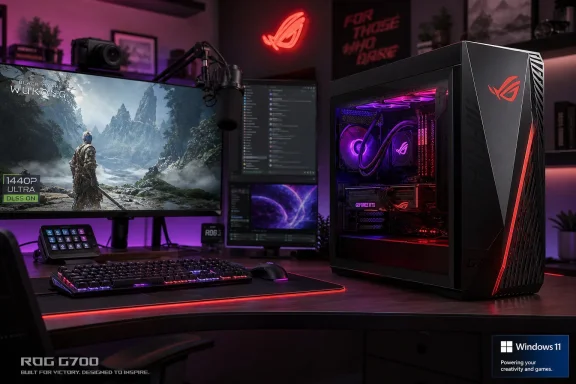 Overview: A High-End Prebuilt With the Right Priorities
The ASUS ROG G700 arrives in a crowded market. Gaming desktops in this class compete not only on benchmark charts, but on cooling, acoustics, component accessibility, networking, software integration, and the confidence that comes from buying a system that has been assembled and validated before it reaches the desk.
That context matters. Building a comparable PC yourself can still offer more component choice and potentially better value, particularly when sales are involved. But a premium prebuilt PC earns its place when it avoids the traditional weaknesses of the category: cramped proprietary cases, limited power supplies, poor cable routing, inadequate airflow, and difficult upgrades.
The ROG G700 gets several of those fundamentals right. ASUS has used a full-sized, ROG-styled chassis with a tempered-glass side panel, prominent ventilation, RGB lighting, and an internal layout designed to present hardware cleanly instead of simply hiding it behind a sealed panel. It is unapologetically a gaming desktop, yet it does not lean so heavily into visual excess that it becomes impractical in a home office or creative workspace.
The reviewed G700TF-PB776Ti configuration includes:
| Component | Specification |
|---|---|
| Processor | Intel Core Ultra 7 265KF |
| Graphics | NVIDIA GeForce RTX 5070 Ti |
| Memory | 32GB DDR5 |
| Storage | 1TB M.2 NVMe PCIe 4.0 SSD |
| Operating system | Windows 11 Home |
| Networking | 2.5Gb Ethernet, wireless networking, Bluetooth |
| Lighting | ASUS Aura Sync RGB |
| Target use | 1440p and 4K gaming, streaming, creative workloads |
The machine’s core proposition is straightforward: buy once, connect a monitor and peripherals, install games and applications, then get to work or play without the usual first-day PC-building concerns.
Design and Build Quality
Premium ROG Styling Without a Completely Overdone Chassis
The ROG G700 has the angular, performance-focused silhouette expected from ASUS’s Republic of Gamers division. Its front treatment is sharp and modern, the tempered-glass side panel puts the hardware on display, and Aura Sync lighting gives owners room to personalize the system without requiring separate third-party RGB software.
That styling will not appeal to every buyer. Minimalist desktop users may still prefer the subdued appearance of a compact black tower with no lighting at all. But within the gaming PC category, ASUS strikes a reasonable balance. The G700 looks purposeful and premium rather than like a toy designed around light strips.
More importantly, the case is not merely decorative. The larger chassis gives the installed CPU, graphics card, power hardware, and cooling system breathing room. That matters when hardware is asked to sustain high clocks during extended gaming sessions, long video renders, shader compilation, or large code builds.
Cable Management and Internal Accessibility
One of the biggest differentiators between a good prebuilt gaming desktop and a frustrating one is how it treats the interior. ASUS has clearly paid attention here. The components are organized neatly, cabling is routed away from key airflow paths, and the visible interior is considerably cleaner than the tangled wiring that has historically plagued mass-market gaming PCs.
The G700’s design also places practical emphasis on serviceability. Its tool-less approach and relatively open internal layout make routine work less intimidating, whether that means adding a drive, installing more memory, cleaning dust filters, or swapping a graphics card down the line.
That does not mean buyers should assume unlimited upgrade freedom. A prebuilt desktop’s exact motherboard layout, power delivery, cable lengths, cooler clearance, storage bays, and graphics-card space always matter. Anyone planning an unusually large GPU upgrade, multiple additional drives, or a major cooling redesign should inspect the specific configuration before purchasing. Still, the ROG G700 is substantially more upgrade-conscious than the enclosed and proprietary machines that dominate some competing product lines.
Cooling and Acoustic Behavior
ASUS has made airflow a visible part of the ROG G700 design. Intake and exhaust vents are placed to help fresh air reach the CPU and GPU while minimizing stagnant hot air inside the chassis. A spacious case is not automatically a cool case, but it provides the physical foundation for better thermal management than a compact, tightly packed gaming tower.
That design pays off in the areas that matter most in daily use: sustained load behavior and fan noise. The G700 is built to handle demanding gaming and creator workloads without turning into a constant source of distracting fan roar. Fans naturally become more audible when the CPU and GPU are under heavy simultaneous load, but the system’s broader cooling strategy helps it avoid the sharp, high-pitched acoustic character often associated with smaller high-performance desktops.
Quiet operation should not be confused with silent operation. A Core Ultra 7 processor and RTX 5070 Ti can consume substantial power when fully engaged. However, a gaming PC that keeps thermals controlled without aggressive and erratic fan behavior is easier to live with, especially for streamers, editors, and users working beside their system for hours at a time.
The Hardware: A Sensible Performance Pairing
Intel Core Ultra 7 265KF
The Intel Core Ultra 7 265KF is a desktop-focused processor with 20 cores split between eight performance cores and 12 efficient cores. It reaches boost clocks up to 5.5GHz and is well suited to the mixed workloads that define a modern high-end Windows PC: game engines, browser tabs, communication apps, capture utilities, media encoders, creative suites, and background tasks often run together rather than one at a time.
For gaming, its strong performance-core behavior helps deliver the consistent frame pacing needed for high-refresh displays. For work, the additional efficient cores are useful when running heavily threaded applications, compiling software, exporting media, or handling multitasking that would strain lower-tier CPUs.
There is an important detail in the processor name: the “F” means this chip does not include integrated graphics. That is not a practical problem in a system equipped with an RTX 5070 Ti, but it does mean owners should connect their displays directly to the graphics card rather than expecting motherboard video outputs to function.
The lack of integrated graphics also removes one potential fallback option during GPU troubleshooting. For most buyers, that is a minor consideration. For advanced users who regularly diagnose hardware, run unusual multi-monitor arrangements, or want Quick Sync media acceleration, it is worth understanding before purchase.
NVIDIA GeForce RTX 5070 Ti
The GeForce RTX 5070 Ti is the centerpiece of the ROG G700. It is particularly well placed for enthusiasts who see 1440p as their primary resolution, especially when paired with a 165Hz, 240Hz, or faster gaming monitor.
This GPU has enough performance for visually demanding games with high-quality settings, while NVIDIA’s Blackwell-era features add another layer to the experience. Supported titles can use DLSS 4, AI-based upscaling, ray reconstruction, and multi-frame generation to improve perceived smoothness and make more ambitious ray-tracing modes practical in games that would otherwise be difficult to run at high settings.
That feature set needs sensible interpretation. Frame generation can dramatically increase displayed frame rates, but it does not replace strong native performance or low input latency. Competitive players should still prioritize high base frame rates, suitable latency settings, and NVIDIA Reflex support where available. DLSS and frame generation are best viewed as tools that expand image-quality and performance options, rather than as a reason to ignore the GPU’s underlying horsepower.
The RTX 5070 Ti is also a strong choice for creators. Its hardware video encoders, CUDA ecosystem, AI acceleration capabilities, and 16GB-class graphics memory profile make it more versatile than a gaming-only component. GPU-assisted video editing, 3D rendering, AI image workflows, real-time visualization, and motion graphics all benefit from a capable NVIDIA graphics card.
32GB of DDR5 Memory
The inclusion of 32GB of DDR5 RAM is appropriate for a PC at this level. It is enough for modern games, Windows 11 multitasking, streaming software, browser-heavy workflows, and most mainstream creative work without forcing users to immediately plan a memory upgrade.
For gaming alone, 32GB is quickly becoming the comfortable standard rather than an extravagance. Large open-world games, modded titles, background launchers, Discord, browser windows, capture software, and game overlays can consume more memory than many users expect.
Creators with especially heavy workloads may still want 64GB or more. Large 4K or 8K video projects, huge Photoshop compositions, advanced Blender scenes, virtual machines, local AI work, and professional engineering applications can consume memory rapidly. Fortunately, the G700’s desktop form factor makes RAM expansion far more realistic than it would be in a laptop or compact mini PC.
A Fast but Modest 1TB SSD
The included 1TB PCIe 4.0 NVMe SSD should deliver quick Windows startup times, responsive application launches, fast game loading, and solid file-transfer performance. PCIe 4.0 storage remains highly capable for gaming and mainstream production work; there is no practical reason to dismiss it simply because newer PCIe generations exist.
Capacity is the issue. A 1TB drive can feel generous on paper, but current AAA games often consume well over 100GB each after updates, high-resolution texture packs, and downloadable content are installed. Add creative applications, project files, game captures, source media, and a growing Windows library, and free space can disappear quickly.
For that reason, storage is the ROG G700’s most obvious future upgrade. Buyers should plan accordingly:
- Add a secondary internal SSD for a larger game library.
- Use a dedicated drive for footage, active creative projects, or scratch files.
- Keep the primary SSD from running near full capacity.
- Consider a larger storage configuration at purchase if it is priced reasonably.
This is not a fatal weakness, but it is a real limitation at a premium price point. A 2TB primary drive would have made the G700 feel more complete out of the box.
Gaming Performance: Built for High-Refresh 1440p
The Best Fit Is 1440p Ultra Gaming
The ASUS ROG G700 is at its best as a 1440p Ultra gaming desktop. That resolution is a natural match for the RTX 5070 Ti because it delivers a substantial visual upgrade over 1080p while making high frame rates more attainable than native 4K in the latest technically demanding games.
In esports titles such as Counter-Strike 2, Valorant, Fortnite, and Apex Legends, the system has the potential to drive extremely high frame rates. That makes it well suited to fast-refresh monitors, where responsiveness and motion clarity can matter as much as image detail.
The system should also feel comfortable in major single-player releases. Games such as Cyberpunk 2077, Alan Wake 2, Black Myth: Wukong, and Forza Horizon 5 can benefit from the GPU’s ray-tracing capabilities and NVIDIA’s AI-assisted rendering features. Users will have room to choose between the highest possible visual settings and the highest possible frame rates rather than being locked into one compromise.
Reading Benchmark Claims Carefully
Reported gaming figures for this configuration are impressive, with claims including more than 140 FPS in Cyberpunk 2077 at 1440p Ultra, more than 120 FPS in Black Myth: Wukong, and more than 200 FPS in Call of Duty. Those figures support the G700’s positioning as a powerful high-refresh gaming system.
However, game benchmarks always require context. Exact results can differ substantially depending on:
- Whether ray tracing or path tracing is enabled.
- The selected DLSS quality mode.
- Whether frame generation is active.
- Game versions, drivers, and patches.
- The test scene rather than the game’s average performance.
- Memory speed, power settings, and thermal conditions.
- Background applications and capture software.
The supplied performance numbers should therefore be treated as indicative rather than universal. They demonstrate the class of experience buyers can expect, but they should not be read as guaranteed minimum frame rates for every scene or every settings combination.
4K Gaming Is Strong, With Smart Settings
The ROG G700 can absolutely serve as a 4K gaming PC, particularly for users comfortable using DLSS and carefully selecting ray-tracing settings. Less demanding games, older titles, competitive releases, and well-optimized engines can run very well at 4K.
The more demanding the game becomes, the more important setting discipline is. Native 4K with every advanced ray-tracing option enabled remains extremely taxing, even for powerful hardware. The RTX 5070 Ti is best understood as a GPU that offers good 4K flexibility, not one that removes all compromise at 4K Ultra in every new release.
That distinction is actually a strength of the overall build. ASUS did not pair the system with an entry-level graphics card and then advertise it as a 4K machine based on selective results. The G700 has the hardware to make 4K realistic, while still remaining especially convincing at 1440p.
Creator and Productivity Performance
The ROG G700 is more than a gaming tower with extra RGB lighting. Its Core Ultra 7 processor, 32GB of DDR5 memory, fast NVMe storage, and RTX 5070 Ti allow it to operate as a capable workstation for many creative users.
Video, Design, and 3D Work
Applications such as Adobe Premiere Pro, DaVinci Resolve, Photoshop, Blender, Unreal Engine, and AutoCAD can all benefit from the system’s processor and graphics hardware. Video creators gain from GPU acceleration and modern encoding support, while 3D users can take advantage of NVIDIA’s established rendering and viewport ecosystem.
For someone moving between gaming, editing, streaming, and production work, the G700’s balanced component selection is a major advantage. The CPU is not so weak that it becomes a bottleneck outside games, and the GPU is not limited to basic display duties or casual acceleration.
Development and AI-Assisted Workflows
Software developers should also find plenty to like. The processor’s combination of performance and efficient cores helps with compilation, local testing, containerized workloads, and multitasking. A fast SSD reduces some of the friction around project loading, dependency handling, and frequent builds.
The RTX 5070 Ti also makes the system more useful for local AI-assisted applications, GPU-accelerated coding tools, image generation workflows, and experimentation with models that fit within available VRAM. It is not a substitute for a dedicated professional AI workstation, but it is a far stronger starting point than a conventional office desktop.
The main caveat again comes back to storage. Creators generate data quickly. Video footage, cache files, exports, 3D assets, machine-learning models, project backups, and game captures will fill a 1TB drive much faster than a conventional document-focused workflow.
Connectivity, Windows 11, and Daily Use
The ROG G700 provides the modern I/O expected from an enthusiast desktop. USB Type-A ports remain essential for keyboards, mice, controllers, external drives, capture devices, and older accessories, while USB Type-C connectivity brings better flexibility for newer storage and peripherals.
A 2.5Gb Ethernet connection is a welcome inclusion. It will not improve internet performance beyond the speed of a buyer’s broadband plan, but it can make a difference on fast local networks, network-attached storage setups, and homes with multi-gig networking equipment.
Wireless support and Bluetooth make the machine easier to place away from a router or use with controllers, headphones, and other cable-free accessories. Because wireless specifications can vary by exact regional or retailer configuration, buyers should verify the listing if Wi-Fi 7 support is a specific requirement rather than assuming every G700 variant includes identical hardware.
Windows 11 Home provides the expected gaming features, broad driver support, DirectStorage compatibility, HDR support, Game Mode, and access to the current PC game ecosystem. On hardware at this level, the operating system should feel immediate: applications launch quickly, switching between tasks is smooth, and the PC has enough headroom to remain responsive even during demanding background activity.
ASUS’s Armoury Crate software is part of the broader ROG experience. It can centralize lighting control, performance profiles, updates, and monitoring, which is convenient for buyers who want an integrated control panel. As with most vendor utility suites, users who prefer a minimal Windows installation may want to review which optional services they actually need.
How It Compares With Premium Gaming Desktops
The ASUS ROG G700 competes against systems such as the Alienware Aurora, MSI Infinite RS, Corsair Vengeance i7500, HP OMEN 45L, and Lenovo Legion Tower 7i. Each offers its own combination of modern processors, RTX 50-series graphics, DDR5 memory, fast SSDs, RGB customization, and advanced cooling.
The ROG G700’s advantage is not that it is the only desktop with a fast CPU and GPU. At this price tier, powerful components are expected. Its appeal is the balance between performance, chassis space, cooling, maintainability, visual design, and ASUS software integration.
Compared with more restrictive designs, the G700’s approachable internal layout is a genuine plus. Compared with boutique custom builders, it may offer less control over every individual component, but it delivers a more conventional retail buying experience. Compared with barebones value prebuilts, it offers a more premium overall ownership experience.
The desktop is particularly compelling for buyers who prioritize the following:
- 1440p gaming at high and ultra settings
- High-refresh-rate esports performance
- Ray tracing with DLSS 4 support
- A capable system for editing, streaming, and 3D work
- A branded, polished prebuilt rather than a self-built tower
- A chassis that is easier to maintain and expand than many mainstream prebuilts
It is less compelling for buyers who simply want the lowest cost per frame, need 2TB or more of internal storage immediately, or want absolute control over the motherboard, power supply, cooling hardware, and every installed component.
Value, Risks, and Buying Considerations
The ROG G700 is expensive because its component list is expensive, but buyers are also paying for ASUS’s assembly, chassis design, cooling implementation, warranty structure, software ecosystem, and ROG branding. That package can be worthwhile, but it means price comparisons should be made carefully.
A sale price around the low-$2,000 range makes the G700 substantially easier to recommend than a full retail price closer to $2,500. Prices move frequently, especially for gaming desktops tied to graphics-card availability and retailer promotions, so the final purchasing decision should be based on the exact configuration and current price rather than a single advertised discount.
The principal compromises are clear:
- Premium pricing limits its value appeal against self-built PCs.
- 1TB of storage is likely to require expansion for many gamers and creators.
- The Core Ultra 7 265KF lacks integrated graphics, removing a troubleshooting fallback.
- Performance claims depend heavily on game settings, DLSS modes, and frame generation.
- Wireless hardware and port selection can vary across regional or retailer-specific SKUs.
None of those points undermine the core product. They simply clarify what the G700 is and is not. This is not a budget gaming PC, an all-in-one workstation, or a no-compromise 4K path-tracing monster. It is a polished high-end desktop designed around excellent 1440p performance and broad Windows productivity capability.
Final Verdict
The ASUS ROG G700TF-PB776Ti is one of the more complete premium prebuilt gaming desktop options for buyers who want powerful hardware without treating system assembly as a hobby. Its combination of the Intel Core Ultra 7 265KF, GeForce RTX 5070 Ti, 32GB of DDR5 RAM, and fast PCIe 4.0 storage creates a machine that is fast, responsive, visually polished, and highly capable across games and creative applications.
Its strongest argument is not a single benchmark number. It is the fact that the hardware is supported by a well-considered chassis, practical airflow, relatively quiet load behavior, modern networking, clean internals, and an upgrade-friendly approach that many premium gaming desktops still fail to provide.
The 1TB SSD is too modest for a system aimed at enthusiasts, and the asking price ensures the ROG G700 must be judged as a luxury purchase rather than an automatic bargain. Yet for gamers, streamers, and creators who value a refined out-of-the-box Windows 11 experience, the ASUS ROG G700 stands out as a powerful, balanced, and long-lived gaming PC built to handle the realities of modern high-performance computing.
