
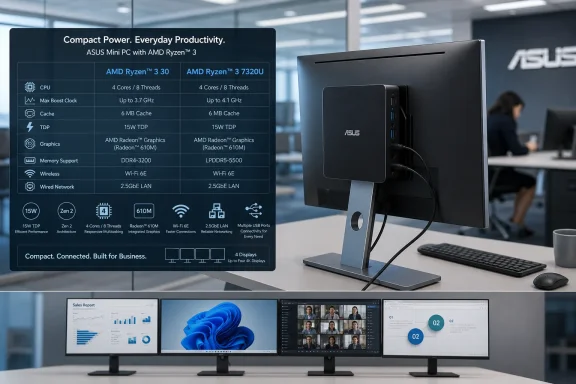
VideoCardz first highlighted the new Chinese retail listing on July 31, while ASUS’s own VM31 product pages now list the Ryzen 3 30 alongside Ryzen 5 40 and Athlon Silver 10 configurations. AMD’s product database confirms that Ryzen 3 30 is a 6nm Mendocino part with four cores, eight threads, a 2.4GHz base clock, a boost clock of up to 4.1GHz, 4MB of L3 cache, Radeon 610M integrated graphics, and a 15W default TDP.
For Windows buyers, the issue is not that Zen 2 is unusable. In a small desktop intended for browser-based work, Microsoft 365, remote sessions, digital signage, or basic multi-monitor productivity, it can still be perfectly serviceable. The issue is that Ryzen 3 30 sounds newer than the silicon actually is, especially against a marketplace already crowded with newer Ryzen, Core, Core Ultra, and ARM-based Windows machines.
 A New SKU Built on an Old Mendocino Foundation
AMD released the original Ryzen 7020 mobile family in 2022 under the Mendocino codename. That platform was aimed squarely at entry-level laptops: modest CPU resources, a small RDNA 2-derived Radeon 610M GPU, LPDDR5 memory, and a low power envelope intended to keep costs and battery consumption down.
The Ryzen 3 7320U was the family’s familiar four-core option. AMD’s original 2022 specifications list four Zen 2 cores, eight threads, 2.4GHz base and 4.1GHz boost speeds, a 15W design point, and Radeon 610M graphics. AMD’s current Ryzen 3 30 listing repeats those headline characteristics, including the same memory limit of 16GB LPDDR5-5500 and PCIe 3.0 connectivity.
That makes the branding exercise unusually straightforward. Ryzen 3 30 is effectively the Ryzen 3 7320U under AMD’s Ryzen 10 Series label, just as the Ryzen 5 40 corresponds to the Ryzen 5 7520U and Athlon Silver 10 maps to the Athlon Silver 7120U. Tom’s Hardware reported on AMD’s wider Ryzen 10 and Ryzen 100 renaming effort in late 2025, noting that Mendocino had moved into the Ryzen 10 family while the older Rembrandt-R line received Ryzen 100 branding.
This does not automatically mean ASUS is selling a misleading system. ASUS identifies the VM31 platform as using Zen 2 processors and Radeon 610M graphics on several regional product pages. But it does mean shoppers and IT purchasers need to look beyond the model number. A “Ryzen 3 30” badge does not convey the same generational position as a recent Ryzen 3 8000-series, Ryzen AI, or even a Ryzen 3 model based on Zen 3 or later.
The VM31 Is More Interesting as a Chassis Than a Performance Machine
The ASUS Mini PC VM31 itself is a deliberately compact system: 135 × 115 × 35.8 mm, weighing about 330 grams. ASUS describes it as a 0.55-liter device with VESA-mount support, a clear signal that the intended deployment is behind monitors, under desks, in retail counters, or in space-constrained business environments rather than on an enthusiast’s desktop.
The platform has respectable connectivity for that role. ASUS specifies Wi-Fi 6E, Bluetooth 5.2, 2.5GbE networking, seven USB ports, HDMI 2.0, DisplayPort 1.4, and USB-C connections that support DisplayPort output. The company says the VM31 can drive up to four displays, which is arguably the system’s most compelling capability for office users.
A four-display workstation does not need to be a high-end workstation. Reception desks, finance terminals, monitoring consoles, call centers, and retail management stations can benefit more from reliable I/O and compact mounting than from abundant CPU cores. In that context, 2.5GbE and several physical display outputs are more valuable than benchmark leadership.
The configuration needs closer inspection, however. ASUS lists up to 16GB of LPDDR5x-5500 memory, and the memory is not a conventional user-replaceable SO-DIMM upgrade path. That ceiling is adequate for a fixed-purpose Windows 11 endpoint, but it limits the VM31’s usefulness as workloads expand. An 8GB configuration with Windows 11, Teams, a modern browser, endpoint security software, and multiple display workloads will have considerably less breathing room than a 16GB model.
Storage is another point where product listings need careful reading. ASUS’s specifications describe M.2 2280 NVMe support and included SSD capacities in lower-end configurations, while regional materials differ on the maximum capacity cited. The key architectural point is clearer: the Mendocino processor provides PCIe 3.0 rather than newer PCIe 4.0 or PCIe 5.0 capability. Fast enough for ordinary Windows boot and application loads, certainly, but not a platform designed to age gracefully as a premium desktop.
Windows 11 Support Is Not the Same as Long-Term Headroom
The Ryzen 3 30 supports Windows 11 64-bit, according to AMD, and ASUS offers VM31 systems with Windows 11 Home or Windows 11 Pro as well as barebone versions without a preinstalled operating system. For small organizations, that Pro option matters because it preserves the familiar management path: BitLocker, Remote Desktop hosting, domain or Entra ID join options, Group Policy, and standard Windows endpoint tooling.
There is also no inherent problem in deploying a Zen 2-based system on Windows 11. Zen 2 meets Microsoft’s supported processor baseline, and the platform’s modern-enough ingredients—UEFI, TPM support through the OEM implementation, NVMe storage, Wi-Fi 6E, and USB-C display output—make it a conventional Windows mini PC rather than an awkward legacy compromise.
But supportability is not a proxy for performance longevity. The Radeon 610M is a two-compute-unit integrated GPU clocked at up to 1.9GHz. It should handle desktop composition, video playback, web conferencing, and light content work, but it is not a gaming GPU, a creator GPU, or an AI acceleration engine. The VM31 has no discrete graphics option, no NPU, and no path to eGPU expansion through USB4 or Thunderbolt.
That matters as Windows workloads change. Microsoft’s baseline Windows 11 experience remains practical on hardware like this, but the broader PC market is moving toward local AI features, higher-resolution display setups, heavier browser applications, more demanding video calls, and increasingly security-heavy endpoint stacks. The VM31’s job is narrow: provide a compact, low-power x86 desktop for ordinary work. It should be judged on that basis, not as a low-cost substitute for a modern performance mini PC.
Procurement Teams Should Treat the Name as a Specification Prompt
The more useful question for buyers is not whether the Ryzen 3 30 name is “bad,” but whether ASUS prices the VM31 according to its actual platform class. European listings for a Ryzen 5 40 barebone VM31 have appeared around the mid-€300 range, although regional pricing and included memory, storage, operating system licensing, and warranty can vary substantially. No U.S. launch price for the Ryzen 3 30 VM31 was established in the available ASUS material as of August 1.
At a genuinely low price, the VM31’s combination of compact dimensions, VESA support, 2.5GbE, Wi-Fi 6E, and four-display capability could make sense for standardized deployments. A business replacing aging Intel Celeron, Pentium, or seventh-generation Core desktops may see a real improvement in responsiveness, networking, and physical manageability.
At a higher price, procurement teams should compare it against systems based on newer AMD Zen 3 or Zen 4 mobile chips, Intel’s more recent Core platforms, and established mini-PC lines with 16GB or 32GB of upgradeable memory. For many Windows users, the extra up-front cost buys more than benchmark scores: it buys a longer useful life, better integrated graphics, modern expansion, and less risk that a compact desktop becomes memory-constrained before its warranty expires.
The VM31 also illustrates why model-number-only inventories are becoming less reliable. An asset register that records “AMD Ryzen 3 30” without architecture, core count, RAM capacity, storage interface, and Windows edition tells an administrator less than it appears to. The underlying platform information is what determines compatibility planning and refresh timing.
A Sensible Niche, Provided Buyers Know What They Are Buying
ASUS has not turned the VM31 into a bad mini PC by using the Ryzen 3 30. In fact, its compact chassis and unusually broad display and networking options make it more practical than many low-cost consumer mini PCs. The Ryzen 3 30 is capable of the basic Windows work ASUS is targeting, and 15W silicon is well suited to quiet, low-maintenance installations.
The concern is one of positioning. AMD’s Ryzen 10 branding places a new label on hardware that traces directly back to the 2022 Mendocino platform, and ASUS’s new configuration gives that naming strategy a visible desktop foothold. Buyers should therefore evaluate the VM31 as a Zen 2, four-core, 16GB-maximum office endpoint—not as evidence that a “Ryzen 3 30” belongs to a newer CPU generation.
ASUS’s next test is pricing and availability. If the Ryzen 3 30 VM31 reaches markets at an appropriately entry-level price, it has a credible role as a compact Windows 11 workhorse. If it lands close to newer Zen 3, Zen 4, or Core-based mini PCs, the older architecture behind its new name will be much harder to overlook.
Update: VM31 appears to have launched months earlier than first reported (August 2, 2026)
Notebookcheck reports that ASUS’s VM31 mini-PC range was not a late-July 2026 launch after all. The outlet says ASUS appears to have quietly introduced the series in February 2026, pointing to the “02_26” identifier in ASUS material and multi-month pricing histories from German tracker Geizhals.
That corrects the impression that the Ryzen 3 30 configuration represented a newly launched VM31 platform. The processor branding may be newly visible in listings, but the underlying mini-PC family has reportedly been on sale in Germany and Austria for several months.
For procurement teams, the practical effect is availability rather than capability: the VM31 should be treated as an already-established regional product line, not an imminent new desktop deployment option. Its modest sales visibility and lack of retailer reviews also suggest buyers should verify local stock, warranty terms, and exact configuration before planning a volume rollout.
