
For Windows users, the more revealing part of this ending is what never happened. When OpenAI launched Atlas in October 2025, it promised Windows, iOS, and Android versions were coming soon. Ten months later, OpenAI is retiring the standalone browser without having delivered a Windows edition. The new ChatGPT desktop app is available on Windows, but the browser that was positioned as a prospective Chrome, Edge, and Safari rival never made it to Microsoft’s platform.
OpenAI detailed the cutoff in its ChatGPT release notes and Atlas transition documentation; TechCrunch, 9to5Mac, and TechRadar independently reported the July 9 retirement announcement. The company’s stated plan is to absorb Atlas’s agentic browsing work into ChatGPT and Codex rather than maintain a separate browser.
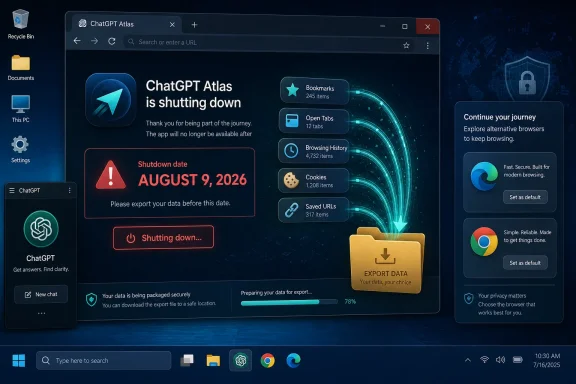 The deadline is a data-migration deadline, not merely an uninstall reminder
OpenAI’s instructions distinguish sharply between ChatGPT account content and local Atlas browser content. Chat history in Atlas’s sidebar is tied to the user’s ChatGPT account and remains available in ChatGPT, subject to the user’s plan, workspace settings, and account access. The ordinary browser material surrounding those conversations is a different matter.
Bookmarks, open tabs, and browsing history do not transfer automatically. The practical effect is larger than it sounds for anyone who used Atlas as a daily browser: saved research tabs, internal application pages, documentation trails, and web-workflow context can disappear from the working environment unless the user preserves them first.
OpenAI tells users to export bookmarks as an HTML file and import them into another browser such as Chrome. It also advises saving important open-tab pages or copying their URLs elsewhere before the cutoff. Browser history is not presented as a portable archive; users need to identify and save pages they may need later.
Cookies and logged-in sessions need more care than bookmarks. OpenAI says Atlas provides export options where available and that cookies and session files should be handled as sensitive data. Its transition material also warns that active sessions cannot simply be imported into another browser. In practice, an exported cookie file can be equivalent to handing over authenticated access to a service. IT administrators should not treat it as a normal profile-migration artifact or place it in a shared drive.
The company says passwords and cookies can be exported to the ChatGPT desktop app, but that is not the same as a general-purpose migration to Chrome, Edge, Firefox, or Safari. Users should expect to sign in again at sites after moving away from Atlas, especially where the replacement is a conventional browser rather than ChatGPT’s built-in browser tools.
Windows never got the standalone Atlas browser
Atlas launched globally for macOS in October 2025. OpenAI described it as a web browser “built with ChatGPT at its core,” with optional browser memories and an agent mode that could research, analyze pages, automate tasks, and act on a user’s behalf while browsing. The initial announcement specifically listed Windows as a future target.
That target never materialized. The official Atlas launch page still describes Windows, iOS, and Android experiences as forthcoming, while the shutdown notice arrives before a Windows release. OpenAI has not published a Windows Atlas download, an end-of-support build number for Windows, or a postmortem explaining why the platform was skipped.
For a Windows-focused audience, that narrows the immediate operational impact. There is no widely deployed Windows Atlas install base that must scramble to replace a browser tomorrow. But it also means OpenAI’s promised cross-platform browser challenge to Chrome and Microsoft Edge ended before it reached the desktop operating system used by most enterprise and consumer PC fleets.
That outcome changes how the product should be remembered. Atlas was not killed after establishing itself as a multiplatform browser competing for default-browser status. It remained a macOS experiment, albeit one with substantial AI integration, and OpenAI is now folding the work into an application it already distributes on Windows.
ChatGPT desktop is the replacement, but not a one-for-one browser replacement
OpenAI’s July 9 release introduced a redesigned ChatGPT desktop app for macOS and Windows. It combines regular ChatGPT conversations, ChatGPT Work for longer-running agent tasks, and Codex for software development. The app includes a built-in browser that can gather web information and work with supported web-based tools and files, subject to user permissions.
OpenAI says the inherited Atlas work will bring multiple tabs, downloads, improved navigation, and account-login support where available to ChatGPT. It also points users to its Chrome extension or sidebar for assistance while browsing in Chrome. The direction is clear: OpenAI wants its browser capabilities to be part of an AI task environment, rather than a standalone application that users launch for all normal web use.
There is a material difference between those two models. A dedicated browser has to handle the mundane but essential browser workload: persistent sessions, profile management, extensions, bookmarks, tab recovery, updates, device synchronization, policy administration, and compatibility with the increasingly complex web. A built-in agent browser can be more narrowly designed around a task: research a topic, inspect a set of pages, collect information from connected services, or complete a controlled workflow.
OpenAI’s new desktop app may be more useful for that second category. It does not automatically recreate the first category for someone whose digital life lived in Atlas tabs and profiles. The company itself acknowledges the gap by instructing users to export bookmarks to Chrome rather than offering a complete Atlas-to-ChatGPT browser-profile migration.
The release notes also contain an important availability qualification. Browser-related features can depend on a user’s plan, region, device, browser, and workspace settings. Enterprise and education customers in particular should not assume a new ChatGPT desktop install means every agent or browser feature is enabled. Administrators need to confirm availability, permissions, data-handling settings, and whether employees are using local or cloud-backed Work conversations.
The consolidation solves OpenAI’s product sprawl, not browser competition
Atlas was launched in a period when AI companies were trying to make the browser the front door to their assistants. Perplexity launched Comet, while Google and Microsoft pushed more AI capability into Chrome and Edge. Associated Press noted at Atlas’s launch that OpenAI was entering a difficult market dominated by Google, with the broader commercial hope of making ChatGPT a gateway to more web activity.
OpenAI’s retreat does not mean it has abandoned browser automation. Its own statement says the opposite: it is moving browser-based agent capabilities into ChatGPT and Codex. TechCrunch characterized the shift as a redistribution of Atlas’s features into the desktop app and Chrome extension rather than an abandonment of AI-assisted browsing.
But the product decision concedes something more practical. Building an AI agent into a browser is easier than operating a browser business that persuades users to leave Chrome, Edge, Safari, and Firefox. A browser must be maintained continuously against web-compatibility breakage and security threats. OpenAI’s support documentation explicitly cites that security-maintenance burden in warning users not to remain on a discontinued browser.
The company is betting that the valuable part of Atlas was the agent, its contextual access to web pages, and the task workflows around it—not the browser shell. For OpenAI, consolidation also reduces the overhead of separately maintaining Atlas, Codex, and the ChatGPT client while those products compete for overlapping users and engineering attention.
What administrators and Atlas users should do before August 9
The appropriate response is straightforward, especially because the cutoff is so close:
- Export Atlas bookmarks to an HTML file and import them into the chosen supported browser.
- Save open-tab URLs, documentation pages, research results, and browser-history items that are still needed.
- Do not share exported cookie or session files casually; treat them as credentials.
- Verify that ChatGPT desktop, ChatGPT Work, Codex, or the Chrome extension is available and permitted for the relevant account, region, and workspace.
- Update internal onboarding notes, support articles, and software inventories that still list Atlas as an approved or supported browser.
For Windows users, the end of Atlas is principally the end of a promise rather than the retirement of a local browser installation. OpenAI will still offer browser-assisted work through the Windows ChatGPT desktop app, but it has replaced a planned browser with an AI application that contains browser functions. Anyone who needs a full, supported everyday browser should complete the migration now and keep that role with Chrome, Edge, Firefox, or another maintained browser before Atlas reaches its August 9 cutoff.
