
The initiative is being launched by the Coca-Cola Youth Support Initiative in collaboration with Aleksandar Grašić—known online as Excel Grašić—with Montenegro’s implementation also supported by the Center for Youth Education (COE) through its European Youth Card program. According to the promotional announcement, the program is entirely online and free for eligible young people in Montenegro and Serbia.
That alone makes the course noteworthy. AI education is often discussed in broad, abstract terms: productivity, disruption, transformation, automation. A short regional course will not turn a beginner into an AI engineer, nor does it claim to. Its potential value lies elsewhere: helping young people develop the habits needed to use widely available AI tools with more purpose, better judgment, and a healthier level of skepticism.
For Windows users, students, early-career professionals, and job seekers, the inclusion of Microsoft Copilot alongside ChatGPT and Claude is particularly relevant. Copilot is increasingly visible across the Microsoft ecosystem, from Windows and the web to Microsoft 365 workflows. Learning where it fits—and, just as importantly, where it does not replace human judgment—is more useful than treating AI as a single all-knowing product.
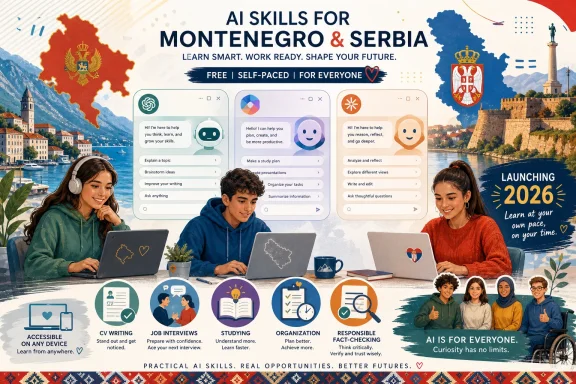 Overview: A Regional AI Course Focused on Practical Use
The course is built around a straightforward premise: artificial intelligence becomes more useful when people can turn it into a practical assistant for real tasks. The announcement describes content focused on asking better questions, researching and organizing information, preparing materials, improving written work, managing time, building a CV, and preparing for job interviews.
That is a sensible place to start. The defining skill in day-to-day generative AI use is not simply knowing which chatbot to open. It is being able to frame a task clearly, supply enough context, review the result critically, and improve the output through iteration.
A user who writes, “Make my CV better,” may receive a generic result. A user who explains the target role, provides their real experience, identifies the desired tone, asks for measurable achievements to be emphasized, and requests a concise format will typically obtain a more relevant draft. The difference is not mysterious technical expertise. It is structured communication.
This is why an introductory course that emphasizes practical application can be valuable. AI literacy should include more than recognizing brand names or trying a novelty prompt. It should teach people to convert vague intentions into manageable tasks.
The advertised four-hour format also reflects an important reality: the barrier to beginning is low. Participants do not need programming experience, advanced mathematics, or previous technical training to learn the basics of effective prompting, source checking, summarization, brainstorming, and document refinement. The course notice explicitly states that no prior technical knowledge is required.
How access is expected to work
The program announcement says the course will be available online beginning August 1, 2026. Participants are directed to the Excel Grašić learning platform and instructed to activate the course with the code CocaColaPodrska26. The published instructions indicate that the full content is intended to remain accessible through September 1, while learners have one month to work through the material at their own pace.
The article supplying the information uses a placeholder rather than a visible destination for the platform link. That means prospective participants should use the original announcement or the organizers’ official channels to locate the genuine registration page rather than relying on reposts, screenshots, or unsolicited messages.
That small precaution matters. Free education programs are attractive targets for misleading links, lookalike domains, and social posts that attempt to capture personal data. Users should confirm the platform address before entering an activation code, creating an account, or sharing personal information.
Why This Matters for Young People Entering an AI-Shaped Job Market
Generative AI is no longer confined to developers, researchers, or large enterprises. It is used for drafting, translation, note-taking, research assistance, visual ideation, coding help, planning, and summarization. The challenge for young people is not merely access. Most can access an AI chatbot in seconds. The challenge is understanding the difference between using AI quickly and using AI competently.
A competent user knows that a chatbot can generate a polished paragraph without necessarily generating a correct one. They know that a summary can omit decisive context. They know that a persuasive answer may contain fabricated citations, outdated information, or assumptions that nobody explicitly supplied.
That is not a reason to avoid the tools. It is the reason to learn how to use them properly.
OpenAI advises users to approach ChatGPT critically, noting that the model can provide incorrect or misleading output, including invented facts, dates, quotes, studies, citations, and references. OpenAI’s guidance recommends treating AI responses as a first draft rather than a final authority, particularly when important information must be accurate.
Microsoft offers substantially the same message for Copilot. Its support guidance says that AI-generated content can be helpful and fast, but users remain responsible for the outcome when the output influences a decision, recommendation, or communication. Microsoft’s Copilot validation guidance recommends checking the source material, independently verifying critical facts, identifying missing context, and testing whether a recommendation still holds across relevant scenarios.
This is precisely where a course such as AI MODE ON has a chance to make a meaningful contribution. The best introductory AI education does not simply tell learners to “use prompts.” It gives them a framework for thinking.
The practical difference between asking and directing
AI chat tools respond differently depending on the information users provide. A stronger prompt tends to include five components:
- The goal — What result is needed?
- The context — What background information changes the answer?
- The audience — Who will read or use the result?
- The constraints — What tone, length, format, language, or limits apply?
- The evidence — Which source material should the tool use, and what should it avoid assuming?
For example, a weak prompt might be:
Write an email about a missed deadline.
A more useful one would be:
Draft a professional but honest email to a project supervisor explaining that a research deadline will be missed by two days because two source interviews were rescheduled. Keep it under 150 words, propose a revised delivery date, and do not imply that the research is complete.
The second prompt makes the AI’s role clear. It is not asked to invent a situation. It is asked to help articulate one.
That pattern can apply to schoolwork, job applications, meeting preparation, travel plans, presentation outlines, study schedules, and document editing. It is a basic but durable AI skill.
ChatGPT, Microsoft Copilot, and Claude: Similar Category, Different Workflows
The program’s decision to cover ChatGPT, Microsoft Copilot, and Claude reflects the fact that users increasingly encounter multiple AI assistants rather than one universal tool. The course announcement says it will compare the possibilities and differences among the three services.
At a high level, each is a conversational AI system capable of helping with language-based tasks. Each can assist in brainstorming, drafting, revising, explaining, organizing ideas, and transforming text. But the practical experience can differ based on account type, enabled features, data sources, integrations, regional availability, and the particular task a user wants to complete.
ChatGPT: Broad drafting and iterative thinking
ChatGPT is commonly used as a flexible assistant for drafting and revising text, breaking down concepts, generating ideas, simulating interview questions, and helping users examine a problem from different angles. But its fluency should never be confused with guaranteed accuracy.
OpenAI explains that ChatGPT can sound confident even when it is wrong, and specifically advises users to check quotes, technical details, data, and references against reliable sources. That makes it useful as an ideation and first-draft tool, not as an unexamined substitute for research.
For students, one of the most productive uses can be turning dense material into study aids:
- Create a list of key terms from notes.
- Explain a concept at different levels of difficulty.
- Generate practice questions.
- Identify gaps in an outline.
- Suggest a revision plan for a draft.
The learner still needs to verify the content against class materials and original sources. AI can accelerate preparation, but it cannot carry academic responsibility.
Microsoft Copilot: Especially relevant to Windows and Microsoft 365 users
For readers in the Windows ecosystem, Microsoft Copilot deserves particular attention because it appears within Microsoft’s broader consumer and productivity landscape. Depending on the version and account context, Copilot can support information discovery, writing assistance, planning, and work involving Microsoft 365 content.
Microsoft says its AI systems can make mistakes or misrepresent web information, even when a response appears convincing. Its privacy FAQ tells users to apply their judgment, double-check facts before making decisions, and review citations as a starting point for accuracy checks.
That approach is useful for students and job seekers. If Copilot helps generate a company research brief before an interview, the output should be treated as a list of leads to investigate—not as the final dossier. If it drafts a cover letter, the applicant should revise it until it reflects real experience, specific achievements, and a genuine voice.
Microsoft’s own recommended validation model is particularly practical:
- Source: Does the output accurately reflect the original material?
- Verified: Have important names, dates, numbers, and recommendations been checked?
- Context: Is a key caveat, dependency, or exception missing?
- Resilient: Would the result still hold up in a different circumstance or for a different audience?
Microsoft describes these four checks in its Copilot validation guidance, and they are worth learning regardless of which AI assistant a person prefers.
Claude: Another model, not a replacement for judgment
Claude is included as a third major AI assistant in the training. The promotional material positions the course as an opportunity to understand differences among the available tools rather than relying on a single service.
That is an important lesson in itself. AI literacy should not mean loyalty to one brand. It should mean being able to define the task, select a sensible tool, provide appropriate instructions, protect sensitive information, and evaluate the result.
A different model may produce a clearer explanation, a more useful outline, or a more appropriate tone for a particular prompt. But no model should receive blind trust simply because its answer is well written. Comparing outputs can be helpful; using independent sources to verify consequential claims is essential.
CV Writing and Interview Preparation: Useful, but Easy to Misuse
The course places specific emphasis on CV preparation and job-interview readiness. According to the announcement, participants will be able to apply the material as they move toward the labor market.
This is one of the most immediately valuable use cases for young people. Many candidates struggle not because they lack potential, but because they find it difficult to present their experiences clearly. AI can help identify transferable skills, tighten wording, tailor a draft to a job description, prepare interview questions, and turn scattered notes into a structured application.
Yet this is also an area where authenticity matters.
An AI-generated CV should not inflate job titles, invent measurable outcomes, exaggerate proficiency, or insert qualifications the candidate does not have. A generic, overly polished application can also make a candidate less distinctive. Recruiters often recognize broad, empty language—phrases such as “results-driven innovator” or “dynamic team player” that are unsupported by specifics.
The strongest workflow is simple:
- Write down genuine education, experience, projects, volunteer work, and skills.
- Use AI to organize and clarify the information.
- Compare the result with the job description.
- Remove unsupported claims and generic filler.
- Add specific examples that only the applicant could truthfully provide.
- Read the final version aloud before submitting it.
For interview preparation, AI can play the role of a practice partner. It can ask likely questions, challenge vague answers, and suggest areas where an applicant needs a stronger example. The candidate should still avoid memorizing artificial scripts. Employers are evaluating communication, judgment, curiosity, and fit—not a chatbot’s ability to manufacture polished answers.
Responsible AI Use Must Include Privacy and Verification
The most encouraging element in the announced curriculum is its stated attention to responsible use, critical thinking, and knowing when information needs more verification. The course description says learners will address AI limitations and assess when additional checking is necessary.
This is not optional add-on material. It is central to digital literacy.
Do not paste sensitive information into public AI tools
Users should think carefully before sharing:
- Passwords, authentication codes, and recovery details.
- Government ID numbers or financial information.
- Medical, legal, or highly personal information.
- Confidential school, workplace, or client documents.
- Other people’s private messages, images, or contact details.
- Unreleased business plans, pricing, source code, or internal reports.
Microsoft notes that data handling varies by Copilot experience and account context, while its consumer-facing privacy documentation explains that usage may involve information such as conversation activity and uploaded files under the service’s applicable policies. Microsoft’s privacy FAQ also emphasizes that users should understand the product’s data settings and use judgment when interacting with AI.
The right practical habit is to reduce data exposure whenever possible. Replace real names with placeholders. Remove identifying information. Summarize confidential documents rather than uploading them in full. Use organization-approved tools when working with school or workplace materials.
AI can help verify, but cannot certify itself
One of the more subtle AI mistakes is asking the same system to prove that its own answer is accurate. An assistant can identify possible weaknesses in its answer, propose sources to check, or compare its draft against material supplied by the user. But it cannot independently certify its own correctness.
Microsoft states this directly in its guidance: Copilot can assist with reviewing and challenging output, but it cannot serve as the final authority on whether its response is correct. The company’s validation guidance urges users to verify against trusted sources when stakes are meaningful.
For ordinary tasks, a quick check may be enough. For anything involving health, law, money, safety, public claims, academic citations, or career decisions, verification should be more rigorous.
A useful rule is this: the greater the consequence of being wrong, the less acceptable it is to rely on AI alone.
The Strengths—and Limits—of a Four-Hour Course
A four-hour online course has clear advantages. It is accessible, low-pressure, and far easier to fit around school, work, caregiving, or job searching than a multi-week program. The organizers say the content is self-paced and can be completed within a month, which lowers the practical barrier to participation.
For beginners, brevity can be a strength. It encourages people to move from vague awareness to direct experimentation. It can establish useful habits early: giving context, refining prompts, checking claims, and protecting personal information.
The program’s regional focus is also meaningful. Skills development opportunities are not distributed evenly across countries, cities, schools, or income levels. A free course that includes popular tools and uses accessible language can help reduce the distance between people who have heard about AI and those who can apply it productively.
However, participants should approach the certificate with realistic expectations. A completion certificate can show engagement and initiative, but it is not equivalent to professional certification, formal technical training, or demonstrated workplace experience. The real value will come from what learners do after the course: using the skills responsibly, creating useful work, documenting projects, and continuing to improve.
The course also cannot resolve every complexity surrounding AI. Tool features, pricing tiers, privacy settings, and capabilities can change quickly. What remains durable is not memorizing a specific interface. It is learning a repeatable process for using any AI assistant:
- Define the task.
- Provide context.
- Request a useful format.
- Review the output.
- Verify important claims.
- Revise until it is genuinely fit for purpose.
A Constructive First Step, Not the Final Destination
Aleksandar Grašić is presented as the course instructor and as the founder of the Outliers platform, with experience in Excel, Microsoft 365 Copilot, and business-oriented AI application. The announcement also describes him as a multiple Microsoft MVP award recipient. Microsoft characterizes the MVP program as recognition for independent community leaders who demonstrate technical expertise, public contribution, and a sustained commitment to helping others use Microsoft technologies. Microsoft’s MVP program overview describes MVPs as community contributors rather than Microsoft employees.
That background aligns with the course’s apparent goal: translating complex technology into lessons that are approachable enough for newcomers to use immediately. Practical education works best when it gives learners both confidence and caution—confidence to begin, caution not to overestimate what the tool knows.
AI MODE ON: How to make AI work for you appears designed to offer precisely that entry point. It will not eliminate the need for deeper learning, independent thought, or source verification. It can, however, help young people in Montenegro and Serbia begin using ChatGPT, Microsoft Copilot, and Claude as tools for clearer thinking, stronger organization, and more effective career preparation rather than as black boxes that produce answers to be accepted without question.
The strongest outcome will not be a participant who simply knows how to generate text. It will be a participant who knows how to ask better questions, recognize weak answers, protect sensitive information, verify meaningful claims, and remain accountable for the work that carries their name.
