
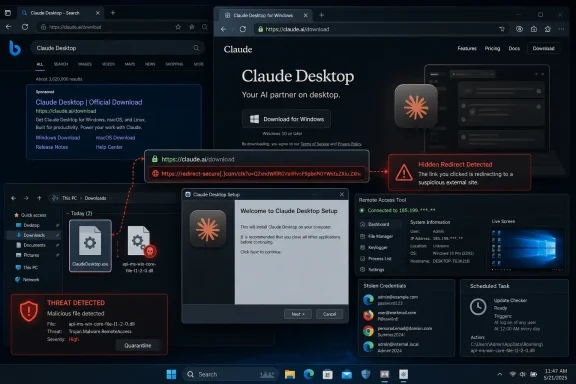
claude.ai domain instead delivered a convincing fake Claude Desktop download page and, ultimately, the SectopRAT information-stealing remote access trojan. The campaign, dubbed FakeAgent by Huntress, is a sharp reminder that the familiar advice to “check the URL” is no longer sufficient when attackers can publish malicious content under a legitimate vendor’s own domain. Huntress’ investigation found that at least 29 organizations were affected during activity observed on July 21 and July 22.The danger was not a misspelled lookalike domain, an obviously suspicious attachment, or a glaring browser warning. The initial sponsored result displayed a trusted address. Users searching Bing for the Claude desktop application could see claude.ai in the destination, click a paid listing at the top of the page, and land on what looked like a vendor-hosted Claude download portal.
That is precisely what made this Windows malware campaign effective.
The malicious page was not hosted on a typosquatted clone of Anthropic’s site. It was a public Claude Artifact hosted beneath the genuine Claude domain, using a platform capability intended to let people build and publish interactive content. Huntress reported that the artifact was removed after notification, but it had accumulated 7,100 page views before takedown. Independent reporting from BleepingComputer corroborates the central chain: Bing malvertising, a public Claude-hosted artifact, a fake ClaudeDesktop.exe, DLL sideloading, and SectopRAT.
For Windows users, IT administrators, and organizations rapidly adopting desktop AI tools, FakeAgent is more than another phishing story. It exposes a structural trust problem: a legitimate domain can contain both official product pages and public, attacker-authored content. The domain may be authentic while the page, download button, and installer are not.
 The Attack That Turned a Real Domain Into a Malware Delivery Channel
At its core, FakeAgent was a malvertising campaign: attackers paid for sponsored search placement to place their lure in front of people actively looking for Claude Desktop. Search advertising is particularly valuable to threat actors because intent is already established. The victim is not being persuaded to want an application; they have already decided to install it.
Huntress found that the victims’ search journey began with a normal query for “Claude Desktop app.” The paid Bing result led to a public artifact on claude.ai, not to a conventional Anthropic product page. The artifact impersonated an official Claude Desktop or Claude Cowork download page closely enough that users could reasonably assume the application was legitimate. Huntress documented that the artifact included Claude’s own platform-level warning that the content was user-generated and unverified, but that notice was far less visually persuasive than the trusted domain in the browser address bar.
That imbalance matters. Security training has long taught people to identify phishing sites through malformed domains such as claude-download.example or clauude.example. In this campaign, a cautious user who checked only the site identity would see claude.ai, a real Anthropic property. The weakness was not simply user behavior. It was the assumption that the main domain necessarily vouches for every page published beneath it.
Public artifacts are legitimate features, not a breach of Anthropic’s domain
Claude Artifacts are designed to let users create and publish content such as interactive tools, documents, web pages, charts, and code-based experiences. Anthropic’s documentation states that published artifacts can be made publicly available and that anyone with the public link can view and interact with them without signing in. Claude’s Artifact publishing documentation also makes clear that public publishing is distinct from internal Team and Enterprise sharing.
That functionality is useful. It supports prototyping, demos, lightweight applications, and collaborative work without requiring users to operate their own hosting environment. However, it also creates a high-trust publishing surface. An attacker who can build a convincing page gains the visual credibility of the host platform’s domain, certificate, design language, and browser reputation.
This is the important distinction: FakeAgent does not mean Anthropic’s core infrastructure was necessarily compromised. Rather, attackers abused a legitimate user-content capability in the same way criminals have historically abused cloud storage, code repositories, document-sharing services, and website builders. The difference is that an AI platform’s artifact feature can rapidly generate a polished imitation of a modern software download page.
The warning was present, but the trust signal was stronger
The malicious artifact reportedly carried the platform disclosure, “Content is user-generated and unverified.” Yet the campaign demonstrates why disclosures must be evaluated in context. People searching for a Windows app are primed to find a download button, not to audit hosting architecture.
A short warning at the edge of a polished page may be technically accurate but operationally weak when:
- A paid search result appears at the top of Bing.
- The link visibly uses the vendor’s real domain.
- The page resembles the expected product download workflow.
- The visitor is trying to complete a routine installation task quickly.
- The malware download happens only after a button click, making the initial landing page appear harmless.
The page itself was not the final payload host. That separation is another reason the campaign could evade casual inspection.
The Redirect Chain: Where the Real Deception Began
Clicking the fake download control sent victims away from the legitimate Claude domain. Huntress traced the path through claude.ai.download-app[.]us, followed by downloading-api.it[.]com/html/claude/win. The first address is intentionally deceptive: claude.ai appears at the beginning, but it is merely a subdomain. The registrable domain is download-app.us. Huntress reported that download-app[.]us was registered on May 9, 2026.
This is a classic parsing trap. Browsers read domain names from right to left in terms of ownership:
- In
claude.ai.download-app.us, the actual site owner controlsdownload-app.us. claude.aiis not the destination’s registrable domain.- The presence of a recognizable company name on the left does not grant any legitimacy.
- A padlock or HTTPS connection only indicates encrypted transport to the destination; it does not verify the safety or official status of the content.
For ordinary users, this is a difficult visual distinction to make under time pressure. For enterprise security teams, it is a reason to treat newly registered domains, ad-driven software downloads, and multi-stage redirect chains as high-risk signals even if the first click began on a reputable site.
The correct Claude Desktop download location
Anthropic provides its official desktop download flow through its dedicated Claude download page. The company’s installation guidance directs Windows users to visit the Claude downloads page, choose the Windows version, install the downloaded application, and then launch it from the Start menu. Anthropic’s current installation documentation lists Windows 10 or later as the baseline Windows requirement.
For managed environments, Anthropic says the Claude desktop app supports Windows deployment using MSIX installers, with enterprise controls for update approval, SSO, and approved desktop extensions. Anthropic’s download information makes this enterprise deployment path explicit.
The practical takeaway is simple: organizations should distribute the approved installer through their software-management tooling, portal, or managed application catalog. Employees should not be expected to locate business software through search advertising.
From Fake Installer to SectopRAT
The downloaded ClaudeDesktop.exe was not a Claude installer. Huntress identified it as a legitimate component associated with JetBrains’ Chromium Embedded Framework tooling, specifically jcef_helper.exe, repurposed in a way that allowed malicious code to run under the appearance of a signed executable. The Huntress technical analysis describes how the campaign used DLL sideloading to load a tampered libcef.dll alongside the otherwise legitimate executable.
Why DLL sideloading remains dangerous
A Dynamic Link Library, or DLL, is a code module that Windows programs load when they start or when a feature is needed. DLLs are normal components of Windows software. The attack happens when an application loads a DLL from an attacker-controlled location instead of the legitimate library expected by the developer.
In FakeAgent, the signed-looking executable was the decoy. The malicious functionality lived in libcef.dll, placed where the vulnerable application would load it. That means a simplistic policy of trusting a file because it bears a legitimate signature can fail. The signature may belong to the loader, while the malicious library is the component doing the damage.
This is why executable reputation, signing status, origin, behavior, and parent-child process relationships all matter. A validly signed binary is useful evidence, but it is not a blanket safety guarantee.
The campaign’s next payload was SectopRAT, a remote access trojan and information stealer also known as ArechClient2. Reporting on the campaign indicates that it targets a broad collection of valuable data, including browser credentials, cookies, autofill information, payment-card data, files, FTP credentials, Discord and Telegram data, Steam information, and VPN-related credentials. BleepingComputer’s coverage notes that the malware also has Hidden Virtual Network Computing capabilities, potentially enabling hands-on activity through a hidden remote desktop environment.
That blend of credential theft and remote access makes a fake desktop app installation particularly damaging. A user may believe they have merely installed a productivity tool, while attackers gain access to saved passwords, web sessions, business files, and potentially services that rely on browser cookies rather than a fresh password prompt.
Persistence, Anti-Analysis, and a More Sophisticated Loader Chain
FakeAgent was not a basic one-file infostealer. Huntress found that the campaign deployed DockerDesktop.exe as a persistence mechanism through a scheduled task. The file was reportedly identical to the initial ClaudeDesktop.exe loader, but used to repeatedly reinfect the system. Huntress’ report also identified another persistent component, sslconf.exe, located in a path resembling Microsoft Edge update infrastructure.
The use of a filename like DockerDesktop.exe is notable because it suggests threat actors were reusing components and naming conventions from an earlier lure. Huntress linked the operator’s activity to an April 2026 campaign involving a fake Docker Desktop installation delivered via Docker Hub and using similar libcef.dll sideloading tactics. The researchers describe this as a linkage based on shared methods and infrastructure clues rather than a definitive attribution to a named threat cluster.
GPU checks complicate automated malware analysis
The malware also attempted to avoid execution in virtualized or sandboxed environments. Huntress observed checks against graphics hardware identifiers associated with QEMU and VMware, scrutiny of available video memory, and timing behavior intended to distinguish a normal physical machine from an emulated analysis environment. The Huntress investigation says that systems with low VRAM allocations, including those below 1 GB, could be treated as suspicious by the malware.
This matters because many automated security products execute unknown files in virtual machines to observe their behavior. If the loader detects that it is being analyzed, it can withhold the payload, appear benign, or delay execution. That does not make detection impossible, but it raises the cost of analysis and can reduce the effectiveness of security controls that rely on uncomplicated sandbox behavior.
Huntress also found that payload decryption relied on a DirectX shader rather than a conventional CPU-based decryption routine. The researchers used Claude Opus 4.8 as part of the analysis process, including support for AES and Shader Model 5 emulation work. This is an unusual but telling detail: AI tooling can be abused as a lure, while the same class of technology can help defenders unravel complex malware.
EtherHiding increases resilience
The campaign used Ethereum BNB Smart Chain transactions to store or retrieve command-and-control information, a technique commonly called EtherHiding. Rather than hard-coding a single command server into the malware, threat actors can use blockchain-hosted data as a more durable and distributed way to update infrastructure. Huntress’ analysis traced related command-and-control activity back to May 30, 2025.
For defenders, the operational implication is that blocking one malicious domain may not end the problem. Endpoint telemetry, process behavior, scheduled tasks, suspicious DLL loading, credential-access indicators, and outbound traffic patterns all need to be examined together.
What FakeAgent Changes About “Trusted” Web Addresses
The major lesson from this Bing ad malware campaign is not that domains are irrelevant. Domains remain important. Instead, the lesson is that domain reputation alone is an incomplete trust model.
A trusted top-level site can host:
- Official vendor product pages.
- Customer files and public documents.
- User-generated web applications.
- Public code samples.
- Shared conversations or artifacts.
- Embedded third-party content.
- Links that redirect visitors to unrelated infrastructure.
The security question is no longer only, “Is this claude.ai?” It is also:
- What kind of page is this?
- Who authored it?
- Is it an official vendor download route or public user content?
- What domain serves the actual installer?
- Does the installer’s provenance match the vendor’s documented deployment method?
- Does the file’s behavior align with a normal installer?
This model applies beyond Claude. Public-content platforms are deliberately designed to make sharing frictionless. The same convenience that enables an employee to share a prototype also gives attackers a way to borrow the platform’s credibility.
Search advertisements are placement, not validation
Sponsored results deserve special attention. An advertisement at the top of Bing, Google, or another search engine is not an endorsement that the advertiser’s destination is the vendor’s canonical software distribution channel. It is paid placement.
This distinction has become especially important for AI tools. Interest in desktop assistants, coding agents, model clients, browser extensions, and productivity applications creates a steady flow of users searching for downloads. Attackers can target that demand with ads, clone familiar pages, and capitalize on the fact that users often expect software installation to start with a search.
The safer routine is to use a bookmarked vendor download page, a company software portal, or a URL supplied through official product documentation. In an enterprise environment, IT should remove the decision from the employee altogether by deploying software through trusted management channels.
Practical Windows Defenses for Individuals and Organizations
No single defense would make FakeAgent impossible. The campaign’s strength is that it combines trusted hosting, paid discovery, redirect obfuscation, signed binary abuse, DLL sideloading, persistence, anti-analysis checks, and credential theft. The appropriate response is therefore layered defense.
For individual Windows users
The most effective habits are straightforward:
- Do not install software from sponsored search results. Search may help locate documentation, but it should not be the final software delivery mechanism.
- Use official download URLs saved as bookmarks. For Claude Desktop, use Anthropic’s official Claude download page, not an ad result or a page discovered through an unfamiliar redirect.
- Inspect the final download location. A page beginning with a trusted brand name can still redirect to an unrelated domain.
- Treat browser-saved passwords as high-value data. An infostealer’s first objective is often to extract credentials and active web sessions.
- Use multifactor authentication wherever possible. Stolen passwords should not be enough to access email, cloud storage, financial services, or work systems.
- Keep Windows and Microsoft Defender protections enabled. Do not add antivirus exclusions to “make an installer work,” especially after downloading a program from an ad or unfamiliar site.
- Avoid running unknown installers with administrator rights. Elevation should be a deliberate exception, not a routine click-through.
For IT administrators
The campaign makes a strong case for controlling software distribution rather than depending exclusively on training. If a desktop AI application is approved, distribute it through Microsoft Intune, Configuration Manager, a managed installer workflow, or another authenticated internal catalog.
Microsoft’s App Control for Business and Smart App Control technologies are relevant here because they can restrict which code executes. Microsoft explains that Smart App Control allows signed code or code predicted safe by Microsoft’s cloud-based security service, while App Control for Business can enforce organization-specific trust rules. Microsoft’s App Control overview emphasizes that application control extends beyond ordinary executable files to scripts, MSI installers, batch files, and PowerShell sessions.
However, FakeAgent also illustrates an important limitation: attackers can abuse signed loaders. An allowlisting policy should not blindly trust every binary from a broad publisher category if the surrounding execution context is suspicious. Organizations should test policies in audit mode, identify required applications, and then deploy carefully scoped enforcement rules. Microsoft’s guidance notes that App Control can operate in audit or enforcement modes and is intended to permit only approved code. Microsoft’s Configuration Manager documentation provides practical deployment details and cautions about local administrators and policy protection.
Additional controls worth prioritizing include:
- Blocking or warning on newly registered domains and suspicious redirect behavior.
- Applying web filtering to software-download categories and known malicious infrastructure.
- Monitoring for Defender exclusions created by unusual processes.
- Alerting on scheduled tasks created from user-writable paths.
- Investigating unexpected DLL loads by trusted applications, particularly where the DLL sits beside a downloaded executable.
- Using endpoint detection and response telemetry to correlate browser downloads, executable launches, child processes, persistence, and outbound network activity.
- Restricting browser credential storage on privileged workstations.
- Requiring phishing-resistant MFA for administrator, financial, and identity-provider accounts.
- Maintaining an inventory of approved AI applications, extensions, and local connectors.
Incident Response: What to Do If the Fake Installer Ran
Any machine that executed the fake ClaudeDesktop.exe should be treated as potentially compromised, not merely as a failed installation. Because SectopRAT targets credentials, cookies, files, and remote-access capability, deleting the visible executable is not an adequate response.
A practical response sequence is:
- Isolate the Windows device from the network to reduce the chance of continued command-and-control activity, data theft, or lateral movement.
- Preserve evidence before broad cleanup if the system belongs to an organization: collect endpoint telemetry, process trees, scheduled-task data, downloaded-file metadata, and relevant event logs.
- Hunt for persistence, including suspicious scheduled tasks and unexpected executables in user profile or application-data paths.
- Reset credentials from a known-clean device, beginning with email, identity-provider, password-manager, privileged, finance, VPN, and cloud-administration accounts.
- Invalidate active web sessions and rotate tokens where services allow it, since stolen browser cookies can bypass the need to enter a password again.
- Review browser extensions, saved passwords, autofill data, and synchronized profiles for signs of exposure.
- Reimage where confidence in cleanup is low, especially for devices used to access privileged business resources.
Microsoft Defender for Endpoint provides response actions such as device isolation, antivirus scans, file blocking, investigation-package collection, and restricted app execution. Microsoft’s device response guidance explains that isolation can disconnect a compromised device from most network communication while preserving its link to Defender services for monitoring and remediation. Microsoft’s device investigation documentation also outlines the use of device timelines, process evidence, incident views, and response actions to determine scope.
For organizations using Defender for Endpoint, indicators can also be used to block known malicious file hashes once they are identified in the environment. Microsoft’s file-response guidance describes how file indicators can trigger alerts and prevent a file from executing on enrolled Windows devices.
The Bigger Security Lesson for AI Desktop Apps
FakeAgent arrived at a moment when AI software is becoming part of ordinary Windows workflows. Desktop applications can access local files, connect to browsers, integrate with developer tools, and support enterprise authentication. Those features are valuable, but they also make fake installers unusually attractive to attackers.
A fake game installer may target personal payment information. A fake AI desktop application can target that and the user’s work context: browser sessions, company documents, cloud credentials, messaging data, developer tokens, VPN access, and saved authentication artifacts.
The campaign therefore deserves attention not because it used a novel spelling trick, but because it defeated a common security heuristic. The initial link really did belong to the company users expected. The malicious content was still real malware delivery infrastructure.
For Windows users, the conclusion is not to abandon trusted domains. It is to assign trust more precisely. Trust the vendor’s documented download page, the organization’s managed software catalog, the verified installer provenance, and the endpoint protections that can stop malicious behavior. Do not place the entire burden of trust on what happens to appear before the first slash in a browser address bar.
