
Gadget Pilipinas reported the August 2 launch with a 16GB LPDDR5-6400 and 512GB PCIe 4.0 configuration, a 65Wh battery, 65W USB-C Power Delivery, Radeon 680M integrated graphics, and a claimed 1.4kg chassis measuring 16.65mm thick. COLORFUL has a product page for the Rimbook L1 Plus, while independent coverage from COMPUTEX 2026 confirms the laptop was shown publicly months earlier as a 16-inch 2.5K Ryzen model. The important development is not that COLORFUL has entered a new processor generation; it has packaged a mature AMD platform around a display specification normally reserved for more expensive productivity machines.
That pairing can still make sense for students and office users who value screen space, battery capacity, and a portable chassis over dedicated graphics or on-device AI. It also creates a specific buying decision: the Rimbook’s panel and storage proposition look stronger than its 2026 silicon position, while several details that should be basic purchasing facts remain inconsistent across the available record.
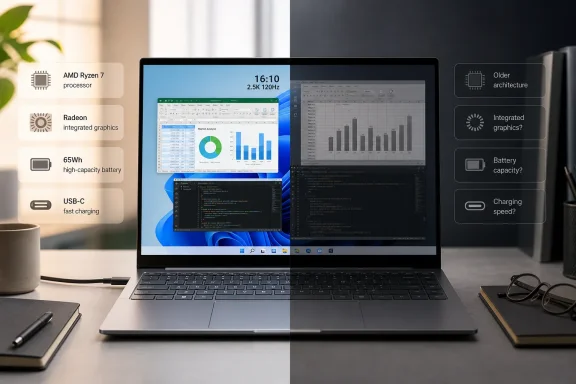 The 120Hz 16:10 panel is the headline feature
The Rimbook L1 Plus uses a 16-inch IPS screen at 2,560 × 1,600, with a 16:10 aspect ratio, 120Hz refresh rate, 100% sRGB coverage, and a quoted 300 nits of brightness. COLORFUL’s earlier COMPUTEX materials described the same combination of a slim metal chassis, a 16-inch 2.5K display, and AMD Ryzen power, and Danawa’s hands-on reporting from the show independently identified the panel as a 2,560 × 1,600, 120Hz unit.
For Windows work, 16:10 is more consequential than the refresh-rate number. The extra vertical pixels make document work, browser-based administration consoles, spreadsheets, PowerShell sessions, and split-window multitasking less cramped than on a 16:9 1080p notebook. At 16 inches, 2,560 × 1,600 also provides enough pixel density for comfortable text rendering without pushing typical desktop applications into the scaling problems associated with smaller high-DPI panels.
The 120Hz panel is a quality-of-use feature rather than proof that this is a gaming laptop. Windows animations, pointer movement, scrolling through long documents, and high-frame-rate video playback can look smoother, but Radeon 680M integrated graphics should not be mistaken for a current discrete-GPU gaming solution at the panel’s native resolution. Modern games will generally demand reduced settings, lower rendering resolution, or both. COLORFUL’s decision here is clearly aimed at everyday visual quality and responsiveness, not at claiming workstation or enthusiast-gaming performance.
The 300-nit brightness figure is the limiting display specification. It should be adequate indoors, including bright offices, but it is modest for frequent outdoor use or rooms with direct sunlight. The 100% sRGB claim is more useful for basic photo, web, and presentation work than for professional color-managed video or print production, where buyers would need calibration information, panel uniformity data, and broader color-gamut coverage that COLORFUL has not published.
Ryzen 7 7735HS is capable, but it is not current AMD mobile silicon
The Ryzen 7 7735HS has eight cores, 16 threads, a 3.2GHz base clock, and boost speeds up to 4.75GHz, paired with Radeon 680M graphics. AMD’s own specifications identify it as a 6nm Zen 3+ processor with a 35W-to-54W power range. In other words, it remains a competent CPU for conventional Windows workloads, but it is a prior-generation design rather than a contemporary Zen 4 or Zen 5 mobile part.
That context changes how the Rimbook should be evaluated. Eight Zen 3+ cores are still more than enough for Office, browser-heavy workloads, code editing, remote desktop sessions, local virtual machines within reasonable memory limits, and light content creation. Radeon 680M was also one of the better integrated GPUs of its generation, and the laptop’s LPDDR5-6400 memory is important because integrated graphics depend heavily on system-memory bandwidth.
However, the Ryzen 7 7735HS does not include AMD’s Ryzen AI NPU. The Rimbook L1 Plus therefore will not qualify as a Copilot+ PC on the strength of this processor, and it does not have the dedicated local AI hardware found in newer Ryzen AI chips. Windows 11’s cloud-backed AI features can still run where Microsoft makes them available, but buyers seeking local AI acceleration, longer-term AI feature support, or the latest integrated graphics architecture should not treat the “Ryzen 7” label as sufficient shorthand.
This is the central tradeoff: COLORFUL is selling a modern notebook configuration around a mature chip. That can be a sensible value proposition at the right price, especially when the display is a priority. It is less persuasive if pricing drifts into territory occupied by laptops with newer AMD Ryzen AI or Intel Core Ultra processors, stronger iGPUs, faster connectivity, and clearly documented support arrangements.
USB-C charging helps, but the port story is less modern than the exterior
COLORFUL says the Rimbook L1 Plus has a 65Wh battery and supports 65W USB-C Power Delivery. For an IT professional or student already carrying a compatible USB-C charger for a phone, tablet, or dock, that is practical: one compact power supply can cover routine charging instead of requiring a proprietary brick.
A Malaysian retailer, Gadget Zone, lists a potentially more complete I/O layout for its Rimbook L1 Plus configuration: one full-function USB-C port with video output and 65W PD, one USB-C port limited to USB 2.0 data, two USB-A ports split between USB 3.2 Gen 1 and USB 2.0, HDMI 1.4, a DC-in jack, and a combined audio jack. The listing is useful, but it also highlights why purchasers should obtain the exact regional specification before ordering. COLORFUL’s public product page presently exposes the model name but not a readable, full specification sheet in its web version.
If Gadget Zone’s port list applies broadly, the Rimbook is functional but not especially forward-looking. A full-function USB-C display-and-charging port is valuable, while a second Type-C connector that is data-only at USB 2.0 speed adds physical convenience without much bandwidth. HDMI 1.4 is also a dated choice for a notebook marketed around a high-resolution display: it is serviceable for common office monitors, but it is not the connector specification buyers expect when planning high-refresh, high-resolution external-monitor deployments.
The supplied launch report says there are two PCIe Gen4 x4 M.2 SSD slots, which would be a major advantage over many thin laptops with a single storage bay. But neither COLORFUL’s accessible product page nor Gadget Zone’s regional listing confirms the slot count, and the retailer does not describe the service procedure or whether the installed drive occupies the only user-accessible bay. Until COLORFUL publishes a service manual or detailed regional datasheet, administrators should not assume two usable M.2 slots when planning capacity upgrades.
Published weight figures conflict by 380 grams
The most conspicuous discrepancy concerns portability. Gadget Pilipinas reports a weight of 1.4kg, and Danawa’s COMPUTEX report likewise said the 16-inch model retained a 1.4kg weight and 16.65mm thickness. Yet Gadget Zone’s retail listing for a Ryzen 7 7735HS, 16GB, 512GB Rimbook L1 Plus gives the weight as 1.78kg.
That is a 380-gram difference—roughly 27% more than the lighter claim—and it is too large to dismiss as rounding. It could reflect a different regional chassis, an error in one listing, or a distinction between a device-only measurement and another shipping or configuration convention. No available documentation explains it.
Prospective buyers should therefore treat 1.4kg as an unverified best-case claim until a retailer confirms the precise SKU and measured system weight. At 1.4kg, this would be unusually light for a 16-inch laptop with a 65Wh battery; at 1.78kg, it remains portable but belongs in a very different class for users carrying it every day.
Pricing and U.S. availability remain unresolved
Gadget Pilipinas says the 16GB/512GB configuration starts at 5,999 RMB and notes that Philippine availability has not been announced. The only readily identifiable retail listing found outside China is Gadget Zone’s Malaysian listing, which showed the system at RM2,399 with a two-year warranty. Those figures cannot be compared directly without knowing taxes, import channels, promotions, regional warranty terms, and whether the machines share an identical hardware bill of materials.
COLORFUL has not announced U.S. pricing, U.S. retailers, a U.S. warranty program, or a launch timetable for North America. There is also no published battery-life testing, webcam specification, keyboard layout information, biometric-login detail, memory-upgrade guidance, or formal Windows driver-support policy for the model.
The Rimbook L1 Plus is therefore best read as a promising regional thin-and-light rather than a finished global product announcement. Its 16-inch 2.5K 120Hz panel, 65Wh battery, USB-C charging, and potentially expandable storage make a stronger case than the older Ryzen 7 7735HS alone. But until COLORFUL resolves the 1.4kg-versus-1.78kg discrepancy and publishes regional configuration and service details, buyers should verify the exact SKU rather than purchasing on the launch specification table alone.
