

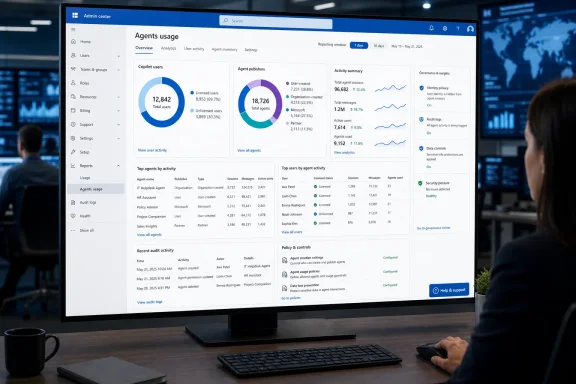
The roadmap entry, updated August 11, says the report is generally available for Worldwide standard multi-tenant customers and covers agents in Microsoft 365 Copilot and Copilot Chat. Microsoft’s accompanying Message Center notice says it appears at Reports > Usage > Microsoft 365 Copilot > Agents, with no preparatory admin action required. But the documentation leaves an important qualification: Microsoft Learn still labels the new report as preview, even while the roadmap status says “Launched” and the Message Center said worldwide general availability would complete by the end of July.
That mismatch does not mean the report is unavailable. It does mean admins should treat its metrics, retention window, and supported workloads as subject to change rather than assuming the July roadmap designation guarantees a settled, feature-complete reporting surface.
The replacement report reaches beyond licensed Copilot users
Microsoft’s older Microsoft 365 Copilot agent report was narrower. Its documentation says it focused on agents created internally through Copilot Studio, Teams Toolkit, or the Agent Builder, and it did not include Microsoft-built or partner-built agents. It also did not provide a way to identify which named users had used which specific agents.
The new report expands each of those boundaries. Microsoft Learn says it covers agents used by both Microsoft 365 Copilot-licensed and unlicensed people, and it classifies activity across four creator types:
- User-created agents built by individuals through Agent Builder and shared within the organization.
- Organization-created agents built through Microsoft Copilot Studio or Microsoft 365 Agents Toolkit and approved for broader deployment.
- Microsoft-built agents.
- Microsoft partner agents that have been approved for use in the tenant.
The shift to include unlicensed usage is the part most likely to alter deployment decisions. An organization that relies only on Microsoft 365 Copilot license-assignment data can see paid-seat adoption, but it can miss grassroots use of agents through Copilot Chat. The report now separates the two populations, allowing an admin to see whether usage is concentrated among paid users or whether employee demand is forming outside the licensed Copilot cohort.
This is also a more useful measure of agent reach than raw deployment counts. An agent can be approved, published, and technically available without anyone using it. Microsoft defines an active agent as an app containing an agent element that has at least one active user during the selected period. An active user, meanwhile, is someone who asks an agent a question and receives a response. The report measures interactions that got to a response; it is not simply a catalog or installation report.
There is one counting wrinkle that will catch analysts comparing totals. Microsoft says the combined licensed and unlicensed active-user counts can exceed the total active-user figure when a person’s Copilot license changes during the selected reporting period. A user assigned or stripped of a license mid-period can appear in both license segments but only once in the all-up active-user count. That is expected behavior, not necessarily duplicate telemetry.
Per-user and per-agent details make this a governance tool
The headline cards—total active users and total active agents—are useful for adoption reporting, but the deeper tables are what make the new report consequential for IT operations.
The user table includes the number of distinct agents each person used, total agent responses received, and their last activity date in UTC. The agent table shows the agent name and ID, creator type, active users split by license state, response volume, and last activity date. The third table joins the two: a user, an agent, response count, and last activity date.
That user–agent pairing gives an administrator evidence to act on. If a partner-built agent has a handful of active users but a disproportionate response volume, its owner can investigate whether it is serving a high-value workflow or simply becoming a de facto answer engine for work it was never approved to handle. Conversely, an internally built agent with broad assignment but no active users can be retired, reworked, or removed from employee-facing catalogs instead of lingering as unsupported AI shelfware.
The data also gives Copilot administrators a way to distinguish demand for an agent from demand for Copilot itself. Microsoft’s all-up Copilot usage reporting already rolls agent usage into its general Copilot totals. That can make broad adoption numbers look healthy while masking whether people are using the core chat experience, a specific internal agent, a Microsoft agent, or a third-party agent. The separate Agents report supplies the missing attribution.
Microsoft has increasingly positioned these controls under its Copilot Control System. Its newer Agent Map feature provides a tenant-wide inventory and filters by publisher, platform, channel, usage, and security state. The usage report is more focused: it is a reporting view, rather than a visual inventory or reliability console. Admins should use the two together, but they should not mistake activity counts for a security assessment. A frequently used agent can still have excessive permissions, weak grounding, poor response quality, or problematic external connectors.
The same distinction applies to cost. Microsoft’s separate Copilot credits report tracks metered consumption and can show credits by user, agent, billing policy, and user–agent combination. The Agents usage report counts users, agents, and responses; it does not replace consumption reporting. An agent with high response activity may have low cost, while an agent that invokes premium capabilities, tools, or metered services can create material spend with comparatively few interactions.
“Active” does not mean effective, reliable, or compliant
The report’s most immediate limitation is definitional. A user counts as active after asking a question and receiving a response. The reporting model does not establish that the response was correct, that the agent completed a business task, or that an employee saved time. A pilot team can produce an impressive active-user chart even if its users are retrying failed prompts, working around weak outputs, or using an agent only once.
Response counts need the same restraint. The report records responses sent to users, not verified successful transactions. For a procurement, HR, support, or knowledge agent, a large response total might represent value—but it can also signal confusion, repeated follow-up prompts, or an agent that cannot complete work on the first pass.
Microsoft has separate tooling for the next layer of analysis. The Agent Map and its single-agent view can expose sessions, tool calls, runtime, and exceptions for agents supplying Agent 365 observability data. Copilot Studio has its own usage and run analytics. Viva Insights provides an Agent Dashboard and broader Copilot analytics intended for adoption and business-impact analysis. Those systems are not interchangeable because they measure different things, and some require additional licensing or depend on the agent type and telemetry being available.
For many Microsoft 365 administrators, the new usage report will therefore be the first triage screen: identify the agents and user populations that warrant attention, then use the specific platform’s analytics, audit records, security controls, and business-owner review to decide whether the activity is healthy.
The current data window is short and some agent scenarios remain missing
The new report is broader than the original version, but it is not complete. Microsoft Learn says the preview provides only 7-day and 30-day views. The standard Microsoft 365 reporting framework often supports 90-day and 180-day periods, and Microsoft says those longer ranges are planned for the agent report in a future update. That means organizations cannot yet use this surface alone for a half-year adoption trend, pre-rollout baseline, or annual license-renewal case.
Historical coverage also differs by agent type. Microsoft says declarative-agent data is available from August 19, 2025, while SharePoint and custom-engine agent data starts November 11, 2025. Those dates matter when exporting records or comparing figures over time: a rising count can reflect a newly included workload rather than a real surge in employee adoption.
There is another specific gap. SharePoint agents used in Teams are not included in the report’s usage metrics. Microsoft states that limitation directly. For organizations pushing SharePoint agents into Teams as a main access route, the new dashboard is therefore incomplete by design; a low SharePoint-agent count cannot be read as proof that those agents are unused.
Microsoft’s July Message Center update had described the initial rollout as covering declarative agents, with SharePoint and custom-engine support due later. The newer Learn documentation now lists SharePoint and custom-engine agents within the report’s scope, showing that the service has moved beyond the initial announcement. But the lingering preview label, 30-day maximum window, and Teams exclusion show why administrators should validate what their own tenant is actually reporting before putting its numbers in executive scorecards.
Identity visibility is controlled centrally, and the access model is broad
The report’s user-level detail will create a privacy and permissions conversation in many organizations. By default, Microsoft 365 usage reports conceal usernames, display names, groups, and site names. The new Agents report follows that setting, so its user and user–agent tables can initially appear anonymized.
A Global Administrator can change the organization-wide Reports setting to reveal identities. Microsoft says that change is logged in the Microsoft Purview audit log, and it applies more broadly than this one dashboard: it affects Microsoft 365 usage reports, relevant Microsoft Graph reporting, Power BI reporting, and Teams admin-center reports that honor the same setting.
That central switch deserves more care than its placement suggests. Enabling names can be necessary for troubleshooting a risky agent, determining who needs training, or investigating an unexpected third-party tool. It also changes the sensitivity of routine operational reporting across the tenant. Organizations with works councils, employee-monitoring restrictions, or strict internal privacy policies should set a documented purpose and limit who can access exports before exposing identities.
The permissions list is also wider than Global Administrators alone. Microsoft says the report can be viewed by roles including Reports Reader, Usage Summary Reports Reader, AI Administrator, Teams Administrator, Exchange Administrator, and SharePoint Administrator, among others. The Report Reader role is useful for separating day-to-day reporting from tenant-wide administration; the least-privilege approach is especially relevant once per-user agent relationships become visible.
The new report is available only in the worldwide standard multi-tenant environment at launch. Microsoft’s admin-center availability table lists Microsoft 365 Copilot Agent usage as unavailable in GCC, GCC High, DoD, and Microsoft 365 operated by 21Vianet environments. Government and sovereign-cloud tenants should not infer a release date from the worldwide roadmap entry; Microsoft marks those environments as future release or unavailable, depending on the cloud.
The immediate administrative task is straightforward: open the new Agents report, compare its totals against the old report and existing Copilot adoption data, and identify which publisher and license segments are driving real use. But the report should be treated as the start of an agent-governance workflow—not the evidence that an agent deployment is valuable, safe, compliant, or ready to scale.