
That correction changes the practical reading of Wave 3. What Microsoft announced on March 9 as a new generation of Copilot—app-native creation, custom agents, workplace context through Work IQ, expanded model choices, and administrative controls—has since become a mix of generally available services, rolling application features, and separately billed agent workloads. For IT departments, this is less a single Office update than a new set of permission, cost, data-access, and oversight decisions.
Microsoft’s original Wave 3 announcement and subsequent documentation describe the shift plainly: Copilot can now work in Word, Excel, PowerPoint, Outlook, and Copilot Chat with more ability to create and revise business artifacts, while Work IQ supplies organizational context. Windows Central’s independent March reporting likewise identified user-created agents, expanded app integration, Work IQ, and governance as the core of the release.
The useful distinction is between asking Copilot to draft an email and delegating a sequence of tasks that may retrieve internal material, prepare outputs, call tools, and wait for approvals. The latter is where the operational risk and the new billing begin.
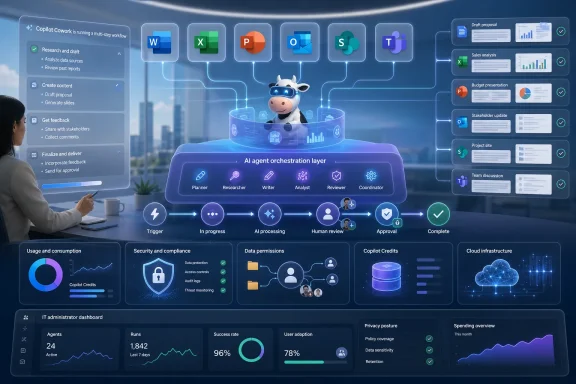 Copilot Cowork Has Moved From Preview to a Metered Service
Microsoft introduced Copilot Cowork in March as a research preview within its Frontier program. At the time, the description in the supplied article—that it was “currently being tested”—was correct. It is no longer correct as of August 24, 2026.
Microsoft announced Copilot Cowork’s general availability on June 16 after roughly three months in Frontier preview. Cowork is intended for long-running, multi-step work: a user describes an outcome, Cowork plans the work, uses available skills and applications, gathers context from Microsoft 365 and connected business systems, and returns artifacts for review. Microsoft says it can pause before sensitive actions, such as sending an email or updating a record.
For users, this makes Cowork distinct from regular Copilot Chat. Chat is the short, interactive option for questions, drafts, summaries, and iterative edits. A specialized agent is meant for a narrow, repeatable job. Cowork is the broader coordinator for work that crosses several steps or applications—such as preparing a report from several sources, coordinating a plan, or working through an inbox task.
The important omitted detail is cost. Cowork requires a Microsoft 365 Copilot User Subscription License, but it is not included as unlimited use in that per-user subscription. Microsoft bills Cowork based on consumption in Copilot Credits, driven by model usage, context retrieval, tool calls, and runtime. Microsoft’s published pay-as-you-go rate is $0.01 per Copilot Credit, while its P3 option lets customers pre-commit to usage in exchange for a discount.
A project that starts as “let the AI organize a few documents” can become a metered workload if it repeatedly searches organizational data, invokes external tools, or runs for a long period. That is not an argument against Cowork; it is a reason to treat it as a governed service rather than a productivity toggle.
Work IQ Is the Context Layer—and the Exposure Surface
“Work IQ” is Microsoft’s name for the contextual layer underneath Copilot and its agents. Microsoft Support says it can use a person’s emails, files, chats, meetings, people, projects, and connected business applications to make answers and actions more relevant to ongoing work.
The supplied article portrays that as generic personalization. The more consequential point is that Work IQ turns scattered Microsoft 365 information into agent-ready context. Microsoft’s developer documentation says the service can retrieve and act across mail, calendars, files, people, chat, and sites. It also provides persistent workspaces within the tenant so agents can retain intermediate work and outputs during longer jobs.
Microsoft says Work IQ respects each user’s existing permissions and that its tools execute in a user-scoped context. That is a meaningful safeguard: an agent should not be able to read a SharePoint site, mailbox, file, or record that the requesting employee cannot access. But existing permissions are not the same thing as sound information governance.
Wave 3 makes oversharing more visible. If an organization has years of poorly managed SharePoint permissions, broadly shared OneDrive folders, inaccurate group membership, or sensitive documents stored without appropriate labels, Copilot and agents can surface that information more efficiently to people who already have access. The AI has not bypassed access controls; it has made the consequences of lax access controls easier to discover and act upon.
Microsoft Support also says users can turn Work IQ on or off in Copilot Chat. With it on, prompts may be grounded in workplace information; with it off, Copilot answers using public web information and prompt attachments instead. That control helps individual users choose an appropriate context, but it does not replace tenant-wide planning for data classification, sensitivity labels, SharePoint permissions, audit retention, and connector governance.
For administrators considering custom agents, Work IQ introduces a second cost boundary. Microsoft Learn says use of the Work IQ API is independent of Microsoft 365 Copilot licensing and is billed by consumption. A company can therefore face charges not only for Cowork tasks but also for its own apps or third-party agents that ground responses in Microsoft 365 data through the Work IQ APIs.
Word, Excel, PowerPoint, and Outlook Are Becoming Agent Workspaces
Wave 3’s other central change is that Copilot is being positioned inside the creation applications rather than beside them. Microsoft says Copilot can now create, edit, and refine work directly in Word, Excel, PowerPoint, and Outlook, while Copilot Chat can start a document, spreadsheet, or presentation from a conversation and trigger common work actions such as scheduling a meeting or drafting an email.
The promised value is not merely faster first drafts. Microsoft is trying to keep the work in native Microsoft 365 files, with familiar review mechanisms, existing compliance settings, and less copying between chat windows and downloaded artifacts. In Word and Excel, Microsoft said the newer experiences were generally available in March, while PowerPoint and Outlook were scheduled to roll out in subsequent months.
There are still boundaries that users should understand. “Create or edit from chat” does not mean Copilot can safely decide the business content, validate a spreadsheet model, verify a legal statement, or infer the intended recipient list for an email. The more capable the system becomes at producing a polished artifact, the easier it is to mistake fluency for correctness.
The new Word, Excel, and PowerPoint agents also rely on an administrative decision that may surprise organizations focused only on Microsoft’s own models. Microsoft Learn states that the agents require Anthropic AI models to be enabled in the tenant. If an administrator disables Anthropic models, users cannot see or use those agents in the Microsoft 365 Copilot app.
That gives Microsoft’s “model diversity” language a concrete consequence. Wave 3 includes technology from OpenAI and Anthropic rather than a single-model stack, and Microsoft says Copilot selects or lets users select models for appropriate jobs in some experiences. But an organization’s AI provider settings can now determine whether newly advertised Copilot functions appear at all.
Building Agents Is Easier; Running Them Safely Is Still an IT Job
Microsoft describes Agent Builder as the accessible route for workers to make task-focused agents for their daily work, while Microsoft Copilot Studio remains the route for more sophisticated business-process agents such as onboarding or procurement workflows. The distinction matters: enabling staff to create an agent is not the same as approving it to operate a repeatable business process.
A narrow agent that summarizes project updates from an approved SharePoint library presents a very different governance problem from an agent allowed to pull data from Dynamics 365, prepare a draft customer response, modify a Planner board, and call a third-party service. The key questions are mundane but essential: whose credentials are used, what data sources can be reached, what tools can write rather than read, what approvals are required, how actions are logged, and who owns the agent after its creator changes jobs.
Microsoft’s answer on the management side is Agent 365. Announced alongside Wave 3, Agent 365 became generally available for commercial customers on May 1, 2026. Microsoft offers it as a standalone $15-per-user-per-month service or within the $99-per-user-per-month Microsoft 365 E7 package. Microsoft says the product provides inventory, governance, security, and observability for agents.
It should not be confused with Copilot Cowork’s usage controls. Agent 365 is Microsoft’s broader control plane for managing agent activity; Cowork has its own controls for enabling access, setting spending limits, budgets, and alerts. An organization deploying both must understand which dashboard governs identity and agent inventory, which controls consumption, and which records activity for audit and incident response.
Microsoft’s June Cowork update says the service is off by default, and administrators decide who can access it. It also offers tenant-, group-, and user-level spending limits plus usage reporting. Those settings should be configured before broad rollout, not after the first unexpected consumption report.
The Practical Wave 3 Rollout Starts With Guardrails
The supplied article is right that Copilot is taking on more responsibility inside workflows. But it is too optimistic to present that development as a simple feature upgrade that businesses can “use safely and effectively” with a little guidance. The technology is now operational enough that the controls need to come first.
Administrators should begin with a limited deployment group and a defined set of tasks. They should verify that SharePoint, OneDrive, Exchange, Teams, and business-system permissions reflect actual job roles; decide whether Anthropic models are permitted; set Work IQ and agent policies; define approval requirements for actions that communicate externally or alter records; and establish Copilot Credit budgets before enabling Cowork.
They should also give users a clear dividing line: use Copilot Chat for assisted work, specialized agents for constrained repeatable tasks, and Cowork only when the task genuinely benefits from a multi-step runtime and a measurable budget. Microsoft’s own product guidance makes that distinction, and it is the simplest way to avoid spending agent capacity on work a short prompt could handle.
As of late August, Wave 3’s headline is not that Microsoft 365 Copilot is gaining agents. It already has them. The live issue for Windows and Microsoft 365 administrators is whether their tenant’s permissions, provider choices, approval paths, and consumption controls are ready for software that can do more than generate text.
