
CopilotKit’s newly open-sourced Channels SDK gives developers a supported route to place an existing AG-UI agent inside Slack and Microsoft Teams, with native platform UI rather than a generic webhook bot. The important qualification is that the open-source code is only one layer of the deployment: the default managed path still requires a CopilotKit Intelligence connection and API key to operate Slack and Teams ingress, delivery, ordering, credentials, and durable conversation mapping.
That boundary is clearer in CopilotKit’s August 4 launch material and current documentation than in the initial coverage from MarkTechPost. The SDK itself is MIT-licensed and the public repository is available, but “open source” does not mean a completely standalone Slack or Teams deployment under the vendor’s managed configuration. Organizations that need to keep provider credentials and transport entirely in-house must use the direct-adapter path and take responsibility for those operations themselves.
For Windows administrators and developers already deploying internal agents, that makes Channels a useful integration layer, but not a magic removal of the hard parts of operating an enterprise Teams bot.
Channels is designed around AG-UI, CopilotKit’s Agent–User Interaction protocol. The practical promise is straightforward: an organization can retain its existing agent framework, model provider, tools, and business logic, then expose that agent through collaboration software without rebuilding its conversation handling separately for Slack and Teams.
CopilotKit lists LangGraph, CrewAI, Mastra, Pydantic AI, Google ADK, Microsoft Agent Framework, and custom AG-UI-compatible services as usable backends. The agent process can remain a Python service, a Node application, or an HTTP endpoint; the Channels runtime is the bridge that receives a platform turn, runs the agent, invokes allowed tools, and returns a response.
The SDK’s rendering approach is more consequential than it initially sounds. Developers author a structured message in JSX, which Channels lowers into a serializable intermediate representation before an adapter renders it as Slack Block Kit or a Teams Adaptive Card. A button, table, form, approval prompt, or generated status card can therefore be described once while producing platform-appropriate output.
That makes Channels more than a message relay. It is intended to preserve interaction state and actions across chat surfaces. The catch is that platform parity is never absolute: Microsoft Teams and Slack have different message and card capabilities, and CopilotKit’s own documentation already distinguishes between what direct and managed adapters can do.
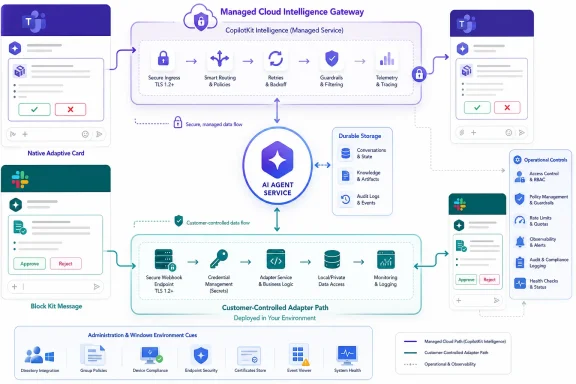
The customer runs the agent, its model credentials, business rules, tools, application state, logs, and a long-running Channels listener. CopilotKit Intelligence manages Slack and Teams provider credentials, inbound events, the persistent delivery path to the customer listener, reconnects, retries, ordering, and its durable channel-to-agent thread mapping.
This is operationally attractive. A developer does not need to build out Azure Bot Service plumbing, Teams messaging endpoints, Slack Socket Mode or webhooks, provider-specific retry logic, identity handoff, delivery de-duplication, and per-thread state before testing an agent in a real workspace. CopilotKit’s own OpenTag example uses this model for an on-call triage assistant that connects a Python LangGraph agent to Slack and Teams.
But it also means that the vendor sits in the message-delivery path. In the managed configuration, a Teams message first reaches CopilotKit Intelligence; Intelligence then delivers the turn over a persistent connection to the organization’s Channels process; the response follows the reverse route as a native Teams card or Slack message. The agent logic can stay inside the organization’s infrastructure, but channel traffic and operational metadata do not simply travel directly between Teams and that agent runtime.
For security reviews, “our model and tools remain self-hosted” is therefore only part of the data-flow answer. Teams administrators will still need to establish what conversational content, attachments, identifiers, thread metadata, approval events, retention data, and telemetry cross the Intelligence boundary, and whether CopilotKit-hosted or self-hosted Enterprise Intelligence is acceptable for the workload.
CopilotKit says Enterprise Intelligence can be hosted by the company or self-hosted for enterprise deployments. The public materials do not set out pricing, availability commitments, regional hosting details, or a complete data-processing model for the managed service. Those are unresolved procurement questions, not implementation footnotes.
That discrepancy is worth flagging because it changes the deployment calculation. Current CopilotKit documentation says a direct adapter can run inside the organization’s Channels process, where the organization stores provider credentials and owns the provider socket or webhook. For Teams, the direct adapter accepts a Microsoft application client ID, client secret, and optional tenant ID, then serves the Teams messaging endpoint —
This is the route for organizations that cannot accept a managed intermediary for provider connectivity. It is also the route that puts the work back on the customer: credential protection, webhook exposure, TLS, bot registration, retries, transient failures, rate limits, message ordering, availability, and monitoring become the organization’s responsibility.
CopilotKit’s docs are explicit that direct does not mean fully independent of its runtime stack. The CopilotRuntime still owns the Channel lifecycle and maintains an Intelligence connection. More importantly, the direct route does not receive the managed real-time gateway’s canonical delivery, retry, and durability layer. A company can move the Teams and Slack provider connection into its environment, but it must then engineer the reliability characteristics it may have expected the managed path to supply.
For a proof of concept, that trade may be reasonable. For production Teams use, it is a familiar bot-service problem wearing a new agent-oriented SDK.
The practical advice is to treat Teams support as available, but validate the exact adapter and deployment model before committing to a workflow. CopilotKit exposes a capabilities boundary because managed and direct adapters do not offer identical behavior. Its documentation gives Slack as the concrete example: the direct adapter supports modals, reactions, incremental streaming, and ephemeral messages, while managed Slack may buffer streamed output and post the result in one message instead of visibly updating it as tokens arrive.
The same general limitation applies to the broader “write once, run everywhere” pitch. Shared JSX reduces the amount of integration code, but the platform adapter decides what a collaboration client can actually render and how it handles interactivity. An approval control that works as intended in a Teams Adaptive Card must still be validated in the Teams clients employees actually use: desktop, web, mobile, private chat, group chat, and channel conversations.
Windows-focused IT shops should also avoid confusing Channels with Microsoft’s own Teams SDK or Microsoft 365 Agents SDK. CopilotKit’s offering is an independent middleware and runtime approach that can connect an AG-UI agent to Teams. It does not replace Microsoft Entra application registration, Teams app packaging, consent, tenant policy, compliance controls, or the administrative decisions that determine whether a bot can be installed and used.
Channels supports persisted state, transcripts, action callbacks, locks, de-duplication, queues, and configurable turn concurrency. The in-memory default is suitable for a local run but resets when the process restarts. CopilotKit advises using a durable store such as Redis or PostgreSQL when transcripts and pending approvals must survive restarts or multiple runtime instances.
Interactive messages introduce a separate failure mode. If an agent posts an approval card and the runtime restarts before the user selects an action, the handler must be reconstructable. Channels supports registering named JSX components for that purpose. Without a durable store and registered components, a click on an older message can turn into an expired action instead of a valid approval.
OpenTag shows the security model CopilotKit wants customers to adopt: Linear and Notion write operations are intercepted in application code, emit a confirmation event, and proceed only after a human approves. The SDK can render the approval step, but it does not automatically make an unsafe tool safe. The authorization check, the user identity mapping, the scope of the tool, and the decision about what needs approval remain the application owner’s job.
That point matters especially in Teams deployments tied to Microsoft 365 data or internal ticketing systems. A polished Adaptive Card is not an access-control boundary.
The trade-off is concrete. Use the managed Slack and Teams path when the priority is getting a known agent into collaboration threads quickly and the organization accepts CopilotKit Intelligence as the channel transport and operations layer. Use the direct adapter model when provider credentials, webhooks, and delivery controls must remain customer-operated — then budget for running them.
For a Teams pilot, the lowest-risk first milestone is a read-only agent with narrow tools, durable state, a documented identity map, and a tested approval gate before any write action. The technical demo may take an afternoon; the production decision rests on who is allowed to move data and commands through the conversation path.
For Windows administrators and developers already deploying internal agents, that makes Channels a useful integration layer, but not a magic removal of the hard parts of operating an enterprise Teams bot.
 The agent stays put; the channel layer changes
Channels is designed around AG-UI, CopilotKit’s Agent–User Interaction protocol. The practical promise is straightforward: an organization can retain its existing agent framework, model provider, tools, and business logic, then expose that agent through collaboration software without rebuilding its conversation handling separately for Slack and Teams.CopilotKit lists LangGraph, CrewAI, Mastra, Pydantic AI, Google ADK, Microsoft Agent Framework, and custom AG-UI-compatible services as usable backends. The agent process can remain a Python service, a Node application, or an HTTP endpoint; the Channels runtime is the bridge that receives a platform turn, runs the agent, invokes allowed tools, and returns a response.
The SDK’s rendering approach is more consequential than it initially sounds. Developers author a structured message in JSX, which Channels lowers into a serializable intermediate representation before an adapter renders it as Slack Block Kit or a Teams Adaptive Card. A button, table, form, approval prompt, or generated status card can therefore be described once while producing platform-appropriate output.
That makes Channels more than a message relay. It is intended to preserve interaction state and actions across chat surfaces. The catch is that platform parity is never absolute: Microsoft Teams and Slack have different message and card capabilities, and CopilotKit’s own documentation already distinguishes between what direct and managed adapters can do.
The managed path removes platform plumbing — and creates a service dependency
CopilotKit’s managed architecture divides responsibility in a way IT teams should examine before treating the SDK as a self-hosted Teams integration.The customer runs the agent, its model credentials, business rules, tools, application state, logs, and a long-running Channels listener. CopilotKit Intelligence manages Slack and Teams provider credentials, inbound events, the persistent delivery path to the customer listener, reconnects, retries, ordering, and its durable channel-to-agent thread mapping.
This is operationally attractive. A developer does not need to build out Azure Bot Service plumbing, Teams messaging endpoints, Slack Socket Mode or webhooks, provider-specific retry logic, identity handoff, delivery de-duplication, and per-thread state before testing an agent in a real workspace. CopilotKit’s own OpenTag example uses this model for an on-call triage assistant that connects a Python LangGraph agent to Slack and Teams.
But it also means that the vendor sits in the message-delivery path. In the managed configuration, a Teams message first reaches CopilotKit Intelligence; Intelligence then delivers the turn over a persistent connection to the organization’s Channels process; the response follows the reverse route as a native Teams card or Slack message. The agent logic can stay inside the organization’s infrastructure, but channel traffic and operational metadata do not simply travel directly between Teams and that agent runtime.
For security reviews, “our model and tools remain self-hosted” is therefore only part of the data-flow answer. Teams administrators will still need to establish what conversational content, attachments, identifiers, thread metadata, approval events, retention data, and telemetry cross the Intelligence boundary, and whether CopilotKit-hosted or self-hosted Enterprise Intelligence is acceptable for the workload.
CopilotKit says Enterprise Intelligence can be hosted by the company or self-hosted for enterprise deployments. The public materials do not set out pricing, availability commitments, regional hosting details, or a complete data-processing model for the managed service. Those are unresolved procurement questions, not implementation footnotes.
A direct Teams adapter exists, but the operating burden returns
The record changed quickly after launch. MarkTechPost described version 0.5.0, Slack and Teams as early-access surfaces, and Discord and Google Chat as future integrations. CopilotKit’s current public documentation identifies@copilotkit/channels 0.6.1, describes managed Slack and Teams support, and documents direct adapters for Slack, Microsoft Teams, Discord, Telegram, and WhatsApp.That discrepancy is worth flagging because it changes the deployment calculation. Current CopilotKit documentation says a direct adapter can run inside the organization’s Channels process, where the organization stores provider credentials and owns the provider socket or webhook. For Teams, the direct adapter accepts a Microsoft application client ID, client secret, and optional tenant ID, then serves the Teams messaging endpoint —
/api/messages by default — from the customer-controlled process.This is the route for organizations that cannot accept a managed intermediary for provider connectivity. It is also the route that puts the work back on the customer: credential protection, webhook exposure, TLS, bot registration, retries, transient failures, rate limits, message ordering, availability, and monitoring become the organization’s responsibility.
CopilotKit’s docs are explicit that direct does not mean fully independent of its runtime stack. The CopilotRuntime still owns the Channel lifecycle and maintains an Intelligence connection. More importantly, the direct route does not receive the managed real-time gateway’s canonical delivery, retry, and durability layer. A company can move the Teams and Slack provider connection into its environment, but it must then engineer the reliability characteristics it may have expected the managed path to supply.
For a proof of concept, that trade may be reasonable. For production Teams use, it is a familiar bot-service problem wearing a new agent-oriented SDK.
Teams support is real, but feature behavior must be tested per adapter
CopilotKit now labels Slack and Teams as generally available on its Channels product page, while an earlier Teams documentation page characterized the managed Teams connection as a controlled integration target. That is another sign the public wording and technical release status are moving faster than the initial reports.The practical advice is to treat Teams support as available, but validate the exact adapter and deployment model before committing to a workflow. CopilotKit exposes a capabilities boundary because managed and direct adapters do not offer identical behavior. Its documentation gives Slack as the concrete example: the direct adapter supports modals, reactions, incremental streaming, and ephemeral messages, while managed Slack may buffer streamed output and post the result in one message instead of visibly updating it as tokens arrive.
The same general limitation applies to the broader “write once, run everywhere” pitch. Shared JSX reduces the amount of integration code, but the platform adapter decides what a collaboration client can actually render and how it handles interactivity. An approval control that works as intended in a Teams Adaptive Card must still be validated in the Teams clients employees actually use: desktop, web, mobile, private chat, group chat, and channel conversations.
Windows-focused IT shops should also avoid confusing Channels with Microsoft’s own Teams SDK or Microsoft 365 Agents SDK. CopilotKit’s offering is an independent middleware and runtime approach that can connect an AG-UI agent to Teams. It does not replace Microsoft Entra application registration, Teams app packaging, consent, tenant policy, compliance controls, or the administrative decisions that determine whether a bot can be installed and used.
Persistence and approvals are the production features, not the JSX
The headline feature is native UI, but the less glamorous facilities determine whether an agent behaves safely after the demo.Channels supports persisted state, transcripts, action callbacks, locks, de-duplication, queues, and configurable turn concurrency. The in-memory default is suitable for a local run but resets when the process restarts. CopilotKit advises using a durable store such as Redis or PostgreSQL when transcripts and pending approvals must survive restarts or multiple runtime instances.
Interactive messages introduce a separate failure mode. If an agent posts an approval card and the runtime restarts before the user selects an action, the handler must be reconstructable. Channels supports registering named JSX components for that purpose. Without a durable store and registered components, a click on an older message can turn into an expired action instead of a valid approval.
OpenTag shows the security model CopilotKit wants customers to adopt: Linear and Notion write operations are intercepted in application code, emit a confirmation event, and proceed only after a human approves. The SDK can render the approval step, but it does not automatically make an unsafe tool safe. The authorization check, the user identity mapping, the scope of the tool, and the decision about what needs approval remain the application owner’s job.
That point matters especially in Teams deployments tied to Microsoft 365 data or internal ticketing systems. A polished Adaptive Card is not an access-control boundary.
The immediate decision is managed convenience versus controlled transport
CopilotKit has delivered an MIT-licensed SDK, a public repository, a working OpenTag reference implementation, and an architecture that can materially reduce duplicated Slack-and-Teams agent work. The current package documentation also shows that the initial launch report is already stale on important details: the listed package version has moved beyond 0.5.0, and direct adapters now cover more than the two managed launch platforms.The trade-off is concrete. Use the managed Slack and Teams path when the priority is getting a known agent into collaboration threads quickly and the organization accepts CopilotKit Intelligence as the channel transport and operations layer. Use the direct adapter model when provider credentials, webhooks, and delivery controls must remain customer-operated — then budget for running them.
For a Teams pilot, the lowest-risk first milestone is a read-only agent with narrow tools, durable state, a documented identity map, and a tested approval gate before any write action. The technical demo may take an afternoon; the production decision rests on who is allowed to move data and commands through the conversation path.
References
- Primary source: MarkTechPost
Published: 2026-08-05T04:43:17+00:00
- Related coverage: copilotkit.ai
Channels for Slack and Microsoft Teams | CopilotKit
Build custom Slack and Microsoft Teams agents with Channels SDK. CopilotRuntime connects your agent while CopilotKit Intelligence provides production channel infrastructure.www.copilotkit.ai - Related coverage: docs.copilotkit.ai
Channels SDK
API reference for managed and direct provider agents built with @copilotkit/channels.docs.copilotkit.ai - Related coverage: docs.copilotkit.ai
Slack: Channels
Run one AG-UI agent in Slack, Microsoft Teams, and more through managed CopilotKit Intelligence connections.docs.copilotkit.ai - Related coverage: copilotkit.ai
Product | CopilotKit
Build AI copilots that actually work. The complete platform for building, customizing, and improving AI copilots with open source core framework, premium features, and stateful platform.www.copilotkit.ai - Related coverage: learn.microsoft.com
Teams SDK (Teams AI Library) | Microsoft Learn
Developer documentation for the Teams SDK (Teams AI Library), which simplifies the development of AI-driven bots for Microsoft Teams.learn.microsoft.com - Related coverage: github.com
GitHub - microsoft/teams-sdk: SDK focused on building AI based applications and extensions for Microsoft Teams and other Bot Framework channels · GitHub
SDK focused on building AI based applications and extensions for Microsoft Teams and other Bot Framework channels - microsoft/teams-sdk github.com
- Related coverage: github.com
GitHub - CopilotKit/CopilotKit: The Frontend Stack for Agents & Generative UI. React, Angular, Mobile, Slack, and more. Makers of the AG-UI Protocol · GitHub
The Frontend Stack for Agents & Generative UI. React, Angular, Mobile, Slack, and more. Makers of the AG-UI Protocol - CopilotKit/CopilotKit
github.com
- Related coverage: learn.microsoft.com
Microsoft 365 Agents SDK for .NET reference | Microsoft Learn
Reference documentation for the Microsoft 365 Agents SDK for .NETlearn.microsoft.com - Related coverage: marketing.partner.microsoft.com
Slide 1: Use the Teams AI Library to build your own Copilot Sample high-level architecture
PDF documentmarketing.partner.microsoft.com
- Related coverage: marketingassets.microsoft.com
- Related coverage: copilotkit-public-assets.s3.us-east-1.amazonaws.com
- Related coverage: techradar.com
50 Microsoft tools you can use for free just in time for Build 2026 | TechRadar
Free tools from across the Microsoft ecosystemwww.techradar.com

