

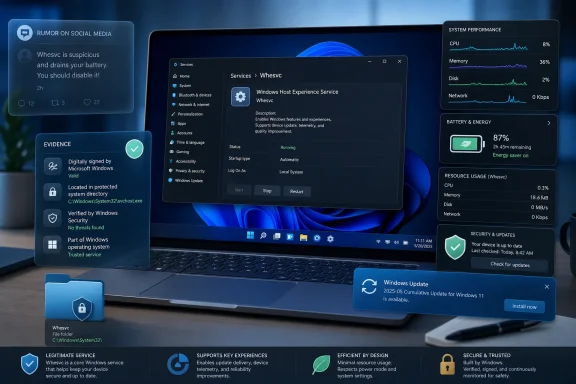
whesvc, is a legitimate Microsoft component—not a newly discovered spyware implant or a proven gaming-performance drain. The viral claim now circulating on X takes a real service and a real local diagnostic trace folder, then stretches both into an assertion the public record does not support.
Neowin’s report correctly identifies the service as part of Windows 11’s recent performance and power-management work. But its conclusion that whesvc runs “on every Windows 11 installation” goes further than Microsoft’s published rollout notes establish. Microsoft first exposed the associated sluggishness logging in the Windows 11 Insider Dev Channel build 26200.5710, released on July 18, 2025, where features could be enabled gradually and were not necessarily present for every tester. The service later appeared more broadly with Windows 11 servicing, but Microsoft has not published a clean matrix saying every edition, build, and hardware configuration runs it.
The practical answer is straightforward: do not disable whesvc merely because of the viral post. Keep Windows patched, leave the service alone unless you have a reproducible operational reason to test without it, and distinguish its local performance traces from Windows’ broader diagnostic-data settings.
What whesvc actually does
Microsoft’s Windows Insider announcement tied whesvc to a specific purpose: collecting local logs when Windows detects slow or sluggish behavior. Those records are placed under %SystemRoot%\Temp\DiagOutputDir\Whesvc, and Microsoft said Feedback Hub collects them when a user files a report through the Desktop > System Sluggishness category.
That detail cuts through the loudest claim. The logs are not described by Microsoft as a timed, automatic upload that leaves a PC every 15 minutes. Microsoft’s stated workflow is local collection first, followed by transmission only when the user submits relevant Feedback Hub feedback. PCWorld and Tom’s Hardware independently reported the same mechanism when the feature appeared in preview builds.
The service also has a second role in Windows 11’s power-management direction. Early analysis of the Canary build that introduced it found a lightweight Lua-based component inspecting such signals as system load, power mode, thermals, battery state, and display brightness. Those findings came from code inspection and reporting around Canary build 27863 in May 2025—not from a comprehensive Microsoft technical specification—so they should be read as implementation evidence, not a promise that every Windows 11 PC adjusts every one of those settings.
What Microsoft has made clearer since then is the connection to Adaptive Energy Saver. The feature can turn Energy Saver on or off according to power state and workload on eligible battery-powered hardware. It is an automation feature for laptops and tablets, not a gamer-focused optimization engine and not a Copilot chatbot process.
Desktop users may still see whesvc, because performance diagnostics are useful on systems without batteries. But its power-saving role is naturally more consequential on portable devices.
The viral privacy claim confuses local collection with automatic telemetry
There is a reasonable privacy question here, but it is narrower than the viral accusation suggests.
Windows can collect diagnostic data under separate system privacy controls, including required diagnostic data and whichever optional diagnostic settings a user or organization permits. Those mechanisms have long existed and deserve scrutiny on their own terms. A local trace created by whesvc is not proof that the trace was uploaded, nor does the presence of a Whesvc folder establish a new data-collection policy.
Microsoft’s published wording is unusually explicit on this point: the sluggishness logs are stored locally and sent through Feedback Hub when feedback is submitted. That does not mean the logs contain nothing sensitive. Performance traces can include meaningful technical context—running processes, drivers, timing data, hardware configuration, and software behavior are all potentially useful in diagnosing a slow launch or system hitch. It means the reported path to Microsoft is tied to an affirmative feedback action rather than an unexplained automatic schedule.
The more accurate criticism is that Windows gives users little visibility into what a given trace contains before it is attached to a Feedback Hub report. Microsoft has told users where the files are kept and when they are sent, but it has not supplied consumer-facing documentation describing every field in a whesvc performance trace or a retention policy specific to those files. That is a transparency gap; it is not evidence that the service is secretly exfiltrating data.
For managed fleets, the distinction matters. Administrators should govern Feedback Hub, diagnostic-data policy, and Insider enrollment through their normal Windows management controls rather than treating one service as a catch-all privacy switch.
The performance accusation has no solid evidence
A background service can consume resources, wake a system, or interfere with an application in a defective build. But neither Microsoft’s release notes nor the independent reporting reviewed around this controversy establishes that whesvc causes a broad gaming-performance regression.
The screenshots circulating with the service generally show it using little or no active CPU while idle. That is unsurprising: a monitoring or event-triggered component will usually spend most of its life waiting. Task Manager snapshots are not a substitute for a proper performance test, but they also do not support the claim that the service routinely “tanks” frame rates.
The reporting should not turn that into an absolute promise. One recent Reddit thread describes ETL trace files appearing after a game’s quick-save behavior seemed to cause a hitch, and its author said disabling whesvc stopped the visible trace creation. That is a user report, not a controlled demonstration that the service caused the game’s slowdown; it could just as plausibly show Windows detecting the existing delay and logging it.
Users who suspect a real connection should test it properly: reproduce the issue on the same game scene or workload, capture frame-time data and CPU activity, change one variable at a time, and re-enable the service after testing. Disabling a Windows component because it has an unfamiliar name is not diagnosis.
The service did have a security flaw—and patching is the answer
The strongest reason not to reduce this story to “nothing to see here” is CVE-2025-59241. Microsoft assigned the vulnerability to Windows Health and Optimized Experiences Service in October 2025, and the National Vulnerability Database describes it as an improper link-resolution issue that could allow a locally authorized attacker to elevate privileges.
Microsoft scored it 7.8 out of 10 under CVSS 3.1, classified as High severity. The attack required local access and existing low-level privileges; it was not a remote, unauthenticated avenue into a PC. Still, a privileged background service is exactly the kind of component that needs timely servicing, and the finding shows why “it is a Microsoft service” should never be confused with “it can never be vulnerable.”
The NVD’s affected-build record is specific: Windows 11 24H2 builds before 26100.6899 and Windows 11 25H2 builds before 26200.6899 were affected. Devices on those or newer build levels have the fix; systems below them should install the relevant cumulative Windows update. Disabling the service is not a better security control than applying the patch, because it creates an unsupported configuration while leaving the PC behind on other security fixes.
There is no public indication that this vulnerability was exploited in the wild. The appropriate response is routine patch hygiene, not a service-removal campaign.
When disabling it may be justified
For ordinary Windows 11 users, the case for disabling whesvc is weak. It supports performance-diagnostic capture, and on portable hardware it may support Adaptive Energy Saver behavior. It is not a meaningful source of reclaimed RAM or CPU capacity on a modern PC.
There are limited circumstances where an administrator or advanced user may reasonably test with it disabled:
- A reproducible regression appears exactly when the service runs, and a controlled A/B test is part of troubleshooting.
- A tightly managed desktop environment has no battery-management requirement and prohibits Feedback Hub-based diagnostic workflows.
- An enterprise security baseline requires the service to be disabled after compatibility testing and after confirming the decision does not undermine supported power or diagnostic functions.
Even in those cases, set the service aside as a test variable rather than treating it as malware. Record the prior startup configuration, validate sleep, wake, power-policy, and user-experience behavior afterward, and revisit the choice after feature updates. Windows cumulative updates can replace service components or change their dependencies.
If a machine shows a service called whesvc but its executable or DLL points outside protected Windows directories, lacks a valid Microsoft signature, or behaves unlike the built-in service, that is a separate incident. Malware can borrow a legitimate service name. Verify the service configuration and file signature before assuming the Windows component itself is compromised.
The whesvc controversy has a mundane conclusion: Windows 11 now maintains targeted local traces to help diagnose sluggishness, and it uses related plumbing for adaptive energy behavior on supported portable devices. Microsoft could explain the service and the contents of its logs much better. But the evidence supports patching and informed configuration—not disabling a legitimate Windows service in response to a viral claim.