
The significance is not that Dacier has merely added a chatbot to an automation console. The more consequential proposition is a control-plane integration: AI agents can query, design, and potentially initiate carefully governed workload automation, while the automation platform manages the operational and infrastructure consequences. For Windows-centric enterprises balancing Azure estates, hybrid servers, business schedulers, and a growing appetite for Microsoft Copilot or ChatGPT integrations, that combination could be materially more useful than standalone generative AI features.
Yet it also raises the bar for governance. Natural-language access to job definitions, schedules, histories, infrastructure, and workflow execution can make automation much more accessible. It can also make an already privileged part of enterprise IT more exposed if authentication, approval flows, tool permissions, audit records, and production safeguards are treated as implementation details instead of the product’s foundation.
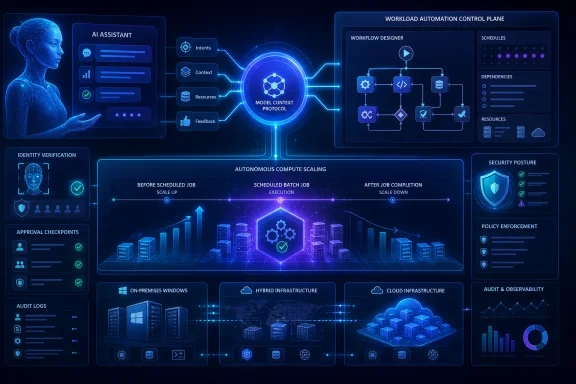 Overview: Enterprise Automation Meets Agentic AI
Dacier describes itself as a cloud-native enterprise workload automation and orchestration platform, and its announcement centers on two connected features: an MCP Server for AI-assisted workflow creation and operational questions, plus autoscaling designed to provision compute before work begins and deprovision it when processing is complete. The company frames the release as a way to avoid choosing between operational reliability and cloud cost control. Dacier’s announcement
That is a credible problem statement. In many organizations, workload automation is still separated into distinct operational domains:
- A scheduler or orchestration system knows when a batch process should run.
- A cloud platform knows what infrastructure is currently available.
- A FinOps team knows what remains running and expensive after the job ends.
- An operations team often owns the scripts, exceptions, alerts, and recovery procedures bridging those systems.
- An AI assistant may understand a user’s natural-language request, but traditionally lacks a safe, structured route into production automation.
Dacier’s approach attempts to join those layers. A user could ask what failed overnight, request an explanation of a job, determine its schedule, or review its run history instead of navigating through a management interface or writing a script. According to Dacier, an AI-assisted flow can turn a natural-language process description into a workflow that is then validated, deployed, and securely executed through the platform. Dacier’s announcement
This matters because modern workload automation is not limited to overnight mainframe-style batch windows. It increasingly includes API calls, file transfers, data engineering, ERP processing, security remediation, cloud resource operations, event-driven tasks, and business processes that stretch across SaaS applications and private infrastructure. In that environment, the value of an orchestrator comes not only from launching jobs but from supplying dependency awareness, retry behavior, auditability, visibility, and a consistent way to represent operational intent.
Why MCP Is the Important Part of This Announcement
A standardized path from AI prompts to enterprise tools
The Model Context Protocol is designed to standardize the way AI applications connect to external tools, data sources, and services. In MCP’s architecture, an AI application acts as a host, connects through MCP clients, and accesses capabilities exposed by MCP servers. Those capabilities can include tools that perform actions, resources that provide contextual data, and prompts that offer reusable interaction templates. MCP’s architecture documentation
In practical terms, MCP offers a more structured alternative to building a bespoke integration for every AI assistant, workflow system, and internal API. An MCP server can present a defined set of functions and associated schemas to an AI client, giving the model a way to discover what actions are available and the inputs those actions expect. The protocol does not decide how a particular language model reasons, nor does it replace enterprise authorization; it establishes a consistent connection model between the AI application and operational systems. MCP’s architecture documentation
For Dacier, that structure could translate into tools such as:
- Looking up the latest result of a workflow or job.
- Explaining job dependencies and expected inputs.
- Retrieving a run history for a defined period.
- Identifying failed tasks and their error context.
- Drafting a new workflow from a business-process description.
- Validating whether a generated workflow meets platform requirements.
- Initiating a deployment or execution only when the caller has appropriate authorization.
- Coordinating resource provisioning ahead of a known workload window.
The announcement specifically says Dacier users can ask what failed overnight, what a job does, the schedule it follows, or when it ran during the past 30 days. Those are primarily read-oriented operational questions, and they are an excellent initial use case for MCP because they remove routine console navigation without immediately granting an AI agent the ability to alter production conditions. Dacier’s announcement
Compatibility is strategically valuable, but implementation still matters
Dacier says its MCP Server is compatible with ChatGPT, Claude, Microsoft Copilot, and other MCP-compatible applications. That promise is strategically more important than support for any single model because enterprise AI preferences are not static. Organizations may use different AI products in separate business units, retain multiple providers for resilience or compliance, or shift their model strategy over time. Dacier’s announcement
The broader platform ecosystem supports that direction. OpenAI documents that ChatGPT developer mode can be used by organizations to build, test, and deploy MCP-powered apps, including applications capable of performing write or modify actions in connected tools. OpenAI also provides administrative controls and role-based access options for eligible enterprise environments. OpenAI’s ChatGPT MCP developer mode documentation
Microsoft is similarly positioning MCP as a way to extend agents with external tools and resources. Its Copilot Studio documentation says MCP can connect agents with knowledge servers and data sources, exposing resources, callable tools, and prompt templates. Microsoft’s Copilot Studio MCP documentation Microsoft also operates an MCP Server for Microsoft Learn, enabling compatible clients such as GitHub Copilot to access current documentation through a remote server. Microsoft Learn MCP Server overview
For WindowsForum readers, the implication is clear: MCP is increasingly becoming part of the fabric around Windows development tools, Microsoft cloud services, Copilot environments, and enterprise AI integrations. A workload automation vendor with a credible MCP implementation could become a useful operational endpoint in that ecosystem.
But “compatible” should not be interpreted as “identical experience everywhere.” Each AI host has its own rules around connector approval, authentication, tool discovery, permissions, confirmation prompts, tenant controls, context handling, and availability. The core protocol lowers integration friction; it does not eliminate the need to test a Dacier workflow experience separately in ChatGPT, Copilot, Claude, and any internally developed agent.
From Plain English to Production Workflow
Lowering the automation barrier
The most immediately attractive Dacier claim is that users can describe a business process in plain language and have AI assist with workflow design and creation. This could reduce a longstanding automation bottleneck: the people who understand a business process are not always the people who understand scheduler syntax, dependency graphs, API payloads, cloud templates, or error-handling conventions.
A finance analyst may know that month-end processing must wait for source files, validate a data set, launch reconciliation, notify a team, and generate an archive. An operations engineer may know how to encode that sequence in an automation platform. In traditional environments, turning the analyst’s understanding into a dependable workflow requires tickets, meetings, documentation, reviews, and handoffs.
AI-assisted workflow design can compress that process. The model can transform a narrative request into a structured draft, expose missing assumptions, map known jobs and systems, and create a starting point for review. That is a substantial productivity opportunity, especially when the orchestration platform itself has access to job definitions, schedules, dependencies, previous runs, and exception information.
The key word, however, is draft. A natural-language request is usually incomplete. “Run the nightly customer import after the file arrives” conceals critical implementation questions:
- Which file location is authoritative?
- What filename pattern is valid?
- How long should the workflow wait?
- Should it run after one file or a complete set?
- What constitutes validation success?
- Which identity should access the data source?
- Does failure require a retry, an escalation, a rollback, or a manual approval?
- Can it overlap with a prior run?
- Should infrastructure remain active for a retry window?
- What downstream systems should be notified?
A well-designed AI-native automation platform should make those decisions visible rather than quietly inventing them. Dacier’s stated validation step is therefore an essential part of the value proposition, not a secondary convenience. Dacier’s announcement
Validation must be both technical and operational
There are at least two kinds of validation that matter in AI-generated automation.
Technical validation checks whether a workflow is structurally sound. That can include syntax, valid references, expected schemas, missing parameters, dependency loops, invalid schedules, unavailable credentials, and resource constraints.
Operational validation asks whether the workflow should exist in that form. It examines business ownership, production change controls, data classification, operational risk, maintenance windows, service-level objectives, rollback paths, and approval requirements.
The first type can be increasingly automated. The second needs people who understand the business and the operational environment. MCP’s own tools specification explicitly recommends a human in the loop with the ability to deny tool invocations, clear visibility into exposed tools, visual indicators when they run, and confirmation prompts for operations. MCP’s tools specification
That recommendation fits Dacier’s domain particularly well. A chat interface can make a high-impact action appear deceptively simple. “Restart the failed pipeline” may be harmless in a development environment but dangerous if it reruns a financial posting workflow, repeats customer communications, or triggers a resource-intensive production job during a constrained capacity period.
The practical design goal should be progressive autonomy:
- Let AI answer questions about jobs and histories with appropriate read permissions.
- Let AI draft workflows and remediation plans in non-production environments.
- Require explicit approval for production deployment.
- Require additional confirmation for destructive, costly, security-sensitive, or externally visible actions.
- Keep a traceable record of the user request, model output, validation result, approval, execution, and final outcome.
That approach preserves speed while preventing a conversational interface from becoming a bypass around established operational control.
Intelligent Cloud Autoscaling: The FinOps Half of the Story
Scheduling should influence capacity planning
Dacier’s second announcement is intelligent cloud autoscaling, which it says can provision compute before workloads start and scale resources down once processing is complete. The company’s argument is straightforward: organizations often pay for cloud infrastructure that remains active between scheduled workloads, even when that capacity is not doing useful work. Dacier’s announcement
This is where workload automation can offer something different from generic autoscaling alone. Conventional autoscaling frequently responds to observed utilization, queue depth, memory pressure, requests, or other runtime metrics. That model is valuable, but it can be reactive: a workload begins, demand rises, a rule triggers, and new capacity needs time to arrive.
Azure Virtual Machine Scale Sets, for example, can scale in or out based on metrics such as CPU, memory demand, disk activity, queues, and application telemetry. Microsoft also supports scheduled scaling, acknowledging that anticipated demand can justify provisioning resources before user or workload pressure occurs. Azure autoscale overview
An orchestration platform has a different source of intelligence: the schedule and dependency graph itself. If Dacier knows a large data-processing workflow is expected at 1:00 a.m., it can theoretically initiate infrastructure provisioning before the first processing task begins. That should reduce startup latency and allow resources to be removed once the workflow and its retry or verification window have completed.
This creates a more complete lifecycle:
- A workload is scheduled or triggered by an event.
- The platform determines the infrastructure needed for that workload.
- Compute is provisioned early enough to meet the start requirement.
- The workflow runs with dependency and status awareness.
- Retries, remediation, or downstream jobs are handled according to policy.
- Resources scale down when no longer required.
- Costs, utilization, workflow outcomes, and exceptions can be reviewed together.
The result is potentially better than maintaining always-on compute for workloads that only need substantial capacity for short, predictable intervals.
The cost promise is plausible—but no savings figure is provided
Dacier says the capability can reduce unnecessary cloud infrastructure costs, remove manual startup and shutdown scripting, scale cloud resources automatically, and optimize compute use for scheduled and event-driven workloads. Dacier’s announcement
Those benefits are directionally consistent with cloud-platform guidance. Microsoft notes that autoscaling can reduce unnecessary virtual machines when demand is low and add instances as demand increases, helping align capacity with demand and control the resources being consumed. Azure VM Scale Sets overview
However, the release does not provide a benchmark, percentage saving, workload profile, supported-cloud matrix, or pricing model. Enterprises should therefore treat any expected savings as workload-specific rather than assuming a universal outcome.
Actual economics will depend on factors such as:
- The length and predictability of workload windows.
- Provisioning lead time for the required compute type.
- Whether jobs require warm caches, mounted storage, or long-lived network sessions.
- Cloud billing granularity and commitment models.
- Minimum capacity requirements for resilience.
- The cost of data movement, storage, networking, and licensing.
- Retry patterns and the risk of scaling down too aggressively.
- Whether applications can safely tolerate infrastructure replacement or horizontal scaling.
Autoscaling is most compelling when it is coordinated with workload requirements rather than triggered solely by a generic resource threshold. But it is not a substitute for application design. Stateful systems, license-bound software, legacy Windows Server workloads, database maintenance tasks, and jobs with difficult startup dependencies may require carefully constrained policies.
The Strongest Use Cases for Windows and Hybrid Environments
Batch estates that grew into cloud estates
Many Windows-focused organizations have a mixture of SQL Server jobs, PowerShell scripts, Windows Task Scheduler tasks, ERP integrations, file-based processes, Azure services, and third-party business platforms. The automation logic often evolves over years, distributed across teams and tools.
Dacier’s MCP layer could provide a useful operational front end if it can safely surface that fragmented knowledge. Instead of searching separate consoles and runbooks, an approved user could request a concise explanation of a workflow, identify dependencies, inspect the last month of execution history, or isolate which upstream task caused a failure.
The capability is especially appealing for incident response. During a morning handover, teams often need immediate answers:
- Which production jobs failed?
- Which failures are new versus recurring?
- What dependencies are blocked?
- Did the job run late, fail immediately, or exhaust retries?
- Is a cloud resource unavailable, or is the business input missing?
- What changed relative to successful runs?
- What recovery procedures are approved?
An AI assistant can make those questions easier to ask. The underlying automation platform remains responsible for ensuring that the answers are complete, current, authorized, and attributable.
Azure automation with workload-aware scale decisions
Dacier’s cloud autoscaling capability may be particularly relevant for organizations using Azure compute to support scheduled workloads. Azure already provides native scaling mechanisms based on schedules and metrics, including scale-in during lower demand and scale-out ahead of known demand periods. Azure autoscale overview
The differentiator Dacier is pursuing is the correlation of autoscaling with business workload orchestration rather than with infrastructure telemetry alone. If that correlation works reliably, it could reduce the need for bespoke PowerShell automation and disconnected startup/shutdown scripts that lack awareness of upstream files, job dependencies, completion status, or exception windows.
For a Windows enterprise, that can simplify a familiar pattern: bring up compute for a controlled processing cycle, run the workload, verify the expected outputs, retain the environment long enough for retries or post-processing, and then scale back down under policy. The benefit is not merely fewer virtual machines; it is the possibility of making infrastructure lifecycle part of the workflow definition rather than a separate operational afterthought.
Security and Governance Cannot Be Bolted On Later
MCP increases utility—and expands the attack surface
The most important caveat is also the most obvious: an MCP server connected to enterprise automation is a high-value integration point. MCP enables AI models to interact with external systems through tools, and its specification recognizes that these tools may query databases, call APIs, perform computations, or otherwise take action beyond the chat window. MCP’s tools specification
The OWASP MCP Security Cheat Sheet warns that MCP changes the attack surface because AI agents can dynamically execute tools based on natural-language interaction while connected to sensitive systems. It identifies risks including tool poisoning, prompt injection, excessive permissions, confused-deputy problems, supply-chain compromise, tool shadowing, and data exfiltration through apparently legitimate tool calls. OWASP’s MCP Security Cheat Sheet
These are not abstract concerns for workload automation. A poorly scoped automation connector could potentially expose information about business processes, hosts, credentials, file locations, execution histories, or data movement. Worse, a write-capable tool could initiate jobs, change schedules, alter dependencies, or modify cloud resources.
OpenAI’s own guidance for MCP-powered ChatGPT apps emphasizes that customers are responsible for verifying whether a server or connector is safe and appropriate for their environment. It warns that unsafe or untrusted MCP servers can increase exposure to security risks, including prompt injection, and notes that administrative review and action controls are particularly relevant for write and modify capabilities. OpenAI’s ChatGPT MCP developer mode documentation
A practical security baseline for Dacier deployments
Organizations evaluating Dacier’s AI-native enterprise automation should require a documented control model before connecting it to production systems. The following baseline aligns with MCP guidance and the needs of enterprise operations:
- Separate read-only and write-capable tools. A tool that explains job history should not inherit the privileges required to execute, edit, or delete workflows.
- Use least-privilege identities. Each MCP tool and automation action should have the smallest practical permission scope rather than sharing a broad administrative credential.
- Require strong authentication and user-context authorization. The system should verify both who is asking and whether that individual is authorized for the specific target environment and action.
- Enforce human approval for sensitive actions. Production deployments, workflow changes, infrastructure deletions, high-cost scale-outs, credential operations, and externally visible jobs should not be silently executed from a natural-language prompt.
- Preserve immutable audit trails. Capture the prompt, model-proposed action, validation results, approval event, final parameters, execution outcome, and any associated infrastructure activity.
- Validate all generated inputs. Model output should be treated as untrusted input, with strict schemas and allowlists around commands, parameters, file paths, resource identifiers, and API targets.
- Pin and review tool definitions. Tool schemas can change, and organizations should know when an MCP server exposes a new action or modifies an existing one.
- Segment environments. Development, test, staging, and production should expose different MCP capabilities, credentials, and approval policies.
- Test failure modes. Teams should test what happens when provisioning is delayed, a job is retried, an AI request is ambiguous, an approval is denied, a resource cannot scale, or an action fails midway through execution.
OWASP specifically recommends scoped per-server credentials, short-lived tokens, tool schema inspection, sandboxing or isolation where appropriate, explicit confirmation for destructive or data-sharing actions, strong input/output validation, and authentication and authorization on remote MCP endpoints. OWASP’s MCP Security Cheat Sheet
What Enterprises Should Watch Next
Dacier’s announcement is promising because it joins two concerns that are too often handled independently: automation reliability and cloud efficiency. AI-assisted workflow design and operational querying can make automation platforms more approachable, while workload-aware resource provisioning can make cloud capacity decisions more purposeful.
The ultimate value will depend on execution details that are not fully specified in the announcement. Buyers will want clarity on supported cloud providers, infrastructure types, warm-up and scale-down policies, job-level cost attribution, rollout controls, integration depth with existing schedulers, authentication methods, audit capabilities, and the granularity of MCP tool permissions.
They should also distinguish between an AI assistant that can describe automation and one that can change automation. The first can deliver immediate operational value with lower risk. The second can be transformative, but only when it is paired with strict authorization, testing, approval, and observability.
Dacier’s strongest idea is that the automation platform should understand both the workload and the infrastructure that enables it. If its MCP Server provides safe, well-governed access to that operational context, and if its autoscaling reliably turns workflow knowledge into timely infrastructure actions, the platform could help enterprises reduce manual friction without sacrificing the discipline that production automation demands.
