
The practical change is straightforward: a customer-service representative or an AI agent can draft an email in Dynamics 365 Customer Service, and Governance evaluates that draft against administrator-defined rules before the message leaves the system. Microsoft says the objective is to catch restricted, sensitive, unsafe, or noncompliant language before a customer receives it, rather than finding it later in quality reviews.
Microsoft’s August 5 product blog is the formal GA announcement. Its corresponding Microsoft Learn administration page, last updated July 8, confirms the implementation detail: Governance evaluates outbound messages authored by both representatives and AI agents, and can block an email, log a violation for review, or route it into a manual approval workflow. That last option is operationally important. This is not merely a red underline in an email composer; an organization can put a policy decision in the path of sending a message.
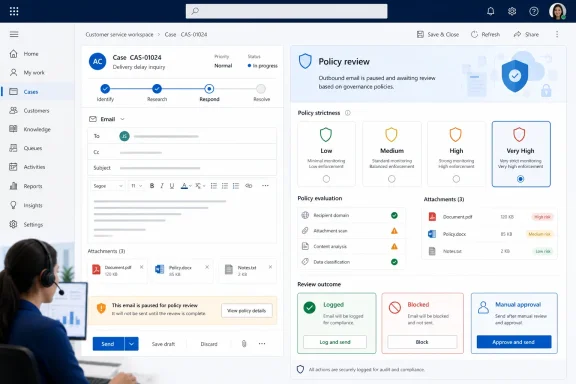 GA adds attachment inspection, but only for text-based files
The headline GA addition is attachment coverage. Microsoft says Governance can inspect PDFs, Word documents, and text files attached to outbound email, alongside the body of the email itself. For support organizations sending account correspondence, contracts, return instructions, incident reports, or customer-specific documentation, that closes an obvious hole in a body-only control.
It is also a narrower capability than the phrase “attachment checks” may suggest. Microsoft specifically calls out text-based PDF, Word, and text files. The company has not said that Governance evaluates spreadsheets, PowerPoint files, images, compressed archives, audio, video, embedded content, or scanned PDFs whose content is not exposed as selectable text. Administrators should therefore treat the feature as a content-policy review for supported textual material, not as general attachment malware scanning, data-loss prevention, or document forensics.
That distinction has consequences for existing security architecture. Governance can help enforce a rule such as “include the required warranty disclaimer” or “do not disclose a competitor’s name” in a draft email and its supported attachments. It does not replace Microsoft Purview DLP, Defender protections, Exchange transport rules, retention controls, or the organization’s document-classification policies. Those products address different decisions—such as whether a file carries a sensitive data type, is malicious, or may leave the tenant at all.
Microsoft previewed Governance on April 29, also for the email channel. At the time, the company described no-code policy authoring, pre-send checks, simulation mode, auditing, and out-of-the-box policies such as profanity filtering, groundedness checks, and template adherence. The move to GA therefore represents the production release of the core control, while attachment review and adjustable strictness are the notable functional additions.
“Flag” means less than the administrator guide suggests
Microsoft’s GA blog says an administrator can choose enforcement behaviors described as “flag or block.” The supporting Learn documentation gives a more detailed, and slightly different, description: when it detects a violation, Governance can block the message, log the violation for later review, or route the message for manual approval.
The difference is not trivial for service-desk workflow design. A flag could mean a non-blocking warning that a representative can ignore; it could mean a logged event reviewed after the email is sent; or it could mean a message that waits in an approval queue. Microsoft has not documented how the blog’s simplified “flag” option maps to the logging and approval actions in the administrator documentation.
Organizations should test that behavior in simulation before enabling production enforcement. A rule that silently logs a violation is useful for measuring policy drift. A rule that blocks an email is a hard gate. A rule that routes an email to an approver creates a queue, an escalation model, and an expectation for response time. Those are three very different business controls, even when they originate from the same policy description.
Microsoft’s preview documentation specifically positioned simulation as a non-blocking mode for assessing policies against real-world drafts. The GA blog retains simulation and reporting as the recommended validation tools. That is the correct rollout path: begin by collecting detections, review false positives and missed violations, then enforce selectively. Starting at “Very High” strictness with blocking turned on is likely to expose unclear policy wording and create avoidable delays for customers.
The quality agent is a pre-send control, not a compliance guarantee
Governance sits beside the Quality Evaluation skill inside the Quality Management agent. Microsoft frames the pairing as a unified quality, compliance, and policy framework, but the two functions work at different points in the customer-service process.
Quality evaluation is designed to assess interactions against defined standards. Governance acts at runtime, before an outbound email is sent. For IT teams, that means Governance is the preventive layer while Quality Evaluation remains the detective and coaching layer. One can stop an email that violates a policy; the other can identify patterns in completed work, assess adherence, and expose where policies or training need revision.
Microsoft also makes a notable limitation explicit in its Learn documentation: Governance is intended to help service managers enhance team performance and customer satisfaction, and should not be used to make employment decisions involving compensation, rewards, seniority, or other employee rights or entitlements. That warning deserves attention because the system records policy violations and supports repeated-risk analysis. A governance log is useful evidence for improving prompts, templates, approval policies, and knowledge content. It should not become an automated employee-scoring mechanism.
The same documentation places legal responsibility with the customer. Companies must comply with laws governing employee analytics, monitoring, recording, storage of communications, notice, and consent. Microsoft supplies the mechanism; it does not turn an organization’s internal rules into a legally sufficient compliance program.
Deployment requires more than turning on a toggle
The UI path itself is short: in Copilot Service admin center, administrators open Customer Support > Quality management, choose Manage for Governance, and enable the feature. The prerequisites tell a more complete story.
Governance requires the CSR Manager role for administrators and the Customer Service Representative role for the people whose messages it evaluates. Environments using custom roles need explicit global permissions on Governance-related Dataverse tables, including msdyn_governanceagent_status, rule and rule-version tables, execution data, scenario types, and guardrail mappings. A deployment that overlooks those permissions can leave a feature technically enabled but unusable for the intended administrators or representatives.
Microsoft also requires Copilot credits, enabled AI agents in the Power Platform admin center, and consent for possible cross-region data movement. The Customer Service pricing page says Copilot Studio usage can be paid through prepaid Copilot Credit Commit Units or pay-as-you-go usage, with an Azure subscription required to run agents. Customer Service Premium includes base Copilot Credit capacity, but the GA announcement does not state the consumption rate for Governance evaluations, whether attachment evaluations consume differently from body-only checks, or whether Enterprise customers receive any included capacity.
That omission matters for volume-heavy support operations. An outbound email policy check is an inference workload placed on each governed send; attachment inspection can add more content to assess. Microsoft has provided no public cost example for Governance itself, so administrators cannot derive a reliable monthly budget from the GA post alone. Track usage in a pilot before placing every outbound email under policy enforcement.
Regional settings are part of the risk decision
The cross-region requirement is not a boilerplate footnote. Microsoft’s Customer Service Copilot documentation says that environments in the United States, Australia, India, the United Kingdom, and government cloud geographies can generally enable Copilot AI features in region by default; Europe has data movement enabled by default. Other regions may need an administrator to opt in to data movement across regions before Copilot features can be used.
Microsoft further explains that cross-region movement can be required when local Azure OpenAI capacity is unavailable, and that declining the option where external capacity is used can lead to throttling or feature unavailability. A compliance team evaluating Governance therefore has to assess two data paths: what policy content and customer correspondence are evaluated, and where the processing may occur.
The documentation says Microsoft does not use customer data to train Azure OpenAI foundation models. It separately offers an optional data-sharing setting that can allow Microsoft to capture and manually review customer inputs, outputs, and related telemetry to improve or validate Dynamics 365 and Power Platform Copilot features. Those settings should be reviewed independently; enabling Governance does not remove the need to make an explicit tenant-level data-handling decision.
Microsoft’s release makes Governance a usable production control for a specific problem: keeping outbound Dynamics 365 Customer Service emails, including supported text attachments, within locally defined policy before they are sent. It does not extend policy enforcement across chat, voice, social messaging, spreadsheets, images, or every other file type a service organization may exchange.
For administrators, the immediate work is to define a small set of high-confidence policies, run them in simulation, verify whether “flag” produces logging or an approval queue in their tenant, validate custom-role permissions, and meter Copilot Credit consumption. The strongest early use cases will be clear, objective rules with a known remediation path—not broad attempts to delegate legal judgment or customer-service management to an adjustable strictness slider.
