
That distinction matters. A single label in a browser interface can be the result of an A/B test, staged rollout, or incomplete feature work. The matching reference inside Edge Beta’s localized UI resources suggests that GPT-5.1 support is being actively prepared within the browser’s Copilot experience. It does not, however, prove that every Smart mode conversation is already running on GPT-5.1—or that the model is available to all Beta users.
For Windows users following the rapid evolution of Microsoft Copilot, the development is significant. Edge is no longer treating AI as a sidebar add-on. The browser is becoming the place where search, web research, context from open tabs, automated actions, and conversational assistance converge. A newer model label in Smart mode may look like a small interface change, but it hints at a much larger shift in how Microsoft plans to position Edge as an AI-first browser.
 Overview: What Appeared in Edge Beta
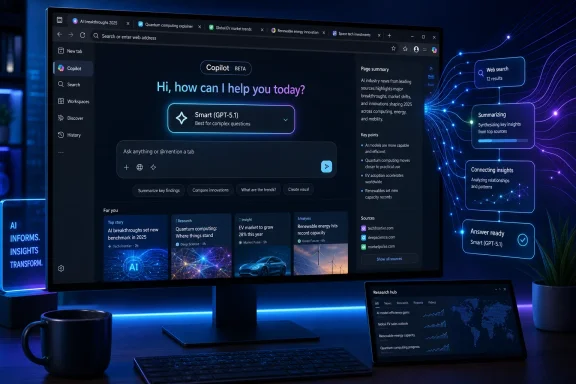
The newly spotted label appears in the consumer Copilot New Tab page in Microsoft Edge Beta. Smart mode is presented as a flexible option that can support either web exploration or ordinary conversation with Copilot, now explicitly tied to GPT-5.1 in the visible description.
This is notable because Smart mode had previously been associated with GPT-5. The mode is designed to determine whether a prompt needs a fast answer, more extensive reasoning, web-grounded context, or some combination of those approaches. Instead of forcing users to pick a “fast” or “deep thinking” model before every prompt, Smart mode functions as an automatic decision layer.
The Edge Beta resource files add an additional layer of credibility to the discovery. The strings.mjs file used by the New Tab page includes the GPT-5.1 wording, indicating that the text is part of the browser’s shipped interface resources rather than being injected solely by a remote service.
At the same time, those resources reportedly retain a separate “Smart (GPT-5)” reference. That means Edge Beta currently contains text for both GPT-5 and GPT-5.1, which strongly suggests a transition rather than a simple global replacement.
Several explanations remain possible:
- Microsoft may be testing GPT-5.1 with a limited subset of Edge Beta users.
- The company may be preparing a phased rollout by region, account type, or device.
- Smart mode may dynamically route prompts between GPT-5 and GPT-5.1.
- The GPT-5.1 label may be staged in the client before server-side availability is broadly enabled.
- The browser may eventually expose a model picker that lets users choose among multiple AI options.
The most important takeaway is straightforward: the label is real, but a public product announcement and a complete technical breakdown are still absent.
Why a Resource-File Reference Carries More Weight Than a UI Screenshot
New browser features frequently appear first as incomplete interface elements. A button can be hidden behind a configuration flag. A dialog can be visible without working. A description can be present even though a backend capability remains disabled.
That is why the second discovery inside Edge Beta’s New Tab page resources is important.
Client Resources Are Not the Same as Runtime Confirmation
A text string inside a browser package demonstrates that Microsoft has included the wording in a client build. It does not independently verify that the browser sends every Smart mode request to a GPT-5.1 endpoint.
Modern AI products are often assembled from several moving parts:
- The browser client and its interface text
- A remote feature-configuration service
- Authentication and account-entitlement checks
- Geographic availability controls
- Safety and policy filters
- Model-routing systems
- Capacity-management rules
- Cloud-side experimentation frameworks
A user may have the correct Edge version and still not receive the same model experience as another user. Microsoft can activate or disable AI functions remotely, alter traffic routing, and test revised interface copy without requiring a new browser download.
The Presence of GPT-5 and GPT-5.1 Together
The coexistence of both labels is arguably the most revealing detail. If Microsoft had simply renamed Smart mode from GPT-5 to GPT-5.1 everywhere, a clean replacement would be expected. Instead, the presence of both names points toward a more nuanced rollout plan.
It may indicate that GPT-5 remains the default for some accounts while GPT-5.1 is tested for others. It could also mean that Smart mode itself can select among different model variants based on task complexity, service capacity, and reliability requirements.
For users, that is a reminder not to infer exact model behavior from a single menu label. “Smart” is fundamentally an abstraction. It describes the user experience Microsoft wants to deliver—an assistant that chooses an appropriate level of reasoning—rather than promising that one specific model handles every request.
Smart Mode Is Becoming the Center of the Copilot Experience
Microsoft’s Copilot interface has steadily moved away from the older, simpler distinction between creative, balanced, and precise chat styles. The newer mode system is more explicit about user intent and expected behavior.
In the current Copilot design, the mode picker can include options such as:
- Smart
- Quick response
- Think Deeper
- Study and learn
- Actions
- Search, depending on the specific Copilot surface and rollout status
Each mode reflects a different trade-off among response speed, reasoning depth, browsing, instructional quality, and automation.
Smart: The Automatic Route
Smart mode is the default-style option for users who do not want to make a technical model decision before every prompt. It is intended to evaluate the request and adapt its approach.
A prompt such as “Summarize this page in five bullet points” should be handled quickly. A request to compare laptop specifications across several tabs, draft a travel plan, or reconcile conflicting sources may require more extensive processing and potentially browsing context.
That automatic routing is why the GPT-5.1 label matters more than a typical model-name badge. If GPT-5.1 becomes the preferred Smart mode model, it could influence the experience of a broad group of Edge users who never explicitly select a model at all.
Quick Response: Speed Over Deliberation
Quick response is aimed at short, direct requests where low latency matters more than lengthy reasoning. It is useful for definitions, quick drafts, lightweight rewriting, or a fast explanation of a visible web page.
The mode’s value is clear, but users should not mistake speed for certainty. A fast answer can be useful, yet time-sensitive facts, medical topics, technical troubleshooting, product pricing, and legal or financial decisions still demand verification from reliable primary material.
Think Deeper: A Separate Reasoning Path
Think Deeper is intended for questions that benefit from more deliberation. The mode can take longer to respond, but it is designed for tasks such as structured analysis, difficult comparisons, longer planning exercises, and step-by-step problem solving.
Keeping Think Deeper separate from Smart is sensible. It gives users a way to signal that they are willing to accept more latency in exchange for a more considered response. A newer Smart mode model could narrow the gap for everyday prompts, while Think Deeper remains the explicit choice for users who want maximum analytical effort.
Study and Learn: A More Guided Experience
Study and learn is designed around explanation rather than merely delivering an answer. It can break complex concepts into manageable steps, guide a learner through a problem, and use questions or examples to build understanding.
That mode is particularly relevant in Edge because the browser is often where students and professionals encounter unfamiliar material. An AI assistant that can reference the active task without turning every interaction into a generic chatbot session has obvious appeal.
Still, educational usefulness depends on accuracy. AI-generated explanations can be persuasive even when incomplete or wrong. Users should treat it as an interactive study aid—not a replacement for assigned material, subject-matter experts, or authoritative documentation.
What GPT-5.1 Could Mean in Practice
Without a Microsoft announcement detailing the specific implementation, it would be premature to claim that GPT-5.1 will deliver a defined percentage improvement in quality, speed, or reasoning. No such performance figures should be assumed from a label alone.
However, a model refresh in an AI browser could have practical consequences in several areas.
Better Handling of Mixed Browsing Tasks
A browser-based assistant has to work with messy inputs. Users may be reading several pages, comparing products, collecting research, watching video, searching for supporting evidence, and writing notes at the same time.
That environment requires more than a model that produces fluent prose. It requires reliable instruction following, strong context management, effective source handling, and the ability to distinguish between a user’s request and arbitrary text encountered on a webpage.
If GPT-5.1 improves these areas, Edge users may notice more coherent multi-tab summaries, fewer irrelevant responses, and smoother task transitions. But those benefits remain possibilities, not confirmed outcomes.
More Natural Use of Edge Context
Copilot Mode in Edge is designed to work with the browser rather than alongside it. The experience can use page context, open tabs, browsing history when enabled, and other browser-aware signals to make assistance more relevant.
A newer model could make that contextual layer feel more useful. For example, a user comparing three product pages may ask for the differences that matter most, rather than manually copying specifications into a chat window.
The risk is equally clear: the more context an assistant can access, the greater the importance of transparent permission controls. Useful AI browsing depends on users understanding what information Copilot can see, when it can see it, and how that information is handled.
Smarter Agentic Tasks
Actions is perhaps the most ambitious item in Edge’s Copilot mode picker. It moves beyond answering questions and into completing browser tasks. That can include opening websites, navigating through pages, organizing related tabs, and assisting with multi-step workflows.
Agentic browsing changes the security equation. An inaccurate answer is frustrating; an AI agent that clicks the wrong button, follows malicious page instructions, or takes an unintended action can be much more serious.
Microsoft has described protections for browser actions, including site limits, confirmation requirements, defenses against malicious instructions, and safeguards around sensitive activity. These are necessary measures, but no defensive system should be treated as perfect. AI agents operating on the open web must continue to earn user trust through clear controls, auditable behavior, and predictable limits.
The Unreleased Model Picker Is Worth Watching
The same Edge Beta resources reportedly include strings for a Model selection feature described as “Choose a model to power AI.” The option is not currently exposed as a functioning consumer setting in the tested build.
This is one of the more intriguing clues in the broader Copilot roadmap.
From Modes to Direct Model Choice
Smart mode is convenient because it hides the complexity of model selection. However, power users often want more control. They may prioritize quick answers for one task, deep reasoning for another, or a particular model behavior for writing, coding, research, and planning.
A proper model picker could make Copilot more transparent. Rather than leaving users to wonder why answers vary from one session to another, Edge could provide an explicit choice between models or model modes.
Potential benefits include:
- Greater predictability for advanced users
- Clearer performance and capability expectations
- Easier comparisons between fast and reasoning-focused modes
- Better troubleshooting when a response is weak or inconsistent
- More meaningful user feedback during preview testing
But a model picker also brings complexity. Most people do not want to learn the subtle differences between model variants before asking a simple question. Microsoft will need to strike a balance between giving enthusiasts real control and keeping the browser approachable for everyone else.
A Model Name Is Not a Full Product Specification
Even if Edge eventually offers named model choices, users should remember that a model name is only part of the story. The final Copilot response may also be affected by system instructions, browsing tools, retrieval systems, policy filtering, account tier, regional availability, and capacity controls.
This is particularly true with Smart mode. A label such as GPT-5.1 may identify the principal model family, but it should not be read as a promise that every response follows identical processing rules.
Edge Beta Remains a Testing Channel
The GPT-5.1 reference has appeared in Microsoft Edge Beta, not as a confirmed general release feature for all Edge users. That alone should shape expectations.
Beta is designed for customers who want early access to features that are closer to release than Canary or Dev builds, while still accepting that details can change. Features may be revised, removed, delayed, renamed, or enabled only for selected accounts.
Why Microsoft Uses Staged Rollouts
AI features are unusually dependent on server-side capacity and real-world testing. A staged rollout lets Microsoft observe how a new model or workflow behaves across a diverse population of devices, prompts, accounts, languages, and network conditions.
It also helps the company assess:
- Response quality and factual reliability
- Safety-filter performance
- Latency under realistic traffic
- Browser stability and memory impact
- Accessibility and localization quality
- The effectiveness of user controls
- Abuse and prompt-injection resistance
For a browser-integrated Copilot feature, this gradual approach is not merely cautious—it is appropriate. The browser is where users access banking sites, email, work systems, medical portals, shopping accounts, and private documents. AI capabilities must be introduced with a higher standard of restraint than a standalone chat experiment.
What Beta Users Should Do
Users who see GPT-5.1 in Edge Beta should view it as an early product signal, not a reason to move sensitive workflows into AI automation without review.
A sensible approach includes:
- Check the selected Copilot mode before submitting an important prompt.
- Review generated answers rather than treating them as authoritative.
- Verify web-based claims using the original pages, especially for current information.
- Keep sensitive information out of consumer AI prompts unless the applicable privacy protections and account conditions are clearly understood.
- Watch every automated browser action and approve sensitive steps manually.
- Use Edge’s permissions and Copilot settings to limit unwanted access to page or browsing context.
Privacy, Security, and the Browser AI Trade-Off
The strongest argument for Copilot in Edge is convenience. The browser already contains the user’s active research, tabs, searches, and online tasks. A contextual assistant can reduce repetition and eliminate the need to shuttle information between web pages and separate AI tools.
The strongest argument for caution is exactly the same: the browser already contains the user’s active research, tabs, searches, and online tasks.
Context Must Be Deliberate
Context-aware AI can make excellent suggestions when it knows what is open or what a user has recently viewed. But browsing history and page content can reveal highly personal information, professional plans, financial interests, health concerns, political views, and relationships.
Microsoft has built Copilot Mode around opt-in mechanisms and visible indicators for browsing-aware features. Those controls need to remain prominent as the experience evolves. Permission should be clear at the moment it matters, rather than buried behind a broad setting that users enable once and forget.
Prompt Injection Is a Persistent Challenge
Web pages are not trustworthy instruction sources. A malicious page can contain hidden text or visible content designed to manipulate an AI agent into ignoring the user’s goal, disclosing information, or navigating to harmful destinations.
This is known as prompt injection, and it is one of the core unresolved challenges of agentic browsing. Model improvements may help, but the problem cannot be solved solely by upgrading from one model version to another.
A secure browser AI system needs layered defenses:
- Strict boundaries between user instructions and webpage content
- Conservative access to sensitive data
- Confirmation prompts for consequential actions
- Clear site permissions and allowlists
- Safe defaults for unknown or high-risk websites
- Strong anti-phishing and anti-malware protections
- The ability for users to stop an agent immediately
The appearance of GPT-5.1 in Smart mode should therefore be viewed through two lenses. Better AI may improve browsing assistance, but more capable AI also raises the importance of thoughtful safeguards.
The Bigger Picture for Microsoft Edge and Copilot
Edge’s GPT-5.1 label is part of a broader transformation. Microsoft is positioning the browser not just as a renderer of websites, but as an intelligent workspace that can search, chat, summarize, compare, organize, explain, and act.
The Copilot New Tab page is central to that strategy. It turns the first screen users see in the browser into an AI entry point rather than a passive collection of shortcuts and news content. Search and chat are increasingly treated as two ways of expressing the same intent: finding information and getting work done.
For Windows users, the result could be compelling. Edge can become a practical hub for research, shopping comparisons, study sessions, travel planning, work preparation, and everyday web tasks. Smart mode is designed to make that assistance feel immediate instead of technical.
Yet Microsoft’s success will depend on more than attaching a newer GPT name to a mode selector. The company must ensure that Copilot in Edge is accurate enough to trust, fast enough to use, transparent enough to understand, and controlled enough to keep users comfortable.
The GPT-5.1 reference in Edge Beta is a promising sign that the browser’s Copilot experience is moving forward. It is also a reminder that the most important question is not simply which model name appears in the interface, but whether that model helps users browse with greater confidence, clarity, and control.
