
The practical point is narrower than the headline suggests: this is an Edge Canary-only experiment, not an announced change to the stable Edge app. Microsoft has not published release notes explaining the requirement, named the Canary build where it appeared, said how many users are seeing it, or committed to shipping it. No second outlet has independently reported the default-browser restriction so far.
Still, the test is worth watching because it shows Microsoft trying a different kind of Edge conversion tactic on Android. Rather than asking users to change their default browser at setup or after an update, the company is placing that request at the moment someone attempts to personalize the browser.
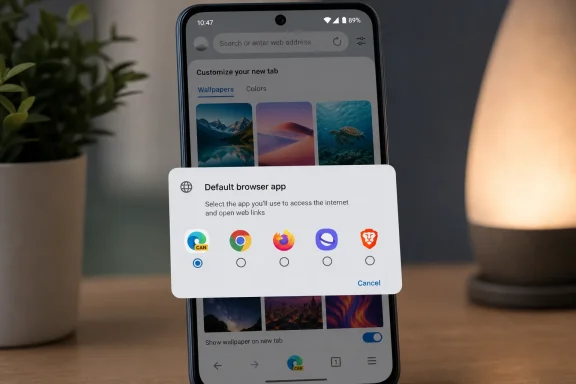 A new-tab background with a system-level condition
According to Windows Central’s report and Varela’s post, Edge Canary now offers several image themes intended for the new-tab page, or NTP. Selecting one triggers a requirement to set Edge as Android’s default browser.
That is an unusual pairing. A background image changes the appearance of a single application; Android’s default-browser setting changes what opens when another app, a message, a document, or a system component hands off a web link. A user who prefers Firefox, Chrome, Samsung Internet, Brave, or another browser for everyday links is effectively being asked to trade that preference for an Edge visual customisation feature.
Microsoft has long offered themes across Edge, including themed browser surfaces and new-tab imagery. The company’s own Edge policy documentation, updated in July, confirms that Android and iOS builds beginning with Edge version 151 support theme and wallpaper customisation. That documentation describes a management control called EdgeThemeEnabled, which can make the theme and wallpaper controls available or hide them altogether.
What it does not say is revealing: there is no documented requirement that Edge be the device’s default browser before a user can set a wallpaper. The default-browser prompt therefore appears to be a Canary product experiment rather than a broadly documented platform rule or an enterprise policy requirement.
Canary users should not mistake the test for a rollout
Microsoft labels the Android Canary channel as its experimental Edge release. Features there can be altered, removed, or held back before they reach Edge Beta or the stable Play Store build. The source reporting itself notes that the default-browser condition may never reach general availability.
That caveat matters more here than it would for a simple new color palette. The test affects an Android setting outside Edge’s own preferences. If Microsoft retains the requirement, the company will be treating an app-level decoration as a benefit reserved for users who route their device-wide browsing activity through Edge.
If it drops the requirement before stable release, the episode will amount to a short-lived attempt to measure whether custom backgrounds persuade enough Canary users to switch defaults. Microsoft has provided no public data about that test, so it is impossible to tell whether the prompt is being evaluated for conversion rates, whether it targets a limited group of accounts, or whether it is tied to particular Android versions or manufacturers.
The lack of build information also makes verification harder. Canary features are commonly delivered in stages, and a report based on one build, account, or region should not be read as proof that every Edge Canary user will receive the same screen.
Enterprise controls make the consumer prompt more awkward
For personal Android devices, the decision is mostly about preference. For managed phones, browser behavior can be more complicated.
Microsoft’s Edge mobile policy reference includes controls for enabling a default-browser setting experience, while the separate theme policy allows administrators to disable theme and wallpaper customisation. An organization can therefore manage whether themes are exposed and can steer browser configuration in Edge, but a device-wide default-browser choice may also be governed by Android Enterprise enrollment, the phone maker’s management layer, or another endpoint-management product.
That means the new test has little obvious value in a corporate deployment. A managed-device user may see a theme option, be asked to set Edge as default, and lack permission to make that change. An administrator who wants a consistent corporate browser does not need wallpaper incentives; they need clear configuration controls and predictable link-handling behavior.
The more relevant observation for IT administrators is that Edge’s Android personalization surface is now mature enough to have a dedicated policy control. If an organization permits Edge theme customization, users on a Canary build could encounter an experimental default-browser nudge that does not appear in existing policy documentation. That is a good reason to keep production users on stable releases rather than treating Canary as a harmless preview channel.
Microsoft is testing a softer form of browser promotion
The company’s browser-promotion history makes the experiment easy to interpret, even without an official explanation. On Windows, Microsoft has repeatedly used setup prompts, recommendations, search integration, and product-specific features to encourage Edge use. Some users see those prompts as ordinary competition; critics argue that the company is leveraging its control of Windows to favor its own browser.
Android changes the power balance. Google’s platform ships with Chrome deeply integrated on many devices, Samsung promotes Samsung Internet on Galaxy phones, and users have a much broader history of choosing among mobile browsers. Microsoft cannot rely on Edge already being present on a Windows PC and synced with an existing Microsoft account. It must first persuade people to install Edge, then persuade them to use it when they tap links elsewhere.
A personalized new-tab page is a relatively low-stakes incentive compared with a warning screen, a forced setup step, or a blocked setting. It also targets users who have already installed an experimental Edge build, which suggests they are at least open to trying browser features. But the exchange remains disproportionate: a wallpaper is being used to influence a device-level routing decision.
For users who already make Edge their default browser, the change may be invisible. For everyone else, it can feel like an arbitrary lock. The theme is stored and displayed in Edge; nothing about drawing a background technically requires Edge to receive links from other apps.
What Edge for Android users can do now
Users who encounter the prompt should treat it as optional, because the reported feature is purely cosmetic. Keeping another browser as default should not prevent ordinary Edge Canary browsing, syncing, or access to existing Edge settings; it should only affect the reported ability to apply the new image backgrounds.
Those evaluating Edge Canary should also remember that a default-browser setting has consequences beyond opening Edge from the app drawer. Links tapped in email, chat apps, documents, and other Android software can begin opening in Edge. Users who only want to inspect the new themes can test the setting, then restore their prior default browser if they decide Edge is not the right system-wide choice.
For managed fleets, the sensible response is to avoid changing policy based on this one experiment. Check whether Edge Canary is permitted on corporate devices, verify that EdgeThemeEnabled is configured as intended, and keep an eye on stable Edge release notes rather than assuming the behavior will survive testing.
Microsoft’s unanswered decision is now straightforward: either release Android themes as ordinary personalization, or explicitly say that making Edge the default browser is part of the feature’s bargain. Until it does, the gate looks less like a technical requirement than a conversion prompt attached to a background image.