
Microsoft Edge is set to open the Copilot side pane automatically when users follow links from Outlook, tying email context directly to the browser in a planned Microsoft 365 rollout. The feature, tracked as Roadmap ID 557561, is aimed at commercial Microsoft 365 tenants worldwide and can surface page highlights and suggested next actions based on the email and destination content.
Microsoft’s 365 Roadmap lists the change as in development and assigns it a general-availability rollout. The published schedule has shifted during development: Microsoft initially targeted May 2026, while roadmap-tracking archives recorded later moves through June and then August. As of August 1, Microsoft has not publicly marked the item as launched.
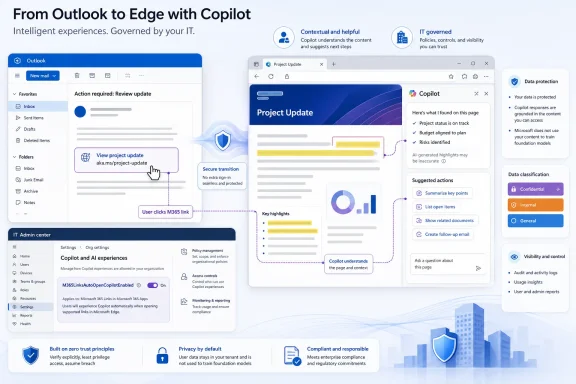
The behavior is narrowly scoped but consequential: a user opens a link from Outlook, Edge opens the destination page, and Copilot can appear alongside it without the user explicitly invoking the assistant. Microsoft says the pane is intended to provide contextual insights and actionable suggestion chips while preserving the browsing flow.
That makes the Outlook-to-Edge handoff a new activation point for Copilot. For users who routinely open project documents, customer portals, dashboards, and knowledge-base pages from email, it could eliminate several manual steps. For others, it risks making the browser feel more intrusive, particularly when the link itself contains sensitive work context.
That should make this a deployment decision rather than an unavoidable client-side change, but organizations should validate the policy’s default behavior and device scope before the rollout reaches production. Edge management teams will also want to test how the pane behaves with existing Copilot policies, Microsoft Purview controls, conditional access, and browser extensions.
Security teams should treat the feature like any other Copilot workflow that can operate on work context. Before enabling it broadly, establish whether the organization’s data-classification, logging, retention, and Copilot access policies produce the expected outcome for finance, legal, HR, and regulated users.
The near-term milestone is not simply Edge receiving another Copilot pane. It is whether Microsoft publishes final rollout timing and whether the admin control is enabled, disabled, or configurable by default when Roadmap ID 557561 moves out of development.
 Outlook Links Become a Copilot Trigger
The behavior is narrowly scoped but consequential: a user opens a link from Outlook, Edge opens the destination page, and Copilot can appear alongside it without the user explicitly invoking the assistant. Microsoft says the pane is intended to provide contextual insights and actionable suggestion chips while preserving the browsing flow.That makes the Outlook-to-Edge handoff a new activation point for Copilot. For users who routinely open project documents, customer portals, dashboards, and knowledge-base pages from email, it could eliminate several manual steps. For others, it risks making the browser feel more intrusive, particularly when the link itself contains sensitive work context.
IT Can Control the Experience
The important operational detail is the policy control. According to the Microsoft 365 Message Center archive for RM557561, administrators can manage availability through the M365LinksAutoOpenCopilotEnabled policy.That should make this a deployment decision rather than an unavoidable client-side change, but organizations should validate the policy’s default behavior and device scope before the rollout reaches production. Edge management teams will also want to test how the pane behaves with existing Copilot policies, Microsoft Purview controls, conditional access, and browser extensions.
The Governance Question Is Context
Microsoft frames the feature as a productivity aid, not an email-reading service. Still, the design connects two potentially sensitive signals: the Outlook message that led to the click and the web content reached afterward.Security teams should treat the feature like any other Copilot workflow that can operate on work context. Before enabling it broadly, establish whether the organization’s data-classification, logging, retention, and Copilot access policies produce the expected outcome for finance, legal, HR, and regulated users.
The near-term milestone is not simply Edge receiving another Copilot pane. It is whether Microsoft publishes final rollout timing and whether the admin control is enabled, disabled, or configurable by default when Roadmap ID 557561 moves out of development.
References
- Primary source: microsoft.com
Microsoft 365 Roadmap | Microsoft 365
The Microsoft 365 Roadmap lists updates that are currently planned for applicable subscribers. Check here for more information on the status of new features and updates.www.microsoft.com
- Related coverage: m365admin.handsontek.net
Microsoft Edge: Auto-open Copilot side pane for Outlook links - M365 Admin
When users open links from Outlook, Microsoft Edge can automatically open the Copilot side pane to provide contextual insights and actionable suggestion chips based on email and destination content – such as highlighting key points, and recommending next actions – without disrupting...m365admin.handsontek.net - Related coverage: askwoody.com
- Related coverage: app.cloudscout.one
2026 CW 19 Microsoft 365 Roadmap changes | cloudscout.one
Microsoft 365 Roadmap week 19 overview: 64 Microsoft 365 Roadmap Items were changed and 27 Microsoft 365 Roadmap Items were added…app.cloudscout.one - Related coverage: winbuzzer.com
Microsoft Edge Will Auto-Launch Copilot on Outlook Links
Microsoft has announced Edge will automatically open the Copilot side pane when users click Outlook links, raising pushback over forced AI integration. winbuzzer.com
- Related coverage: levelupm365.com
Microsoft 365 Roadmap Updates March 2026 – Level Up M365
Photo credit: Gemini Table of Contents Intro Copilot: Deeper Integration, Better Grounding, and New Agent CapabilitiesSearch & Discovery EnhancementsAgent Mode in PowerPoint: A Massive Expansio…levelupm365.com