

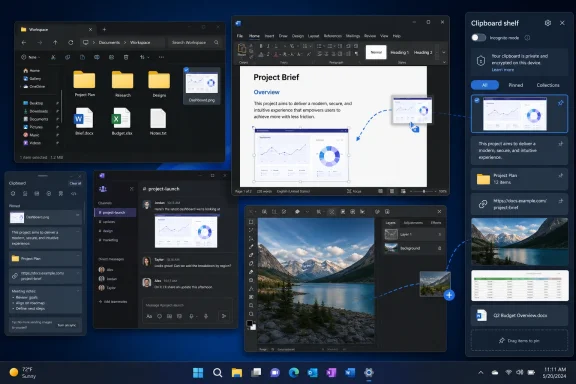
The crucial distinction is that Edge Drop is not simply offering a longer list of copied items. It uses Windows’ drag-and-drop plumbing to hand another application an item as a drop operation. A file can be dragged from the shelf into Explorer, an upload target, Slack, Word, or an image editor without first putting it back on the ordinary clipboard. That makes it closer to a temporary staging tray for desktop work than a traditional clipboard-history replacement.
Windows Central reached a similar conclusion in its July hands-on: Edge Drop’s appeal is its mouse-first interaction and file stacking, not a claim that Microsoft’s built-in clipboard has suddenly stopped working. The project’s public GitHub repository describes it as a public beta built with Electron, React, and TypeScript, and the developer has now distributed it through the Microsoft Store as well as through its open-source project page.
The practical benefit is real. The recommendation needs a qualification: installing a clipboard manager means allowing another application to watch one of the most sensitive data channels on a PC. Edge Drop has begun documenting the right safeguards, but its early-beta status means it belongs on an enthusiast workstation or a controlled pilot before it belongs on a managed production fleet.
Windows 11’s Clipboard Is Small by Design
MakeUseOf’s complaint about Windows 11 clipboard history is directionally right, but the exact Microsoft limits show why a third-party shelf can be tempting. Microsoft documents Win+V history as limited to 25 copied entries, with a 4 MB limit per item; it supports text, HTML, and bitmap formats. Unpinned items are cleared when the PC restarts, while pinned entries survive.
That is adequate for the original job: recalling a few lines of text or a recent screenshot. It is not designed to hold a working set of files, visual references, and snippets while somebody moves through a multi-window task. A user collecting six screenshots, two folders, three links, and a block of diagnostic output can exceed the native history limit quickly, and a file larger than the native per-item limit will not fit its intended model at all.
Microsoft’s clipboard also has a capability Edge Drop does not advertise: cross-device synchronization for text through a Microsoft or work account. An IT pro who copies commands on a desktop and expects them to appear on a laptop should keep Windows clipboard sync enabled; Edge Drop is local by design and does not substitute for it.
MakeUseOf says Edge Drop’s current configuration allows 100 to 1,000 stored entries, with 500 as the default. Its project documentation also lists automatic deletion options ranging from one hour to seven days, plus a “never” option, and says unpinned content can be cleared on restart. That makes it more flexible than Win+V, but users should not read “up to 1,000 items” as a promise of a permanent personal archive. Retention depends on the configured timer, pin state, and whether the current build is set to clear unpinned entries at launch.
The stronger use case is short-term, visible persistence: keeping work material available long enough to finish an assignment, rather than treating clipboard history as a place to store records.
Drag-and-Drop Changes the Job
Most clipboard managers, including the long-running Ditto utility cited by MakeUseOf, are optimized around finding an old item and placing it back on the clipboard with a hotkey. That is a strong model for code fragments, canned replies, addresses, and other text that needs searching and pasting. Ditto also supports network synchronization, backup and restore, extensive keyboard operation, and effectively much deeper retained history.
Edge Drop takes the opposite route. A thin, transparent trigger strip stays at a chosen screen edge, and the panel appears when the pointer reaches it. The shelf can be placed on the left or right, assigned to a selected display, adjusted vertically, and configured to avoid revealing itself while a fullscreen game, video, or presentation is active.
That design removes the modal interruption in the standard workflow. Instead of copying an item, summoning a history palette, selecting the item, refocusing the destination, and pasting, the user can pull the shelf out and drag the asset to the target. The difference may sound cosmetic until the job involves files. Dropping a group of screenshots into a case-management system or dragging a document into an email attachment area is a direct action; pasting may not be supported by the target application at all.
Edge Drop’s developer says the app captures text, URLs, rich HTML, images, and multi-file selections, while using Windows OLE drag-and-drop functions to pass file handles outward. The repository specifically calls out multi-file grouping, image previews, drag-in support for adding files to the shelf, and drag-out support for external applications. Those are the features that explain why this utility exists alongside Win+V rather than merely duplicating it.
There are limits. MakeUseOf found Ditto’s search function substantially better and said Edge Drop lacked history search in the build it tested. Edge Drop’s repository now includes a SearchBar component in its published source tree, but its feature documentation does not clearly state that full history search is currently shipped and reliable. Until the developer documents it in a release note, buyers should assume that browsing by filters, pins, and stacks—not retrieving an obscure copied string from weeks ago—is the product’s strength.
That makes Edge Drop less compelling for a keyboard-centric administrator who lives in terminals and text editors, and more compelling for a user whose work includes screenshots, documents, folders, upload fields, and several GUI applications at once.
A Clipboard Shelf Is Also a Data Store
The user-facing Incognito mode is sensible: it pauses clipboard capture while somebody is copying a password, recovery code, API key, customer detail, or other material that should not become part of history. But it is a manual control, so it only protects users who remember to enable it before copying sensitive information.
The project’s current security documentation says Edge Drop polls the system clipboard every 600 milliseconds and respects Windows privacy-related clipboard formats, including flags used to exclude material from monitoring or cloud history. It also says it recognizes concealed formats used by 1Password, Bitwarden, and KeePass. Those are welcome implementation details, and the project says its stored history is protected with Windows DPAPI encryption under the current user account.
They do not eliminate the security decision. A password manager or business application must actually mark its copied content in a way the watcher recognizes. Plain text copied from a browser, a Remote Desktop session, a PowerShell console, a ticketing system, or a database tool can still be visible to a clipboard manager. DPAPI encryption protects stored content against casual offline access by another account; it does not make the data inaccessible to the user session running Edge Drop, and it does not replace endpoint retention or data-loss controls.
For personal systems, the practical setup is straightforward: leave automatic launch off at first, use a short auto-delete interval, verify that Incognito mode stops capture, and test only disposable sample strings from the applications that matter. For workplace deployments, administrators should test exclusion behavior with synthetic passwords, mock API tokens, and controlled screenshots before approving the app. They should also confirm what remains in the application’s local data after an item is deleted, after history is cleared, and after the app is removed.
The source is open under the Apache 2.0 license, which makes that review possible. Open source is an advantage for inspection and bug reporting; it is not a substitute for a security assessment of the build installed on endpoints.
The Name Is Still a Deployment Problem
The new utility’s name creates needless ambiguity. Microsoft has long used “Drop” for the file-and-note sharing feature inside the Edge browser, commonly called Edge Drop, while the independent Windows utility uses the same two words for an unrelated desktop clipboard shelf.
Windows Central reported on June 22 that Microsoft was retiring the browser’s Drop feature, with an Edge Canary message telling users that shared files would remain in OneDrive and text notes should be downloaded separately. That retirement does not make the name safe. Search results, support requests, and internal help-desk tickets can still easily send users toward the wrong product, especially because both tools deal with moving files and both target Windows users.
The independent developer has called the Store version “Edge Drop” while using “Edge-Drop” in the open-source repository. That punctuation difference will not prevent confusion in Store searches or browser searches. A distinct name would make rollout, documentation, and support substantially easier before the utility gains a broader audience.
A Better Fit for a Narrower Problem
Edge Drop has identified a gap in Windows 11’s clipboard design: Win+V remembers recent copies, but it does not provide a place to visually collect and move a working set of files and images. The edge-hover shelf is an unusually direct answer to that problem, and it is more than a polished animation around ordinary copy-and-paste.
It should not displace Ditto for users who need deep searchable history, backups, network synchronization, and keyboard-driven retrieval. Nor should it displace Windows clipboard sync for users who rely on Microsoft-account text synchronization across devices. Edge Drop earns its place when the work is spatial and visual: gather assets, keep them nearby, then drag them into the next window.
The app’s immediate test is simple. Copy a handful of non-sensitive screenshots and files, put them in a stack, and drop them into the applications used every day. If that replaces repeated file-picker trips and Win+V detours, the shelf has justified another background process. If the workflow is primarily commands, credentials, and searchable text snippets, the older clipboard managers remain the safer fit.