

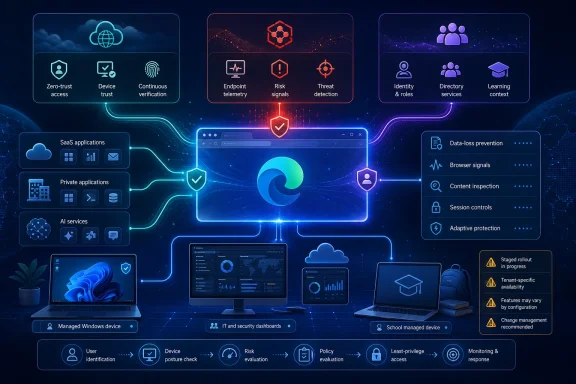
WindowsReport described the set as a major new Edge for Business security upgrade. Microsoft’s own documentation and partner announcements show a more complicated rollout. Cisco announced its Edge for Business integration on May 29; Microsoft published Tanium setup documentation updated June 17; and Clever said on May 12 that school customers using Entra and Edge for Business could begin using its device-trust flow. Microsoft had also discussed Clever among its connector partners at RSAC in March.
That does not make the integrations unimportant. It changes the procurement and deployment reading: this is a connector framework maturing through partner releases, not a single Edge update that administrators can simply install this week and expect to protect every browser session.
Cisco Secure Access brings policy closer to the browser
Cisco Secure Access is the most consequential of the three additions for organizations already using Cisco’s cloud-delivered Security Service Edge platform. Cisco says the Edge for Business integration provides zero-trust access to private applications while applying browser-level controls for sensitive data and AI use. Its public material describes controls involving copy and paste, printing, screenshots, watermarking, and data-loss prevention for managed and unmanaged-device scenarios.
The distinction between browser controls and network controls is important. A conventional secure web gateway can inspect or restrict traffic after it leaves an endpoint, but browser-aware enforcement can act on user behavior inside the web session. That is useful when a contractor on an unmanaged PC needs access to a private application, or when a company wants different treatment for a managed Edge work profile than for a personal browsing session.
Cisco’s own Secure Access documentation presents Edge for Business alongside Chrome Enterprise as supported enterprise-browser integrations. The company also positions the feature for clientless private-application access, which could reduce dependence on a full VPN client or virtual desktop for carefully defined third-party access cases. It is not a blanket replacement for either technology: Cisco’s broader platform still includes client-based controls, network security functions, and device-posture capabilities that the browser connector does not reproduce by itself.
For Edge administrators, the key operational consequence is that deploying the connector is a policy project, not merely a browser configuration. Organizations must decide which applications are accessible through the enterprise browser, which device states are acceptable, whether users can download or print data, and how exceptions are audited. The integration can make existing Cisco policy more granular in Edge; it does not eliminate the work of designing that policy.
Microsoft and Cisco have not published a standalone price for the Edge integration. Microsoft says the connector framework itself adds no extra Microsoft charge, but Cisco Secure Access remains a separately licensed service. Enterprises should not interpret “available now” as a free security feature bundled with Edge.
Tanium telemetry is useful only where Tanium is already present
The Tanium Security Browser Connector is a reporting integration, not a new browser threat-prevention engine. Microsoft’s setup guide says it sends real-time Edge for Business telemetry from Windows endpoints into the Tanium Autonomous IT Platform, including signals related to password breaches, malware, unsafe sites, and sensitive-data transfers. Tanium customers can use those signals in existing reporting, investigation, and remediation workflows rather than moving browser events into a separate console.
That is a sensible addition for organizations that already rely on Tanium for endpoint visibility. Browser activity often sits in an awkward gap between endpoint telemetry, web gateway logs, identity records, and SaaS audit trails. A security team investigating an infected device or suspected credential exposure can benefit from seeing the relevant browser events alongside the endpoint’s inventory and response history.
But the connector’s scope is narrower than the broad “reduce blind spots” framing implies. Microsoft’s documentation states that its dashboards show information only for endpoints that run the Tanium Client. It also requires Tanium Asset, Tanium Partner Integration, and Tanium Reporting. A Windows endpoint that is outside Tanium management does not suddenly become visible because it runs Edge for Business.
The deployment path also exposes another limitation that matters for mixed fleets. Microsoft requires an Intune-type Edge for Business configuration policy assigned to Windows 10 or later endpoints for this connector. The general connector framework lists Windows 10, Windows 11, and Windows Server 2016 or later as supported platforms, but the documented Tanium setup specifically targets Windows client endpoints. Organizations with substantial macOS, Linux, mobile, or unmanaged contractor populations should not count this connector as browser-wide telemetry coverage.
Administrators will need to manage the Tanium API credential lifecycle as well. Microsoft’s configuration instructions say the token generated in Tanium is valid for 31 days and cannot be viewed again in the Tanium Console after creation. That creates a recurring operational task. If a team treats the connector as a one-time deployment and misses token renewal, its browser reporting can fail silently at precisely the point analysts assume they have coverage.
Clever’s school-focused MFA reduction depends on device trust
Clever Classroom MFA TrustPass targets a different problem: repeated multifactor-authentication prompts in schools. Clever says the Edge for Business integration recognizes a trusted device so students and staff using Microsoft Entra can sign in without completing Classroom MFA on every access attempt. For districts that have introduced stronger authentication requirements, that can remove a genuine source of classroom friction and help-desk load.
The security trade-off is explicit. MFA is being skipped for a session only because another control has established that the device should be trusted. Districts need to treat enrollment, device assignment, shared-device handling, browser-profile separation, and offboarding as part of the authentication design. A trusted-device decision is only as good as the processes controlling who can use that device afterward.
There is also a timing discrepancy worth noting. Microsoft’s March RSAC post said Clever was available among newly announced connector partners, and Clever’s May announcement said eligible Entra and Edge for Business school organizations could get started. Yet Microsoft’s current public connectors directory labels Clever Classroom MFA TrustPass as “coming soon,” while Cisco and Tanium are marked available. The available documentation does not explain the mismatch.
The most likely reading is that availability is conditional on the customer’s education tenant, licensing, or staged service rollout rather than universal across every Edge for Business customer. Microsoft has not published a public rollout matrix that resolves it. School IT administrators should therefore validate availability in their own Edge Management Service and Clever environment before changing MFA expectations for staff or students.
Edge is becoming the integration point, not the replacement security stack
Microsoft’s connector model divides partners into three categories: device trust, data loss prevention, and reporting. The company’s objective is straightforward: make Edge for Business a place where an organization’s existing identity, endpoint, and data-protection investments can exchange signals and enforce policy without requiring another standalone enterprise browser.
That approach has advantages for Windows shops that have already standardized on Microsoft 365 Admin Center and Intune. Administrators manage connectors through the Edge Management Service, and Microsoft lists a baseline of Edge version 135.0.3179.85 or later, Microsoft Edge Administrator permissions, and supported Windows or Windows Server versions. The framework is no longer limited to Microsoft’s own security services, which gives enterprises a route to integrate incumbent tools rather than replace them as the cost of standardizing on Edge.
It also creates a new dependency chain. A connector deployment relies on Edge policy, the management plane, the partner platform, endpoint agents where required, credentials or API tokens, and the partner’s own entitlement. When security events stop appearing or an access rule behaves unexpectedly, the troubleshooting boundary crosses multiple vendors. Consolidating visibility does not necessarily consolidate responsibility.
For most organizations, the first sensible step is a narrowly scoped pilot: one group, one partner connector, a short list of browser events or protected applications, and explicit success criteria. The important measure is not whether the connector appears in the Edge Management Service. It is whether it improves an actual incident workflow, reduces risky data handling, or removes authentication friction without creating an unmonitored trust exception.
Cisco Secure Access and Tanium are publicly documented as available Edge for Business integrations. Clever’s trust-based MFA flow has been announced for education customers, but Microsoft’s own directory still presents its connector as forthcoming. Until Microsoft clarifies that status, the Clever integration should be treated as tenant-specific availability, while Cisco and Tanium can be evaluated as deployable additions to an existing enterprise security stack.