
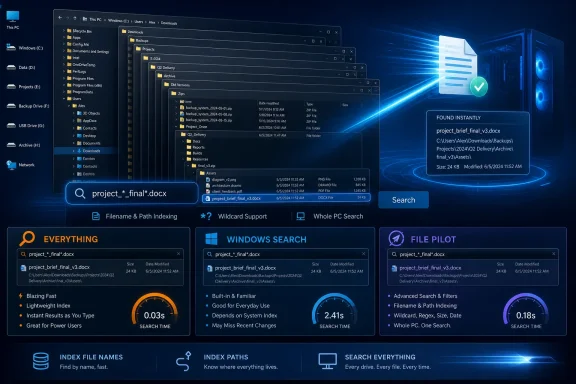
Everything remains the practical choice for Windows users who need to recover a misplaced file quickly, beating both Windows 11’s built-in search and the newer File Pilot in a hands-on comparison published by XDA on July 30. The key distinction is not merely that Everything feels faster: it is built around a narrower, more useful promise—finding filenames and paths across a PC with almost no delay.
That makes it especially relevant on long-lived Windows installations, where Downloads, Desktop, project folders, removable drives, archives, installers, and old backups turn into an accidental filing system. Windows Search can be tuned to improve its behavior, and File Pilot offers a more modern file-management experience, but Everything is the tool most likely to locate the file before the user has finished reconsidering its name.
XDA tested all three against files stored several folder levels below Downloads, a familiar stress case for anyone who treats that directory as a temporary holding area for years. Windows Search performed poorly in that test, File Pilot made a strong showing, and Everything was the clear winner for whole-PC retrieval.
Windows 11 already has search in the taskbar and File Explorer, but its default behavior is shaped by indexing boundaries. In the standard configuration, Windows focuses on selected locations rather than treating every local path as equally searchable. That can be sensible for battery life, processor activity, and keeping the index manageable—but it is a poor fit for the user who cannot remember whether a spreadsheet landed in Downloads, a browser-created subfolder, or an old project directory on C:.
Microsoft offers an Enhanced indexing mode under Settings > Privacy & security > Searching Windows. This expands file-name and property indexing across the PC, while allowing exclusions for locations that should not be cataloged. Microsoft has also used that setting as the foundation for newer semantic-search work on Copilot+ PCs, which aims to recognize natural-language descriptions of local documents and images.
But improved coverage is not the same as an improved retrieval experience. As XDA found, switching on Enhanced indexing helped Windows Search find more files, yet the initial indexing process was resource-intensive enough to cause noticeable fan activity on the test laptop. File Explorer searches could also remain slow, while taskbar and Explorer search did not always return the desired files promptly.
The mismatch is architectural as much as cosmetic. Windows Search is a general Windows platform: it can index file properties and, for supported formats and locations, content; it also has to coexist with app search, Settings search, cloud-connected results, and the broader Windows shell. That flexibility has value, especially for people searching inside documents rather than simply locating them. It also means local filename retrieval is only one job among many.
For an administrator, that distinction matters. A properly configured Windows Search index can be useful for managed device fleets, Outlook data, user libraries, and known working folders. It should not be assumed to be a dependable forensic-style inventory of every filename scattered across a machine.
According to XDA, File Pilot’s default search filters the current folder immediately as the user types. That is a fast and intuitive behavior when the user knows the general neighborhood of a file: open Documents, Downloads, Pictures, or a project root, type a partial name, and watch the list contract in real time.
The more important shortcut is Ctrl+E, which expands the query into subfolders beneath the current path. From the C: drive, that effectively becomes a whole-drive search. In XDA’s testing, File Pilot returned results from the entire PC in under nine seconds, including items stored several layers down in the directory tree.
Nine seconds is dramatically better than waiting through an Explorer search with uncertain indexing coverage. It is also enough to make File Pilot attractive to users who want fewer utilities and prefer a replacement file manager that can navigate, filter, and search in one interface.
There are limits. The report notes that results could occasionally reshuffle after appearing finished, and File Pilot does not yet match Everything’s wildcard-driven search flexibility. Its current beta is free, but the developer’s pricing page positions paid, perpetual licenses as the post-beta model. The public beta remains open, while the developer lists a stable 1.x release as expected in 2026.
File Pilot also remains a work in progress in ways IT pros should weigh before standardizing on it. Version 0.8.2, updated July 25, is an x86-64 Windows build; ARM support is planned rather than present, and the developer acknowledges incomplete Unicode support for some Asian languages. It can work with mapped and UNC network paths, but the project identifies rough edges with certain SMB arrangements and credential-prompt scenarios.
Those caveats do not erase the appeal. File Pilot is a compelling answer for users who want search to be a natural extension of file navigation. It is just not the most specialized answer to “where did that file go?”
That narrower index is the advantage. Everything can rapidly build an inventory of NTFS volumes and keep it current through filesystem change tracking. Once that inventory exists, a query is not a slow crawl through the drive. It is a lookup against an already prepared catalog.
In XDA’s comparison, Everything indexed the machine in seconds and delivered results effectively instantly afterward. The application matches terms across filenames regardless of where an item lives, making it suited to the user who recalls fragments—“invoice,” “iso,” “meeting,” “2024”—but not the folder path.
Everything’s real advantage is query control. Its syntax supports filters for paths, sizes, dates, extensions, and other criteria, so a broad recollection can be narrowed into a targeted search. A user who remembers only that a file was a ZIP archive modified last month and stored somewhere under a project directory can express that far more precisely than through a conventional Explorer search box.
Wildcards matter here, too. Asterisks and other pattern matching features let users reconstruct uncertain filenames from partial memory. That is a small feature until it saves a user from manually inspecting hundreds of similarly named exports, screenshots, installers, or backups.
Everything is not a replacement for every Windows Search use case. Its primary index is not a full-text index of document contents, so it is not the tool to use when the only remembered clue is a sentence buried inside a PDF or Word document. Its strength is inventory: finding the item itself, rapidly and predictably.
That makes it especially valuable for power users, help-desk staff, developers juggling build outputs, and sysadmins examining a workstation’s file footprint. It can also be integrated into launcher-based workflows rather than used solely through its own interface, preserving its search engine while replacing the visual shell with a preferred keyboard launcher.
But XDA’s test highlights the gap between a broad platform feature and a tool with one job. Windows Search is appropriate when the search includes apps, settings, selected folders, and supported content. File Pilot is the stronger option when users are already managing files and want fast filtering that expands naturally into a directory tree.
Everything is the tool to install when the problem is a lost filename somewhere on a local Windows PC. It is free, lightweight, mature, and optimized around the question users actually ask in a panic: “I know this file exists—where is it?”
For Windows users with years of accumulated data, that is often the only question that matters.
XDA tested all three against files stored several folder levels below Downloads, a familiar stress case for anyone who treats that directory as a temporary holding area for years. Windows Search performed poorly in that test, File Pilot made a strong showing, and Everything was the clear winner for whole-PC retrieval.
Windows Search Still Makes Users Choose Between Coverage and Comfort
Windows 11 already has search in the taskbar and File Explorer, but its default behavior is shaped by indexing boundaries. In the standard configuration, Windows focuses on selected locations rather than treating every local path as equally searchable. That can be sensible for battery life, processor activity, and keeping the index manageable—but it is a poor fit for the user who cannot remember whether a spreadsheet landed in Downloads, a browser-created subfolder, or an old project directory on C:.Microsoft offers an Enhanced indexing mode under Settings > Privacy & security > Searching Windows. This expands file-name and property indexing across the PC, while allowing exclusions for locations that should not be cataloged. Microsoft has also used that setting as the foundation for newer semantic-search work on Copilot+ PCs, which aims to recognize natural-language descriptions of local documents and images.
But improved coverage is not the same as an improved retrieval experience. As XDA found, switching on Enhanced indexing helped Windows Search find more files, yet the initial indexing process was resource-intensive enough to cause noticeable fan activity on the test laptop. File Explorer searches could also remain slow, while taskbar and Explorer search did not always return the desired files promptly.
The mismatch is architectural as much as cosmetic. Windows Search is a general Windows platform: it can index file properties and, for supported formats and locations, content; it also has to coexist with app search, Settings search, cloud-connected results, and the broader Windows shell. That flexibility has value, especially for people searching inside documents rather than simply locating them. It also means local filename retrieval is only one job among many.
For an administrator, that distinction matters. A properly configured Windows Search index can be useful for managed device fleets, Outlook data, user libraries, and known working folders. It should not be assumed to be a dependable forensic-style inventory of every filename scattered across a machine.
File Pilot Makes Search Feel Like Part of File Management
File Pilot occupies a different position. It is not a dedicated search engine first; it is a third-party file manager whose search and filtering behavior is designed to stay close to the folder navigation workflow.According to XDA, File Pilot’s default search filters the current folder immediately as the user types. That is a fast and intuitive behavior when the user knows the general neighborhood of a file: open Documents, Downloads, Pictures, or a project root, type a partial name, and watch the list contract in real time.
The more important shortcut is Ctrl+E, which expands the query into subfolders beneath the current path. From the C: drive, that effectively becomes a whole-drive search. In XDA’s testing, File Pilot returned results from the entire PC in under nine seconds, including items stored several layers down in the directory tree.
Nine seconds is dramatically better than waiting through an Explorer search with uncertain indexing coverage. It is also enough to make File Pilot attractive to users who want fewer utilities and prefer a replacement file manager that can navigate, filter, and search in one interface.
There are limits. The report notes that results could occasionally reshuffle after appearing finished, and File Pilot does not yet match Everything’s wildcard-driven search flexibility. Its current beta is free, but the developer’s pricing page positions paid, perpetual licenses as the post-beta model. The public beta remains open, while the developer lists a stable 1.x release as expected in 2026.
File Pilot also remains a work in progress in ways IT pros should weigh before standardizing on it. Version 0.8.2, updated July 25, is an x86-64 Windows build; ARM support is planned rather than present, and the developer acknowledges incomplete Unicode support for some Asian languages. It can work with mapped and UNC network paths, but the project identifies rough edges with certain SMB arrangements and credential-prompt scenarios.
Those caveats do not erase the appeal. File Pilot is a compelling answer for users who want search to be a natural extension of file navigation. It is just not the most specialized answer to “where did that file go?”
Everything Wins by Refusing to Be a Generalist
Everything, from Voidtools, is deliberately old-school in presentation and unusually focused in purpose. The software describes itself as a filename search engine for Windows, and that wording captures why its results feel so immediate: it primarily indexes file and folder names, paths, and metadata rather than attempting to make every document’s contents continuously searchable.That narrower index is the advantage. Everything can rapidly build an inventory of NTFS volumes and keep it current through filesystem change tracking. Once that inventory exists, a query is not a slow crawl through the drive. It is a lookup against an already prepared catalog.
In XDA’s comparison, Everything indexed the machine in seconds and delivered results effectively instantly afterward. The application matches terms across filenames regardless of where an item lives, making it suited to the user who recalls fragments—“invoice,” “iso,” “meeting,” “2024”—but not the folder path.
Everything’s real advantage is query control. Its syntax supports filters for paths, sizes, dates, extensions, and other criteria, so a broad recollection can be narrowed into a targeted search. A user who remembers only that a file was a ZIP archive modified last month and stored somewhere under a project directory can express that far more precisely than through a conventional Explorer search box.
Wildcards matter here, too. Asterisks and other pattern matching features let users reconstruct uncertain filenames from partial memory. That is a small feature until it saves a user from manually inspecting hundreds of similarly named exports, screenshots, installers, or backups.
Everything is not a replacement for every Windows Search use case. Its primary index is not a full-text index of document contents, so it is not the tool to use when the only remembered clue is a sentence buried inside a PDF or Word document. Its strength is inventory: finding the item itself, rapidly and predictably.
That makes it especially valuable for power users, help-desk staff, developers juggling build outputs, and sysadmins examining a workstation’s file footprint. It can also be integrated into launcher-based workflows rather than used solely through its own interface, preserving its search engine while replacing the visual shell with a preferred keyboard launcher.
The Better Default Depends on the Question Being Asked
The comparison is not really a verdict that every Windows user must abandon Windows Search. Windows Search remains the built-in option, it can be configured for wider indexing, and Microsoft is continuing to improve it—particularly on Copilot+ PCs with semantic search features for supported local content.But XDA’s test highlights the gap between a broad platform feature and a tool with one job. Windows Search is appropriate when the search includes apps, settings, selected folders, and supported content. File Pilot is the stronger option when users are already managing files and want fast filtering that expands naturally into a directory tree.
Everything is the tool to install when the problem is a lost filename somewhere on a local Windows PC. It is free, lightweight, mature, and optimized around the question users actually ask in a panic: “I know this file exists—where is it?”
For Windows users with years of accumulated data, that is often the only question that matters.
References
- Primary source: XDA
Published: 2026-07-30T22:00:10+00:00
Loading…
www.xda-developers.com - Related coverage: voidtools.com
Loading…
voidtools.com - Related coverage: mail.voidtools.com
Loading…
mail.voidtools.com - Related coverage: voidtools.com
Loading…
voidtools.com - Related coverage: learn.microsoft.com
Indexing process in Windows Search - Win32 apps | Microsoft Learn
This topic describes the three stages of the indexing process and the primary components involved in each, explains the timing of indexing activity, and provides some notes for third-party developers who want their data stores or file formats indexed.learn.microsoft.com - Related coverage: blogs.windows.com
Previewing Improved Windows Search on Copilot+ PCs with Windows Insiders in the Dev Channel
Hello Windows Insiders, today we are releasing Windows 11 Insider Preview Build 26120.2992 (KB5050083) to the Dev Channel. With this update, we are previewing improved Windows Search with Windows Insiders with Snapdrblogs.windows.com - Related coverage: windowscentral.com
Microsoft announces major Windows 11 search overhaul that prioritizes clearer, local results, and removes ads: Huge effort to fix search on Windows is finally happening | Windows Central
Windows 11's search user experience is getting a big update, with Microsoft moving to prioritize local results, remove promotional content, and much more.www.windowscentral.com - Related coverage: windowscentral.com
Loading…
www.windowscentral.com - Related coverage: techradar.com
'We love this... except gradual rollouts': Windows 11 search is being improved in a big way, with users impatient to get these changes — and I don't blame them | TechRadar
Less clutter, more relevance — and an option to ditch web resultswww.techradar.com - Related coverage: techradar.com
Microsoft is fixing one of the most baffling things about Windows 11 — 'spam' in search results | TechRadar
Why didn't this happen long before now? Search mewww.techradar.com