
The early Apple M5 Max entry represents an 18-core configuration with six cores in one cluster and 12 in another, paired with 48GB of unified memory. It ran macOS 26.5.2 and reported a 4.60GHz base frequency. These details matter because a benchmark database result is a snapshot of one specific hardware and software configuration, not a universal verdict on every M5 Max system.
For the broader PC market, Geekbench 7 is a reset. Scores from Geekbench 6 cannot be treated as direct comparisons, and the new suite arrives at a moment when Windows laptops, desktops, workstations, and AI PCs are being judged on more than traditional CPU rendering or compression tests. The benchmark now attempts to reflect a computing world shaped by video calls, browser-heavy work, content creation, machine-learning effects, image pipelines, and GPU acceleration.
 Overview: A New Geekbench Scale Means Old Scores No Longer Apply
The first rule of Geekbench 7 is simple: do not compare Geekbench 7 scores with Geekbench 6 scores. This is not an incremental revision with a lightly adjusted workload mix. It uses a new score scale and revised workloads, so a familiar-looking number does not carry the same meaning it did in the previous version.
Geekbench 7’s CPU score is normalized around 2,500 points for a Lenovo Legion system equipped with an AMD Ryzen 7 7700. Its GPU score is normalized around 100,000 points for that same class of laptop using an NVIDIA GeForce RTX 4060. Those anchors provide an accessible reference point, but they also underline that the benchmark is no longer designed around historical continuity.
That decision has both advantages and drawbacks.
On the positive side, a fresh baseline gives the benchmark maker freedom to account for current hardware realities. CPUs now contain mixed performance and efficiency core arrangements. GPUs are increasingly used for computer vision, imaging, inference, and media work. PC buyers care about experiences such as background blur, photo enhancement, fast browser responsiveness, and the smoothness of high-resolution video playback.
The trade-off is that years of easy Geekbench 6 comparison charts immediately become less useful. A Windows enthusiast who knows their Ryzen 9, Core Ultra, or Snapdragon X Elite score from the older release must run the new benchmark again before drawing a meaningful conclusion. That is an inconvenience, but it is also an unavoidable consequence of a benchmark that genuinely changes what it measures.
The Apple M5 Max Result in Context
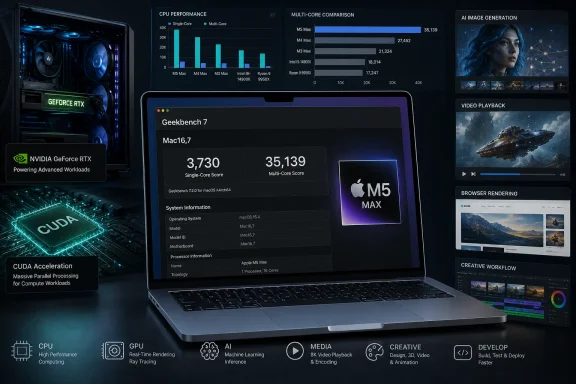
The headline M5 Max result shows:
- Single-core score: 3,730
- Multi-core score: 35,139
- Processor: Apple M5 Max
- CPU topology: 18 cores
- Memory: 48GB unified memory
- Operating system: macOS 26.5.2
- Geekbench version: 7.0.0 for macOS AArch64
The single-core figure reinforces Apple silicon’s longstanding strength in latency-sensitive and lightly threaded work. Geekbench 7’s individual tests show particularly strong results in media playback, structure-from-motion processing, PDF handling, browser activity, and compiler-related tasks. The M5 Max achieved a notably high 5,357 in the Video Player subtest and 4,439 in Structure from Motion, illustrating how the updated suite can reward a platform’s broad media and image-processing capabilities.
The multi-core score is also substantial, though it needs to be read carefully. It is not a direct measure of how quickly a machine will compile an enormous Windows codebase, render a feature-length project in a professional 3D package, or process a high-volume server workload. Geekbench 7 is expressly less focused on strict aggregate throughput than benchmarks built for sustained high-core-count compute.
That distinction is central to interpreting every Geekbench 7 result, whether the hardware comes from Apple, AMD, Intel, Qualcomm, or NVIDIA.
Background: Why Geekbench 7 Looks So Different
Geekbench has always occupied a particular place in the benchmarking landscape. It is easy to run, available across major desktop and mobile platforms, and supported by a public online database of submitted results. That combination makes it valuable for quick comparisons across Windows, Linux, macOS, Android, and iOS hardware.
Its limits have been equally familiar. A short benchmark cannot fully describe a PC’s gaming performance, battery life, cooling behavior, memory bandwidth, storage responsiveness, driver maturity, or real-world application compatibility. Nor can it settle a debate over whether a Windows workstation or MacBook Pro is better for a particular professional workflow.
Geekbench 7 does not solve every one of those problems. Instead, it rebalances the suite to better reflect the tasks users perform on contemporary devices.
A Shift Toward Realistic Interactive Workloads
The revised CPU benchmark includes a larger and more diverse set of task components. Familiar categories remain, but they have been expanded and modernized.
File Compression, for example, now works across multiple archive types and compression libraries, using LZ4, zlib, and Zstandard with SHA-1 verification. That is more representative of the mix of compression approaches seen in developer tools, installers, backups, archives, and productivity applications than a single narrow compression job.
PDF Viewer uses PDFium, the rendering engine associated with Chromium-based browsing. That makes the workload especially relevant to Windows users, because Chromium engines dominate a large share of browsing and embedded document-viewing experiences on modern PCs.
Photo Library now incorporates JPEG XL and DNG alongside JPEG processing. It also uses image tagging and database operations, adding a more application-like flow than a simple isolated decode test. The benchmark’s Photo Editor task similarly expands its image set and adjustments.
Several workloads will sound familiar to Windows power users and developers:
- OpenStreetMap routing
- Headless browser rendering
- Clang compilation
- Python-based Markdown-to-HTML conversion
- Blender Cycles ray tracing
- Jolt physics simulation
- Compression and asset processing
- HDR image operations
This mixture is designed to expose a system’s ability to handle varied workloads rather than excel at one narrowly optimized routine.
Media Work Is Now a First-Class Benchmark Category
The largest conceptual change is Geekbench 7’s emphasis on media. The benchmark treats communication, video streaming, playback, captioning, and content processing as core computing tasks rather than peripheral features.
That approach is timely. Windows PCs now routinely perform real-time background effects in Teams, Zoom, Discord, browser-based conferencing platforms, and enterprise collaboration software. They decode increasingly efficient video formats, encode clips for sharing, process photos from high-resolution cameras, and use AI-enhanced filters that were once limited to specialized applications.
Geekbench 7 includes a media group with workloads such as:
- Video Encoder, using the AOM AV1 encoder on simulated screen-sharing footage
- Audio Encoder, processing music and speech through the Opus codec
- Video Decoder, combining AV1 unpacking, Opus decoding, resampling, and Whisper-powered caption generation
The Video Decoder workload is especially interesting because it is a chain of operations rather than a single decode rate. That reflects the way modern applications often move media through multiple processing stages before a user sees the final result.
For a Windows laptop buyer, this is potentially more useful than a synthetic integer test alone. A machine that delivers a high score in a task like this may be better positioned for captioning, conferencing, local media processing, and browser-based entertainment. But it is still not a replacement for measuring the exact application stack a user depends on.
What the M5 Max Score Reveals—and What It Does Not
The Apple M5 Max result is compelling because it appears near the beginning of Geekbench 7’s public life. New benchmark versions always create a rush to establish pecking orders, and Apple’s top-tier laptop silicon is a natural early point of interest.
Still, the score is most useful as a data point, not as a final ranking.
Strong Single-Core Performance Remains Apple’s Calling Card
A 3,730 single-core score suggests that the M5 Max continues to perform extremely well in the type of work where one fast core, low latency, efficient caches, and aggressive boost behavior make the difference. In daily use, these qualities can influence how responsive a machine feels during light application work, browser activity, scripting, document manipulation, interface work, and many creative tools.
The score should be especially notable for Windows users tracking the wider ARM PC transition. Windows on ARM devices powered by Qualcomm processors have improved dramatically in responsiveness, efficiency, and native software support. Apple’s continued high single-threaded performance demonstrates the competitive pressure on every ARM PC vendor, as well as on Intel and AMD’s mobile architectures.
However, a Geekbench single-core victory is not the same thing as a blanket productivity victory. Windows software can behave very differently depending on whether it runs natively on x86-64, natively on ARM64, through emulation, or with a GPU-accelerated component. Drivers, plugins, security software, browser engines, storage performance, and memory capacity can all matter more than a single-core benchmark score.
The Multi-Core Result Is Impressive but Not a Server Metric
The M5 Max’s 35,139 multi-core score looks formidable, particularly for a chip intended for a portable workstation. Its individual multi-core subtest performance is high in areas such as Clang compilation, asset compression, ray tracing, photo editing, and general photo-library processing.
Yet Geekbench 7’s multi-core design intentionally does not behave like a pure scaling test. That is not a flaw by itself. It is a design choice.
A benchmark can attempt to answer different questions:
- How quickly can a device complete a sequence of common user-facing tasks?
- How efficiently does a processor use all available CPU resources during a bounded workload?
- How much sustained throughput can a platform produce over hours of compilation, rendering, scientific computing, virtualization, or database processing?
- How well does a server process parallel jobs from many users or services simultaneously?
Geekbench 7 is strongest in the first two categories. It is less definitive for the latter two.
That means a desktop Ryzen 9 processor, an Intel Core Ultra desktop part, or a high-core-count Threadripper and Xeon workstation could appear closer to an Apple M5 Max than raw core counts might suggest. Such a result should not be misread as evidence that an 18-core laptop processor can automatically replace a workstation configured for sustained professional throughput.
For Windows workstation planning, SPEC CPU, Cinebench, Blender rendering tests, compile-time testing, engineering application benchmarks, virtualization workloads, and storage-heavy productivity tests remain essential companions to Geekbench.
Geekbench 7 GPU Testing Brings CUDA Into the Main Conversation
Perhaps the most consequential change for the Windows ecosystem is Geekbench 7’s revised GPU benchmark and its inclusion of native NVIDIA CUDA support.
This is a major development because NVIDIA GPUs remain dominant in Windows gaming PCs, creative workstations, AI development rigs, scientific compute machines, and professional visualization systems. A cross-platform GPU benchmark that can use CUDA directly is more relevant than one that depends on translation layers or indirect paths that may distort performance.
A Modern Mix of AI, Imaging, and Creative Tests
Geekbench 7’s GPU suite moves beyond simple graphics-oriented kernels. Its workload mix incorporates computer vision, machine learning, image manipulation, rendering, and simulations.
The new tasks include:
- DeepLabV3+ for background segmentation and blur effects
- RetinaFace for face-detection and face-filter workflows
- RFDN image upscaling from 256×256 to 1024×1024
- Horizon correction and image adjustments
- Photo filters
- LUT color grading with tetrahedral interpolation
- RAW image processing, including denoising, color work, and demosaicing
- Feature matching
- Path tracing based on the Blender BMW scene
- Simulation workloads
This is a far more relevant mix for a modern Windows PC than a score derived mainly from conventional compute primitives. The workloads overlap conceptually with what users encounter in Adobe applications, video conferencing clients, image editors, creator software, local AI tools, and GPU-accelerated media pipelines.
Why CUDA Support Matters for Windows PCs
NVIDIA hardware has long been compared through a confusing collection of APIs and application-specific acceleration paths. CUDA is critical for many professional and AI workflows, but it does not run on AMD Radeon or Intel Arc GPUs. OpenCL, Vulkan, DirectCompute, Metal, and vendor-specific APIs all have their own strengths and compatibility implications.
By adding CUDA, Geekbench 7 can better represent the native execution model used by NVIDIA hardware. That should produce more meaningful comparisons within the NVIDIA ecosystem and give users a clearer picture of how GeForce and RTX professional products respond to the benchmark’s modern workloads.
There is a caveat: cross-API comparisons still demand caution. A CUDA result on an RTX GPU, a Metal result on Apple silicon, an OpenCL result on an AMD GPU, and a Vulkan result on an Intel Arc card can all be useful, but they are not necessarily identical representations of the same underlying software path.
The practical lesson is straightforward: compare like with like whenever possible.
For a Windows user choosing between two NVIDIA GPUs, CUDA-based Geekbench 7 data may be extremely informative. For a buyer deciding between a Windows RTX laptop and an Apple MacBook Pro, the GPU scores should be considered alongside application support, RAM or VRAM capacity, external-display requirements, gaming needs, driver behavior, and the specific creative suite in use.
Why Windows Enthusiasts Should Care About an Apple Benchmark Result
An Apple M5 Max result may initially seem remote from a Windows-focused audience. It is not.
WindowsForum readers increasingly evaluate PCs in a market shaped by competing architectures and platform strategies:
- AMD Ryzen and Ryzen AI systems balancing performance, graphics, and efficiency
- Intel Core Ultra laptops and desktops emphasizing hybrid architectures and integrated NPUs
- Qualcomm Snapdragon X Windows on ARM systems pursuing battery life and always-connected computing
- NVIDIA RTX GPUs defining the highest end of gaming, content creation, and local AI performance
- Apple silicon continuing to set an important efficiency and single-threaded performance reference point
Geekbench 7 creates a common language across many of those platforms. It does not erase architectural differences, but it gives the industry a refreshed lens through which to view them.
Cross-Platform Visibility Is a Real Strength
A Windows PC benchmark is most useful when it can be run on the hardware people actually use. Geekbench 7 is available across major operating systems, including Windows, Linux, macOS, and Android, with preview availability extending to Linux environments on ARM and RISC-V.
That broad support matters as Windows diversifies. A user may own a gaming desktop with an RTX GPU, a Snapdragon-based ultrabook, an Intel-powered work laptop, and an Android phone. Geekbench can generate a consistent set of high-level results across all of them.
No score can perfectly normalize the differences between operating systems, compilers, drivers, APIs, and scheduling policies. But the ability to run the same benchmark family across platforms remains one of Geekbench’s defining advantages.
Risks, Limitations, and Early-Version Concerns
Geekbench 7’s redesigned approach is promising, but it arrives with predictable risks.
One Result Is Never a Product Review
The Apple M5 Max score comes from one uploaded system. It is not a controlled lab average, nor does it establish the performance of every M5 Max configuration. Cooling capacity, power mode, memory configuration, operating-system revisions, background tasks, firmware, and benchmark version can all affect results.
The same is true for Windows results. A high-scoring desktop may use aggressive BIOS power limits, faster memory, elevated fan curves, or a lightly loaded test installation. A laptop score may have been recorded while plugged in, in a performance profile, or after the device had reached a particular thermal state.
The proper use of benchmark databases is to identify patterns across multiple credible submissions—not to treat a single entry as conclusive.
New Workloads Create New Optimization Incentives
Every benchmark influences vendor behavior. Once a test becomes widely cited, hardware and software companies have an incentive to optimize for it. That is not necessarily improper; performance engineering is part of product development. The concern arises when gains in a benchmark do not translate into gains for ordinary applications.
Geekbench’s expanded real-world workload set makes narrow optimization harder than in a simplistic synthetic test, but it cannot eliminate the possibility. Users should continue to look for independent testing in the actual programs they run.
Public Result Management Appears Immature
There is also an early usability issue around results management. Uploaded Geekbench 7 entries associated with an account may not yet appear properly on the account page, which makes result tracking and historical comparisons less convenient.
That is a small issue compared with benchmark validity, but it matters. A public result browser is most useful when users can organize runs, preserve links, identify the exact configuration, and compare before-and-after changes following driver updates, BIOS revisions, or Windows feature releases.
Until the account experience matures, users should save direct links to important submissions and maintain their own records of settings, temperatures, power plans, drivers, and memory configurations.
How to Use Geekbench 7 Responsibly on Windows
Geekbench 7 can be a valuable Windows performance tool if it is used as part of a broader test strategy.
A Practical Benchmarking Checklist
- Run the test more than once.
Record at least three runs and look for consistency rather than celebrating the highest number. - Use the appropriate power profile.
On laptops, test both balanced and performance modes while connected to AC power. Note whether the system’s vendor software changes fan or power behavior. - Document your configuration.
Record your Windows version, GPU driver, chipset driver, BIOS revision, memory capacity, memory speed, storage state, and power settings. - Separate CPU and GPU conclusions.
A fast CPU score does not guarantee excellent GPU performance, while a high GPU score does not guarantee a responsive system in lightly threaded tasks. - Compare within the same Geekbench version.
Do not use Geekbench 6 data to calculate performance gains or losses against Geekbench 7. - Use specialized tests for specialized workloads.
Test games in real games. Test video exports in your editing application. Test local AI models with the frameworks you use. Test compilation with your real codebase. - Watch sustained performance.
Run longer workloads after Geekbench if buying a laptop or compact desktop. Short burst performance and sustained productivity performance are different measurements.
The Best Role for Geekbench 7
Geekbench 7 is likely to be most valuable as a quick, cross-platform health check. It can help identify whether a new Windows laptop is operating as expected, whether a driver update altered GPU compute performance, whether an overclock or undervolt produced a measurable change, or whether a compact system is competitive in everyday creative and media tasks.
It is less suitable as the sole deciding factor for a gaming PC purchase, a professional workstation deployment, a server build, or an enterprise fleet refresh.
That is not a criticism unique to Geekbench. It is the reality of all benchmark scores. The more a number tries to summarize, the more context users need to interpret it properly.
The Bottom Line
The early Apple M5 Max Geekbench 7 result is impressive, with 3,730 single-core points and 35,139 multi-core points highlighting the chip’s potential in modern interactive, media-focused, and mixed creative workloads. But the result is only one piece of a much larger story.
The bigger development is Geekbench 7 itself. Its new baselines, revamped CPU workloads, strong focus on media processing, and GPU tests built around AI and creative effects reflect how people now use laptops and desktops. Native CUDA support also gives the benchmark a more meaningful role in the Windows ecosystem, where NVIDIA acceleration remains central to gaming, visual production, research, and local AI.
For Windows users, the arrival of Geekbench 7 should prompt a fresh round of testing rather than a rush to compare old charts. Its scores will become more useful as the database fills with Ryzen, Core Ultra, Snapdragon, Arc, Radeon, and GeForce systems across a range of real configurations.
The M5 Max may be one of the first prominent entries in that new landscape, but the lasting significance of Geekbench 7 will be determined by how well it captures the changing balance between CPU speed, GPU acceleration, media engines, AI workloads, and the everyday responsiveness that defines a modern PC.
