
But the IT15 is not a new 2026 arrival, nor is its 99-TOPS label a measure of a single dedicated AI accelerator. Geekom’s own product materials and Intel’s platform specifications combine the CPU, integrated GPU, and NPU into that total. The distinction matters for anyone expecting Copilot+ PC-class on-device AI features or shopping for a local LLM machine.
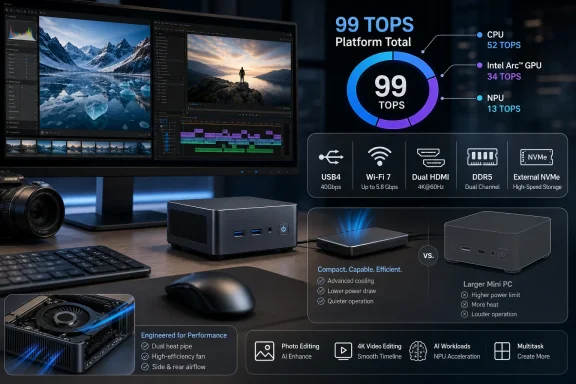 The 99-TOPS number is a platform total, not NPU performance
The Core Ultra 9 285H’s Intel AI Boost NPU is rated for up to 13 TOPS. Intel attributes up to 77 TOPS to the Arc 140T integrated GPU and about 9 TOPS to the CPU, producing the heavily advertised 99-TOPS total when all three compute blocks are counted together.
That is a legitimate way to describe aggregate AI throughput, but it does not mean every AI application can access 99 TOPS, or that the IT15 has a 99-TOPS neural processor. Software has to support the relevant execution path—CPU, GPU, NPU, or some combination—and results will vary with model format, memory use, drivers, and the application’s backend.
Liliputing made the practical implication clear in its IT15 coverage: the 13-TOPS NPU falls short of the 40-TOPS NPU threshold Microsoft established for Copilot+ PCs. Buyers should therefore not assume that the Mini IT15 receives every Windows feature reserved for Copilot+ hardware merely because its marketing material says “AI PC” and “99 TOPS.”
For Lightroom Classic, Photoshop, Capture One, Premiere Pro, and DaVinci Resolve users, that limitation is less dramatic than it sounds. Those workflows benefit more directly from a fast CPU, usable integrated GPU acceleration, adequate RAM, and hardware media engines than from Windows’ NPU-gated features. The IT15 has the right general ingredients for that work. Camera Jabber’s claim that it is comfortable with GPU-assisted photo editing and 4K media tasks is consistent with the platform’s capabilities, while Tom’s Guide likewise found it capable of demanding photo and video editing workloads.
What Camera Jabber does not provide is its own export-time, AI Denoise, or Resolve benchmark data. “Smooth” timeline playback and “quick” exports are reasonable expectations for some 4K projects, but they should not be read as a quantified performance finding across codecs, effects, source media, or project complexity.
The compact chassis sets the real performance ceiling
The Core Ultra 9 285H name does not guarantee identical results across mini PCs. Notebookcheck’s testing of the GMKtec EVO-T1, which uses the same processor and Arc 140T graphics, shows exactly why.
Notebookcheck reported that Geekom sets the Mini IT15’s sustained power limit at 33W, while GMKtec lets the EVO-T1 operate at up to 80W briefly and around 70W under sustained load in its performance mode. That difference is not a minor firmware preference. It changes how long the processor and graphics can hold higher clocks during renders, encodes, shader-heavy edits, compilations, and local inference.
The EVO-T1 consequently led the IT15 in several of Notebookcheck’s comparative multi-core and graphics-oriented results. In one Geekbench 6 multi-core comparison, the machines were close; in other sustained or compute-heavy tests, the GMKtec’s higher power envelope opened a wider advantage. A buyer comparing only processor names could easily miss that distinction.
The trade-off is physical and acoustic. GMKtec’s larger design provides more cooling capacity, but Notebookcheck found its performance mode noticeably loud. Tom’s Guide also described an audible hum from the IT15, so “quiet” should be treated as a relative claim, not a promise of silence. The Mini IT15 is designed to fit behind a monitor or disappear on a desk; it does not evade the basic relationship between a 33W sustained limit, heat, and fan noise.
For an editor who exports a few projects a week and values a small, tidy Windows workstation, Geekom’s restraint can be sensible. For someone routinely rendering long 4K projects, transcoding large archives, compiling code, or running GPU compute jobs for hours, the IT15’s compact cooling policy becomes a reason to consider a larger mini PC—or a desktop with discrete graphics—rather than a flaw hidden by the same Core Ultra 9 badge.
Shared DDR5 is useful, but it is not workstation-class unified memory
Camera Jabber also presents the IT15’s shared-memory design as an advantage for larger AI models. In a narrow sense, it is: Intel’s integrated Arc graphics does not depend on a small pool of soldered VRAM. The GPU accesses system DDR5, and that gives the machine more flexibility than an integrated design constrained by a tiny fixed graphics-memory allocation.
However, this is ordinary shared system memory in a dual-SODIMM PC, not the high-bandwidth unified-memory architecture found in systems built specifically around large local AI workloads. Geekom lists configurations up to 64GB of DDR5-5600, while the 285H processor itself can theoretically support more memory in other designs. The Mini IT15’s actual ceiling is therefore the one that matters: 64GB, shared by Windows, applications, the CPU, and the integrated GPU.
That can work for smaller quantized language models, image-generation experiments, and AI-assisted creative tools. It is not the same proposition as a Ryzen AI Max+ 395 mini PC with up to 128GB of shared memory and materially stronger integrated graphics. Those systems target local-model users willing to pay for capacity and graphics throughput; the IT15 is better understood as a traditional productivity PC with competent integrated AI and graphics hardware.
There is a related storage limitation that deserves more attention than the TOPS number. Liliputing found one M.2 2280 PCIe 4.0 NVMe slot in the IT15, plus an unpopulated M.2 Key-B slot limited to slower SATA storage. That is enough for a 2TB system drive and an additional archive drive, but it is less flexible than mini PCs that offer two or three full-speed NVMe sockets. For photographers and video editors maintaining active catalogs, proxies, cache files, source footage, and backups, the internal expansion plan matters more than an aggregate AI rating.
A capable editing mini PC, with a specific buyer in mind
The Mini IT15’s strongest case is straightforward: it brings a Core Ultra 9 285H, Arc 140T graphics, Windows 11 Pro, modern networking, and a practical collection of display and USB ports into a chassis measuring roughly 117 by 112 by 45.5 mm. TechRadar’s tested configuration listed 32GB of DDR5-5600 memory and a 2TB PCIe 4.0 SSD, which is a sensible baseline for creative applications and large RAW libraries.
The Windows advantage here is convenience rather than a unique breakthrough. Users can attach several displays, run standard x86 creative suites without translation layers, connect fast external NVMe storage through USB4, and mount the unit with the supplied VESA bracket. For a desk-based Lightroom or Photoshop station, it offers much of the day-to-day feel of a small tower without the footprint.
The caveat is that Geekom’s IT15 should be bought for its compact all-rounder design, not as the highest-performing implementation of the 285H or as a substitute for an AI workstation. The same chip can run considerably faster in a roomier chassis, while the 13-TOPS NPU means it does not meet Microsoft’s Copilot+ hardware threshold. And creators who need several fast internal drives will find the single full-speed NVMe slot restrictive sooner than they expect.
Camera Jabber’s core recommendation holds up if the target is a small Windows editing PC with modern ports and respectable integrated graphics. The buyer should simply treat “99 TOPS” as a platform marketing total, choose 32GB or 64GB of RAM from the outset, budget for external USB4 storage if media libraries will grow, and compare sustained-power limits before assuming that every Core Ultra 9 285H mini PC performs alike.
