
A long press of the Mac’s Fn key invokes the feature, letting users dictate into an active document, message composer, browser field, or other editable window without first opening a separate Gemini chat. Google product managers Michael Friedman and Alvin Zhou described the capability as a way to create, edit, and summarize material while remaining in the current workflow.
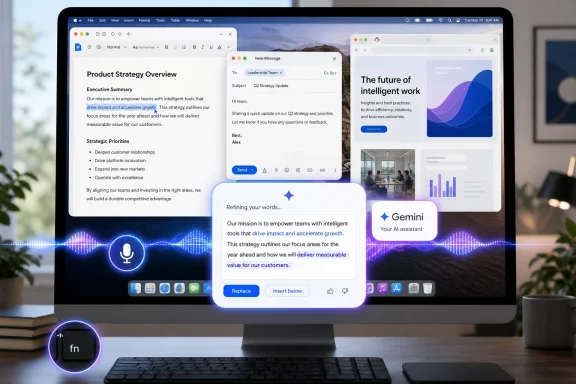 Gemini turns dictation into a drafting tool
The default mode is not simply speech-to-text. According to TestingCatalog’s report, Gemini can remove verbal filler, interpret mid-sentence corrections, format output, and turn rough spoken notes into a more polished draft before inserting it at the cursor.
That potentially makes the feature more useful for longer-form work than conventional system dictation. A user could dictate a reply, a meeting summary, or a first-pass document in Microsoft Word, Google Docs, Outlook on the web, or another app, then keep editing in place rather than shuttling text through an AI prompt window.
Google positioned Gemini for Mac around reducing context switching when it launched the native app in April. The app already supported an Option+Space shortcut and window sharing so Gemini could work from content visible on screen; Speak to Window shifts that same idea toward system-wide, voice-first creation.
On-screen reasoning is an optional escalation
A separate Gemini setting enables a reasoning mode that can use visible on-screen context for more involved spoken requests. TestingCatalog says users can reference selected text, local files, images, and documents when asking Gemini to extract information, summarize material, rewrite a passage, or change its tone.
That distinction matters. Basic dictation primarily concerns what a user says; context-aware requests may involve the contents of an active window or selected material. For IT teams, that makes data handling and Mac privacy permissions the real operational question—not just whether the Fn-key shortcut is convenient.
Mac users should verify what screen, accessibility, microphone, and file permissions Gemini has received before enabling the feature in environments where customer data, source code, regulated documents, or administrative consoles may be visible. The practical safeguard is familiar: do not treat an AI assistant with screen context as though it sees only the final words being inserted.
A Mac-only move with desktop-AI implications
Speak to Window is another sign that desktop AI competition is moving beyond chat sidebars toward tools embedded in the active application. Microsoft’s Windows ecosystem has pursued a similar destination through Copilot integrations, voice access, and AI-assisted writing features, though Google’s implementation is specifically aimed at the macOS desktop app.
For Gemini Mac users, the immediate value is simple: an Fn-key hold can become a shortcut for turning spoken intent into editable text where work is already happening. The more consequential change will be whether organizations permit the optional screen-aware mode on managed Macs—and under what controls.
