
That sounds like ordinary refactoring advice, but generative coding changes the stakes. A developer can now turn a plain-language request into a working feature, helper function, API wrapper, test scaffold, or entire application screen in minutes. The friction that once constrained software growth—typing, syntax recall, boilerplate, and implementation time—has been dramatically reduced. The friction of understanding, validating, maintaining, and securing that new code has not.
As XDA Developers argues, AI is extraordinarily willing to say yes. It will create the second version of an existing utility, add an abstraction around a single line of logic, or build a fresh pathway for a behavior already buried elsewhere in the repository. The immediate result can work perfectly. The longer-term result is a codebase where the next change is slower, riskier, and increasingly dependent on asking the model to rediscover what it created in prior sessions.
For Windows developers, this is particularly relevant as AI tools become more deeply embedded in Visual Studio and Visual Studio Code workflows. Microsoft is now actively teaching developers to use GitHub Copilot Agent to identify and consolidate duplicate logic, rather than treating Copilot strictly as a code-generation engine. That is a notable shift in emphasis: AI assistance is no longer only about producing more output. It is also becoming a way to make existing projects smaller and easier to reason about.
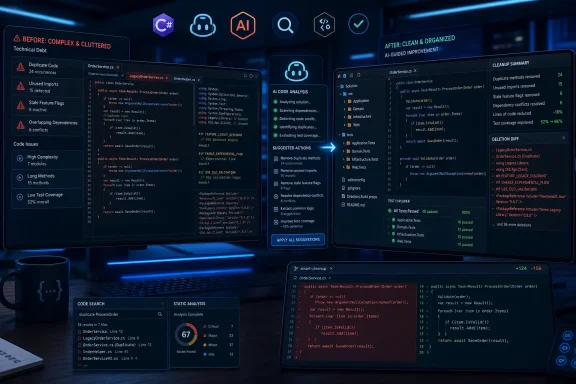 The Bottleneck Moved From Typing to Understanding
The old coding bottleneck was implementation. A feature required someone who knew the language, framework, build system, APIs, conventions, and the project’s accumulated history. AI has not eliminated that expertise, but it has lowered the cost of producing plausible code to the point where a developer—or an ambitious non-developer—can generate a great deal of it before fully understanding the system underneath.
That is the appeal of what has become known as vibe coding: describe the intended outcome, accept the generated implementation, test whether it appears to work, then move to the next request. It is valuable for prototypes, internal utilities, proof-of-concept apps, and isolated automation. But it also changes the failure mode. Instead of being blocked from adding a feature, teams can add it too easily.
Google’s 2025 DORA report made a similar point in broader organizational terms: AI tends to amplify the condition of the team and its engineering environment. A disciplined team with tests, review practices, architecture boundaries, and reliable delivery pipelines can use AI to move faster. A disorganized project can use the same tools to scale its disorder.
The important distinction is that functional code is not necessarily understandable code. An application can pass a happy-path test while containing duplicated data access logic, unused dependencies, dead feature flags, inconsistent error handling, overly broad permissions, and slightly different copies of the same business rule. All of those defects can stay invisible until a change request exposes them.
AI can accelerate the first implementation. It cannot make the cost of future comprehension disappear.
Deletion Is a Different Kind of AI Prompt
The XDA Developers piece makes the useful case that “remove code without changing behavior” should be treated as an explicit development task, not as something a model will volunteer while it is busy satisfying feature requests.
That means changing the prompt from “add a settings panel” to something more constrained:
- “Identify unused imports, unreachable branches, dead functions, and obsolete feature flags in this file. Do not edit anything yet.”
- “Search the solution for existing implementations of this behavior before creating a new helper.”
- “Find duplicated validation logic across these C# projects and propose one consolidation plan.”
- “List abstractions that have only one caller or do not reduce complexity.”
- “Prepare a minimal refactoring patch that preserves public APIs and existing behavior.”
The key word is minimal. Asking an agent to “clean up the codebase” can produce a sweeping rewrite with too much surface area to review safely. Asking it to identify one kind of waste, explain the evidence, propose a small patch, and then run the relevant tests creates a much safer loop.
Microsoft’s Copilot training material on duplicate-logic consolidation reflects this process. The company distinguishes between using Copilot’s Ask mode to understand a repository and locate redundancy, then using Agent mode to perform the refactoring. That separation matters. Discovery and modification are different jobs, and a developer should be able to reject the proposed deletion before the tool touches production logic.
For a .NET solution, the safest version of this process starts with search and evidence. Let the assistant identify the call sites, explain why a method is unused, point to the tests that cover the relevant behavior, and show the expected diff. Only then should it make an edit.
AI-Generated Debt Is Not Just a Theoretical Problem
The warning against code bloat is not merely aesthetic. A March 2026 research paper, Debt Behind the AI Boom, examined more than 304,000 verified AI-authored commits across 6,275 GitHub repositories. Its authors reported that over 15 percent of commits from every assistant studied introduced at least one issue identified by static analysis, while code smells represented the overwhelming majority of the problems found. Nearly a quarter of tracked AI-introduced issues remained in the repositories’ latest revisions.
That does not prove every Copilot or Claude Code change is poor, nor does it mean human-written code is clean by default. The study’s useful lesson is narrower: generated code can leave behind maintenance costs that persist long after the original prompt is forgotten.
Other research offers a necessary counterweight. A 2025 controlled study of 151 participants found significant speed improvements for developers using AI assistants when adding features, but did not find a clear, systematic decline in maintainability when different developers later evolved the resulting code. In other words, the evidence does not support a simplistic claim that AI-written code is inherently unmaintainable.
The more credible conclusion is that outcome depends on process. AI can make developers faster, and it can generate redundancy at a pace conventional workflows rarely allowed. Both can be true.
For IT teams, the practical risk is not a dramatic “AI broke the whole application” event. It is a steady accumulation of low-grade complexity: a local cache layered over an existing cache, separate HTTP clients with subtly different retry policies, duplicate authentication checks, a legacy configuration field that nobody removes, or a new service abstraction that has one caller and no real boundary to enforce.
Each item may be harmless. Together, they make incident response, patching, onboarding, and security review harder.
Windows Tooling Already Supports the Cleanup Loop
Visual Studio’s newer Copilot features make this workflow easier to put into practice. Copilot Edits can prepare coordinated multi-file changes, while agent-based features can run commands and iterate on build failures. Microsoft has also introduced Copilot testing for .NET in Visual Studio 2026 version 18.3 and later, allowing developers to generate, build, and run unit tests for C# projects through the Test Explorer workflow.
That does not turn test generation into proof of correctness. Generated tests can faithfully validate the model’s own mistaken assumptions. But a deletion-oriented change is much safer when it begins with tests that describe current behavior, followed by a small diff, a build, static analysis, and targeted regression tests.
A sensible cleanup cadence for a Windows application or internal .NET service might be:
- Ask the AI to inventory duplicate helpers, unused code, stale configuration, and overlapping dependencies without making changes.
- Select one tightly bounded cleanup item and require an explanation of every affected caller.
- Have the tool generate or strengthen tests around the existing behavior before removing anything.
- Review the diff as a deletion, not a feature delivery, paying close attention to permissions, error paths, logging, telemetry, and configuration migration.
- Run the full build and relevant test suites before merging the patch.
This approach also avoids a common trap: reducing line count at the expense of clarity. Fewer lines are not automatically better. A 30-line function with comprehensible control flow may be safer than a compressed 10-line expression that obscures error handling. The objective is not code golf. It is eliminating code, dependencies, paths, and abstractions that no longer earn their maintenance cost.
The Best Prompt May Be “Does This Already Exist?”
The most valuable preventive step happens before a new feature is generated. Rather than telling the model to implement a requirement immediately, ask it to map the repository first.
“Find the closest existing implementation and explain whether this should be extended rather than rebuilt” is a much more mature prompt than “create a new service for this.” It forces the assistant into code-reading mode, makes existing conventions visible, and gives the human operator a chance to catch overlap before it becomes permanent.
That matters because code-generation models are optimized to produce an answer. They are not naturally incentivized to tell a user that the best answer is a three-line modification to a method written last week. Unless prompted otherwise, a tool with access to a large codebase may still choose the locally convenient solution: create a new file, new helper, new class, and new path through the program.
The next phase of AI-assisted development will therefore be less about whether a tool can generate an application from a description. It clearly can. The harder question is whether teams can preserve a codebase that humans, automated tools, and future AI agents can safely understand.
For developers using Copilot in Visual Studio, Claude Code in Windows Terminal, or any comparable assistant, the durable habit is simple: before approving the next feature, ask the tool to prove that it is needed. Then ask what can disappear.
