
Google is now showing at least some Microsoft Edge Dev users a Chrome download card on Google.com before they search, moving its browser-switch pitch from the Chrome download page to one of the web’s most frequently visited entry points. Windows Report says it observed the prompt immediately after opening the homepage in an Edge Dev profile signed in to a Microsoft account but signed out of Google; the card offered a prominent Chrome download button and a dismissive choice worded “Do not use Chrome.”
The important qualification is scope. This is an observed experiment, not an announced Google product change. Google has not published rollout criteria, supported regions, affected Edge versions, persistence rules, or an administrative control to suppress it. No independent outlet has yet reported the Edge-specific appearance described by Windows Report, so it should not be treated as a universal Edge behavior.
What is clear is the direction of travel. In May, Windows Report found the same homepage treatment in Brave, Vivaldi, and Perplexity Comet, while specifically saying it had not seen it in Edge or Opera. The new Edge Dev sighting therefore appears to expand a targeted campaign rather than introduce a brand-new kind of Chrome promotion.
A Chrome promotion on Google’s dedicated Chrome download page would be ordinary product marketing. A floating prompt on Google’s search homepage changes the timing: it reaches a person who may simply be using Google as a search engine, without first indicating any interest in changing browsers.
That timing is the real development for Windows users. Edge remains preinstalled and heavily integrated into Windows, and Google.com is a common first destination after a fresh PC setup or a newly created browser profile. A homepage-level recommendation gives Google an opportunity to market Chrome before the user searches for “Chrome download,” visits another browser’s site, or performs any action that makes browser-switching intent explicit.
Windows Report’s earlier report described the treatment as a lower-right floating card, not a conventional search advertisement or a small compatibility notice. The wording is also conspicuous. “Do not use Chrome” is a rejection option that still repeats the product name, rather than a neutral “Not now” or close button. The latest Edge report characterizes the body copy as calling Chrome “the browser built by Google,” while the May coverage quoted the headline as “Choose Chrome, the browser built by Google.” That variation may reflect an A/B-tested creative change, a shortened description of the same text, or a different version of the card. Without Google documentation or more public sightings, the exact current wording cannot be pinned down.
For managed environments, the card is mostly a user-experience issue rather than an installation pathway. It does not install Chrome silently, change the Windows default browser, or override enterprise browser policy merely by appearing. But it adds a first-party Google prompt to an environment where administrators may already be trying to standardize browser support, extensions, security settings, and sign-in behavior.
Google also does not need to guess which browser has opened its homepage. Microsoft’s own Edge developer documentation explains that websites can identify Edge through User-Agent Client Hints and, as a legacy fallback, the browser’s User-Agent string. On desktop, the legacy string includes both a Chrome-style token and a separate
That is why this episode reads as browser acquisition, not browser support. The earlier Windows Report testing found the homepage card in Brave, Vivaldi, and Comet — all Chromium-derived competitors — and the Edge Dev observation extends the same logic to Microsoft’s Chromium browser. Google is not warning that a site will fail in Edge. It is choosing to promote the browser that gives Google the direct product relationship.
There is a meaningful wrinkle in the Edge Dev detail. Microsoft says Edge Dev and Canary do not receive the User-Agent compatibility overrides used in Beta and Stable. Those preview channels expose the default Edge identity for site testing, whereas Stable and Beta can apply Microsoft-maintained overrides for specific sites to prevent compatibility failures. That does not prove Google is targeting Edge Dev specifically, but it means channel choice can alter the request and browser-identification conditions that Google sees.
The reporting does not establish whether the card is triggered by Edge’s channel, browser version, Windows version, geographic location, cookies, account state, IP reputation, prior Chrome installation signals, or a server-side experiment bucket. The test profile was signed in to Microsoft but signed out of Google, which rules out one simple explanation — a Google-account setting attached to that particular signed-in user — but little else. It also means reports from users on Edge Stable, Edge Beta, or unmanaged PCs may legitimately differ.
In 2021, Windows Latest reported that Edge showed selected users a “browse securely” warning when they reached Chrome’s download page. The message said Edge runs on the same technology as Chrome “with the added trust of Microsoft,” and directed people toward Edge instead of blocking the Chrome download. The Register independently documented the same wording and behavior in 2023 after it appeared in Edge Canary. More recent reporting by TechRadar described another Edge test on Chrome’s download page that emphasized privacy and security features, again with a “Browse securely now” call to action.
The implementation distinction matters. Microsoft’s prompt has typically appeared in Edge’s own browser interface or in a Microsoft-controlled Bing results page after a person has searched for Chrome or landed on Chrome’s download page. Google’s reported card is page content served on Google.com before a user performs a search. Both are forms of choice architecture — shaping a decision through placement and timing — but Google’s version acts earlier in the journey.
Microsoft’s browser promotions are also tied to its special position on Windows. Edge is supplied with Windows, and Windows can surface its defaults and feature prompts at system level. Google lacks that operating-system foothold on Windows, but it owns the search page that many users open first. The homepage card is Google using its strongest consumer web property to compensate for Microsoft’s Windows advantage.
Neither company’s prompt, as described in the reporting, is a technical block. Users can dismiss the card, download the competing browser, and change their default browser later. The concern is cumulative friction: users encounter competing product pitches while trying to complete an otherwise straightforward task.
For IT teams, the immediate risk is support noise rather than an uncontrolled deployment. A user who clicks through may install Chrome if local application controls permit it; whether that succeeds is governed by the organization’s existing Windows application-management, privilege, and browser policies, not by Google’s homepage card. Companies that mandate Edge or another browser should make sure their approved-browser policy and installation controls are already clear, because a homepage prompt is a reminder that browser-choice messaging can arrive from outside the operating system.
The most consequential unanswered question is rollout breadth. Windows Report’s May testing already showed that Google could select several Chromium rivals, but it did not initially see Edge. The August 6 Edge Dev report establishes that the exclusion is no longer reliable — at least for one tested configuration. Until Google explains the experiment or broader testing confirms it across Edge Stable, the right description is a limited, server-side Chrome acquisition test whose targeting criteria remain undisclosed.
For Windows users, the practical consequence is simple: the familiar “use Edge instead” pressure at the Chrome download stage now has a counterpart at Google’s front door.
What is clear is the direction of travel. In May, Windows Report found the same homepage treatment in Brave, Vivaldi, and Perplexity Comet, while specifically saying it had not seen it in Edge or Opera. The new Edge Dev sighting therefore appears to expand a targeted campaign rather than introduce a brand-new kind of Chrome promotion.
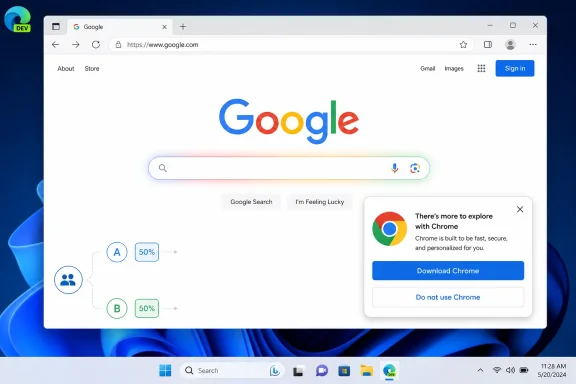 Google.com has become the point of interception
A Chrome promotion on Google’s dedicated Chrome download page would be ordinary product marketing. A floating prompt on Google’s search homepage changes the timing: it reaches a person who may simply be using Google as a search engine, without first indicating any interest in changing browsers.That timing is the real development for Windows users. Edge remains preinstalled and heavily integrated into Windows, and Google.com is a common first destination after a fresh PC setup or a newly created browser profile. A homepage-level recommendation gives Google an opportunity to market Chrome before the user searches for “Chrome download,” visits another browser’s site, or performs any action that makes browser-switching intent explicit.
Windows Report’s earlier report described the treatment as a lower-right floating card, not a conventional search advertisement or a small compatibility notice. The wording is also conspicuous. “Do not use Chrome” is a rejection option that still repeats the product name, rather than a neutral “Not now” or close button. The latest Edge report characterizes the body copy as calling Chrome “the browser built by Google,” while the May coverage quoted the headline as “Choose Chrome, the browser built by Google.” That variation may reflect an A/B-tested creative change, a shortened description of the same text, or a different version of the card. Without Google documentation or more public sightings, the exact current wording cannot be pinned down.
For managed environments, the card is mostly a user-experience issue rather than an installation pathway. It does not install Chrome silently, change the Windows default browser, or override enterprise browser policy merely by appearing. But it adds a first-party Google prompt to an environment where administrators may already be trying to standardize browser support, extensions, security settings, and sign-in behavior.
Edge is easy for Google to identify, even though both browsers use Chromium
There is no technical compatibility argument for presenting Chrome to Edge users. Microsoft Edge and Google Chrome are both Chromium-based browsers, sharing the same broad rendering-engine family and much of the underlying web-platform behavior. For ordinary websites, Edge does not need Chrome installed to render Google Search or access the Google account services already available in Edge.Google also does not need to guess which browser has opened its homepage. Microsoft’s own Edge developer documentation explains that websites can identify Edge through User-Agent Client Hints and, as a legacy fallback, the browser’s User-Agent string. On desktop, the legacy string includes both a Chrome-style token and a separate
Edg token; Client Hints can expose “Microsoft Edge” as a browser brand. In other words, a service can distinguish Edge from Chrome while also recognizing that both are Chromium-family browsers.That is why this episode reads as browser acquisition, not browser support. The earlier Windows Report testing found the homepage card in Brave, Vivaldi, and Comet — all Chromium-derived competitors — and the Edge Dev observation extends the same logic to Microsoft’s Chromium browser. Google is not warning that a site will fail in Edge. It is choosing to promote the browser that gives Google the direct product relationship.
There is a meaningful wrinkle in the Edge Dev detail. Microsoft says Edge Dev and Canary do not receive the User-Agent compatibility overrides used in Beta and Stable. Those preview channels expose the default Edge identity for site testing, whereas Stable and Beta can apply Microsoft-maintained overrides for specific sites to prevent compatibility failures. That does not prove Google is targeting Edge Dev specifically, but it means channel choice can alter the request and browser-identification conditions that Google sees.
The reporting does not establish whether the card is triggered by Edge’s channel, browser version, Windows version, geographic location, cookies, account state, IP reputation, prior Chrome installation signals, or a server-side experiment bucket. The test profile was signed in to Microsoft but signed out of Google, which rules out one simple explanation — a Google-account setting attached to that particular signed-in user — but little else. It also means reports from users on Edge Stable, Edge Beta, or unmanaged PCs may legitimately differ.
Google is mirroring a tactic Microsoft has used for years
The symmetry will be familiar to anyone who has downloaded Chrome from a new Windows PC. Microsoft has repeatedly used Edge, Bing, Windows setup experiences, and its web properties to argue that users should stay with Edge rather than install a rival browser.In 2021, Windows Latest reported that Edge showed selected users a “browse securely” warning when they reached Chrome’s download page. The message said Edge runs on the same technology as Chrome “with the added trust of Microsoft,” and directed people toward Edge instead of blocking the Chrome download. The Register independently documented the same wording and behavior in 2023 after it appeared in Edge Canary. More recent reporting by TechRadar described another Edge test on Chrome’s download page that emphasized privacy and security features, again with a “Browse securely now” call to action.
The implementation distinction matters. Microsoft’s prompt has typically appeared in Edge’s own browser interface or in a Microsoft-controlled Bing results page after a person has searched for Chrome or landed on Chrome’s download page. Google’s reported card is page content served on Google.com before a user performs a search. Both are forms of choice architecture — shaping a decision through placement and timing — but Google’s version acts earlier in the journey.
Microsoft’s browser promotions are also tied to its special position on Windows. Edge is supplied with Windows, and Windows can surface its defaults and feature prompts at system level. Google lacks that operating-system foothold on Windows, but it owns the search page that many users open first. The homepage card is Google using its strongest consumer web property to compensate for Microsoft’s Windows advantage.
Neither company’s prompt, as described in the reporting, is a technical block. Users can dismiss the card, download the competing browser, and change their default browser later. The concern is cumulative friction: users encounter competing product pitches while trying to complete an otherwise straightforward task.
What Edge users and administrators should expect
For ordinary Edge users, there is no repair or security action required. If the card appears, its download button should be treated like any other link to Google’s Chrome download flow, while “Do not use Chrome” dismisses the promotion. It should not be confused with a Microsoft Edge warning, Windows security alert, or a browser update prompt.For IT teams, the immediate risk is support noise rather than an uncontrolled deployment. A user who clicks through may install Chrome if local application controls permit it; whether that succeeds is governed by the organization’s existing Windows application-management, privilege, and browser policies, not by Google’s homepage card. Companies that mandate Edge or another browser should make sure their approved-browser policy and installation controls are already clear, because a homepage prompt is a reminder that browser-choice messaging can arrive from outside the operating system.
The most consequential unanswered question is rollout breadth. Windows Report’s May testing already showed that Google could select several Chromium rivals, but it did not initially see Edge. The August 6 Edge Dev report establishes that the exclusion is no longer reliable — at least for one tested configuration. Until Google explains the experiment or broader testing confirms it across Edge Stable, the right description is a limited, server-side Chrome acquisition test whose targeting criteria remain undisclosed.
For Windows users, the practical consequence is simple: the familiar “use Edge instead” pressure at the Chrome download stage now has a counterpart at Google’s front door.
References
- Primary source: Windows Report
Published: 2026-08-06T06:45:04+00:00
Loading…
windowsreport.com - Related coverage: windowsreport.com
Loading…
windowsreport.com - Related coverage: google.com
Loading…
www.google.com - Related coverage: support.google.com
Loading…
support.google.com - Related coverage: brave.com
Loading…
brave.com - Related coverage: learn.microsoft.com
Loading…
learn.microsoft.com - Related coverage: developer.chrome.com
Loading…
developer.chrome.com - Related coverage: learn.microsoft.com
Loading…
learn.microsoft.com - Related coverage: developer.microsoft.com
Loading…
developer.microsoft.com - Related coverage: digitalcitizen.life
Loading…
www.digitalcitizen.life - Related coverage: microsoftedge.github.io
Loading…
microsoftedge.github.io - Related coverage: michigan.gov
Loading…
www.michigan.gov - Related coverage: techradar.com
Microsoft’s latest desperate attempt to stop people using Edge to download Google Chrome focuses on internet safety | TechRadar
Microsoft is getting desperatewww.techradar.com - Related coverage: tomsguide.com
Searching for Chrome on Bing? Microsoft has a new clingy tactic to beg you to stay | Tom's Guide
Microsoft's latest move to convince Bing users to stop switching to Google Chrome includes a new comparison banner promoting the perks of using the default Windows browser.www.tomsguide.com - Related coverage: theregister.com
Loading…
www.theregister.com - Related coverage: windowsforum.com
Loading…
windowsforum.com - Related coverage: forbes.com
Loading…
www.forbes.com - Related coverage: windowsforum.com
Loading…
windowsforum.com - Related coverage: chromium.org
Loading…
www.chromium.org - Related coverage: medium.com
Loading…
medium.com - Related coverage: chromium.googlesource.com
Loading…
chromium.googlesource.com - Related coverage: umatechnology.org
Loading…
umatechnology.org - Related coverage: blogs.windows.com
Loading…
blogs.windows.com - Related coverage: blogs.windows.com