

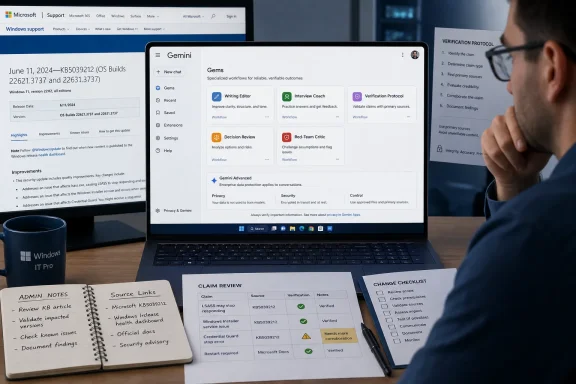
MakeUseOf’s August 9 guide identifies five reusable roles: writing editor, career coach, fact checker, decision compass, and contrarian reviewer. Google’s own Gemini documentation supports the basic premise. Gems preserve detailed instructions for recurring tasks, can be built from scratch or adapted from Google’s premade Writing Editor and Career Guide templates, and can use uploaded files as background knowledge.
For Windows users, administrators, and technical writers, the practical value is straightforward: stop pasting the same paragraph of role, tone, output format, and constraints into every new chat. The important correction is that no one needs five separate bots to gain that benefit. Build a small library around distinct workflows—tasks with stable inputs, repeatable outputs, and a clear human approval point—not around broad personality labels.
Google itself frames Gem instructions around four components: persona, task, context, and format. That is a more durable blueprint than telling Gemini to “make it better,” “be skeptical,” or “fact-check this.” Those vague instructions may influence the next answer, but they do not create a controlled process.
The five suggestions are really three kinds of work
The writing editor is the most immediately useful Gem in MakeUseOf’s list. Google ships a Writing Editor Gem as one of its examples, and its official guidance specifically supports uploaded documents, line-by-line feedback, structural suggestions, and formatting advice. A personal editor Gem can carry an organization’s house style, preferred capitalization, forbidden filler phrases, product naming conventions, and formatting rules from one drafting session to the next.
For technical work, the best version does not try to imitate a person’s entire voice. It defines testable editorial behavior. A Windows support editor, for example, can be told to preserve build numbers and KB identifiers exactly; distinguish an observed issue from a vendor claim; flag unsupported causal language; keep troubleshooting steps reversible; and return a clean revised draft followed by a short list of claims that still require checking. Those instructions turn the Gem into a repeatable editing pass rather than an unreliable ghostwriter.
The career coach and decision compass are both forms of structured rehearsal. One interrogates a candidate against a supplied job description; the other forces a decision through several lenses. They work best when their output is constrained: ask five questions before offering advice, identify evidence missing from the record, score options against criteria supplied by the user, and state what would change the recommendation.
The contrarian Gem is another useful variation of the same pattern. Its job is not to disagree theatrically. Its job is to find the weakest assumption, the unmeasured risk, and the information that would falsify a proposal. For IT staff, that can mean challenging an endpoint-management migration plan, a Windows 11 deployment timetable, or a proposed security exception. A Gem asked to “argue with me” will often produce shallow counterarguments; one instructed to examine dependencies, failure modes, rollback capacity, licensing assumptions, and operational ownership has a real assignment.
That leaves the fact-checking Gem. This is where the article’s advice needs a firmer boundary.
A Gem cannot promise to know what it has not checked
MakeUseOf recommends instructing a Gem not to guess at prices, versions, and news, and says Gems have direct access to Google Search. The official record is narrower. Google documents Google Search as a default source for Gemini’s separate Deep Research workflow, where the user starts a research request, can inspect or modify a research plan, and can select sources such as Search, Gmail, Drive, uploaded files, or NotebookLM notebooks.
Google’s developer guidance makes the underlying point plainly: grounding with Google Search should be enabled when a model needs obscure or recent facts. In other words, a sentence in a Gem’s instructions cannot make a language model current. It can tell Gemini to refuse unsupported answers or request a live search, but the user still needs to confirm that search or research actually happened and inspect the sources returned.
This distinction matters most for the Windows audience. A “fact-checking” Gem should never be trusted to identify the latest Windows build, cumulative update, revised support deadline, known issue, CVE severity, or Microsoft 365 licensing term without checking the primary record. The safer design is a verification protocol Gem with a defined output:
- It should separate stable background information from facts that require current verification.
- It should require first-party confirmation for Microsoft KB articles, Windows release-health notices, MSRC advisories, CVEs, and product lifecycle dates.
- It should return a list of unanswered questions rather than filling gaps with plausible prose.
- It should label each assertion as vendor-announced, independently observed, or unverified.
That is more valuable than asking for citations as a cosmetic add-on. Links and source lists can be irrelevant, stale, or attached to claims they do not actually support. The standard is whether the cited material proves the claim, not whether an AI response has a bibliography.
Deep Research can help with broad reconnaissance, and Google says it normally takes five to 10 minutes because it reviews multiple sources. It also has usage limits, with higher limits for Google AI Pro and Google AI Ultra subscribers. It is therefore a poor default for a quick editor pass or every small decision, but useful for a research assignment that starts with a question and ends with material a human will audit.
Uploading a “knowledge base” changes the privacy and sharing calculus
MakeUseOf suggests adding interview documents, budgets, and other personal materials to Gems. That can improve the output, but it also changes the exposure of the assistant. Google says a Gem can use uploaded device files or Google Drive files as knowledge, and Drive-based additions require Gemini Apps activity to be enabled and the Google Workspace connection to be active.
This is not a reason to avoid Gems. It is a reason to build them like a lightweight internal tool, especially when a Gem is intended for a team. Do not upload HR records, confidential incident reports, customer exports, credential-bearing configuration files, or documents that contain secrets simply because Gemini can read them. Give a Gem a sanitized template, a redacted case study, or a controlled reference document whenever possible.
The sharing model deserves particular attention. Google’s current documentation says that people who can view a shared Gem can view its instructions and uploaded files; editors can also modify or delete both. When a shared Gem includes eligible files, Google prompts the owner to share access to those files. Shared Gems and their uploaded content are saved into a Google Drive folder.
That makes a shared Gem closer to a shared Drive artifact than a sealed AI persona. An organization that shares a help-desk response Gem or change-review Gem should treat the Gem’s instructions and attached documents as accessible content, review sharing permissions, and avoid putting sensitive operational details inside the instruction field on the assumption that users will see only the chat interface.
Google’s Gemini Apps Privacy Hub also says that, when Keep Activity is enabled, interactions and uploads may be used to improve Google services with human reviewers. With Keep Activity disabled, future chats are not used to improve Google’s AI models unless feedback is submitted, though Google says temporary chats and chats with activity off are retained for 72 hours for service operation and safety. The setting is a deployment decision, not a footnote.
Build procedures, then test them like procedures
The strongest Gem is usually the one that begins as a proven manual prompt. Use ordinary Gemini chats to refine a task until it produces a reliable result across several representative inputs. Only then move the stable instruction set into a Gem.
For the five roles MakeUseOf highlights, that yields a more practical starter set:
- A writing Gem should enforce a specific editorial checklist and preserve facts, rather than merely request a more natural tone.
- An interview Gem should extract requirements from a job description, ask progressively harder questions, and provide scored feedback against those requirements.
- A verification Gem should identify which claims need live checking and insist on primary sources for vendor, security, and release information.
- A decision Gem should compare options against user-provided criteria and show assumptions, trade-offs, and disqualifiers.
- A red-team Gem should identify the strongest objection and the evidence that could overturn the user’s conclusion, without inventing objections merely to sound balanced.
Keep each Gem narrow enough that a failed answer is easy to diagnose. “Be my expert technology adviser” combines too many jobs—research, writing, architecture, risk analysis, and product recommendations—into one assistant whose output cannot be audited consistently. A “Windows patch-note verifier” or “PowerShell script review checklist” Gem has a defined input, a known output structure, and a clear place for human judgment.
Google provides a preview pane when creating a Gem, but previewing one friendly example is not validation. Test the Gem with a clean input, an incomplete input, an ambiguous request, outdated source material, and a prompt that tries to push it outside its stated role. If it produces polished speculation when information is missing, tighten the instructions or stop using it for that class of task.
The point of Gems is to save the re-explanation tax, as MakeUseOf puts it. The durable payoff comes when that saved context is a documented process: clear task boundaries, current-source checks where they matter, controlled reference material, and an output a Windows professional can review before acting on it.