
Google frames the feature as an additional sign-in and recovery option for people who lose access to a phone, computer, password, or other usual authentication method. The company says the video is stored with consent, encrypted at rest, and removable from the Google Account security controls. It also says it uses live-movement prompts, video matching, and existing suspicious-login defenses to counter impersonation attempts. Google’s announcement makes a reasonable case that more recovery options can prevent a lost device from becoming a lost digital life.
Yet convenience is not the same as necessity. For most Windows users, the better immediate move is to retain established recovery methods—particularly passkeys, recovery contacts, recovery codes, and a protected recovery email—while Google’s selfie-video approach proves itself over time. Facial biometrics are uniquely personal, difficult to replace, and increasingly entangled with deepfake technology, age-estimation systems, and broader debates over how platforms should verify identity.
The new feature is not inherently reckless. But it deserves a higher standard of scrutiny than a new password-manager checkbox or another two-factor authentication prompt. A password can be changed. A recovery phone can be replaced. A face is not so easily rotated.
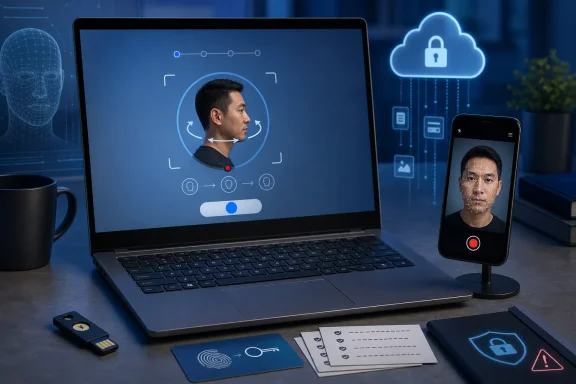 Overview: Google’s Face-Based Recovery Option
Google announced selfie video sign-in on July 23, positioning it as a backup method rather than a wholesale replacement for passwords, passkeys, or two-step verification. The setup process asks a person to look at their device camera and make a few guided head movements, capturing multiple angles of the face. In a later recovery scenario, the user records another video, and Google compares it with the stored enrollment capture. Google’s product post describes the goal as providing another route back into an account when a normal device or method is unavailable.
That distinction matters. This is not simply Windows Hello-style local biometric authentication, where a device’s camera or fingerprint sensor can unlock a PC while biometric data remains protected within the hardware security boundary. Google’s system involves a video capture that is retained in the user’s online account for future comparison. It is, in practical terms, a cloud-backed biometric recovery factor.
The feature is not available everywhere or to everyone. Google’s support documentation says that selfie video may be unavailable for some regions, accounts, and devices. It also excludes Google Workspace accounts, child accounts, and accounts enrolled in the Advanced Protection Program at launch. Google’s support page further notes that users cannot enroll while they are already locked out or in the middle of account recovery.
That final limitation is easy to overlook. Selfie video is not an emergency escape hatch that can be switched on after a crisis. Like backup codes, a recovery phone, or a security key, it must be established before it is needed.
How Selfie Video Sign-In Works
At a high level, Google’s workflow follows the familiar architecture of a remote identity-verification system.
Enrollment comes first
To add selfie video, eligible users go to Google Account > Security & sign-in > How you sign in to Google > Selfie video and follow the on-screen process. Google says the capture requires camera permission and that a person’s eyes, nose, and mouth should be visible; the company also instructs users to avoid backgrounds containing other people or images of faces. Google’s setup guidance indicates that a desktop without a usable camera can hand the process off through a QR code to another device.
The guided motion is not merely cosmetic. Asking someone to turn their head is a form of liveness check—a mechanism intended to establish that the system is seeing a present, responsive human rather than a static photo.
Recovery relies on a second capture
If Google offers selfie video during sign-in or recovery, the user records another short facial video and completes a requested movement such as turning their head. Google then compares the live video with the enrollment video. A successful face match can verify identity and permit account access. Google’s help documentation explicitly says that substantial changes in appearance may require the person to update the saved selfie video.
That creates a practical consideration that rarely appears in glossy authentication demos. Facial appearance changes over time, and not only because of age. A user may have a beard, shave it, wear different glasses, undergo medical treatment, change hairstyle, have swelling or injury, or simply use a poor webcam under bad lighting. Systems must balance a threshold strict enough to reject impostors against one flexible enough not to reject the legitimate account owner.
Deletion is available, but not necessarily instantaneous
Google says that users can delete a saved selfie video in their account settings. However, its support page also says deletion occurs “after a period of time,” and that Google may retain it temporarily as a security measure. If a person violated a Google policy, the company says it may keep the video longer in order to enforce its policies. Google’s deletion guidance is more nuanced than a simple “delete means immediately gone” promise.
That is not unusual for online services. Security logs, fraud controls, and legal obligations often make immediate erasure technically or operationally complicated. But it is precisely why biometric enrollment deserves more deliberation than turning on a convenience feature and assuming there is no long-term consequence.
Why the Idea Has Real Appeal
A cautious stance should not erase the legitimate benefits. Account recovery is one of the weakest and most stressful points in consumer security.
A Google Account can contain years of Gmail correspondence, Google Photos libraries, Drive documents, calendars, payment information, Android backups, Chrome data, and access to other services that use Google sign-in. Someone who loses both a trusted phone and an authenticator—or who never configured recovery methods well—can discover how little a conventional password matters once recovery begins.
For that audience, a video selfie can look like a useful spare key.
It may reduce dependence on a single device
People lose phones. They change numbers. SIM swaps occur. Hardware security keys can be misplaced. A recovery method based on a person’s physical presence can be appealing precisely because it is available across devices with cameras.
Reuters reported that Google sees the new feature as potentially useful in cases involving forgotten passwords, lost devices, or lack of access to preferred devices. Reuters’ report on the rollout also notes that companies commonly rely on trusted devices, registered phone numbers, recovery contacts, and two-factor authentication during recovery.
It raises the bar above a single password
A reused password is still one of the most damaging habits in consumer security. If a password appears in a breach and is reused elsewhere, credential stuffing attacks can turn a leak at one service into a compromise at another. A biometrically assisted recovery check is not dependent on an attacker merely knowing or guessing a password.
The strongest interpretation of Google’s move is therefore not “your face replaces your password.” It is “your face can become another evidence signal when conventional recovery signals are missing.”
Google is not relying on a static photograph alone
Google says it combines a comparison against the saved video with prompted live movements and its regular suspicious-sign-in detection practices. Google’s security description specifically cites defenses against fake photos, fake videos, and deepfakes.
That is better than accepting a single uploaded portrait. It reflects the reality that serious facial-verification systems must consider not only whether a face resembles an enrolled person, but whether the submission is a live, authentic capture from the expected context.
The Security Problem: Liveness Is an Arms Race
The concern is not that facial verification is useless. The concern is that its attack surface is moving quickly.
A face is visible in everyday life. It may be found in social media images, workplace videos, conference recordings, family photo archives, public event footage, or data exposed in a breach. Unlike a cryptographic private key, it cannot be kept secret. The security of facial authentication therefore depends heavily on the quality of the matching system, liveness detection, device integrity checks, risk analysis, and the attacker’s ability to generate or inject believable media.
A head turn is useful—but no longer magical
The instruction to turn a head was once a meaningful obstacle to low-effort spoofing. A printed photo cannot readily rotate in depth, and a pre-recorded video may fail if the prompt is unpredictable.
Modern generative AI complicates that picture. Attackers can potentially use face reenactment, manipulated live camera feeds, synthetic video, or a body double whose face is altered in real time. PCWorld’s analysis correctly identifies this as the central security question: whether rapidly improving deepfake capabilities can imitate the guided movements that verification systems use to establish liveness. PCWorld’s report notes that attackers can map a target face onto another person who performs the required motions.
This does not demonstrate that Google’s implementation is vulnerable. No public evidence in the available reporting establishes that. Google says it has anti-impersonation safeguards and continuously adapts to emerging threats. But it does establish why users should resist treating a face as an infallible secret.
Research supports the concern without proving a Google-specific flaw
Recent academic work describes mobile remote identity-verification systems as exposed to presentation attacks, real-time deepfakes, and video-injection attacks. The researchers behind Selfie-Capture Dynamics as an Auxiliary Signal Against Deepfakes and Injection Attacks for Mobile Identity Verification argue that camera-only checks can benefit from additional evidence, including motion-sensor data captured during selfie creation. The paper’s abstract highlights the need for evaluation against cross-device, cross-session, and real injection attacks.
That research does not evaluate Google’s selfie-video sign-in feature, and it should not be presented as a verdict on Google’s defenses. Its relevance is broader: remote face verification is a difficult security domain, and a visually convincing video is not the only risk. The integrity of the camera input itself matters.
A separate technical assessment from Georgetown’s Institute for Technology Law & Policy makes a similar point in the age-assurance context. It warns that, without a mechanism preventing users from injecting their own video, facial age estimation can be susceptible to injection attacks. The Georgetown report also stresses that privacy and availability trade-offs grow when systems require trusted hardware.
The underlying lesson applies here. The harder a platform works to stop synthetic submissions, the more it may need to learn about the device, the capture path, and the user’s behavior. Stronger anti-fraud controls can bring more friction and more data collection.
The Privacy Problem: A Face Is Not Just Another Recovery Code
Google says selfie videos are encrypted at rest, under user control, and used only for sign-in unless the user chooses additional purposes. Google’s announcement deserves credit for stating those controls clearly.
However, the privacy question is not limited to whether Google sells, shares, or encrypts the raw video. It is also about data purpose, retention, biometric inference, and future use.
The optional AI-improvement setting deserves careful reading
Google’s support page says users can opt in to allow the company to use selfie videos and related data to help develop and improve:
- Facial recognition
- Age estimation
- Other verification methods using physical features or movement
The setting is described as optional and can be revoked later. Google’s documentation is explicit on both points.
That matters because opt-in is materially different from a mandatory condition of account recovery. Users who want the recovery feature are not required to contribute training data for these broader improvement efforts, according to Google’s published guidance.
Still, an optional checkbox is not a trivial detail. “Improve Google services” is a familiar, benign-sounding label. In this case, the decision concerns video of a person’s face and movement patterns—information that can support systems far beyond a single account-recovery workflow.
The proper response is not panic. It is intentional consent. Users should understand what the checkbox allows before enabling it, and should revisit the setting if their privacy preference changes.
Facial data is durable and hard to compartmentalize
A password leak creates a clear response: change the password. A compromised recovery code can be revoked. A physical security key can be removed from the account.
Biometric data does not work that way. A face is persistent, observable, and used continuously in ordinary life. Even if a service stores a derived template rather than a plain video file for some operations, the enrollment process still creates a high-value record connected to a person’s account identity.
The Georgetown assessment of facial age estimation warns that a face image can create privacy risks because an evaluator may be able to identify someone with commercially available facial-recognition tools or reuse the image for other purposes. Its analysis is not about Google’s sign-in product specifically, but its warning is highly relevant: an image can become a bridge between identities and services that a person expected to remain separate.
Age estimation changes the context
Google’s disclosure that opted-in selfie videos may support age estimation is especially important amid expanding interest in age assurance online. The feature does not mean Google is using account-recovery videos to enforce age gates by default. The support page says the broader improvement use is optional. But it demonstrates a technical convergence: facial-video systems can support sign-in, anti-bot checks, identity verification, avatars, and age-related assessments.
Once the same class of biometric signal supports several kinds of verification, the privacy conversation must extend beyond the immediate convenience of recovering Gmail. The question becomes whether users are comfortable helping normalize face-video capture as routine infrastructure for access to digital services.
Why Windows Users Should Prefer Passkeys First
For most people, passkeys are the better default upgrade from passwords.
Passkeys use public-key cryptography. The private credential is stored on a device or password manager and is unlocked locally through the device’s normal verification method, such as Windows Hello, a PIN, or a fingerprint. The website receives a cryptographic proof rather than a reusable password. That makes passkeys much more resistant to phishing than passwords because the credential is tied to the legitimate site.
Google itself positions selfie video alongside passkeys and recovery contacts rather than as a replacement for them. Its announcement recommends multiple sign-in methods, which is sound advice.
For Windows users, a sensible account-recovery stack should look like this:
- Use a unique password stored in a reputable password manager if a passkey is unavailable.
- Enable passkeys for Google and other major accounts where supported.
- Turn on two-step verification, preferably with an authenticator app, passkey, or physical security key rather than SMS alone.
- Save backup codes offline in a protected location.
- Add and periodically verify a recovery email and recovery phone number.
- Configure a recovery contact where the service supports it.
- Review signed-in devices and third-party app access on a regular schedule.
- Treat a selfie video as an optional final layer, not as the first recovery method to activate.
This approach creates redundancy without placing too much trust in any one factor. It also avoids the dangerous habit of assuming that biometrics, by themselves, are “stronger” simply because they feel more personal.
Who Might Reasonably Enable It Now?
A universal recommendation would be too simplistic. There are users for whom selfie video recovery may be worth the trade-off.
The strongest candidates are people who:
- Have a history of losing devices or switching phone numbers.
- Travel frequently and may be separated from trusted hardware.
- Maintain several dependable recovery methods already.
- Understand the privacy setting and leave AI-improvement sharing off unless they consciously want to opt in.
- Have a personal account that is eligible and not enrolled in Advanced Protection.
- Accept that the feature may reduce recovery friction but cannot eliminate the risk of account compromise or failed verification.
Even in those cases, the feature should be viewed as one redundant fallback among several, not a replacement for careful account hygiene.
There are also clear groups who should be more hesitant:
- People at elevated risk of targeted impersonation, harassment, stalking, or identity theft.
- Public-facing professionals whose faces are widely available in photos and video.
- Activists, journalists, political figures, or others whose account compromise could expose sensitive communications.
- Users who want to minimize biometric data held by major online platforms.
- Anyone who has not yet implemented passkeys, backup codes, and recovery contacts.
For the last group, the order of operations is clear. Fix the basics first. A well-managed passkey and recovery setup offers much more immediate value than an experimental-feeling biometric backup path.
A Cautious Verdict on Google Selfie Video Sign-In
Google’s selfie video feature addresses a genuine problem. Recovering a digital identity after losing a device or forgetting credentials is often painful, and a secure extra method could keep people from being permanently locked out of email, photos, documents, and connected services. Google has also built in several important controls: enrollment is voluntary, the data is encrypted at rest, deletion is available, and broader use for facial-recognition and age-estimation improvements is presented as optional. Google’s help guidance supports those points.
But the decision is not merely about whether Google’s current protections are credible. It is about whether a person needs to place a persistent facial video into another cloud-based security system at all.
The answer for many Windows users is not yet. Passkeys, authenticator apps, physical security keys, recovery codes, recovery contacts, and a carefully maintained recovery email already deliver strong account protection without requiring Google to retain a video of a face for future comparison.
A face-based recovery factor may eventually become an ordinary, well-tested part of account security. For now, the smarter security posture is measured adoption: understand the fine print, keep the optional AI-improvement setting disabled unless it is a deliberate choice, and rely first on the authentication methods that are both proven and easier to replace if something goes wrong.
