

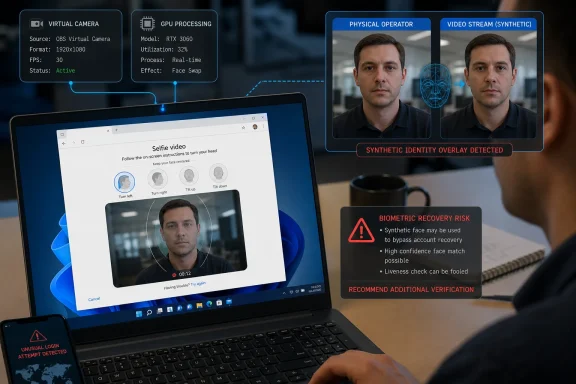
Reality Defender says its tester used an eligible personal Google Account owned by the company, a Windows 11 system with an NVIDIA GPU, commercially available face-swapping software and camera-input manipulation. The tester performed Google’s guided head movements in real time while the software replaced the visible face. Google’s flow accepted the transformed video as the account’s saved selfie reference in both trials.
The report was first detailed by Reality Defender and subsequently covered by Biometric Update. No independent outlet has published a separate reproduction of the two successful enrollments, and Reality Defender sells media-manipulation detection technology. That commercial interest does not negate the result, but it does mean the finding should be read for exactly what it establishes: a vendor’s two-for-two test of a company-controlled account, not a demonstrated account-takeover technique or a measured failure rate across Google’s service.
Google’s recovery feature has a narrow job, but a high-value one
Google announced Selfie Video on July 23 as an optional backup way for eligible personal-account users to regain access when they are locked out or cannot use their normal device. During setup, the user records a video while completing guided head movements; during a later recovery event, Google compares a new recording with the saved reference.
Google says the videos are encrypted at rest, user-controlled and deletable. Its public announcement also says the service uses multiple layers of protection: comparison with the saved video, simple movements intended to establish that the submission is live, and Google’s existing suspicious-sign-in checks.
The company’s own help documentation adds important scope that was less prominent in the launch announcement. Selfie Video is not available to Google Workspace accounts, child accounts or accounts in the Advanced Protection Program, and availability varies by account, device and region. That exclusion means IT administrators do not need to treat this as a new Google Workspace authentication control; it is currently a consumer Google Account recovery feature.
Google also told The Register that passing the selfie check alone may not always restore access. The company says it evaluates overall account risk and can require additional sign-in methods. That claim is significant here: Reality Defender tested enrollment acceptance, not a full recovery attempt against an account with Google’s broader risk engine engaged.
Still, enrollment is where the system creates the biometric reference it will trust later. If a synthetic face can be saved at that point, the recovery system may be comparing a future recovery video against a reference that never represented the human who performed enrollment.
The Windows 11 detail exposes the boundary that mattered
Reality Defender’s report is careful not to disclose the names or settings of the face-swap and camera-manipulation tools, and that restraint is appropriate. The relevant security finding is not a recipe for reproducing the test. It is that Google’s browser-based enrollment flow accepted a camera stream after a local Windows software stack had altered it.
A liveness challenge answers one question: is somebody responding to prompts at this moment? In Reality Defender’s test, the answer appears to have been yes. A real operator moved their head as instructed. The harder question is whether the image delivered to the verifier faithfully represents that operator. In the reported test, it did not.
This distinction has practical implications beyond Google. A webcam feed in Windows is not necessarily a direct hardware signal. Between the physical camera and a browser tab sit drivers, the operating system’s media pipeline, GPU processing, browser capture APIs, and sometimes virtual-camera or overlay software. A person can be physically present and responding correctly while a different face is rendered into the frames received by the website.
Reality Defender’s test therefore points to a limitation in challenge-response checks based only on movement. Random prompts can frustrate a static photo or a replayed clip, but they are weaker against a live human operating a real-time altered feed. The test does not prove Google ignored all device or session-integrity signals; the researchers do not disclose enough to establish that. What it does prove is that whatever checks applied to that Edge-on-Windows configuration did not reject the manipulated enrollment.
For Windows users, the lesson is more specific than “webcams are unsafe.” A browser can receive video that looks live and responds to a challenge while still lacking reliable evidence that the media originated unmodified from a physical camera. That is the security boundary biometric recovery systems now have to defend.
Google’s product language leaves an unanswered implementation question
Google describes several defenses, including protections against fake photos, videos and deepfakes. Reality Defender reports that its test bypassed the enrollment flow using an off-the-shelf real-time face replacement, but it did not identify the tools, the account’s risk profile, the region, or Google’s server-side decision signals. Google has not publicly said which technical properties of a capture path it evaluates, whether it detects virtual cameras, or how it treats browser-based video from Windows compared with mobile capture.
That missing detail is understandable from an anti-abuse perspective, but it limits what customers and administrators can verify. Users cannot tell whether eligibility reflects a risk-based rollout, whether certain devices receive stronger scrutiny, or whether a particular configuration is more resistant to media injection. The published help page says availability varies, but it does not explain why.
There is also a product-design consequence. Google’s launch post describes Selfie Video as another recovery option alongside passkeys and recovery contacts. That is the correct framing. A stored selfie should not become the sole means of recovering a high-value account, especially when the onboarding flow has now been shown to accept a synthetic enrollment under controlled conditions.
Google’s Advanced Protection Program offers a useful contrast. It does not currently permit Selfie Video enrollment and instead requires stronger sign-in protections such as passkeys or security keys. For people whose personal Google Account contains sensitive business documents, financial records, administrator credentials, source-code access or a large password-reset footprint, that approach remains more defensible than adding a remotely processed facial recovery factor.
What personal-account users should do now
The immediate response should not be panic or wholesale removal of every biometric option. Reality Defender did not access a third-party account, steal credentials, retrieve private data or prove a recovery takeover. Google also says it uses other account-risk signals and may require additional verification.
But users should avoid treating Selfie Video as a replacement for stronger, independently controlled recovery methods. The safer arrangement is to retain several factors that do not all depend on the same facial reference or the same online account session:
- Use passkeys on devices protected by a strong device sign-in method, and keep another passkey-capable device available where possible.
- Add and periodically verify a recovery contact, recovery email address and recovery phone number that an attacker cannot easily control.
- Generate backup codes and store them offline in a protected location rather than inside the Google Account they are intended to recover.
- Consider Advanced Protection for accounts exposed to targeted attacks, especially if they are used by journalists, activists, executives, IT administrators or people handling sensitive data.
- Treat the “Improve Google Services” consent separately from recovery. Google says users can opt in to allow selfie-video data to help improve facial recognition, age estimation and other verification methods; that choice is distinct from merely storing a video for account access.
Reality Defender’s assessment does not settle whether a different person could later recover the company’s test account using the synthetic reference. The researchers explicitly say they did not test that scenario. But the enrollment result is enough to put pressure on the feature’s core promise: guided movement verifies that a video is live; it does not, by itself, verify that the face in that live video is authentic.
Google’s rollout is still limited, and the company has room to change the system before it reaches more accounts and regions. Until it explains how it hardens the capture path against real-time media manipulation, Selfie Video belongs in the “additional recovery option” category Google itself described—not at the center of a personal account’s security plan.