
That distinction turns “has HDMI 2.2” into an incomplete answer for anyone buying a television, monitor, graphics card, AV receiver, or dock. The version number identifies a specification family. It does not tell a Windows PC owner what signal the port can actually accept or transmit, which features are implemented, or whether a particular input on a display has the same capability as the others.
SlashGear’s warning is sound, but the more consequential detail is that this is not a new failure introduced by HDMI 2.2. It is the continuation of the HDMI 2.1 purchasing problem that already caught many TV and monitor buyers: the standard advertises a ceiling, while product implementations frequently stop below it.
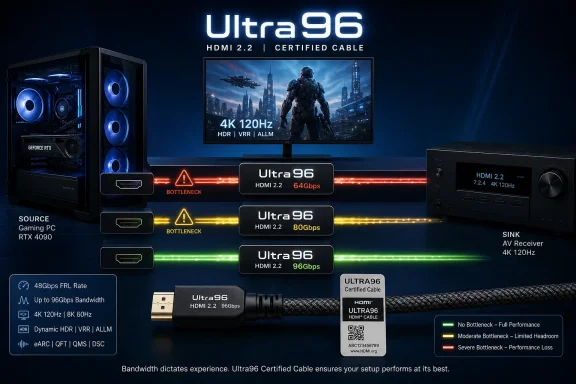 Ultra96 means a cable class and a product feature name
The HDMI Forum released HDMI 2.2 on June 25, 2025, with a maximum raw link bandwidth of 96Gbps — double HDMI 2.1’s 48Gbps ceiling. Its published materials say the new Ultra96 HDMI Cable is the cable category that supports all HDMI 2.2 applications, and that certified cable packages are meant to carry a distinct certification label.
For cables, the message is relatively straightforward. An authentic certified Ultra96 cable is rated for up to 96Gbps. It does not somehow turn an older HDMI 2.0 or HDMI 2.1 port into a faster port, but it removes the cable as the limiting link in a setup designed for the new standard.
For devices, HDMI has chosen much looser language. The HDMI Licensing Administrator says “Ultra96” is a feature name manufacturers are encouraged to use for products supporting a maximum of 64Gbps, 80Gbps, or 96Gbps under HDMI 2.2. It can appear on a port, product packaging, a specification sheet, a user guide, an on-screen display, or marketing copy.
The result is an awkward piece of consumer vocabulary: Ultra96 does not necessarily mean 96Gbps. It means the product belongs to the HDMI 2.2 generation and reaches one of the specification’s three new maximum bandwidth points. A 64Gbps device and a 96Gbps device can therefore carry the same feature name despite a 50% difference in link capacity.
That is why buyers should treat “Ultra96” on a television carton or monitor webpage as the beginning of the research, not the end of it.
The published 16K claim leaves out the important qualifier
HDMI 2.2’s headline formats are impressive: up to 12K at 120Hz and 16K at 60Hz, with the HDMI Forum also calling out uncompressed 8K at 60Hz and 4K at 240Hz in full 4:4:4 chroma at 10-bit or 12-bit color.
The wording matters. In its own release, the HDMI Forum explicitly describes only 8K60 and 4K240 as uncompressed full-chroma examples. It lists 12K120 and 16K60 separately. That is a meaningful omission, not a nitpick: high-resolution claims can depend on Display Stream Compression, chroma subsampling, lower bit depth, or other compromises that are highly relevant to PC users who want crisp desktop text and accurate color.
TechRadar reported when HDMI 2.2 was finalized that the highest advertised modes rely on optional DSC 1.2a support. That means a future monitor’s “16K60” line item will not, by itself, establish that the source GPU, cable, display input, and panel path can carry an uncompressed 16K image. Nor does it establish what color format is available.
For a Windows workstation, the practical formats are far more likely to be 4K at 240Hz, 5K or ultrawide resolutions at high refresh rates, and 8K60 with full chroma. Those are genuine bandwidth-sensitive workloads. They matter to users driving OLED gaming monitors, high-refresh 4K panels, large-format displays, and professional screens from a PC rather than a console.
But a port’s maximum number still does not answer the question a buyer actually has: Which exact modes work on this input with my GPU?
The lowest-capability link still sets the result
A display connection is negotiated end to end. To obtain a demanding HDMI 2.2 mode, the graphics card’s HDMI transmitter, the cable, the display’s selected input, and any equipment in between must all support the required signaling rate and video format.
Insert an AV receiver, soundbar with video pass-through, HDMI matrix, capture device, KVM switch, or USB-C dock into the signal path and it becomes another possible bottleneck. A 96Gbps cable connected to an 80Gbps receiver will not create a 96Gbps path. Neither will a 96Gbps monitor connected to a graphics card with a lower-rate HDMI output.
This has immediate implications for Windows users. A future GPU can expose an HDMI 2.2 output while operating at a lower maximum rate than the display supports. Likewise, a monitor could advertise HDMI 2.2 but reserve its highest refresh mode for DisplayPort, or make it available only on one HDMI input. Windows will simply offer the modes reported through the display’s EDID and allowed by the negotiated connection; it cannot use a driver update to overcome a physical link-rate limit.
RTINGS makes the same point from the monitor side: modern HDMI and DisplayPort devices often implement less than their generation’s maximum bandwidth. HDMI 2.1 monitors have shipped with 24Gbps links despite HDMI 2.1’s 48Gbps maximum. DisplayPort 2.1 has its own tiers, including lower-speed UHBR implementations that fall well short of the 80Gbps maximum.
The existence of tiers is not inherently deceptive. A 64Gbps HDMI 2.2 port could be entirely sufficient for a 4K television that will never display 8K60 4:4:4. Using a lower-speed receiver can reduce cost, power draw, and implementation complexity when the panel and intended source cannot use the extra capacity.
The problem is disclosure. A version label without a per-port bandwidth figure gives the buyer no way to distinguish a cost-conscious implementation from a full-rate one.
HDMI 2.1 already showed how this goes wrong
The HDMI 2.1 transition established the precedent. HDMI 2.1 expanded the maximum link rate to 48Gbps, but devices did not need to implement every HDMI 2.1 feature or the maximum bandwidth to market themselves as HDMI 2.1-capable.
A TV capable of 4K at 120Hz with chroma subsampling could use roughly 32Gbps and still meet its intended gaming target. That is not necessarily a defect. It becomes a problem when a product’s “HDMI 2.1” badge is used to imply 4K120 with HDR, RGB or 4:4:4 chroma, VRR, eARC, and all the other features buyers associate with the name.
HDMI 2.2 risks repeating that ambiguity at a larger scale. Its 64Gbps floor is already above HDMI 2.1’s 48Gbps maximum, so even the lowest new tier represents a bandwidth increase. But the jump from 64Gbps to 96Gbps is large enough to affect which high-end modes can run without compression or chroma reduction.
The safe reading of HDMI 2.2 is therefore: it enables products to support higher bandwidths and newer capabilities. It does not guarantee that every product bearing the label supplies them.
What to demand from TV, monitor, and GPU spec sheets
The buying checklist for HDMI 2.2 products should be concrete:
- The manufacturer should state the maximum bandwidth for each individual HDMI port, in Gbps, rather than merely listing HDMI 2.2 or Ultra96.
- The product documentation should identify exact supported modes, including resolution, refresh rate, bit depth, and RGB or 4:4:4 chroma capability.
- Buyers should establish whether the highest modes require DSC, whether DSC is supported by both source and display, and whether it affects any desired GPU features.
- A system using a receiver, dock, KVM, capture device, or switch should verify that every intervening device supports the needed bandwidth and formats.
- Cable purchases should look for the official Ultra96 certification label and its verification markings, not generic “96Gbps,” “16K,” or “HDMI 2.2” claims printed by a cable vendor.
The last point deserves emphasis. Plenty of cables are likely to be sold with HDMI 2.2-style marketing before a buyer can easily verify whether they have passed the official certification process. A product description claiming 96Gbps is not equivalent to a certified Ultra96 cable label.
2027 hardware will be the first real test
HDMI 2.2 is a published specification, not yet a mature retail platform. FlatpanelsHD reported from Computex 2026 that HDMI Licensing Administrator CEO Rob Tobias expected the first devices with up to 96Gbps support in 2027, as chipmakers begin sampling the required FRL2 silicon. HDTVTest and VideoCardz independently relayed the same expected timetable from that reporting.
That 2027 estimate applies to the arrival of full-bandwidth devices, not an assurance that every first-generation HDMI 2.2 television, monitor, graphics card, or receiver will run at 96Gbps. In fact, the Forum’s 64Gbps, 80Gbps, and 96Gbps framework makes mixed implementations likely from day one.
For most current Windows gaming PCs, HDMI 2.1 remains enough for 4K120 televisions and consoles. HDMI 2.2 becomes worth paying attention to when a buyer needs a documented 4K240 full-chroma connection, 8K60 full-chroma output, or a high-bandwidth PC-to-TV setup that cannot use DisplayPort. Until product makers publish exact per-port figures, “HDMI 2.2” is a capability category, not a performance guarantee.
