

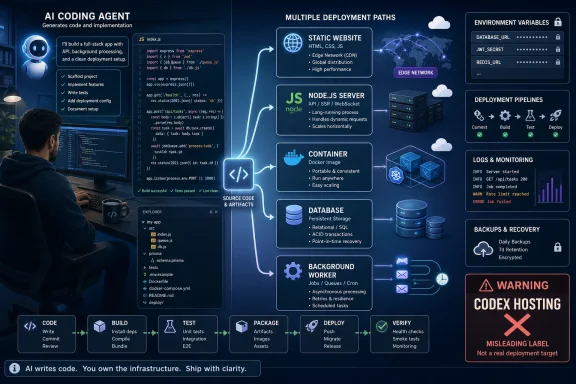
That distinction is more than pedantry for developers deciding where to deploy. Hostinger sells its own managed Node.js service as “Codex hosting,” places it first in a 15-platform comparison, and labels it the budget choice. Its own support material confirms what the product actually is: managed hosting for a defined set of Node.js-oriented frameworks, deployed from GitHub or a ZIP archive, with build detection and fixed plan resources. That can be a reasonable way to publish a small React, Express, Next.js, or Vite project. It does not turn a shared hosting plan into a universal production target for every application Codex can create.
OpenAI’s documentation describes the current Codex as a coding agent that works on repository tasks, reviews, fixes, and feature work. It is not the old Codex API, which is an important correction in Hostinger’s guide. But a Codex-generated repository has no inherent runtime: an app may be static HTML, a .NET API, a Python worker, a containerized WebSocket service, or a Next.js frontend with a managed PostgreSQL database. Hosting should be selected from the application’s architecture and operational demands—not the tool used to generate its first commit.
The comparison’s prices already show why buyers must check the live plan
The most immediate problem is that a guide modified on August 7 contains commercial figures that do not match Hostinger’s current Codex-hosting sales page. The article says the Business plan starts at $3.99 a month with a 48-month commitment. Hostinger’s current product page advertises $3.79 a month, or $181.92 paid upfront for 48 months, before renewal at $16.99 a month.
The difference is small in dollar terms, but it exposes the larger weakness in a price-led comparison: promotional hosting prices are volatile, contract-length dependent, and often materially different from renewal costs. Calling Hostinger the “best budget option” based on an introductory monthly equivalent obscures the actual purchase decision. A buyer is committing nearly four years of prepaid service and accepting a renewal rate more than four times the advertised entry price.
The same issue appears elsewhere. Hostinger says Netlify’s $20 Pro plan includes 3,000 credits and unlimited members. Netlify’s own pricing-change announcement lists 5,000 credits for Pro and prices it at $20 per member per month. For a solo developer the error may look harmless; for a five-person team, it changes the stated monthly cost from $20 to $100 before any overages.
Railway’s description is also behind the provider’s current plan structure. The Hostinger guide describes a 30-day free tier with $5 in credits. Railway now separates a one-time $5 trial grant from its Free plan, which includes $1 of monthly credit. Its $5 Hobby and $20 Pro subscriptions apply those same amounts toward resource consumption, but usage beyond them is billed. Developers treating either plan as a fixed monthly hosting bill will get the wrong answer.
These are not unusual mistakes in hosting coverage. They are a reason to treat every comparison’s price table as a dated snapshot, particularly when the publisher is also one of the sellers. A guide can accurately explain a product’s broad fit while still being a poor source for the amount that will appear on a credit-card statement.
Codex changes the review burden, not the hosting requirement
The more consequential omission is operational. AI-assisted development shortens the time between “it works on my Windows machine” and “it is exposed to the internet.” It does not shorten the work required to verify authentication, access control, dependency versions, database migrations, retention policies, rate limits, observability, and recovery.
OpenAI has repeatedly warned that Codex can produce buggy or insecure code. Its current security material also warns that enabling agent internet access can introduce prompt-injection, credential-exposure, and licensing risks. That is separate from the hosting provider’s web application firewall, CDN, or managed TLS certificate. Those controls help protect the edge; they do not establish that an application correctly authorizes a user, safely handles an uploaded file, or avoids leaking an API key from a server response.
For a Codex-built application, the deployment checklist should begin before the provider comparison:
- The repository should contain a reproducible production build, an explicit runtime version, and a health endpoint that does not expose sensitive configuration.
- Secrets must be held in the host’s environment-variable or secret-management service, never committed to Git or embedded in frontend bundles.
- Database schema changes need a migration and rollback plan; a managed database is not a substitute for tested restores.
- Logging, error reporting, request limits, and a spending cap or alert should be configured before public traffic arrives.
- The generated code needs human review for authorization checks, input validation, package provenance, and externally reachable administrative routes.
Hostinger’s guide tells readers to test locally and validate environment variables, which is good advice, but it treats those checks as a closing deployment chore. For AI-generated code, they are the decision point between a prototype and a service that should be reachable from the public internet.
The platforms divide by workload, not by developer fashion
The guide’s strongest platform choices are generally correct once they are stripped of the Codex branding. Vercel remains a focused answer for Next.js and frontend-heavy applications, particularly where preview deployments and its framework integration matter. Its official terms and plan documentation remain clear that the free Hobby tier is for personal, non-commercial work; an app being sold, operated for a business, or developed by a paid consultant belongs on a paid plan.
Netlify and Cloudflare Pages fit static sites, documentation, landing pages, and frontend applications where backend work can be handled through functions or a separate API. These services reduce operational work because there is no always-running application server to patch or supervise. They are a poor fit when the architecture assumes a persistent Node.js process, conventional local filesystem storage, or a relational database living beside the app.
Railway and Render are often the least-friction next step for a conventional full-stack prototype: connect a repository, deploy a web service, attach a database, inspect logs, and add a worker or scheduled task. But neither should be treated as “set and forget” infrastructure. Render’s own documentation says a free web service spins down after 15 minutes without inbound HTTP or WebSocket traffic, takes roughly a minute to resume, and loses any data stored on its ephemeral local filesystem. That is acceptable for a demo, and unacceptable for many customer-facing applications.
Google Cloud Run, Fly.io, Azure App Service, DigitalOcean App Platform, and Northflank address a different stage of the decision. They are options when a developer needs container portability, deeper networking controls, specific regional placement, private services, staging environments, policy controls, or a deliberate route to scale. They require more cloud literacy because the underlying decisions do not disappear; they become configuration.
Cloud Run deserves a particular qualification. It is an excellent home for stateless HTTP services and event-driven APIs because it can scale down to zero and charges by consumption. Google’s documentation also makes clear that local container storage is disposable and that scale-to-zero means a request must initiate the return from zero instances. A service that requires continuously running background work must be designed around Cloud Run jobs or worker pools, use a queue, or pay to keep instances available. It is not a generic replacement for a VPS simply because it accepts a Docker image.
Hostinger’s Node.js offer has a narrower, legitimate role
Hostinger’s managed service is best read as an entry-level deployment path for small Node.js applications, not as the default answer for a Codex project. The current product page offers automatic deployment, managed TLS, a CDN, backups, GitHub integration, and managed MySQL. Its support documentation lists familiar frontend and backend frameworks, including React, Next.js, Express, NestJS, Vite, Vue, SvelteKit, and Fastify.
For a personal dashboard, a lightweight business site, a simple internal tool, or an MVP with predictable traffic, that package removes several tasks that a Windows developer would otherwise handle on a VPS: installing the runtime, configuring a process manager, renewing certificates, applying server updates, and wiring a reverse proxy. Fixed resources can also be easier to understand than multi-dimensional cloud billing.
The restrictions are the trade. Hostinger itself describes fixed resource limits and an upgrade path rather than on-demand scaling. Developers who need a custom operating-system package, non-Node runtime, private network, container image control, regional replicas, long-lived workers, or unusual process behavior should rule it out early rather than attempting to force a growing service into a shared-hosting model.
That is not a failure of managed Node.js hosting. It is simply the normal boundary between a low-cost managed platform and infrastructure built for sustained, variable, or specialized workloads.
The practical shortlist is shorter than 15 platforms
Most Codex users do not need to evaluate every service in Hostinger’s list. They need to classify the app before deployment.
A static portfolio, documentation site, or marketing page belongs on Cloudflare Pages, Netlify, or Vercel. A Next.js application with a mostly frontend-oriented architecture has a strong default in Vercel, provided commercial use is budgeted for from day one. A conventional Node.js or Python MVP with a database and a background worker is usually better served by Render or Railway than by a frontend platform. A containerized API with bursty traffic can fit Cloud Run, while a Microsoft-centric .NET organization should start its assessment with Azure App Service rather than trying to recreate Azure workflows on a consumer-oriented host.
Firebase App Hosting is also more specific than the guide implies. Firebase says the service requires the pay-as-you-go Blaze plan and deploys through Cloud Build, Cloud Run, Cloud CDN, Artifact Registry, and related Google Cloud services. It can be productive for an application already committed to Firebase Authentication and Firestore, but it is not a flat-price alternative to a basic web host.
The usable conclusion is straightforward: choose the host after identifying the runtime, state, traffic pattern, data store, deployment controls, and recovery needs. Codex can generate the application quickly. It cannot make a fixed-resource Node.js plan suitable for a production API with persistent jobs, nor make an edge-function platform appropriate for a server that expects to keep local state.