
The announcement, published by iManage on August 24 and carried by LawNext, positions the rollout as a secure “context fabric” connecting documents, email, matters, people, and external business-system data. For Windows and enterprise administrators, the practical appeal is clear: Copilot-based agents could work against the firm’s existing iManage repository rather than requiring legal teams to export sensitive work product into a separate AI knowledge base.
But the general-availability announcement also leaves several operational details unanswered, including licensing, rollout sequencing, supported deployment configurations, and which controls are enabled by default. iManage’s own current MCP documentation fills in one important point: read-only access is the default, while write-capable actions depend on administrator configuration and explicit per-client permissions.
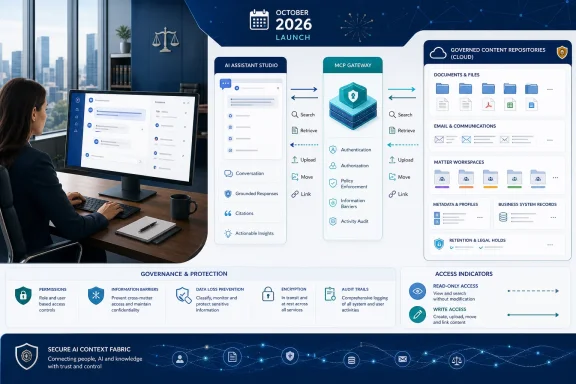 October GA expands the interface around existing cloud content
iManage describes the October release as a reimagined experience built on its cloud platform, with AI capabilities integrated into everyday legal work. Its public platform material separately says the next-generation experience builds on iManage Cloud installations without a content migration, new repository, or “rip-and-replace” project. That should make the release more attractive to firms already standardized on iManage Work, Microsoft 365, and Windows desktop applications.
The company is presenting its Context Fabric as the connective layer: a record of a matter or project that combines documents and correspondence with parties, relationships, metadata, and data from practice-management or finance systems. In its account, an AI response can be traced back to an organization’s own information and constrained by the user’s access rights and information barriers.
That distinction carries real weight in legal and financial-services deployments. A generic AI assistant that can search an entire tenant may be useful, but it is a governance problem if a lawyer working on one restricted matter can surface documents from another. iManage’s pitch is that its permissions model remains the policy enforcement point while multiple AI clients draw on the same governed corpus.
The company has not published a complete product matrix for the October release, however. It has said that playbook-based review, tabular review, and MCP read-and-write actions are available now, while the redesigned platform becomes generally available in October. Buyers should therefore avoid treating “GA” as proof that every function described in the announcement will be newly enabled for every tenant on day one.
Microsoft Copilot Studio integration is the enterprise IT hook
The clearest Microsoft-specific element is iManage’s documented connector for Microsoft Copilot Studio. iManage’s setup guide directs administrators to add an “iManage Work MCP” tool to a Copilot Studio agent, authenticate it through iManage, select the allowed tools, publish the agent, and then optionally make it available through Microsoft 365 and Teams channels.
Microsoft’s own August 2026 release notes show why this timing matters. Microsoft has been extending Microsoft 365 Copilot’s support for federated connectors built on MCP, allowing administrators to connect external data sources and line-of-business systems while retaining Microsoft’s compliance and administration controls. iManage is positioning its service as a legal-content source within that broader shift from indexed search connectors to agent-accessible tools.
For a firm, that means the relevant deployment decision is not merely whether to “connect Copilot to iManage.” Administrators will need to decide which agents can invoke the connector, which groups may use those agents, which individual tools the agent receives, and whether the agent is permitted to do more than read. iManage documents separate access policies by MCP client, meaning an organization can give one approved client read-and-write permissions while leaving another client restricted to read access.
That design is better suited to legal deployments than a single tenant-wide switch. A research or matter-summary agent may need search, document retrieval, and metadata access; an intake or records-management agent may need narrowly bounded workspace and folder creation; few organizations should begin by granting every connected assistant the ability to move or upload documents.
Write actions turn a connector into a records-management workflow
iManage says its MCP server is advancing beyond read operations to agentic actions including creation of workspaces and folders, filing, moving, and linking documents. The current iManage Work connector documentation confirms tools for creating workspaces, creating folders, building document relationships, updating profiles, moving documents, and uploading new Word or PDF content.
Those capabilities could remove a tedious handoff in Windows-centric legal environments. An agent working in Copilot Studio could, in principle, collect matter details, use a permitted workspace template, create a correctly structured workspace, draft a document, and place the result into the proper folder with the repository’s existing security and lifecycle rules. That is a more consequential workflow than asking an assistant to summarize a contract in a chat window.
It also changes the risk profile. A wrong answer in a legal summary can be caught during review; an incorrectly filed, moved, or security-inherited document can create a records, confidentiality, or retention problem before anyone notices. iManage’s documentation states that users and groups can be limited to selected tools, and that policies can be tailored by client. Firms should use that granularity rather than assuming the same permissions that make sense for a human iManage user make sense for an autonomous or semi-autonomous agent.
There is a meaningful audit caveat in iManage’s own technical material. The company says existing security policies, permissions, and audit trails remain intact, but its user documentation for the list_actions tool says the visible list does not track every MCP operation — specifically naming workspace creation as an example — and does not include moves performed directly in iManage Work. That does not establish that those events lack audit records elsewhere in iManage; it does establish that administrators should not rely on the MCP action list alone as a complete activity ledger.
Before granting write access, records and security teams should verify where each action is logged, which identity is recorded for an agent-initiated event, how permission inheritance behaves after moves, and how actions are reversed. iManage’s documented move tool can apply destination-folder profile and security settings by default, although those behaviors can be disabled. That makes a controlled pilot with nonproduction matters, narrow permissions, and review queues more sensible than an immediate firm-wide rollout.
“Nothing is exported” is a control claim, not a full AI risk assessment
iManage says data is not exported and that models see only information permitted to the relevant user or agent. Its MCP documentation similarly says data does not leave iManage and that existing controls remain in place. In the technical sense, that describes a governed tool-access model rather than bulk copying a document library into an external index.
It does not eliminate the need to assess the AI client on the other side of the connection. An MCP-enabled client receives information returned by tools during a user session, and iManage requires administrators to accept a disclaimer governing client selection, data handling, and output validation before configuring MCP settings. The documentation also lets administrators approve or reject connecting clients, which is an acknowledgement that the client itself is part of the security boundary.
This is particularly relevant where firms use multiple assistants named in iManage’s announcement, including Microsoft Copilot, ChatGPT Enterprise, Claude, Harvey, Legora, Thomson Reuters products, and Spellbook. “Open” access can reduce integration friction, but every additional client brings its own identity model, retention settings, prompt handling, administrator roles, and potential exposure to instruction-manipulation attacks embedded in documents.
The right question for IT is therefore narrower than whether iManage supports MCP. It is whether a given approved AI client, assigned to a defined user group, may call a defined set of iManage tools against a defined class of matters. That is the configuration level at which the company’s promised information barriers and permission checks become operational rather than promotional.
Context quality will determine whether the AI is useful
The strongest part of iManage’s strategy is also the least instantaneous. Its platform material says the Context Fabric relies on AI enrichment and connected business context, including extracted document attributes such as agreement type, parties, jurisdiction, and governing law, alongside data from business systems. That can make precedent review and matter summaries materially more useful than a raw keyword search.
Yet the same premise creates an implementation obligation. A firm with inconsistent matter metadata, poorly maintained workspaces, duplicate precedents, outdated templates, or broad legacy access permissions will hand those weaknesses to every connected AI tool. The model may produce fluent work, but it cannot reliably distinguish the current approved playbook from an obsolete document if the repository’s structure and labels do not make the difference clear.
iManage’s July guidance on information architecture acknowledges that firms must organize, curate, enrich, and govern content before they can expect dependable AI results. That is the work hidden behind the announcement’s promise that results will improve as new AI-generated work product is written back into the platform. More records can deepen context, but they can also compound bad classifications or unreviewed output if firms do not set quality controls.
October’s general availability should therefore be treated as the start of a deployment program, not the end of one. For existing iManage Cloud customers, the immediate task is to inventory MCP clients and permissions, establish a read-only Copilot pilot, validate logging and document-security behavior, and only then introduce tightly scoped write actions where the operational benefit justifies the new authority.
