
That distinction is missing from BGR’s broad claim that anyone on a Windows 10 build from early 2024 onward “will have to use different apps.” Apple did launch Apple Music, Apple TV, and Apple Devices for Windows in February 2024, as MacRumors and Ars Technica reported at the time. Those apps split up most of iTunes’ old jobs. They did not, however, remove the option to install or keep using iTunes as a single application on Windows.
Apple’s current iTunes page still offers both direct and Microsoft Store downloads for 64-bit Windows, lists Windows 10 as the supported operating-system baseline, and directs users to iTunes support. More importantly, Apple updated its Windows software-update guidance on June 8, 2026, naming iTunes alongside Apple Music, Apple TV, Apple Devices, and iCloud as Windows apps available and maintained through the Microsoft Store.
The practical answer for Windows users is therefore straightforward: iTunes is supported, but Apple has made it a conditional legacy workflow rather than the default route for music, video, and iPhone management.
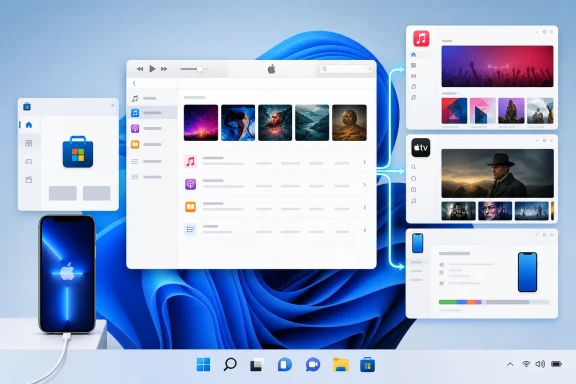 What Apple replaced—and what it did not
Apple removed iTunes from macOS with macOS Catalina in 2019. Music moved to the Music app, TV content moved to the TV app, podcasts received their own app, and iPhone and iPad management moved into Finder. A Mac running macOS Mojave or an earlier release can still use iTunes; a Mac on Catalina or newer cannot install the old Mac iTunes application as its normal media manager.
Windows took a different path. Apple continued to distribute iTunes, then released three dedicated Windows applications in February 2024:
- Apple Music manages music libraries, locally imported files, Apple Music streaming, and iTunes Store music purchases.
- Apple TV manages purchased movies and television shows, rentals where available, and Apple TV+.
- Apple Devices handles iPhone and iPad updates, backups, restores, syncing, and file transfers.
Apple’s own Windows iTunes user guide says that once Apple Music or Apple TV is installed, those applications take over music, movies, and TV shows. iTunes remains for audiobooks and free podcasts. Install all three replacement apps, and the old all-in-one iTunes experience is intentionally broken apart.
But the reverse is equally important: Apple says that users who do not install Apple Music or Apple TV can continue using iTunes for all their media. That means iTunes remains a viable supported choice for a Windows PC that needs one familiar library, one set of playlists, CD importing, local-file playback, device syncing, store purchases, and media management in one application.
The shift is a product transition, not an immediate end-of-life notice.
The installation choice changes iTunes’ capabilities
For Windows users, “Does iTunes still work?” is the wrong troubleshooting question. The more useful question is: Which Apple apps are currently installed on this PC?
Installing Apple Music or Apple TV changes what iTunes is allowed to manage. Apple explicitly tells users that after those apps are installed, iTunes is limited to audiobooks and podcasts. The software is still there, but its music, film, and television sections have been handed to the newer apps.
Installing Apple Devices also changes the expected route for managing an iPhone or iPad. Apple’s current support instructions direct Windows 10 and later users to Apple Devices for file sharing, backup, restore, software updates, and syncing. That is the supported path for a current Windows installation that has adopted Apple’s newer application lineup.
This has an operational consequence that Apple’s marketing language tends to smooth over: an IT administrator or home user cannot freely mix the two approaches and expect each app to expose every old iTunes control. A PC running the new Apple Music, Apple TV, and Apple Devices apps should be treated as a migrated setup. A PC that intentionally relies on classic iTunes should avoid installing replacement apps unless the user is prepared for iTunes’ role to narrow.
The safe rule before changing anything is to identify the workflow that matters. A user who only needs an encrypted local iPhone backup should use Apple Devices. Someone who needs to maintain an established iTunes library, import CDs, or keep a traditional all-in-one media setup may have a reason to remain on iTunes.
Podcasts and audiobooks are why iTunes has not vanished
Apple did not leave iTunes on Windows merely as an abandoned download page. Its current documentation assigns iTunes a specific ongoing role: audiobooks and free podcasts.
That is an awkward arrangement. On macOS, Apple has separate Podcasts and Books apps. Windows does not have equivalent first-party desktop apps serving the same combination of local podcast and audiobook library functions. As Ars Technica noted when the Windows apps left preview in 2024, iTunes survived specifically because it still carried those categories.
This is the clearest sign that Apple’s Windows transition remains incomplete from a feature-consolidation perspective. The company has separated services that align with subscriptions—Apple Music and Apple TV—and separated device administration into Apple Devices. It has not delivered a matching Windows replacement for every function that remained in iTunes.
For users with large audiobook or podcast libraries, that makes iTunes more than historical software. It remains the official Apple client for those media types on Windows, and Apple continues to publish an active Windows iTunes guide with update instructions.
Support does not mean feature parity or a modern design
“Supported” needs some care here. Apple still distributes iTunes, provides update mechanisms, hosts support documentation, and keeps it in its current Windows software guidance. Those are meaningful signs of active support.
They do not mean iTunes is Apple’s preferred development target for Windows. Apple’s preferred architecture is plainly the split-app model: Apple Music for audio, Apple TV for video, and Apple Devices for hardware management. Microsoft Store distribution also gives Apple a simpler way to update those components separately from the legacy iTunes application.
Apple has not announced a retirement date for iTunes on Windows in the material it currently publishes. It also has not promised that every future Apple service feature will arrive in iTunes. Windows users should therefore avoid treating the continued download as a guarantee that iTunes will remain feature-complete indefinitely.
For managed environments, this is a reason to document a standard rather than allowing ad hoc installations. Supporting iPhones on Windows can mean two different software stacks:
| Use case | Apple’s current Windows route |
|---|---|
| Music, Apple Music streaming, and local music library management | Apple Music |
| Movies, TV purchases, rentals, and Apple TV+ | Apple TV |
| iPhone or iPad backup, restore, update, sync, and file sharing | Apple Devices |
| Podcasts and audiobooks | iTunes |
| One all-in-one legacy media workflow | iTunes, without installing the apps that take over its media categories |
The key is consistency. A help desk will have a much easier time supporting a defined Apple Devices workflow than untangling a machine where iTunes and the replacement applications were installed at different times for different reasons.
What Windows users should do now
Users starting from scratch on Windows 10 or Windows 11 should generally follow Apple’s current direction and install Apple Music, Apple TV, and Apple Devices from the Microsoft Store. It is the supported setup Apple is actively steering customers toward, especially for iPhone and iPad administration.
Users who already depend on iTunes should not uninstall it simply because it is old. First inventory the functions they use: local music libraries, CD ripping, playlists, device sync, podcast downloads, audiobooks, or iTunes Store purchases. Then determine whether the newer applications actually cover that workflow before introducing them.
BGR is right about the larger historical change: iTunes ceased to be Apple’s central desktop application years ago. But on Windows, it is inaccurate to describe iTunes as something available only for obsolete PCs or legacy installations. Apple still supports it, still distributes it, and still relies on it for podcast and audiobook use cases that its newer Windows apps do not fully replace.
For now, iTunes on Windows is neither dead nor fully current. It is a maintained legacy application whose capabilities depend on whether a PC has been moved into Apple’s newer, fragmented app model.
