

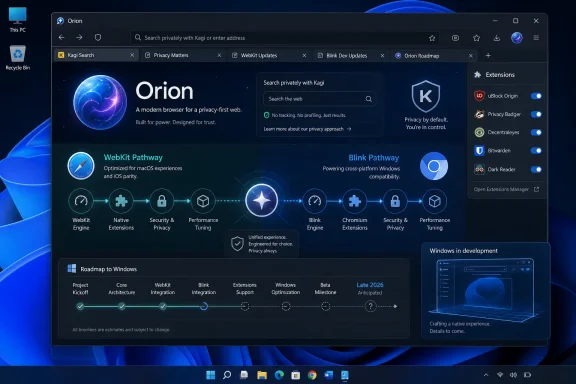
Thurrott reported this week that Orion’s Windows work has progressed through private newsletter updates since March, describing a C# and WinUI 3 interface over a C++ browser backend. Kagi had already put a late-2026 Windows release target in its November 25, 2025 announcement for Orion 1.0 on macOS, and Orion’s own support site continues to say Windows is in development. The new reporting adds technical color, but it does not establish a beta date or change Kagi’s public delivery window.
That distinction is more than calendar pedantry. In the browser market, a planned port can look complete in screenshots long before its rendering engine, extension compatibility, security-update process, and enterprise manageability are ready for exposure to the wider web.
The Windows release is real, but the timetable remains broad
Kagi’s November announcement was unusually explicit by browser-project standards: Orion for Windows was “in development,” with a target release in late 2026 and an ambition to reach feature parity with Orion 1.0 for macOS. The company also promised synchronized profiles and Orion+ benefits across platforms.
Since then, Kagi’s public support documentation has continued to list Windows as forthcoming, while its installation instructions offer downloads for macOS, iOS, iPadOS, and a public Linux beta. There is no equivalent Windows download page, no stated minimum Windows version, no installer type, and no declared support for x64 versus Arm64 PCs.
Thurrott’s expectation of a beta before year-end is reasonable as an inference from the development updates it received, but it remains an inference. Kagi’s public language is broader: late 2026 for a release. No other independently reported public schedule pins down a Windows beta, and Kagi has not said whether early builds will be restricted to Orion+ subscribers, newsletter recipients, or open public testing.
That means Windows enthusiasts should resist treating screenshots and mailing-list progress reports as an availability announcement. There is a material gap between a functioning tabbed prototype and a browser safe enough to use for banking, administration consoles, password management, and daily work.
Orion’s engine plan is the story Windows users should watch
The Windows port matters because Orion has spent years positioning itself as an alternative to Chromium-derived browsers. On macOS and Apple mobile devices, Orion is built on WebKit, the engine behind Safari. Kagi says it adds built-in tracker and ad blocking, zero telemetry, profiles, customization, and a translation layer intended to run many Chrome, Firefox, and Safari extensions.
For Windows, however, the engine decision is less settled in the public record than the marketing suggests. Thurrott reports that Orion has told newsletter subscribers it intends to support both WebKit and Blink. Orion’s official social account has also indicated that it wants to give users a choice, while confirming that the Windows interface is being made with C# and WinUI 3.
A dual-engine browser would be an ambitious design. Blink is the Chromium rendering engine used by Chrome, Microsoft Edge, Brave, Vivaldi, Opera, and many other Windows browsers. It offers the most familiar compatibility path for modern Windows web applications and Chrome extensions. WebKit would give Orion a genuinely distinct rendering stack on Windows, potentially making the browser useful to developers, web compatibility testers, and users who want a Safari-like engine outside Apple hardware.
But “native” needs careful interpretation here. A C# and WinUI 3 front end can make Orion look and behave like a Windows 11 application, with Windows controls, dark mode, settings surfaces, and system integration. It does not by itself make the browser engine native to Windows. The difficult work lies underneath: multi-process isolation, graphics acceleration, media playback, accessibility, sandboxing, extension permissions, PDF handling, GPU-driver interactions, and emergency security updates all depend on the browser core and its platform integration.
Kagi previously told users on its feedback forum that it would use the rendering engine “most native to the platform,” acknowledging that supporting different engines would make the job much harder. That statement makes Blink a plausible Windows default. If Orion also ships WebKit, the company will have to explain whether the engines are selectable per profile, per tab, per site, or fixed by build—and which one governs extension behavior, sync, passwords, and security patches.
Until Kagi answers those questions, “supports WebKit and Blink” should be read as a development claim, not as a finished product feature.
WebKit on Windows brings independence—and a maintenance burden
There is a Windows port of WebKit, and it is actively documented by the WebKit project. Developers can build it on Windows with Visual Studio tooling and run its MiniBrowser test application. That confirms that WebKit is technically viable on Windows; Orion would not be starting from a nonexistent code base.
The catch is in WebKit’s own documentation. It describes the Windows port as facilitating development and testing, and says that regular releases and security advisories are currently produced by the Apple and Igalia-maintained ports, not by the other upstream ports. The public WebKit downloads page likewise offers Safari Technology Preview for macOS and Epiphany Technology Preview for Linux, but no packaged end-user Windows browser.
This is the overlooked operational issue in Orion’s Windows story. A WebKit browser on Windows needs a vendor to take responsibility for packaging the engine, tracking upstream fixes, backporting or integrating security patches, running regression tests, and publishing updates quickly when vulnerabilities are disclosed. Chrome, Edge, Firefox, and Brave already operate that machinery at scale. Kagi would be building much of it alongside the browser itself.
That does not make a WebKit-based Orion for Windows a bad idea. It makes it a much bigger undertaking than placing a custom interface around an existing browser framework. Kagi itself has made the same broader point: unlike Chromium, WebKit does not provide a complete, ready-to-brand desktop browser application. The browser vendor must build the surrounding product—tabs, settings, profiles, menus, extensions, synchronization, and platform features—largely on its own.
The Linux beta offers a useful reality check. Orion’s Linux version is publicly available as a Flatpak beta, but Kagi’s own documentation warns that features may be missing and that it may not be ready for everyday use. It’s FOSS found basic browsing functional in March testing but reported incomplete or inconsistent features, including extension and sync limitations, page-loading errors, placeholder controls, and history problems. A Windows build may use different platform components and should not be judged solely by Linux results, but the beta demonstrates how much work remains after a browser can render websites and open tabs.
Extension compatibility will decide whether Orion can be a practical switch
Orion’s most attractive promise is its extension story. Kagi says it has ported WebExtensions APIs to WebKit so that Orion can run Chrome and Firefox extensions, while also supporting some Safari extensions. That is an unusual proposition: the browser aims to combine a WebKit core with the add-on libraries users associate with Chromium and Firefox.
The company has been appropriately cautious on macOS. Its own materials say extension support remains experimental and that some extensions will not work properly. That caveat is especially important for Windows users whose browsing depends on password managers, security tools, developer extensions, content blockers, Microsoft 365 integrations, and enterprise single sign-on components.
A Windows build that uses Blink could inherit a more conventional Chrome-extension compatibility path, though that still would not guarantee support for every extension or every permission model. A WebKit mode would have to prove that Orion’s compatibility layer remains reliable on a third platform. If Kagi allows both engines in one Windows product, it will also need to make failures legible: users must be able to tell whether an extension, website, or authentication flow broke because of WebKit, Blink, Orion’s extension layer, or a policy set by an employer.
The company has named features such as bookmarks, history, persistent settings, profiles, dark mode, and compact tabs as implemented in the Windows work, according to Thurrott’s newsletter reporting. It says tab management, sync, password management, and extension support are still only partly done. For a prospective daily driver, that second category matters more than the first. A browser can have polished tabs and still be unusable if profile synchronization, credential storage, or extensions are unreliable.
Windows on Arm remains an unanswered requirement
There is also no public commitment to a native Windows on Arm version. Thurrott specifically raised the prospect of trying Orion on Windows 11 Arm hardware, but Kagi has not published an architecture list for the Windows port.
That omission matters now that Copilot+ PCs and other Snapdragon-based Windows 11 systems are no longer niche hardware. An x64-only initial beta could still run under emulation on many Arm PCs, but that would undercut the performance and efficiency claims attached to Orion’s WebKit heritage. A native Arm64 browser build is not a cosmetic extra; browser processes are among the most persistent workloads on a laptop, and they magnify the cost of emulation, memory pressure, and battery draw.
IT administrators have an additional list of unknowns: there is no stated Microsoft Intune support, Group Policy or ADMX template plan, managed-update mechanism, installer format, software inventory identifier, or roadmap for enterprise policy controls. Kagi’s browser is aimed at individual privacy-conscious users, and its small six-developer team is not pretending to be an enterprise browser vendor. Still, those omissions place Orion outside any serious Windows standardization conversation for now.
Orion’s Windows arrival is significant because it could eventually give the platform a polished browser that is neither a Chromium reskin nor a Firefox fork. But the public evidence supports a narrower conclusion in August 2026: Kagi has committed to a late-2026 Windows release, development is visibly underway, and the important technical choices—especially engine behavior, extension reliability, security servicing, Arm64 support, and beta availability—have not yet been published.