
For Windows enthusiasts, the H2 presents an interesting contradiction. It combines the flexible, familiar foundation of Windows 11 Pro with processor specifications more commonly associated with powerful laptops, then packages them in a chassis suited to a desk, a media cabinet, or a home rack shelf. It can function as a compact workstation today, then be repurposed as a Proxmox node, Plex server, test machine, or always-on automation box tomorrow.
That versatility is the Kamrui Hyper Series H2’s strongest argument. The question is whether the price, the limited graphics capability, and a few infrastructure compromises leave enough room for it to become a genuinely compelling mini PC rather than simply an impressive specification sheet.
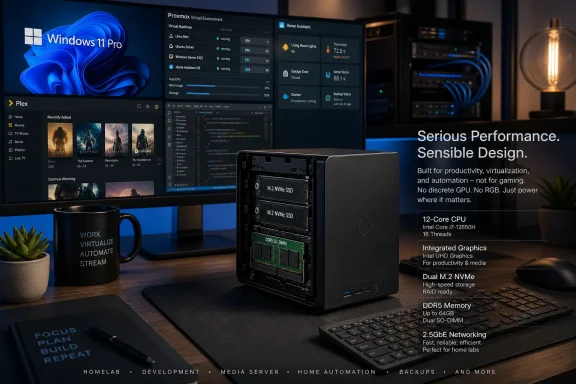 Overview: A Mini PC With Laptop-Class Muscle
At the heart of the Kamrui Hyper Series H2 is Intel’s Core i5-14500HX, a high-power mobile processor from the 14th-generation Core family. Intel lists the chip with 14 CPU cores, 20 threads, a maximum turbo frequency of 4.9GHz, 24MB of Intel Smart Cache, and a 55W processor base power. It also supports both DDR4-3200 and DDR5-5600 memory, giving system builders flexibility depending on the platform implementation. Intel’s official i5-14500HX specifications confirm that this is far more substantial silicon than the low-power U-series and N-series processors that dominate many compact PCs.
The H2 configuration reviewed ships with 16GB of dual-channel DDR4-3200 memory and a 512GB PCIe 4.0 NVMe SSD, but Kamrui’s design includes two M.2 storage slots and allows memory upgrades to 64GB, according to the review. That matters because the machine’s likely buyers are not simply looking for a browser-and-Office PC. They are likely to be people running several applications at once, working in development environments, hosting services, or allocating memory to virtual machines. The reviewed configuration and expansion claims are detailed in the original test.
Kamrui’s port selection is also designed around that broader role. The system includes HDMI, DisplayPort, and USB-C video output for up to three 4K displays at 60Hz, alongside six USB 3.2 Gen 2 ports, USB-C, Wi-Fi 6, Bluetooth 5.2, and a 3.5mm audio jack. On paper, it should work just as comfortably as a triple-display Windows desk setup as it does as a headless server managed remotely after initial deployment. Retro Handhelds lists the H2’s ports, wireless features, and display outputs.
A specification correction worth noting
One technical detail in the supplied H2 review deserves clarification. The review describes the Core i5-14500HX as an 8 Performance-core plus 6 Efficient-core processor. Intel’s own processor database instead identifies the chip as having 6 Performance-cores and 8 Efficient-cores, still totaling 14 cores and 20 threads. Intel’s official breakdown should be treated as the authoritative description of the CPU topology.
That correction does not fundamentally change the H2’s intended use. Eight efficiency cores remain a meaningful asset for a host that needs to keep lightweight services active while preserving responsive performance-core capacity for desktop work, compilation, transcoding, or guest virtual machines. It does, however, illustrate why buyers should distinguish between a processor’s headline core count and the way those cores are actually arranged.
Why the i5-14500HX Makes Sense for Windows Power Users
The i5-14500HX is the reason the H2 deserves more attention than a typical mini PC. In many small-form-factor systems, the processor is deliberately selected to reduce heat and power use, accepting limited sustained performance as a tradeoff. Kamrui has taken the opposite approach: it has placed a 55W HX-class laptop CPU inside a compact desktop chassis.
That choice creates a machine that should feel extremely comfortable under ordinary Windows workloads. Productivity software, browser-heavy multitasking, spreadsheets, coding tools, local databases, Docker containers, and remote desktop sessions are not inherently difficult jobs for modern processors. But they become more demanding when they happen together. A PC with 20 threads can spread background activity across more execution resources instead of allowing updates, antivirus scans, browser tabs, local sync tools, or media processes to interrupt foreground work.
For a Windows 11 Pro user, that translates into a practical quality-of-life advantage. The machine can be a conventional desktop with several displays during the day, then take on background server duties after hours. The Pro edition of Windows also brings capabilities that align with this audience, including Remote Desktop host functionality, Hyper-V support, BitLocker drive encryption, Group Policy controls, and Windows Sandbox. The H2’s processor is not overkill if the machine is expected to support those layered roles.
Intel also lists VT-x, VT-d, and Extended Page Tables support for the Core i5-14500HX. These hardware virtualization features are directly relevant to Hyper-V, VirtualBox, VMware Workstation, Proxmox, and PCIe passthrough-oriented server projects. Intel’s specifications confirm those virtualization capabilities, though actual passthrough success still depends on the mini PC’s BIOS options, chipset configuration, and device layout.
The hidden advantage: sustained multitasking
The most persuasive case for the H2 is not that it can launch a single demanding application quickly. It is that it should retain performance when several jobs overlap.
A practical Windows workload might include:
- A browser with many active tabs
- Microsoft Teams, Slack, Discord, or another communications client
- One or more local development environments
- A Windows Subsystem for Linux distribution
- File synchronization or backup software
- A local database, web server, or container stack
- A remote desktop connection into another machine
- Media encoding or downloads running in the background
On a lower-end mini PC, each additional service increases the likelihood that the system feels inconsistent. The H2’s Core i5-14500HX is designed for a higher ceiling. That makes the machine especially suited to users who do not want to think about whether a background task will derail their desktop experience.
The review’s Geekbench discussion reaches the same broad conclusion: the H2 is a processor-first machine, with benchmark results reinforcing that it has far more CPU potential than graphics potential. Retro Handhelds’ test results and analysis frame the system as a workhorse rather than a gaming-focused device.
Graphics: Functional, Flexible, and Not the Reason to Buy It
The H2’s main weakness is not obscure: it is the integrated graphics. Intel identifies the i5-14500HX GPU simply as Intel UHD Graphics for 14th Gen Intel Processors, with 32 execution units, a maximum dynamic frequency of 1.55GHz, DirectX 12.1 support, and Intel Quick Sync Video support. Intel’s graphics specifications provide a more precise description than retail shorthand such as “UHD 770.”
That 32-EU integrated GPU is perfectly adequate for Windows productivity, web media, multiple displays, and light graphical applications. It is not a substitute for a current dedicated graphics card, and buyers should not expect it to transform the H2 into a budget gaming desktop merely because the CPU is powerful.
This mismatch is important. A system with a 14-core, 20-thread processor invites assumptions about all-around performance. But gaming performance is often constrained by the GPU long before the CPU becomes the limiting factor. Older games, esports titles, emulators, indie releases, and less demanding 3D workloads should be possible with sensible resolution and quality settings. Modern AAA games will require major compromises, and in many cases the integrated graphics will not deliver an experience that matches the system’s price class.
Triple displays are not the same as high-end graphics
Kamrui advertises triple 4K display support through its HDMI, DisplayPort, and USB-C outputs. That is useful, but buyers should understand the distinction between display connectivity and 3D rendering horsepower. The H2 can drive high-resolution monitors for desktop productivity, dashboards, browser work, code, spreadsheets, and media playback. That does not mean it can game fluidly at 4K.
Intel’s published specifications support up to four displays for the processor’s integrated graphics and list 4K at 60Hz via HDMI as a supported maximum resolution. Intel’s i5-14500HX product page therefore supports the general display-focused use case, while the exact port combination and monitor compatibility remain dependent on Kamrui’s implementation.
For a Windows workstation, this is not necessarily a flaw. A three-monitor productivity setup can be more valuable than gaming performance for many buyers. The issue is one of price positioning. At a premium price, prospective owners should compare the H2 not just with other mini PCs, but with compact desktop systems that may include a dedicated GPU.
A Promising Proxmox and Homelab Platform
The most compelling portion of the Retro Handhelds review is its use of the H2 as a replacement for an older Proxmox host. That is where the component choices begin to look coherent.
Proxmox Virtual Environment is an open-source server virtualization platform that combines KVM virtual machines, Linux Containers, software-defined storage, networking features, and browser-based management tools. Proxmox’s overview describes it as a single platform for running and managing virtual machines and containers, a model that fits compact homelab hardware particularly well.
The H2’s 20 threads are useful here because a homelab does not usually run one huge workload. It runs several small-to-medium workloads concurrently:
- A Home Assistant instance
- A Plex Media Server
- A Linux file server
- An Ubuntu or Debian development VM
- Network monitoring tools
- DNS filtering
- A Windows test VM
- Containers for web services, databases, and automation projects
- Backup or replication utilities
Each service can be modest on its own. Together, they benefit from scheduling headroom, memory capacity, and fast NVMe storage. The H2’s processor clearly provides the first of those. Its upgradeable memory and second M.2 slot offer a route toward the other two.
Intel Quick Sync is a major media-server asset
The i5-14500HX also includes Intel Quick Sync Video and two multi-format codec engines, according to Intel’s official specifications. Intel’s product page confirms the presence of Quick Sync rather than leaving it to an assumption based on the processor generation.
That feature is central to the H2’s prospects as a Plex or Jellyfin host. Hardware video acceleration can shift compatible video decode and encode work away from general-purpose CPU cores, reducing the strain that multiple concurrent media streams would otherwise create. The review reports that the H2 managed four simultaneous Plex transcodes while also running multiple virtual machines, a result that illustrates why a current Intel integrated GPU can be more valuable in a home server than a much stronger gaming GPU. The original review’s Plex and Proxmox testing presents that as a real-world strength of the machine.
That result should still be read as a tested configuration rather than a universal guarantee. Transcoding capacity varies with source resolution, bitrate, subtitles, tone mapping, audio processing, client compatibility, operating system configuration, container settings, and whether the relevant hardware acceleration path is properly exposed to the application. It is encouraging evidence, not a fixed promise that every H2 owner will reproduce the same stream count.
Memory is the first upgrade homelab owners should consider
The reviewed H2 starts with 16GB of RAM. That is workable for a Windows desktop or a light Proxmox setup, but it is not generous once virtual machines enter the picture.
Proxmox recommends reserving memory not only for its own services but also for each guest, and it notes that storage configurations such as ZFS and Ceph require additional memory. Proxmox’s hardware requirements recommend at least 2GB for the operating system and Proxmox services plus guest allocations, while also advising roughly 1GB of memory per terabyte of storage for Ceph or ZFS use cases.
For that reason, an H2 intended as a serious homelab server should be budgeted as a 32GB machine at minimum, with 64GB worth considering for owners who expect to maintain multiple conventional virtual machines. Linux containers can be extremely efficient, but Windows VMs, development environments, databases, browser-accessible services, and caching layers can consume memory quickly.
This does not diminish the value of the upgradeable design. It simply means that the base configuration is an entry point, not necessarily the final configuration.
Storage and Serviceability: Better Than Many Mini PCs
Kamrui deserves credit for not sealing the H2 into a fixed configuration. The review reports that opening the system requires a single screw and access to a lock switch, followed by removing a heat shield to reach the memory and storage bays. Retro Handhelds’ teardown notes indicate that RAM and M.2 expansion are straightforward rather than being a specialist repair exercise.
That is particularly valuable in a mini PC positioned toward long-term use. Storage requirements expand quickly once a machine becomes a media server, VM host, local backup target, or test platform. A single 512GB SSD can disappear rapidly after installing Windows, applications, VM images, ISO files, Docker data, backups, and media metadata.
The presence of dual M.2 slots makes the H2 more practical. A sensible setup could place the Windows installation or Proxmox boot environment on one SSD and reserve the second drive for virtual machines, containers, media metadata, or high-speed scratch storage. Separating those workloads can make maintenance easier and avoid filling the operating system disk with service data.
Still, buyers should not misread dual M.2 slots as an all-in-one storage solution. Mini PCs rarely replace the capacity and resilience of a dedicated NAS. An H2 can host services that use network storage, run a small local storage pool, or serve as a capable compute node, but it is not inherently a multi-drive storage appliance.
The Networking Limitation Is Real
The H2’s most obvious infrastructure weakness is its single 1GbE Ethernet port. For a conventional Windows desktop, that is usually sufficient. For a homelab machine, it is an increasingly awkward compromise.
Proxmox recommends redundant gigabit networking for production server deployments and notes that higher-speed networking is supported depending on the storage technology and cluster design. Proxmox’s hardware guidance highlights why networking matters more once virtualization, shared storage, backups, or clustered services are involved.
A lone 1GbE port does not make the H2 unusable as a server. It simply creates several practical constraints:
- Backups to a NAS may be limited by gigabit throughput.
- Multiple media streams and file transfers share the same network connection.
- A virtualized router or firewall setup becomes more complicated without a second physical NIC.
- Cluster experiments and storage-heavy homelab projects are less elegant.
- The system cannot take full advantage of multi-gig home networking without an adapter.
Kamrui partly offsets this with plentiful USB connectivity. A USB 3.2-based 2.5GbE adapter is an inexpensive and reasonable workaround for many situations. But it remains a workaround. At a premium price, an integrated 2.5GbE port would have made the H2 considerably more future-ready and more competitive as a Proxmox mini PC.
Value: The Hardware Is Good, the Price Is the Problem
The conclusion of the original review is difficult to dispute: the Kamrui H2 is good hardware confronting poor timing. Retro Handhelds’ final assessment identifies a listed price of $669.99 for the reviewed unit, while also noting the volatility that often affects mini PC pricing and promotions.
At that level, the H2 has to compete outside the mini PC category. It is no longer just being compared with inexpensive N100 systems, refurbished office desktops, or lower-spec AMD mini PCs. It is competing with larger desktops that may offer:
- A socketed desktop processor
- More storage bays
- Standard DIMM memory rather than laptop SO-DIMMs
- PCIe expansion capability
- Better cooling potential
- Multiple integrated Ethernet ports
- A discrete graphics card
- More straightforward repairability
The H2 wins on size, power density, and simplicity. It loses on expansion flexibility beyond storage and RAM. For a buyer whose priority is a quiet, compact workstation or a small Proxmox node with strong CPU performance, those tradeoffs may be entirely acceptable. For someone who wants gaming capability, high-speed networking, or a long upgrade path, they are harder to justify.
The price threshold matters more than the sticker price
The H2 makes far more sense when discounted. Mini PC listings often move sharply, and a meaningful price reduction would improve its position against both used office hardware and entry-level gaming desktops.
At a lower price, the argument becomes straightforward: buy a compact machine with a modern 14-core Intel HX processor, upgrade the memory when needed, add a second SSD, attach a 2.5GbE adapter if required, and build a flexible Windows or Proxmox platform around it.
At a higher price, every limitation becomes more visible. The integrated graphics are no longer merely a sensible compromise; they are a conspicuous omission. The 1GbE port stops looking adequate and starts looking dated. The base 16GB memory configuration becomes a cost waiting to be incurred rather than a fully provisioned homelab solution.
Who Should Buy the Kamrui Hyper Series H2?
The H2 has a distinct audience, and buyers outside that group should be cautious.
Strong fit
The Kamrui Hyper Series H2 is well suited to:
- Windows power users who need sustained multitasking performance in a tiny footprint
- Developers running local services, containers, IDEs, databases, and test environments
- Homelab newcomers who want headroom for Proxmox VMs and Linux containers
- Plex or Jellyfin users who can benefit from Intel Quick Sync Video
- Home automation enthusiasts running Home Assistant and associated services
- Multi-monitor office users who value desktop space over graphics performance
- Small-business users needing a compact, remotely manageable Windows 11 Pro computer
Weak fit
The system is a poorer match for:
- PC gamers expecting a dedicated-GPU experience
- Users needing 2.5GbE or faster networking out of the box
- Storage-heavy users who need several internal drive bays
- Buyers who want desktop-class PCIe expansion
- Owners of an already capable recent homelab server
- Value-focused shoppers unwilling to wait for a meaningful discount
Final Verdict
The Kamrui Hyper Series H2 succeeds because it understands that mini PCs do not have to be low-power machines. Its Core i5-14500HX supplies the kind of multi-threaded capacity that can make a small Windows desktop feel effortless, or turn the same hardware into a remarkably capable Proxmox, Plex, Home Assistant, and development server. Intel’s support for hardware virtualization and Quick Sync Video reinforces that server-oriented potential. Intel’s official processor specifications validate the underlying capabilities that make the H2 stand out.
The design also gets meaningful practical details right. Upgradeable DDR4 memory, dual M.2 slots, Wi-Fi 6, a generous collection of USB ports, and multiple display outputs make it more adaptable than a sealed mini PC with a fixed life span. For Windows 11 Pro productivity, the H2 could easily become the only desktop many users need.
But it is not a complete victory. The lack of a dedicated GPU limits gaming appeal, while the single gigabit Ethernet port undermines some of its otherwise strong homelab credentials. More importantly, the price cited in the review leaves little room for those tradeoffs. Retro Handhelds’ testing shows a compact system with substantial CPU performance, but also correctly identifies that raw capability does not automatically equal compelling value.
The Kamrui Hyper Series H2 is therefore best understood as a small, powerful, upgradeable compute box rather than an all-purpose mini PC. Buy it for virtualization, media serving, developer workloads, dense Windows multitasking, and the freedom to repurpose it over time. Avoid it if gaming, multi-gig networking, or the absolute best price-per-performance ratio is the priority.
