
Microsoft’s July 28 optional Windows 11 previews, KB5101681 for version 26H1 and KB5101684 for versions 24H2 and 25H2, are the most practical part of a week otherwise defined by a major Xbox failure, a fake-app download campaign, and an unusually revealing set of financial results. The patches move several long-running Insider features closer to everyday PCs, while the Xbox incident showed how quickly a problem in shared licensing infrastructure can turn into a platform-wide access outage.
As first reported in Neowin’s weekly roundup, the week brought together stories that ordinarily would not belong in the same conversation: Windows Update controls, AI-driven earnings, desktop-utility impersonation, and Xbox services going dark. But there is a common thread. Microsoft is increasingly selling an ecosystem of cloud-connected services, and the practical questions for users are whether those services are controllable, trustworthy, and available when needed.
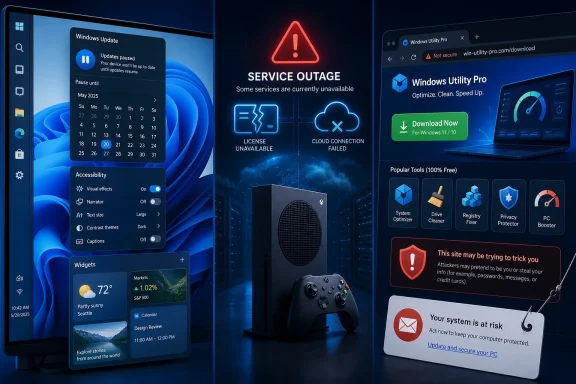
KB5101681 advances Windows 11 26H1 to build 28000.2608 and introduces a calendar-based way to pause Windows Update. Instead of picking from a short predefined interval, users can select an end date up to 35 days away, then extend the pause by choosing another date when the deadline arrives.
That is a small interface change with larger consequences for administrators and power users. Windows Update pauses have long been useful for avoiding driver regressions, holding a production workstation steady during a project, or waiting for reports from the field before taking a non-security feature update. A date-based control is clearer than managing a rolling countdown, even if it does not remove the 35-day ceiling or replace formal update-management tools such as Windows Update for Business, WSUS, or Intune.
Microsoft’s support documentation also confirms a quieter Widgets experience in KB5101681. Widgets will no longer open merely because the pointer moved over them, while notifications and taskbar badges are reduced by default. For users who regard Widgets as an occasional dashboard rather than an ambient stream of prompts, that is a welcome shift in default behavior.
The same preview includes two accessibility changes that are more substantive than their short release-note entries suggest. Screen tint adds a full-screen color overlay with adjustable intensity, intended to reduce eyestrain and improve readability. Magnifier gains direct entry of zoom percentages and smaller-step changes, giving users more precise control than a simple preset ladder provides.
KB5101684 takes a parallel route for Windows 11 24H2 and 25H2, raising them to builds 26100.8973 and 26200.8973 respectively. According to Microsoft’s release notes and reporting from Windows Latest, the optional preview carries Voice Isolation for Voice Access, precision touchpad gesture controls, and a broader group of performance and reliability work. Because it is a late-month preview update, it is not intended as a mandatory deployment for every machine on day one; the same code generally arrives in the next month’s cumulative update after more testing.
That distinction matters. Users who enable the “Get the latest updates as soon as they’re available” switch may see these previews sooner, but IT teams should treat them as a validation opportunity, not a security-update deadline. Test the applications, drivers, shell extensions, and peripherals that matter locally, then decide whether the incremental usability improvements justify early adoption.
Microsoft had already previewed the underlying personalization work in May, but the newest flights make it more visible to a wider Insider audience. The change is not simply cosmetic. A vertical taskbar can be genuinely useful on widescreen displays, especially for people who work with long lists of windows, terminals, tickets, or documents. It also addresses a lingering point of friction for organizations migrating staff from Windows 10 or older Windows deployments.
Experimental builds 26300.9032 and 28120.2630 add smarter Search indexing, Phone Link previews in Start, and an adaptive hibernate policy aimed at battery life. Meanwhile, the Future Platforms builds, 29634.1000 and 29639.1000, carry Voice Isolation and braille-display support in Narrator, along with the new update scheduling approach.
The immediate action item is less exciting but important: the builds include a renewed Insider flight certificate. Microsoft says the previous certificate expires on August 11, 2026. Insiders who want their devices to continue receiving flights should install a current build before that date rather than discovering too late that their preview channel has stopped moving.
Neowin reported that Wintoys developer Bogdan_X found a site using the wintoys.app domain and impersonating the project. The developer reportedly traced the contact address associated with the domain to more than 70 lookalike sites posing as familiar Windows utilities, including PowerToys, CrystalDiskMark, WinUtil, EasyBCD, and Lively Wallpaper. Cybersecurity-focused reporting has independently described the cluster as a broad fake-download operation built to exploit the credibility of recognizable utility names.
The danger here is not that every visitor can be fooled by a poor clone. The danger is that a believable domain, a plausible logo, AI-generated documentation, and a high search placement can remove the hesitation that would ordinarily stop a user from running an unknown installer. The technique turns routine software maintenance into a supply-chain problem at the individual-PC level.
For home users and help desks, the response is straightforward: obtain tools from the developer’s official repository, a verified publisher page, the Microsoft Store where applicable, or a recognized package manager with a validated manifest. A search-engine result, a domain that contains the product’s name, and a download page that looks professionally made are not evidence of authenticity. Administrators should also watch for newly introduced utilities that appear outside their approved-software process, particularly when they request elevation.
Microsoft’s own inbox-app releases were less dramatic. Notepad, Calculator, Clock, and Media Player received stability and bug-fix updates in Release Preview, making a regular-channel rollout likely around the next Patch Tuesday. Excel’s July update, meanwhile, continues the company’s Copilot push with Power BI support, citation features, and brand tools, while dropping an AutoSave requirement.
Xbox CTO Scott Van Vliet said the root cause was a licensing service outside the Xbox organization but relied upon by Xbox for entitlement checks. In effect, a failed service used to verify ownership spread beyond a single storefront component and prevented users from accessing parts of the platform they expected to work.
That explanation is technically useful because it identifies the failure as more than an overloaded gaming network. Licensing and entitlement systems sit at the intersection of accounts, subscriptions, purchases, discs, downloads, and regional storefronts. If a dependency there fails without adequate fallback behavior, the result can be worse than losing multiplayer: users may be unable to prove they are entitled to play games already installed on their own consoles.
Reports that some physical-disc games were affected made the incident especially uncomfortable. Van Vliet said Xbox would conduct a full post-incident review focused not only on the immediate cause, but on why one service could have such a large blast radius and why restoration took so long. That is the correct scope for the investigation. Redundancy is not meaningful if fallback paths still require the same unavailable entitlement authority.
Microsoft’s fiscal results make the contrast hard to ignore. The Associated Press reported that Microsoft posted $90 billion in April-through-June quarterly revenue, up 18% year over year; Azure revenue passed $100 billion annually for the first time, and Microsoft 365 Copilot exceeded 30 million paid seats. Those are formidable numbers, but an outage like Xbox’s is a reminder that revenue from recurring services raises the operational standard. Customers are not buying only software; they are buying continued access.
The business backdrop is rougher. Double Fine cut 23 employees after becoming independent from Xbox, a move founder Tim Schafer described as necessary for the studio’s survival. PC Gamer and Windows Central both reported the reduction, though estimates of the studio’s pre-layoff headcount vary, making the exact percentage uncertain.
Ubisoft also reportedly canceled Project Maverick, its proposed Far Cry extraction shooter, according to Insider Gaming, while retaining elements for another project. Separately, Ubisoft has begun allowing Xbox console owners of selected titles to unlock PC versions through Ubisoft Connect, a modest but meaningful concession to cross-platform library expectations.
For Windows users, the immediate decisions are practical: deploy July’s preview updates deliberately, update Insider PCs before August 11, and tighten the path by which utilities reach endpoints. For Xbox players, the next milestone is Microsoft’s post-incident review—and whether it produces an offline and entitlement-resilience fix that proves the July outage was not simply explained, but meaningfully prevented.
Windows Update Gets a Calendar Instead of a Countdown
KB5101681 advances Windows 11 26H1 to build 28000.2608 and introduces a calendar-based way to pause Windows Update. Instead of picking from a short predefined interval, users can select an end date up to 35 days away, then extend the pause by choosing another date when the deadline arrives.That is a small interface change with larger consequences for administrators and power users. Windows Update pauses have long been useful for avoiding driver regressions, holding a production workstation steady during a project, or waiting for reports from the field before taking a non-security feature update. A date-based control is clearer than managing a rolling countdown, even if it does not remove the 35-day ceiling or replace formal update-management tools such as Windows Update for Business, WSUS, or Intune.
Microsoft’s support documentation also confirms a quieter Widgets experience in KB5101681. Widgets will no longer open merely because the pointer moved over them, while notifications and taskbar badges are reduced by default. For users who regard Widgets as an occasional dashboard rather than an ambient stream of prompts, that is a welcome shift in default behavior.
The same preview includes two accessibility changes that are more substantive than their short release-note entries suggest. Screen tint adds a full-screen color overlay with adjustable intensity, intended to reduce eyestrain and improve readability. Magnifier gains direct entry of zoom percentages and smaller-step changes, giving users more precise control than a simple preset ladder provides.
KB5101684 takes a parallel route for Windows 11 24H2 and 25H2, raising them to builds 26100.8973 and 26200.8973 respectively. According to Microsoft’s release notes and reporting from Windows Latest, the optional preview carries Voice Isolation for Voice Access, precision touchpad gesture controls, and a broader group of performance and reliability work. Because it is a late-month preview update, it is not intended as a mandatory deployment for every machine on day one; the same code generally arrives in the next month’s cumulative update after more testing.
That distinction matters. Users who enable the “Get the latest updates as soon as they’re available” switch may see these previews sooner, but IT teams should treat them as a validation opportunity, not a security-update deadline. Test the applications, drivers, shell extensions, and peripherals that matter locally, then decide whether the incremental usability improvements justify early adoption.
Insider Builds Put Taskbar Control Back on the Table
The Windows Insider Program was busy as Microsoft continued reshaping its preview channels and build families. Beta builds 26220.9022 and 28020.2623 expose taskbar placement controls that Windows 11 users have requested since the operating system’s launch: bottom, top, left, or right positioning, plus options for a smaller taskbar.Microsoft had already previewed the underlying personalization work in May, but the newest flights make it more visible to a wider Insider audience. The change is not simply cosmetic. A vertical taskbar can be genuinely useful on widescreen displays, especially for people who work with long lists of windows, terminals, tickets, or documents. It also addresses a lingering point of friction for organizations migrating staff from Windows 10 or older Windows deployments.
Experimental builds 26300.9032 and 28120.2630 add smarter Search indexing, Phone Link previews in Start, and an adaptive hibernate policy aimed at battery life. Meanwhile, the Future Platforms builds, 29634.1000 and 29639.1000, carry Voice Isolation and braille-display support in Narrator, along with the new update scheduling approach.
The immediate action item is less exciting but important: the builds include a renewed Insider flight certificate. Microsoft says the previous certificate expires on August 11, 2026. Insiders who want their devices to continue receiving flights should install a current build before that date rather than discovering too late that their preview channel has stopped moving.
A Fake Wintoys Site Shows Why Search Results Are Not a Trust Boundary
Wintoys, a popular Windows customization utility, received a performance-focused update this week as it moves to .NET 10 and Windows App SDK 2.3.1. Yet the bigger Wintoys story was security, not speed.Neowin reported that Wintoys developer Bogdan_X found a site using the wintoys.app domain and impersonating the project. The developer reportedly traced the contact address associated with the domain to more than 70 lookalike sites posing as familiar Windows utilities, including PowerToys, CrystalDiskMark, WinUtil, EasyBCD, and Lively Wallpaper. Cybersecurity-focused reporting has independently described the cluster as a broad fake-download operation built to exploit the credibility of recognizable utility names.
The danger here is not that every visitor can be fooled by a poor clone. The danger is that a believable domain, a plausible logo, AI-generated documentation, and a high search placement can remove the hesitation that would ordinarily stop a user from running an unknown installer. The technique turns routine software maintenance into a supply-chain problem at the individual-PC level.
For home users and help desks, the response is straightforward: obtain tools from the developer’s official repository, a verified publisher page, the Microsoft Store where applicable, or a recognized package manager with a validated manifest. A search-engine result, a domain that contains the product’s name, and a download page that looks professionally made are not evidence of authenticity. Administrators should also watch for newly introduced utilities that appear outside their approved-software process, particularly when they request elevation.
Microsoft’s own inbox-app releases were less dramatic. Notepad, Calculator, Clock, and Media Player received stability and bug-fix updates in Release Preview, making a regular-channel rollout likely around the next Patch Tuesday. Excel’s July update, meanwhile, continues the company’s Copilot push with Power BI support, citation features, and brand tools, while dropping an AutoSave requirement.
Xbox’s Licensing Failure Became a Test of Digital Ownership
The week’s sharpest service failure arrived on Xbox. A broad outage disrupted account sign-in, the Store, game launches, game-library access, and mobile services for much of July 27 and into July 28. Windows Central and Tom’s Hardware reported that the disruption lasted roughly 16 hours for some customers.Xbox CTO Scott Van Vliet said the root cause was a licensing service outside the Xbox organization but relied upon by Xbox for entitlement checks. In effect, a failed service used to verify ownership spread beyond a single storefront component and prevented users from accessing parts of the platform they expected to work.
That explanation is technically useful because it identifies the failure as more than an overloaded gaming network. Licensing and entitlement systems sit at the intersection of accounts, subscriptions, purchases, discs, downloads, and regional storefronts. If a dependency there fails without adequate fallback behavior, the result can be worse than losing multiplayer: users may be unable to prove they are entitled to play games already installed on their own consoles.
Reports that some physical-disc games were affected made the incident especially uncomfortable. Van Vliet said Xbox would conduct a full post-incident review focused not only on the immediate cause, but on why one service could have such a large blast radius and why restoration took so long. That is the correct scope for the investigation. Redundancy is not meaningful if fallback paths still require the same unavailable entitlement authority.
Microsoft’s fiscal results make the contrast hard to ignore. The Associated Press reported that Microsoft posted $90 billion in April-through-June quarterly revenue, up 18% year over year; Azure revenue passed $100 billion annually for the first time, and Microsoft 365 Copilot exceeded 30 million paid seats. Those are formidable numbers, but an outage like Xbox’s is a reminder that revenue from recurring services raises the operational standard. Customers are not buying only software; they are buying continued access.
Gamescom Will Be a Showcase, but Xbox’s Reset Is Still Visible
Microsoft has confirmed a substantial Xbox presence at Gamescom 2026, where it plans 140 gaming stations and 25 playable titles, including Call of Duty: Modern Warfare 4, Fable, and Alien: Isolation 2. Gears of War: E-Day also revealed its 12-player Horde Siege multiplayer mode, built around three four-player squads operating on a shared map.The business backdrop is rougher. Double Fine cut 23 employees after becoming independent from Xbox, a move founder Tim Schafer described as necessary for the studio’s survival. PC Gamer and Windows Central both reported the reduction, though estimates of the studio’s pre-layoff headcount vary, making the exact percentage uncertain.
Ubisoft also reportedly canceled Project Maverick, its proposed Far Cry extraction shooter, according to Insider Gaming, while retaining elements for another project. Separately, Ubisoft has begun allowing Xbox console owners of selected titles to unlock PC versions through Ubisoft Connect, a modest but meaningful concession to cross-platform library expectations.
For Windows users, the immediate decisions are practical: deploy July’s preview updates deliberately, update Insider PCs before August 11, and tighten the path by which utilities reach endpoints. For Xbox players, the next milestone is Microsoft’s post-incident review—and whether it produces an offline and entitlement-resilience fix that proves the July outage was not simply explained, but meaningfully prevented.
References
- Primary source: Neowin
Published: 2026-08-01T15:00:02+00:00
Loading…
www.neowin.net - Related coverage: tomshardware.com
Loading…
www.tomshardware.com - Related coverage: windowscentral.com
Loading…
www.windowscentral.com - Related coverage: gamesradar.com
Loading…
www.gamesradar.com - Related coverage: gamesradar.com
Loading…
www.gamesradar.com - Related coverage: windowscentral.com
Xbox’s biggest outage in years proved something uncomfortable — even physical discs don’t mean you truly own your games | Windows Central
Xbox CTO Scott Van Vliet recently addressed issues concerning Xbox discs not launching games during Xbox Live's most recent outage and plans to make sure this doesn't happen againwww.windowscentral.com - Related coverage: tomshardware.com
Loading…
www.tomshardware.com - Related coverage: support.microsoft.com
July 28, 2026—KB5101681 (OS Build 28000.2608) Preview | Microsoft Support
July 28, 2026—KB5101681 (OS Build 28000.2608) Previewsupport.microsoft.com - Related coverage: learn.microsoft.com
Windows 11 - release information | Microsoft Learn
Learn release information for Windows 11 releaseslearn.microsoft.com - Related coverage: support.microsoft.com
Loading…
support.microsoft.com - Related coverage: allthings.how
Loading…
allthings.how - Related coverage: tech.sportskeeda.com
Loading…
tech.sportskeeda.com - Related coverage: sportsdunia.com
Loading…
www.sportsdunia.com - Related coverage: tweaktown.com
Loading…
www.tweaktown.com - Related coverage: learn.microsoft.com
Windows 11, version 26H1 known issues and notifications | Microsoft Learn
View announcements and review known issues and fixes for Windows 11, version 26H1learn.microsoft.com - Related coverage: blogs.windows.com
Improving Windows quality: Making Taskbar and Start more personal
In our commitment to Windows quality, we outlined our plans to deliver improvements in performance, reliability, and craft. We are also committed toblogs.windows.com - Related coverage: neowin.net
Scammers are setting up fake websites to download Windows applications in latest operation - Neowin
A growing network of fake Windows app sites is emerging, and what looks harmless today could become a much bigger threat tomorrow.www.neowin.net
- Related coverage: blogs.windows.com
Loading…
blogs.windows.com - Related coverage: cyberpress.org
Loading…
cyberpress.org - Related coverage: techspot.com
Microsoft is cutting 3,200 Xbox jobs and spinning off four game studios | TechSpot
In a public memo to Xbox employees, CEO Asha Sharma confirmed that Microsoft will eliminate approximately 3,200 positions across the gaming division between now and July 2027,...www.techspot.com