

Microsoft Support describes KB5120994 simply as a security update with quality improvements and says it has no known issues as of August 12. The company’s Windows 11 release-information page separately records the package as August’s scheduled Hotpatch release, confirming that it is part of the planned servicing cadence rather than an out-of-band response to a newly disclosed problem.
For eligible organizations, the value is operational: apply this month’s Windows security work during the normal maintenance cycle without scheduling a Windows restart for the Hotpatch payload itself. For everyone else, KB5120994 is largely a reminder that the same Patch Tuesday can legitimately leave different devices on different build numbers.
KB5120994 is a Hotpatch build, not the August baseline cumulative update
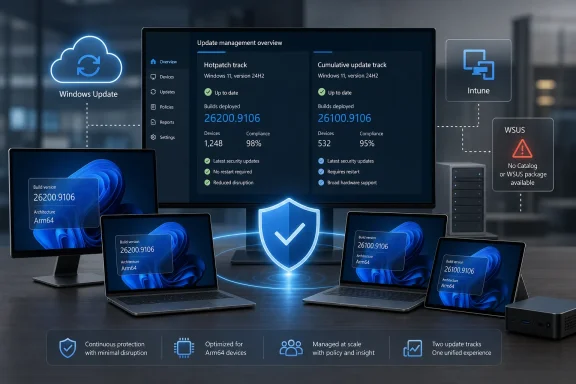
Microsoft’s release history identifies KB5120994 as the August 2026 Hotpatch update for both Windows 11 25H2 and 24H2. The standard August security release is KB5121003, which brings those versions to builds 26200.9168 and 26100.9168 respectively. Hotpatch-managed devices instead land on 26200.9106 or 26100.9106.
That gap is intentional. Microsoft’s hotpatch calendar calls July 14’s KB5101650, which installed build 26200.8875 or 26100.8875, a baseline update. Baselines are conventional cumulative updates and require a restart. August and September are the two security-only Hotpatch months that follow before the next scheduled baseline, currently set for October.
Administrators should therefore avoid using “latest Windows build” as a blanket compliance test across the fleet. A device reporting 26100.9106 on the Hotpatch program is not necessarily missing August security fixes merely because another 24H2 device reports 26100.9168. The correct assessment is whether the device is enrolled, eligible, on the expected Hotpatch sequence, and has received KB5120994.
This is a small but consequential reporting difference for endpoint-management teams. Compliance dashboards, vulnerability scanners, custom PowerShell checks, and service-desk runbooks that expect only the public cumulative-update build will falsely flag properly patched Hotpatch clients. The build number needs to be evaluated alongside the servicing channel.
Microsoft offers no standalone package or WSUS path
KB5120994 is available through Windows Update and Microsoft Update, but Microsoft’s own distribution table marks the Microsoft Update Catalog and Server Update Services as unavailable. That means the update is not a package administrators can manually import, stage through WSUS, or sideload from the Catalog in the way many organizations handle ordinary cumulative updates.
That limitation is not incidental; it reflects the design of Windows client Hotpatch. Microsoft ties enrollment and delivery to update-management policy rather than treating the update as a generic .msu payload. A team that relies on disconnected WSUS infrastructure or a manual Catalog approval process cannot bolt KB5120994 onto that workflow.
The practical consequence is that a restart-free patching plan needs to be designed before Patch Tuesday, not improvised after it. Organizations that have not enrolled appropriate devices in a Hotpatch-enabled quality-update policy should deploy the standard August cumulative update and plan their restart window. They should not expect KB5120994 to appear as an alternative download in the Catalog.
Microsoft also says the latest servicing stack update is combined with the Hotpatch package when deployment occurs through Windows Update. That reduces one version-management variable, but it does not turn a non-enrolled machine into a Hotpatch client or remove the prerequisites for the service.
Arm64 support broadens the option, with conditions attached
The KB5120994 documentation says Hotpatch is generally available for Windows 11 25H2 and 24H2 on Arm64 devices. Microsoft’s instructions are specific enough to show why “generally available” should not be read as “automatically enabled for every ARM PC.”
For Arm64 devices, Microsoft requires:
- Windows 11 Enterprise 25H2 or 24H2 at build 26100.4929 or later, with the current baseline installed.
- A qualifying Windows, Microsoft 365, Education, Business Premium, or Windows 365 Enterprise license.
- Microsoft Intune and a Windows quality-update policy configured to apply updates without restarting when available.
- Virtualization-based security enabled and Compiled Hybrid PE, or CHPE, disabled.
CHPE is the compatibility technology Microsoft uses to help Arm64 Windows run certain x64 code. Microsoft says it is incompatible with Hotpatch and requires a one-time policy or registry change followed by a restart before the device becomes Hotpatch-ready. In other words, the restart-free benefit begins only after an organization completes setup and installs the appropriate baseline; it does not eliminate every reboot associated with moving a device into the program.
The KB’s “Applies to” label names Windows 11 Enterprise LTSC 2024, while the Arm64 prerequisites name Windows 11 Enterprise 24H2 and 25H2 plus specific licensing and Intune conditions. Those statements are not necessarily contradictory, but they are not a substitute for validating edition, architecture, license assignment, management state, VBS, and CHPE status. The support page supplies explicit readiness steps for Arm64 devices; admins should not infer from the headline alone that every Windows 11 24H2 or 25H2 installation can receive this build.
The security bulletin is deliberately sparse
Microsoft says KB5120994 provides security improvements and directs customers to the Microsoft Security Response Center’s August 2026 Security Update Guide for vulnerability detail. The KB itself does not enumerate CVE identifiers, severity ratings, exploit status, or component-by-component changes.
That is a normal pattern for a servicing article, but it matters when teams are deciding whether to expedite deployment. The Hotpatch KB establishes that security content shipped; it does not, by itself, establish which individual risks are mitigated on a particular device. Security operations teams should map their exposure decisions through the August MSRC guidance, then verify the appropriate package installed for each servicing path.
Microsoft says it is not currently aware of known issues in KB5120994. That statement is useful, but it is a point-in-time vendor status rather than proof that there will be no deployment problems in a specific environment. In particular, organizations with custom inventory rules should test that their tools correctly recognize the .9106 builds before treating build-number discrepancies as a failed deployment.
Secure Boot certificate notice is related to servicing, not proof of a certificate payload
KB5120994 also carries Microsoft’s ongoing notice about Secure Boot certificate expiration. The company says certificates used by most Windows devices began expiring in June 2026 and that it has been delivering replacements through Windows Update over recent months. Devices that have not yet received newer certificates will still boot and continue to receive standard Windows updates, according to Microsoft.
What the KB does not say is that KB5120994 itself installs a new Secure Boot certificate. The certificate notice appears in the announcement area of the update page, while the published improvement list identifies only broad security improvements. Administrators should not use the presence of KB5120994 as evidence that certificate remediation is complete.
For managed fleets, that creates two separate checks: verify that eligible endpoints have received the August Hotpatch build, and separately use Microsoft’s Secure Boot guidance and Windows Security status information to identify certificate-update readiness. Conflating the two will produce a reassuring but unsupported compliance result.
The next planned Hotpatch month is September 2026. The next ordinary baseline is scheduled for October, when enrolled Windows 11 24H2 and 25H2 devices should again expect a cumulative update and a restart before the Hotpatch cycle resumes.
Update: Additional details (August 12, 2026)
Microsoft’s Hotpatch calendar also records June 9’s KB5094126 as a restart-required baseline, even though June would normally have been a Hotpatch month. Microsoft’s documented policy permits extra baselines for security reasons without replacing the regularly scheduled quarterly baseline, so July’s KB5101650 remained a required-restart baseline as planned. The practical implication is that Hotpatch reduces scheduled restart frequency but does not guarantee only four restart-required servicing events per year.
Microsoft further clarifies that enrollment is not immediate for devices already off the current Hotpatch baseline. A device added after installing a regular non-baseline cumulative update must wait for the next baseline month to join the no-restart cycle; one that missed the baseline may need both the baseline and Hotpatch payload, with a restart required. For 24H2, eligibility also depends on Windows Autopatch registration, Intune management through a Hotpatch-enabled quality-update policy, VBS, qualifying licensing, and current baseline status.