

Thurrott first reported the two headline packages as KB5121000 for 26H1 and KB5121003 for 24H2 and 25H2. Microsoft’s own release notes confirm those identifiers and builds, but the detailed record also exposes two important qualifications missing from a simple “Patch Tuesday adds features” reading: version 23H2 is still in the security-update picture for some organizations, and most of the user-visible additions remain controlled feature rollouts.
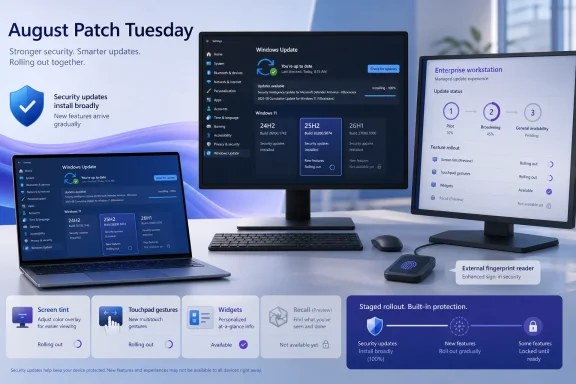
The August releases bundle the quality improvements that Microsoft shipped in late-July preview updates. That is how the new Screen tint accessibility overlay, quieter Widgets behavior, extended Windows Update pausing, precision-touchpad controls, and Windows Hello Enhanced Sign-in Security support for external fingerprint readers arrive in the monthly cumulative update. It does not mean all eligible devices will immediately show every option.
KB5121003 brings late-July features into the security baseline
For Windows 11 24H2 and 25H2, KB5121003 is the August cumulative security update and raises devices to builds 26100.9168 and 26200.9168 respectively. Microsoft says it incorporates the July 28 KB5101684 preview, as well as the July 18 out-of-band update and the July 14 Patch Tuesday package. In practical terms, a fully current 24H2 or 25H2 PC receives only the delta since its last installed update; a machine that skipped July’s optional preview gets that code through August’s mandatory security package.
The additions in the July preview are substantial enough to matter to help desks and endpoint teams. Precision-touchpad devices get controls under Settings > Bluetooth & devices > Touchpad for baseline scroll and zoom speed, plus accelerated scrolling that increases movement as users repeat a gesture. Windows Search is meant to do a better job matching misspelled or partial application and Settings names, while Voice Access receives Voice Isolation to suppress other speakers and background noise after a one-time voice setup.
Windows Hello Enhanced Sign-in Security now extends to supported peripheral fingerprint readers, not solely sensors built into a laptop. That changes the deployment calculation for desktop fleets and docked notebooks: a supported external ESS reader can offer the stronger sign-in path without replacing the PC. Microsoft’s late-July notes say the capability was disclosed in January but is only now beginning to roll out, so buying a reader because it advertises generic Windows Hello support is not enough. The reader must support ESS, and the Windows feature still has to reach the endpoint.
Widgets also gets two different sets of changes that could confuse users. Its taskbar badges now use the Windows accent color instead of the usual red, and the Lock screen defaults to Weather alone for new users. Separately, Microsoft is reducing the intrusiveness of Widgets overall: it will no longer open merely because the pointer hovers over it, notifications and badges are minimized by default, and alert badges clear when the user leaves a dashboard.
The Windows Update changes are more operationally useful than flashy. Microsoft has revised the progress calculation shown in Settings and changed post-installation cleanup logic, saying the latter should improve system performance immediately after an update. The energy-saver threshold also returns under Settings > System > Power & battery, restoring a control that had disappeared from the interface.
A “feature in the update” may still be absent on the PC
Microsoft’s own late-July documentation draws a line that is frequently lost in Patch Tuesday summaries. The features carried in KB5101684 and KB5101681 are divided between gradual rollout and normal rollout. A gradual rollout releases functionality in phases, so the same August cumulative update can be installed on two fully patched, identical Windows 11 PCs while only one exposes a new control in Settings.
That distinction applies directly to the most visible August additions. A user who does not see the new touchpad controls, Voice Isolation, Windows Hello ESS support, or changed Widgets behavior should not assume the installation failed or attempt to force-reinstall KB5121003. The security patch is present; Microsoft’s feature configuration has not necessarily enabled the new experience on that device yet.
The same is true of the 35-day pause feature that Thurrott highlighted. Microsoft’s July 28 notes describe a calendar interface in Settings > Windows Update that lets users select an end date and pause updates for as long as 35 days, then choose a new end date to pause again. For unmanaged home PCs, that is a clearer interface than a series of fixed pause increments. For managed PCs, however, update deferrals, deadlines, and policy controls still take precedence. It does not create a new way for end users to override Windows Update for Business or Intune policy.
IT departments should also note that the July preview was not automatically offered to Windows Update for Business. The August security cumulative update is. That is the point at which the underlying code reaches managed estates under normal update policy, even though Microsoft may continue withholding individual feature switches as part of the staged rollout.
KB5121000 is for a narrow 26H1 population
KB5121000 raises Windows 11 26H1 to build 28000.2704. Microsoft’s release note is unusually restrained: it explicitly lists a fix for accurate TPM endorsement-key certificate maintenance reporting and additional device-targeting data intended to expand automated delivery of new Secure Boot certificates. It also says that the package includes the July 14 and July 28 updates.
The late-July 26H1 preview is where Microsoft documented the Screen tint, Widgets, and 35-day pause controls. Screen tint adds a full-screen color overlay under Settings > Accessibility, with preset colors, adjustable intensity, and an automatic mode intended to reduce eye strain or improve readability. Magnifier also gains direct percentage entry and more direct control over zoom increments.
There is a bigger deployment caveat: 26H1 is not the next universal Windows 11 upgrade. Microsoft’s release-information record says it is scoped to new devices that began arriving in early 2026 and is not offered as an in-place update from 24H2 or 25H2 on existing hardware. An administrator cannot use the appearance of a newer 28000-series build as a reason to pursue a broad 26H1 migration; for most existing Windows 11 estates, 25H2 remains the relevant forward path.
That makes the overlap in features less surprising. Microsoft is continuing its “continuous innovation” approach across supported Windows branches rather than holding basic interface, accessibility, and maintenance improvements exclusively for the newest build. Version 25H2 and 24H2 share a servicing base, and 25H2 itself was delivered as an enablement package over 24H2. The August feature list is therefore less a case of 26H1 leaping ahead than a staged feature set landing across separate supported branches.
The overlooked Windows 11 update is KB5120240 for 23H2
The claim that Microsoft updated every supported Windows 11 version is broadly correct, but the two-KB framing leaves out KB5120240. That update is the August security release for Windows 11 23H2, taking it to build 22631.7517.
For most consumer and Pro deployments, 23H2 has already reached end of servicing. Enterprise and Education editions remain supported until November 10, 2026, according to Microsoft’s update page. Those machines are still receiving monthly security updates, and organizations with 23H2 Enterprise or Education fleets should not mistake the silence around KB5120240 for an end-of-life exemption.
Microsoft lists mostly reliability work inherited from July for 23H2, including refreshed mobile-operator settings, improved behavior when an MDM certificate expires, and more reliable File History backups to SMB network shares. Those are not the headline features being promoted for 24H2, 25H2, and 26H1, but the security servicing obligation is the same. With fewer than three months of support remaining for 23H2 Enterprise and Education, August should also be a migration checkpoint rather than merely another monthly approval.
There is a similar date facing 24H2 Home and Pro users: those editions reach end of updates on October 13, 2026. Enterprise and Education 24H2 editions continue until October 12, 2027. The build label alone is no longer sufficient for fleet reporting; edition determines the support deadline.
The AI security narrative needs a narrower reading
Thurrott reports that Trend Micro’s Zero Day Initiative counted 398 CVEs addressed across Microsoft’s August release, with 62 rated Critical, and reported one actively exploited Important vulnerability that can lead to SYSTEM-level code execution. Microsoft’s Security Update Guide is the primary record for the individual CVEs, severity assessments, exploitability information, and affected products, but its public release-note page does not present a simple static total that independently confirms that count. The 398 figure should therefore be understood as ZDI’s tally as reported by Thurrott, not as a number Microsoft has placed prominently in its Windows KB articles.
The broader point about volume is well supported by Microsoft’s own recent explanation of Patch Tuesday. In May, Microsoft said automated analysis, wider researcher participation, AI-assisted secure coding, and its multi-model AI-driven scanning harness were helping surface more vulnerabilities. It also warned that customers should expect larger releases for some time.
That is context, not proof that every August fix was found by AI, nor does it reduce the need for prioritization. Large counts mix Windows, Office, cloud-connected components, development tools, browsers, and server products with sharply different exposure profiles. Endpoint teams should use the Security Update Guide’s affected-product and exploitation data to identify their actual exposure rather than treating the total CVE number as the patching plan.
Microsoft currently lists no known issues for KB5121000 or KB5121003. That is a starting status, not a substitute for ring-based deployment, especially for organizations that image Windows media. Microsoft warns that dynamic-update deployment must include the matching boot.stl file in installation media for Secure Boot validation; omitting it can prevent booting that media and produce error 0xc0430001.
For ordinary Windows 11 devices, the August action is simple: install the cumulative update and allow time for staged features to appear. For administrators, the concrete work is less glamorous: approve KB5121003, KB5121000 where 26H1 hardware exists, and KB5120240 for remaining 23H2 Enterprise and Education systems—then use the October 13 and November 10 support deadlines to turn monthly patching into a migration plan.
Update: Report identifies three August zero-day fixes (August 11, 2026)
ÇözümPark reports that Microsoft’s August 2026 Patch Tuesday addresses three zero-day vulnerabilities, rather than the single actively exploited Windows issue highlighted in initial coverage. The reported flaws are CVE-2026-68820 in the Windows Ancillary Function Driver for WinSock, CVE-2026-62832 in the Windows User Profile Service, and CVE-2026-72971 in the Windows Container Isolation FS Filter Driver (unionfs.sys).
The distinction matters: “zero-day” does not necessarily mean Microsoft has confirmed active exploitation. Administrators should not treat the report as proof that all three flaws are being used in attacks, but the affected components reinforce the case for prompt deployment of the August Windows cumulative updates.
ÇözümPark puts the wider release at 400 vulnerabilities, slightly above the 398-CVE tally previously attributed to Trend Micro’s Zero Day Initiative. The discrepancy may reflect different counting methods or late catalog changes; Microsoft’s Security Update Guide remains the record to use when determining affected products, exploitability status, and prioritization for a specific environment.
Update: Later report puts August zero-day count at two, not three (August 11, 2026)
Contrary to the earlier three-zero-day report, Redmondmag says Microsoft’s August release includes two zero-days: CVE-2026-68820 in the Windows Ancillary Function Driver for WinSock and CVE-2026-62832 in the Windows User Profile Service.
The distinction is important for prioritization. Redmondmag reports that Microsoft has confirmed active exploitation only for CVE-2026-68820, a local privilege-escalation flaw that can allow a low-privileged authenticated attacker to reach SYSTEM. CVE-2026-62832 was reportedly publicly disclosed before patching but is not confirmed as exploited in the wild.
The report also highlights critical cloud and server issues—including Azure SQL Database, Microsoft Entra-related services, Microsoft 365 Admin Center, Windows DNS Server, SharePoint, and Office—that may require separate attention from teams operating those workloads. Endpoint administrators should continue deploying the Windows cumulative updates promptly, while cloud and infrastructure teams should validate exposure through Microsoft’s Security Update Guide rather than relying on aggregate CVE totals.
Update: Report flags additional Voice Access, File Explorer, and Copilot+ changes (August 12, 2026)
The WinCentral reports that KB5121003 also adds Korean-language support for Voice Access and improves the feature’s launch reliability. It further describes three selectable microphone-processing modes: Voice Isolation, background-noise removal only, and unfiltered input.
The report identifies several File Explorer refinements not detailed in the initial coverage, including automatically scaled file-size units in Details view, middle-click support for opening folders in new tabs, sharper Recommended thumbnails, and fixes for Home-page flashing or unintended scrolling.
For Copilot+ PCs, The WinCentral says users can remove the standalone Image Generation AI component if it is not needed, while Microsoft has updated local models used for image search, content extraction, and semantic analysis. Administrators should treat those AI-component changes as relevant to feature governance and image-management baselines, not as a change to the August security-update requirement.
Update: Petri flags critical DNS, WDS, Exchange, and Entra vulnerabilities (August 12, 2026)
Petri reports that August’s security release also includes several high-severity infrastructure flaws requiring attention beyond Windows client patching. These include CVE-2026-62878, a 9.8-rated remote-code-execution vulnerability in Windows DNS Server, and CVE-2026-62893, an unauthenticated remote-code-execution issue in Windows Deployment Services TFTP Server.
According to Petri, CVE-2026-62911 affects Exchange Server and could enable privilege escalation through an authentication bypass, while CVE-2026-50481 and CVE-2026-59115 affect Microsoft Entra ID and Entra Provisioning Service respectively. The latter two are rated 9.9 and concern privilege escalation for already authorized attackers.
For IT teams, this reinforces that August remediation cannot be limited to approving Windows 11 cumulative updates. Administrators operating DNS, WDS, Exchange, or Entra-connected environments should identify exposed roles, apply the relevant product updates, and prioritize internet-facing or broadly trusted infrastructure.
Update: Report highlights additional Voice Typing and power-setting changes (August 12, 2026)
According to ProPakistani, the August Windows 11 rollout also turns Fluid Dictation off by default for new Voice Typing users and adds in-product guidance explaining the feature. That is separate from the previously reported Voice Access microphone modes and may reduce unexpected speech-processing behavior on newly configured devices.
The report also says Windows now applies changes to display, sleep, hibernation, and lid-action settings across power plans, rather than requiring administrators or users to repeat equivalent adjustments plan by plan. This could simplify baseline configuration and troubleshooting on managed laptops.
Other reported refinements include a redesigned Start menu Account Control surface that can show subscription and account details, plus fixes and tuning for dark-mode system sounds, time-zone detection, printing, networking, and clipboard reliability. These remain quality-of-life changes delivered through the August cumulative update and, where applicable, may still be subject to Microsoft’s controlled feature rollout.
Update: Report links exploited WinSock zero-day to Lazarus recruitment campaign (August 13, 2026)
According to a LinkedIn report citing Check Point research, the actively exploited CVE-2026-68820 Windows Ancillary Function Driver for WinSock vulnerability was used by the North Korean-linked Lazarus group to deploy an updated FudModule kernel-mode rootkit.
The reported campaign used fraudulent job opportunities to persuade targets to run malicious material, then used the local privilege-escalation flaw to obtain SYSTEM-level access. Patching prevents this escalation route going forward, but it does not remove a rootkit or other malware from systems compromised before the update was installed.
Organizations should prioritize August updates for developer workstations and other endpoints where users may run externally supplied code. Security teams should also investigate suspicious recruitment-themed files, unexpected driver activity, security-tool tampering, and newly appearing SYSTEM-level processes—particularly on systems patched only after August 11.