
EXCEPTION_ACCESS_VIOLATION, or restart the PC when a third-party driver associated with RGB-capable hardware is present.
TalkEsport linked Wardogs crashes to inpoutx64.sys, an old low-level driver that can be installed by hardware-control utilities. Reports from Wardogs players independently line up with that diagnosis, including system restarts and INVALID_KERNEL_HANDLE bug checks. But the important correction is that Microsoft has not named Wardogs among the games it has confirmed as affected, and neither Bulkhead nor Epic’s Easy Anti-Cheat has published a technical advisory pinning every Wardogs crash on that driver.
The practical result is straightforward: treat inpoutx64.sys as a specific, testable cause—not a universal Wardogs fix.
Bulkhead’s Wardogs closed beta began August 21 and runs through August 23, ahead of the game’s planned September 10 Steam Early Access launch. The studio has already said it is using the test to assess server scaling and stability after pre-orders exceeded expectations. PC Gamer reported severe queue and connection issues during the opening period; crash reports now add a separate local-PC failure class that players should diagnose before changing game files, GPU settings, or Windows servicing.
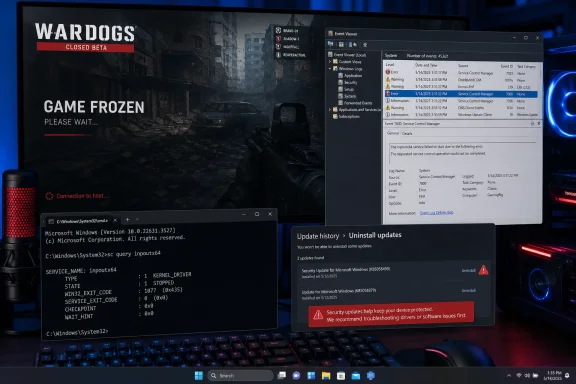 Microsoft confirms the Windows 11 pattern, but not Wardogs by name
Microsoft added the issue to KB5121003’s known-issues section on August 20. The company says it is investigating interaction between certain games and components installed by peripherals or internal devices with RGB lighting features. Those products may install drivers or software with names similar to inpoutx64, Microsoft says.
The company specifically lists ARC Raiders, MARVEL Tōkon: Fighting Souls, and The Finals. Its symptom list is unusually close to what Wardogs users are describing: games becoming unresponsive, unexplained exits, EXCEPTION_ACCESS_VIOLATION, and unexpected restarts.
That corroborates the underlying Windows problem. It does not establish that a Wardogs crash caused by a shader-compilation fault, an Easy Anti-Cheat install problem, an unstable GPU overclock, or an overloaded beta server has the same cause.
Microsoft’s documented scope is Windows 11 versions 24H2 and 25H2, on builds 26100.9168 and 26200.9168 after KB5121003. Players on another Windows release, or on a machine where the inpoutx64 service does not exist, should stop treating this particular workaround as relevant.
Why disabling a driver is safer than removing the security update
TalkEsport’s proposed commands disable the inpoutx64 driver service rather than deleting the .sys file. For a machine demonstrably affected by this issue, that is a more reversible first step than removing KB5121003.
KB5121003 is a cumulative Windows security update, not a Wardogs-specific patch. Removing it rolls the PC back from that month’s security fixes and changes other system components at the same time. It can appear to solve a crash, but it does not identify whether the actual trigger was the Windows update, the third-party driver, or both.
Embark Studios, which develops ARC Raiders and The Finals, has separately tied its game crashes after KB5121003 to inpoutx64.sys; Windows Central and BleepingComputer reported that Embark’s temporary workaround was to stop and remove that driver. Microsoft’s own wording is more guarded: it refers to RGB-related components with filenames similar to inpoutx64, and says its investigation remains ongoing.
That gap matters. A filename is not proof of root cause, and deleting a kernel driver because a forum post says it is “nonessential” can break the utility, peripheral, or startup task that installed it. One Wardogs player reported that disabling it affected boot behavior because another component depended on it. The cleanest remedy is to identify the owning utility and update or remove that software through its normal uninstaller once the immediate beta problem is confirmed.
Check whether your Wardogs crash matches this fault
Before entering commands in an elevated terminal, establish whether the driver exists and whether Windows recorded a related stop error. Open Command Prompt or Windows Terminal as Administrator and run:
sc.exe query inpoutx64
sc.exe qc inpoutx64
If Windows returns error 1060—the service does not exist—then inpoutx64 is not installed as a service on that PC. Do not run the disable command and expect it to resolve Wardogs. Move on to ordinary game troubleshooting: verify the Steam installation, restore GPU and CPU overclocks to stock settings, update the graphics driver, and capture the precise Easy Anti-Cheat or game error if one is shown.
If the service exists, sc.exe qc inpoutx64 should reveal its configuration and driver path. Check the timing against a restart in Event Viewer as well:
- Open Event Viewer and go to Windows Logs > System.
- Find events at the time of the Wardogs crash, especially BugCheck or Windows Error Reporting entries.
- Look for a bug check such as
0x00000093,INVALID_KERNEL_HANDLE, or a reference toinpoutx64.sys. - If Windows created a dump, inspect the files in
C:\Windows\Minidumpwith WinDbg rather than assuming the game executable caused the failure.
A game process showing up near a bug check only identifies what was running when the system failed. It does not, by itself, prove the game or Easy Anti-Cheat was the defective kernel component.
The reversible test for affected PCs
For a Wardogs machine where the service exists and the crash evidence points to the driver, disable it first:
sc.exe stop inpoutx64
sc.exe config inpoutx64 start= disabled
Then restart Windows and retest the game. The space after start= is required by the Service Control syntax. The stop command may fail for a loaded kernel driver; the startup configuration change and reboot are the meaningful parts of this test.
Do not copy TalkEsport’s suggested re-enable command as written. sc start inpoutx64 only attempts to start the driver for the current session; it does not restore the automatic-start setting that the disable command changed. To restore the original automatic startup behavior, use:
sc.exe config inpoutx64 start= auto
Then reboot. If the driver was configured for demand start instead of automatic start before the test, restore that setting instead:
sc.exe config inpoutx64 start= demand
The more permanent solution is to determine what installed the driver. Microsoft’s current description points toward RGB-capable peripherals and internal components, but older port-I/O libraries can also be bundled with monitoring, fan-control, lighting, and motherboard-management utilities. Update the relevant utility and device software first. If the vendor no longer supports it, uninstalling the parent application through Windows Settings is preferable to manually deleting a file from C:\Windows\System32\drivers.
Separate Wardogs launch failures from system-level crashes
Wardogs reports cover more than one symptom. A full PC restart or blue screen is materially different from an Easy Anti-Cheat loader error, a crash during shader compilation, a black screen, or a game that cannot get through the beta queue.
Community reports include cases where inpoutx64 was absent and the workaround did nothing, as well as users whose Wardogs startup crash improved after disabling Hardware-Accelerated GPU Scheduling. Those are anecdotes, not a validated Bulkhead fix, but they demonstrate why blindly disabling kernel services is poor triage.
For an ordinary application crash, start with Steam’s Verify integrity of game files option, restart Windows, and confirm that Windows and GPU drivers are current. If Easy Anti-Cheat itself fails before the game opens, preserve the error text or screenshot and use Wardogs’ official support channel rather than deleting its anti-cheat folder manually. Repeatedly removing and regenerating game components can erase evidence that Bulkhead needs to distinguish an installation fault from the KB5121003 issue.
Microsoft is asking affected users to submit reports through Feedback Hub using Windows key + F. Include the Windows build, KB5121003 installation status, whether inpoutx64 exists, the crash timestamp, and any bug-check code. Wardogs is not yet on Microsoft’s confirmed title list, so those details are the path to getting it counted rather than merely circulated as another forum workaround.
For now, the defensible advice is narrow: keep KB5121003 installed, verify whether inpoutx64 is actually present, disable it only as a reversible diagnostic step when the evidence matches, and report crashes that persist. Wardogs’ beta ends before Microsoft’s investigation is likely to produce a broad fix; players who cannot reproduce the driver link should avoid spending the weekend weakening Windows security for a problem that may lie elsewhere.